
Split a launch review across Notion sub-agents
Notion 3.7 lets one Custom Agent hand parts of a run to sub-agents; here is how to split a launch-readiness review across specialists, brief each one, and keep credits, access, and debugging under control.

Notion 3.7, released on September 15, 2026, lets one Custom Agent pass part of a run to other Custom Agents. Notion calls the helpers sub-agents, and each one keeps its own instructions, context, access, and model. 12
A single agent asked to check the documentation, read the support queue, and judge the launch metrics carries three jobs inside one instruction box. Notion's own advice is to keep instructions short and focused, and to break a setup that keeps growing into several agents. 3 Sub-agents make that split possible inside one run: the primary agent plans the job, calls a specialist for each part, and writes the result itself.
If you have made agents cooperate before, you likely chained them through a database — the first flips a status, the second fires on that change. A chain like that still fits work that spreads across hours or days. A sub-agent fits the case where the primary needs the answer before it can finish, so the whole job lands in one run.
Before you build it
- A Business or Enterprise plan. Custom Agents run on those plans. 2
- Each specialist built and tested as an ordinary agent first. A sub-agent is a Custom Agent you already have, so the primary can only call agents that exist and that you can add to its list. 2
- Edit access on the primary agent, because sub-agents are added in its Tools & access settings. 2
- The models you plan to use. Workspace admins can restrict which models Custom Agents may use, and a restricted model appears dimmed in the menu. 2
- Room in the credit budget. Every hand-off spends Notion credits, and a hand-off on a premium model spends at that model's price. 2
Step 1: Draw the seams first
The split is the design work. Three signals tell you a job deserves its own agent: it reads a different source, it wants a different model, or it carries a definition of done the primary should not be holding at the same time.
A launch-readiness review makes the seams concrete. A page lands in a Releases database, and one agent has to end with a written verdict on that page. Three parts of the job each read a different place, so each becomes a specialist:
| Agent | Job it owns | Access it gets | Model | What it returns |
|---|---|---|---|---|
| Launch Review Lead (primary) | Reads the release, decides the checks, writes the verdict | Releases database (edit), the specialist agents | A stronger model, or Auto | The readiness section and the status |
| Support Risk | Finds the ticket themes tied to the feature | Support tickets database (view) | A lighter model, or Auto | Up to five themes, each with ticket links |
| Docs Check | Compares the release notes with the help docs | Help docs database (view) | A lighter model, or Auto | Each missing or outdated page, with its link |
| Metrics Gate (optional) | Checks the launch metrics against their guardrails | Metrics dashboard page (view) | A lighter model, or Auto | Pass or flag, with the values |
Notion's guidance is to start with one or two sub-agents and add another only when it has a clear job of its own. Build Support Risk and Docs Check first, and add Metrics Gate once those two return the right shape. 2
Model choice follows the work. Give the primary a stronger model, because it has to plan, hand off, check results, and pull the work together; give the focused specialists faster, lighter models. Notion recommends
Auto as the starting point and measuring quality before adding more hand-offs. 2Step 2: Build and test each specialist alone
Create each specialist in the
Agents section, write its instructions, and set Tools & access to the one source it reads. Then run it by hand from the agent's Chat tab against a real case before the primary ever calls it. Notion's best-practices page gives the reason: get the simplest version running reliably before adding complexity, and use Run to test before turning on any trigger. 3Two settings carry most of the quality:
- Access scope. Give a specialist
Can viewon its source. GrantCan edit contentonly when it genuinely needs to write, and give it that one source rather than a set. 3 - A definition of done. End the instructions with the exact output the primary needs back, and say what to return when the source is empty — for example, "If no tickets match, return: no matching tickets." 3
Keep each specialist's instructions short. Notion notes that shorter instructions produce more consistent results, and that a workflow which keeps growing should be broken into more agents. 3
Step 3: Add the specialists to the primary
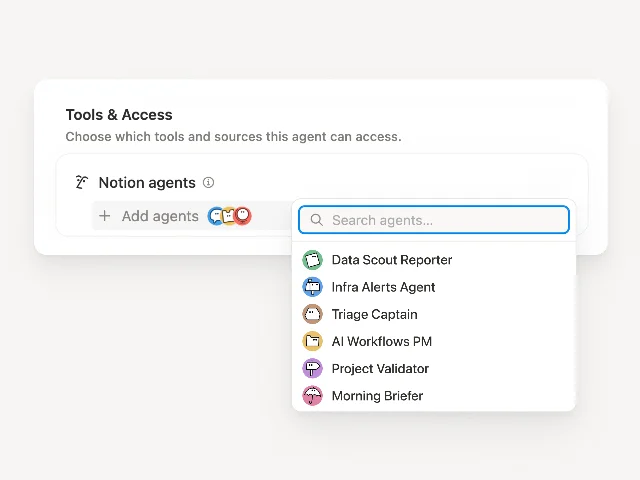
Open the primary agent, go to
Settings → Tools & access, and under Notion agents choose Add agents. Select the specialists you built, and they join the primary's tool list. 2That list is only the menu. When each specialist gets called, and what it must send back, belongs in the primary's instructions. Without that contract the primary guesses, and a guess spends credits.
Step 4: Write the hand-off contract
For each specialist, the primary's instructions need three things: the condition that starts the hand-off, what to send, and what a usable reply contains. This block is the whole contract for the example above.
You are the Launch Review Lead. When a page is added to the Releases database, review it
before anyone marks it ready to ship.

Hand off these checks, and wait for each reply before you write your verdict:

1. Support Risk — when the release names a feature with support tickets, ask it for the
   current themes. Send: the feature name and the release page link. It must return up to
   five themes, each with the ticket links behind it.
2. Docs Check — always. Ask it to compare the release notes with the help docs. Send: the
   release page link and the help docs database link. It must return each missing or
   outdated page with its link.

Then write one "Readiness" section on the release page: a short summary, the support themes
as bullets, and the docs gaps as bullets. Set the Readiness status to "Reviewed".

If a specialist reports no findings, say so in one line and carry on. If a specialist fails,
write what it could not check and set Readiness to "Needs manual review".
Step 5: Give the primary its trigger and its write-back
Open the primary's
Settings → Triggers and add a Notion trigger pointed at the Releases database, with the event Page added. Add a filter when the review should start only at a chosen status. 2Then set the primary's own access to cover the write-back: the Releases database at
Can edit content, plus the specialist agents. The specialists keep view-only access to their own sources, which is the point of the split. 3What the reviewer sees after it runs
Someone adds a release to the database. Minutes later the release page carries a Readiness section — a summary, the support themes with links to the tickets behind them, and the docs gaps with links to the pages — and the status reads Reviewed. The reviewer clicks through the links instead of hunting for them, and the primary wrote the whole section from the specialists' replies.
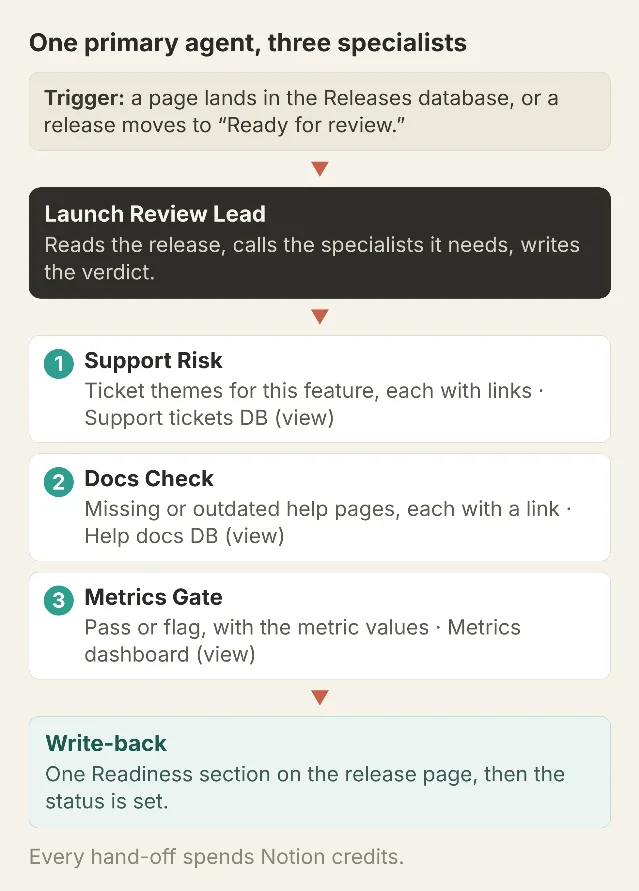
How one run splits: the primary calls each specialist and folds the replies into a single write-back. Each specialist keeps its own instructions, access, and model, and every hand-off spends credits. Diagram by the author.
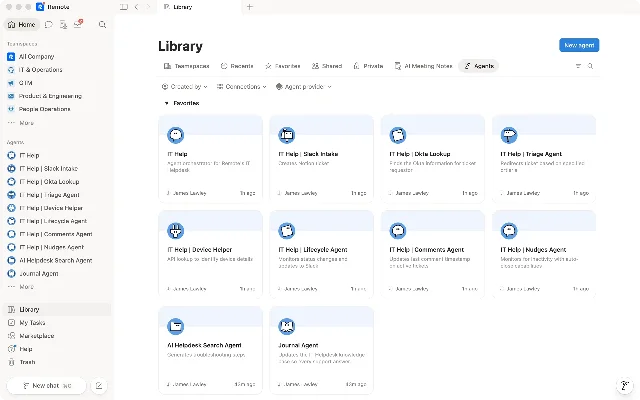
Notion points to one company running this shape in production. Remote, a global payroll company, runs its IT help desk on a fleet of Custom Agents — an intake agent, a triage agent, a device-helper agent, and a nudges agent that chases tickets going quiet — and reports roughly one in four resolved IT tickets handled end to end by AI, with AI resolutions up about 35% while ticket volume stayed flat. 4 Notion's 3.7 release notes list Remote's five-agent help desk among the sub-agent examples and put the saving at $500k a year. 1
Test it before you trust it
| Scenario | Setup | Expected result |
|---|---|---|
| A specialist alone | Run Support Risk from its Chat tab with a feature name | Themes with ticket links, or a one-line "no matching tickets" |
| The full run | Add a release page to the database | A Readiness section with the summary, themes, and docs gaps; status Reviewed |
| A specialist finds nothing | Trigger a release whose feature has no tickets | That section reads "no findings" and the verdict still lands |
| A specialist fails | Leave Docs Check without access to the help docs database | The verdict names what it could not check and sets Needs manual review |
| A model is disabled | An admin turns off the model a specialist uses | The agent switches to the workspace default, or to Auto; re-check its output 2 |
Gotchas
Every hand-off spends credits. Sub-agent work bills to Notion credits, so a run with three hand-offs costs more than a run with one, and a hand-off on a premium model costs more again, at that model's own price. 2 Check the
Activity and Insights tabs after the first few runs and compare the added cost against the value the hand-off brings. 2A disabled model switches silently. When an admin turns off the model a specialist runs, that agent falls back to the workspace default, or to
Auto, on its own. 2 Re-check the specialists after any change to the workspace's allowed models.Each specialist's access is its own blast radius. The reason to split Docs Check away from Support Risk is that the docs specialist has no reach into the support queue. Give each one the single source it needs, and keep the write access in the primary. 3
More agents can raise the bill while adding little. Notion's guidance is to start with one or two sub-agents and add another only when it has a clear job of its own. 2
A sub-agent runs when the primary calls it. Give the specialist its own trigger in
Triggers when you also want it to run standalone, for the one-off question outside the review. 2Debugging spans every agent. The primary's
Activity tab shows the run and the hand-offs, while each specialist logs its own work under its own Activity tab. When a verdict looks wrong, open the specialist that fed it. 2When the primary outgrows a page, split it again. A hand-off contract adds lines to the primary. Instructions that grow past what reads in one pass are the signal for another specialist, the same reason Notion points to more agents when a workflow keeps growing. 3
Build the first version as a primary and one specialist. Run it by hand a few times, and add the second once the first reply arrives in the shape you asked for.
This story was produced automatically by a channel. One sentence is all it takes for Neodrop to keep producing for you.