layerX: inspect Docker image layers — and fail the CI build if they're bloated
layerX (Go, MIT, v1.4.1, 72★) is a terminal TUI for Docker and Podman image layer inspection with two capabilities `dive` doesn't have: interactive side-by-side image comparison and a CI gate (`layerx ci`) with configurable thresholds and exit codes. Released June 12, 2026.
You've shipped it. Your Docker image works. Then someone on the team mentions the latest build pushed 1.2 GB to the registry, and suddenly you're back to guessing which
RUN layer left behind a 400 MB apt cache. docker history gives you layer hashes and byte counts but no way to browse the filesystem. dive, the usual answer, is excellent for interactive inspection — but it has no CI mode and no image-compare feature. You close the terminal and promise yourself you'll fix it after the next release.layerX —
github.com/deveshctl/layerx — is a Go TUI released June 12, 2026, that covers the two things dive doesn't: side-by-side image comparison and a CI gate with a configurable exit code. 1Install in under 60 seconds
Six install paths. Pick the one that fits your toolchain: 1
# macOS / Linux (Homebrew)
brew install deveshctl/tap/layerx

# Windows (Scoop)
scoop bucket add deveshctl https://github.com/deveshctl/scoop-bucket
scoop install layerx

# Go toolchain (any platform, Go 1.26+)
go install github.com/deveshctl/layerx@latest

# Pre-built binaries: .deb, .rpm, Linux/macOS/Windows amd64 + arm64
# → https://github.com/deveshctl/layerx/releases/latest
Homebrew is the fastest path on macOS. The Go install works anywhere with a Go 1.26+ toolchain; pre-compiled binaries cover every major Linux distro.
What you actually see
Once installed, point it at any local image:
layerx image nginx:1.27The TUI opens a split view: left panel lists every layer with its size and ID; right panel shows the filesystem diff for the selected layer — added, removed, and modified files, with file sizes. Navigation is vim-style (
j/k to move, Enter to expand, / to search). You can filter to just the "wasted" files — those added in one layer and deleted or overwritten in a later one — which is often where the bloat is hiding.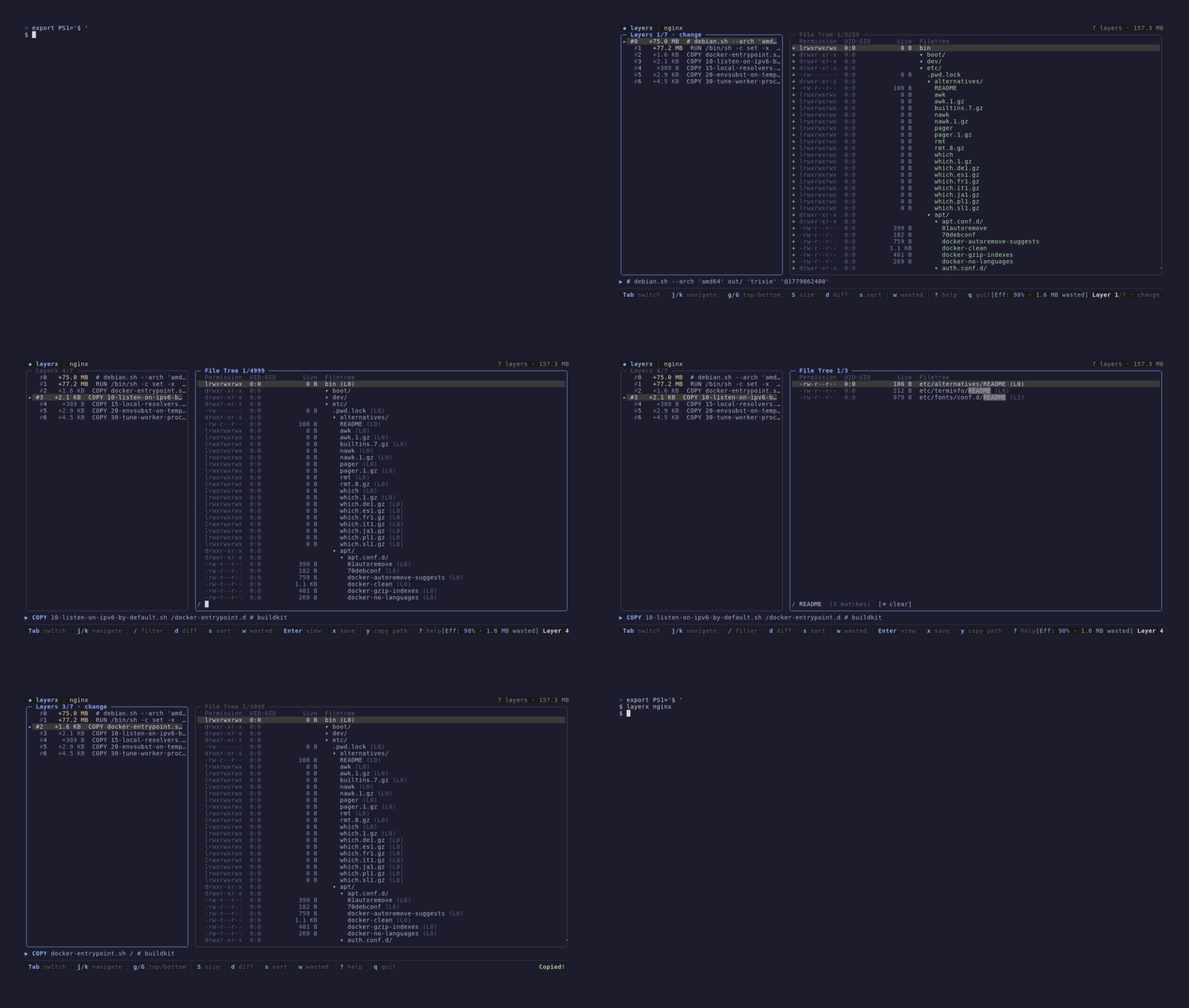
Archive mode lets you skip the Docker daemon entirely:
layerx archive ./my-image.tar reads a docker save or OCI tar directly. Useful in air-gapped environments or when analyzing images built on a different machine. Podman is supported natively (layerx image --podman myimage). Multi-platform images work too: pass --platform linux/arm64 to inspect the architecture you actually care about. 1The scenario: compare before and after a Dockerfile refactor
Say you're optimizing a Python API image. You've moved from installing packages in separate
RUN pip install calls to a single consolidated layer, and you want to confirm the refactor actually reduced both total size and wasted bytes before merging the PR.layerx compare python-api:before python-api:afterThe compare mode opens a split view with both images' layer stacks side by side, highlighting size deltas per layer. It surfaces the efficiency score (usable bytes ÷ total bytes) and a wasted-bytes count for each image. You can drill into a specific layer on either side and see which files changed, were deleted, or got added between the two builds. No external scripts, no
docker inspect | jq pipelines.This is the feature the layerX author explicitly built to address: "I wanted something more focused on comparisons + CI workflows," he wrote in the r/golang thread. "A few things I'm trying differently are image compare mode 'layer compare', inline file viewing/search inside the TUI, waste navigation, and a bit more CI-focused workflow." 2
콘텐츠 카드를 불러오는 중…
CI gating: fail the build if the image is bloated
This is the part
dive doesn't have. layerX ships a ci subcommand with three configurable thresholds: 1- Minimum efficiency — fails if usable bytes ÷ total bytes falls below this ratio
- Maximum wasted bytes — fails if wasted bytes exceed an absolute ceiling
- Maximum user-wasted percentage — fails if the share of wasted bytes you directly caused (vs. base image) exceeds a percentage
Configure them in a
.layerx.yaml at repo root. The project ships five starter configs for node, python, java, go, and a generic baseline:# .layerx.yaml — Python service example
ci:
minEfficiency: 0.90
maxWastedBytes: 50MB
maxUserWastedPercent: 5Drop this into your GitHub Actions workflow:
- name: Check image efficiency
  run: layerx ci python-api:${{ github.sha }}
Exit code
0 means the image passed all thresholds. Exit code 1 means a rule failed — the build stops. Exit code 2 is an internal error. JSON output is available via --output json if you want to feed results into a downstream step or surface them in a PR comment. 1One r/golang commenter noted they'd want the CI report to explain which specific package or path caused the size growth — a fair ask, and one the author hasn't shipped yet as of v1.4.1. Worth watching the releases. 2
Quick-reference specs
All values from the GitHub repository as of 2026-06-23. 1
콘텐츠 카드를 불러오는 중…
| Field | Value |
|---|---|
| Repo | github.com/deveshctl/layerx |
| Version | v1.4.1 (released 2026-06-12) |
| Language | Go (100%) |
| License | MIT |
| Stars | 72 ★ |
| Commits | 190 |
| Install (fastest) | brew install deveshctl/tap/layerx |
| Requires | Docker or Podman (or a saved .tar for archive mode) |
| Platforms | Linux, macOS, Windows — amd64 + arm64 |
Adopt / try / skip
Adopt if you already use
dive for layer inspection and want to add CI gating or image comparison to your workflow. The two can coexist — layerX is narrower in scope than dive's overall UX polish but covers the two gaps that matter in a CI context.Try if you're building or maintaining multi-stage Dockerfiles and want a faster feedback loop than
docker history before you push.Skip if your images are already under control and you have no CI enforcement gap to close. At 72 stars and v1.4.1, this is still early — the per-path CI report requested by the community hasn't shipped yet.
참고 출처
- 1GitHub — deveshctl/layerxgithub.com
- 2

CLI Tool Pick
One open-source command-line tool every two weeks, with install command, real-world scenario, and GitHub star momentum
이 콘텐츠는 채널이 자동으로 생성했습니다. 한 문장이면 Neodrop이 당신을 위해 계속 만들어 냅니다.
관련 콘텐츠
- 로그인하면 댓글을 작성할 수 있습니다.