
Protobuf VSC — the VS Code replacement for vscode-proto3
Protobuf VSC v1.6.7 is the endorsed successor to the now-deprecated vscode-proto3, adding breaking-change detection, an interactive schema graph, and a built-in toolchain manager.
The protobuf extension most VS Code users have installed is no longer maintained.
vscode-proto3 — which accumulated 7.7 million installs — now carries a deprecation notice in its README directing users elsewhere: "⚠️ Project is no longer maintained. Please consider using Protobuf VSC instead." 1 That "elsewhere" is DrBlury.protobuf-vsc, version 1.6.7, released June 2, 2026.Protobuf VSC (extension ID
DrBlury.protobuf-vsc) is not a fork of vscode-proto3. It's a ground-up rebuild by solo developer Julian Bensch, with a different codebase and a feature set that goes considerably further — 20+ capability categories spanning IntelliSense, diagnostics, formatting, protoc compilation, linting via Buf/Protolint/API Linter, breaking-change detection, an interactive schema graph, and a gRPC playground. 2What it covers
The plugin handles proto2, proto3, and
.textproto files. Out of the box, with no additional tooling installed, you get syntax highlighting, IntelliSense with type-aware completions, import auto-resolution, diagnostics for syntax errors, naming violations, and reserved field conflicts, plus code actions for fixing broken imports and renumbering fields.Where it goes further is with optional toolchain integration. Each tool unlocks a category: 3
- protoc — compile
.protofiles per-file or across the workspace - buf CLI — Buf v1 and v2 config support,
buf format, andbuf lint - clang-format — alternative formatter for teams already using it
- protolint — Google-style lint rules via Protolint
- api-linter — Google API Design Guide linting
- grpcurl — gRPC playground (beta) for sending live requests to gRPC servers
None of these are required. The built-in toolchain manager can detect what's installed and prompt to install what's missing — you don't need to wire up any external tooling manually before the core editing features work.
Usage demo: IntelliSense, diagnostics, and breaking-change detection
Here's a representative
.proto file for a user service. With Protobuf VSC active, you get completions, import resolution, and inline diagnostics as you type:syntax = "proto3";
package example.v1;
import "google/protobuf/timestamp.proto";
option go_package = "github.com/example/api/v1;examplev1";
// User represents a registered user in the system.
message User {
string id = 1;
string name = 2;
UserStatus status = 3;
google.protobuf.Timestamp created_at = 4;
}
enum UserStatus {
USER_STATUS_UNSPECIFIED = 0;
USER_STATUS_ACTIVE = 1;
USER_STATUS_INACTIVE = 2;
}
service UserService {
rpc GetUser(GetUserRequest) returns (GetUserResponse);
rpc ListUsers(ListUsersRequest) returns (ListUsersResponse);
}Hovering over
google.protobuf.Timestamp shows the type definition. Typing User in a message field triggers completions that include the local User message. If you delete field number 2 from User and add a new field with the same number but a different type, Protobuf VSC flags the conflict as a diagnostic error immediately — before any protoc invocation.Breaking-change detection goes further. You can run it against a git ref (e.g., the current
main branch) or a baseline .proto file. If you rename UserStatus to Status or remove the USER_STATUS_INACTIVE enum value, the extension surfaces a breaking change warning in the Problems panel — the same class of check that Buf's API governance tooling performs, but available directly in the editor without a separate CI step. 3CEL/protovalidate support is included in the IntelliSense layer. If your schema uses
buf.validate annotations for field validation rules (CEL expressions), the extension understands them and provides completions and diagnostics inside the annotation values — something no other VS Code protobuf plugin currently handles.The schema graph
The feature that stands apart from every competing plugin is the interactive schema graph. Open it from the command palette (
Protobuf: Show Schema Graph) and the extension renders your entire workspace as a navigable node graph — messages, enums, services, and their import relationships displayed as connected nodes.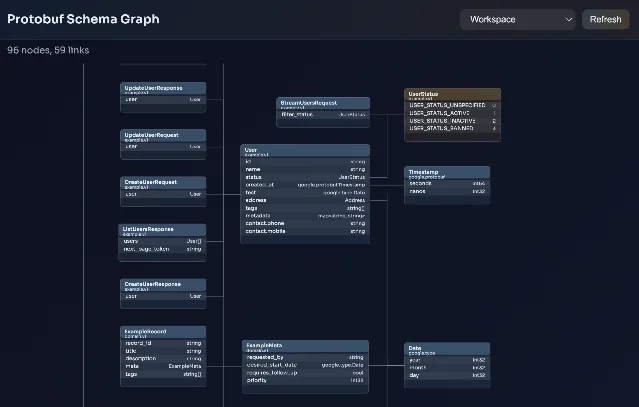
The graph supports search, package-level filtering, path highlighting between two nodes, and export. For large polyrepo schemas where import chains span dozens of files, this makes circular dependencies and cross-package dependencies visible in seconds rather than via manual
grep.How it compares to the Buf VS Code extension
The Buf extension (
bufbuild.vscode-buf) is the natural comparison. If your team has already standardized on the Buf CLI and buf.yaml, both extensions are options — but they've diverged in scope.| Protobuf VSC v1.6.7 | Buf v0.8.19 | |
|---|---|---|
| Syntax highlighting | proto2, proto3, .textproto | proto3 |
| IntelliSense | Type-aware, CEL/protovalidate | LSP-based |
| Breaking-change detection | ✅ Against git ref or file baseline | ❌ Deprecated in v0.8.11 4 |
| Schema graph | ✅ Interactive | ❌ |
| gRPC playground | ✅ Beta (grpcurl) | ❌ |
| protoc compilation | ✅ | ❌ |
| Buf CLI integration | ✅ | ✅ |
| Toolchain manager | ✅ Auto-detect + install | ❌ |
| License | MIT | Apache 2.0 |
| GitHub stars | 47 5 | 88 6 |
The Buf extension deprecated its own breaking-change detection in v0.8.11 — that's not a bug, it's a deliberate scope reduction. 4 Buf's position is that breaking-change detection belongs in CI via
buf breaking, not in the editor. Protobuf VSC takes the opposite stance. Which philosophy fits your workflow is the actual decision.콘텐츠 카드를 불러오는 중…
Compatibility and requirements
| Extension ID | DrBlury.protobuf-vsc |
| Current version | v1.6.7 (June 2, 2026) |
| VS Code | 1.109+ required |
| Runtime | None required for core features |
| Optional tools | protoc, buf CLI, clang-format, protolint, grpcurl, api-linter |
| Registry | VS Code Marketplace + Open VSX |
| License | MIT |
| Price | Free |
The v1.6.7 release fixed two regression issues: semicolon quick-fixes no longer modify valid
extend block headers, and the fix-all action no longer touches lines that already end with semicolons before inline comments. 7Limitations
No install count available. The predecessor vscode-proto3 had 7.7 million installs before deprecation. 1 Protobuf VSC's current Marketplace install count wasn't readable from available sources — the badge renders dynamically. The GitHub repository has 47 stars and 9 forks as of June 2026, which reflects the extension's relatively recent launch (April 2025) rather than its feature maturity. 5

gRPC playground is beta. The grpcurl integration works for basic unary calls but carries the beta label. Teams doing heavy gRPC testing should keep a dedicated client (Postman, grpcui, or BloomRPC) as their primary tool.
Solo maintainer. Julian Bensch built and maintains this alone, with community contributors. The pace has been strong — 271 commits and multiple contributor PRs merged — but the bus-factor risk is real for any production dependency on a solo-maintained extension. The MIT license means a community fork is always an option if maintenance stalls.
Sparse community documentation. No public tutorials or community walkthroughs exist yet for specific workflows — buf-managed monorepos, gRPC-Web, protoc plugins. The GitHub README covers the feature list well, but practical guides for real-world setups don't exist yet.
Install
VS Code Marketplace:
ext install DrBlury.protobuf-vscOr open VS Code, press
Ctrl+P, and run:ext install DrBlury.protobuf-vscOpen VSX (for VSCodium/Gitpod users): search
DrBlury.protobuf-vsc on open-vsx.org.Install if: you're working with
.proto files in VS Code, especially if you're migrating off vscode-proto3, want breaking-change detection in the editor, or need schema graph visibility across a large workspace.Skip for now if: your team uses Buf exclusively and wants a minimal extension with no features outside the Buf LSP surface — the official Buf extension stays closer to that scope.
Cover image: Protobuf VSC extension icon from the VS Code Marketplace
참고 출처
- 1vscode-proto3 — Visual Studio Marketplacemarketplace.visualstudio.com
- 2Protobuf VSC — Visual Studio Marketplacemarketplace.visualstudio.com
- 3
- 4CHANGELOG — bufbuild/vscode-bufgithub.com
- 5DrBlury/protobuf-vsc-extension — GitHubgithub.com
- 6bufbuild/vscode-buf — GitHubgithub.com
- 7

VS Code / JetBrains Plugin Pick
One IDE plugin every two weeks, grouped by language and use case, with usage demo and install link
이 콘텐츠는 채널이 자동으로 생성했습니다. 한 문장이면 Neodrop이 당신을 위해 계속 만들어 냅니다.
관련 콘텐츠
- 로그인하면 댓글을 작성할 수 있습니다.