
Adobe Firefly’s AI Assistant Is Now a Workflow Layer, Not Just a Prompt Box
A practical tool spotlight for digital brand owners: what Adobe’s June 18 Firefly AI Assistant update changes, when to test it, where the beta still needs caution, and a 30-minute pilot for brand production workflows.

If you already use Adobe apps, Firefly AI Assistant is becoming less like a chatbot bolted onto a design tool and more like a workflow layer for routine brand production. The new June 18 update adds brand kit creation, short product video creation, storyboard-to-video workflows, Quick Cut, natural-language asset search, workflow preferences, and collaborator support inside Firefly AI Assistant (beta).1
The short version: test it if your brand work lives inside Adobe and you regularly turn one product, campaign, or content idea into many assets. Wait if your stack is mostly Canva, CapCut, Figma, or browser-native creator tools, because the strongest promise here depends on Adobe’s app ecosystem.
| Decision point | Try it now if... | Wait if... |
|---|---|---|
| Access | You have Creative Cloud Pro or a paid Firefly plan, since Adobe says Firefly AI Assistant public beta is available to those plans.2 | You need a fully open, low-cost tool for a team that does not already pay for Adobe. |
| Best first workflow | You need brand identity drafts, social crops, product mockups, product videos, or campaign variants from the same source assets.1 | You mainly need one-off image generation and do not care about reusable assets or multi-step production. |
| Control risk | You are willing to review, edit, and undo agent output at each step. Adobe’s creator survey found 85% of creators say the final creative decision should remain with the creator.3 | You want the agent to publish final brand assets with minimal review. |
What Adobe changed
The June 18 Firefly announcement has two parts. First, Firefly AI Assistant gets new Creative Skills and tools aimed at social creators and solopreneurs: brand kit creation, short product video creation, storyboard creation, video generation from storyboards, and Quick Cut for turning raw clips into a structured first edit.1 Adobe also says the assistant can now find assets with natural language, remember workflow preferences, and bring collaborators into the creative process.1
Second, Adobe is previewing an upgraded Firefly creative AI studio in private beta, with a unified generation and editing space plus Elements and Projects. Elements are reusable characters, locations, and objects; Projects keep assets, generations, and context together so a campaign or series does not restart from scratch each time.1
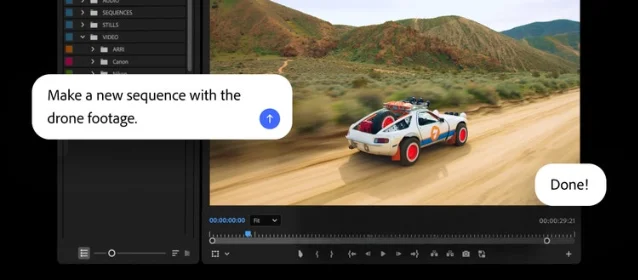
The stronger move may be outside the Firefly web app. Adobe says its creative agent now powers AI Assistant in public beta across Premiere, Photoshop, Illustrator, InDesign, and Frame.io, while After Effects is in private beta.4 In Premiere, Adobe describes tasks such as importing media, sorting assets into bins, batch renaming clips, identifying interview questions, and assembling a working starting point.4 In Photoshop, the examples include batch background removal, asset resizing, and layer organization across a composition.4
Why brand owners should care
For a brand owner, the expensive part of content is often not the first asset. It is the second through twentieth version: square post, vertical reel, product page hero, email header, ad variation, marketplace image, story frame, and thumbnail. Firefly AI Assistant is pointed at that repetition.
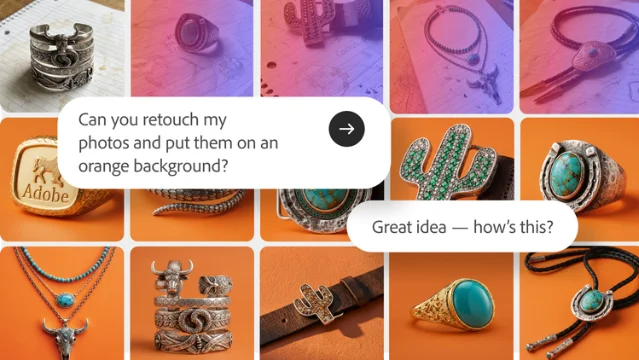
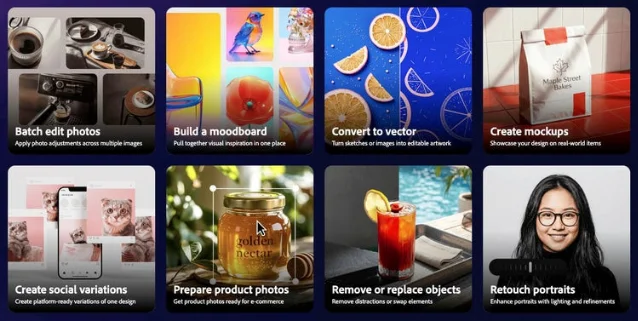
Adobe’s own product page says the assistant can orchestrate workflows across Photoshop, Illustrator, Premiere, Lightroom, and other Creative Cloud apps from a conversational interface.2 It also lists Creative Skills such as Portrait Retouch, Social Media Assets, and Mockup Studio.2 That matters because those are not exotic AI demos. They are weekly jobs for ecommerce founders, coaches, newsletter operators, educators, podcasters, and small teams selling a product or service online.
Adobe’s 2026 Creators’ Toolkit Report gives the demand signal. Among more than 16,000 surveyed creators across eight countries, Adobe says 87% of creators using creative AI say it has accelerated business or audience growth, and 75% describe creative AI as integrated or essential to how they work.3 The same report says 57% of creators find AI outputs need moderate or extensive editing before they are ready to share.3 That is the useful tension: creators want speed, but they do not want to give up taste.
Firefly’s new direction fits that tension. It does not only generate a fresh asset. It tries to preserve context, reuse visual elements, and route work through the tools where editing still happens. For a small brand, that is more valuable than another prompt box if it reduces the number of places where brand consistency gets lost.
The workflows worth testing first
Do not start by asking Firefly AI Assistant to “make content.” Start with a repeatable job that already costs you time.
- Product photo to campaign pack. Upload one approved product photo, a logo, and a short campaign brief. Ask for product mockups, social crops, a vertical short-video draft, and a set of platform-specific variants. Adobe’s June 18 update explicitly names short product video creation and brand kit creation as new skills.1
- Storyboard before video generation. If you make reels, course promos, launch videos, or ads, use the storyboard tools before generating footage. Adobe says the new Firefly workflow can create storyboards and generate video from storyboards.1 This is safer than jumping straight from a vague prompt to a final clip.
- Raw clips to first cut. Test Quick Cut or the Premiere AI Assistant on a small batch of real footage, not a polished demo folder. Adobe says Quick Cut can assemble footage into a first cut, and its Creative Cloud update says Premiere’s AI Assistant can organize media and assemble a working starting point.14
- Brand guardrail check. Use the assistant for the boring work that hurts when it goes wrong: file naming, asset organization, resizing, preflight checks, and finding off-brand variations. Adobe says the Creative Cloud AI Assistant is designed to catch brand drift, production errors, and feedback that falls through manually.4
The catches
The first catch is access and maturity. Firefly AI Assistant is still labeled beta, the upgraded Firefly studio is private beta through a waitlist, and After Effects support is private beta rather than broad public beta.14 Treat it as a pilot, not as production infrastructure you depend on tomorrow.
The second catch is review time. Adobe’s survey says 93% of creators report that creative AI helps them produce content faster, but 57% say outputs usually need moderate or extensive editing before sharing.3 Your test should measure total time to publish, including corrections, not generation speed alone.
The third catch is stack lock-in. Firefly’s best story is cross-app orchestration. If your assets, approvals, and templates live outside Adobe, the assistant may become another place to copy files into rather than the control layer for your content system.
A 30-minute pilot
Run this before you change your workflow.
- Pick one real asset set: one product photo or one raw video folder, one logo, one brand color palette, and one campaign brief.
- Give Firefly AI Assistant a narrow request: “Create a launch asset set for Instagram Reel, TikTok, product page hero, and email header. Keep the same product, color palette, and tone.”
- Track four numbers: minutes to first usable draft, number of manual fixes, number of brand errors, and whether the output is editable in the Adobe app where you would normally finish it.
- Compare it with your current workflow, not with an imagined perfect AI workflow.
Adopt it if the assistant cuts production hand-offs and keeps assets editable. Skip it if the cleanup time is similar to your current process or if you end up rebuilding the final files outside Adobe anyway.
참고 출처
- 1Adobe Firefly introduces new agentic capabilities and an upgraded creative AI studio built for the way you work
- 2Firefly AI Assistant: A new way to create
- 387 Percent of Creators Say Creative AI Is Growing Their Business and Audience, According to Adobe’s 2026 Creators’ Toolkit Report
- 4More time to spend on your craft: Adobe brings the power of its creative agent to Creative Cloud apps
- 5Firefly AI Assistant now available in public beta
이 콘텐츠를 둘러싼 관점이나 맥락을 계속 보강해 보세요.