
OpenAI Operator: The $200 Browser Agent With a 38.1% Report Card
OpenAI pitched Operator as the browser agent that could finally do work for you. Its own CUA benchmark showed 38.1% success on full computer-use tasks, while independent tests and users found slow navigation, hallucinated contact data, and brittle UI handling.

리서치 브리프
OpenAI sold Operator as the moment ChatGPT stopped talking and started doing. The launch copy said it could use its own browser, look at webpages, click, type, scroll, fill forms, order groceries, and create memes. It was one of OpenAI's first agents: give it a task and it will execute it. The small print was already screaming. Operator was a research preview, limited to U.S. Pro users, and OpenAI later folded it into ChatGPT agent after sunsetting the standalone site. 1
That is the entire agent hype cycle in one tab. The pitch is "independent digital worker." The product is a remote browser that sometimes needs you to stand over its shoulder like a nervous parent watching a toddler carry soup.
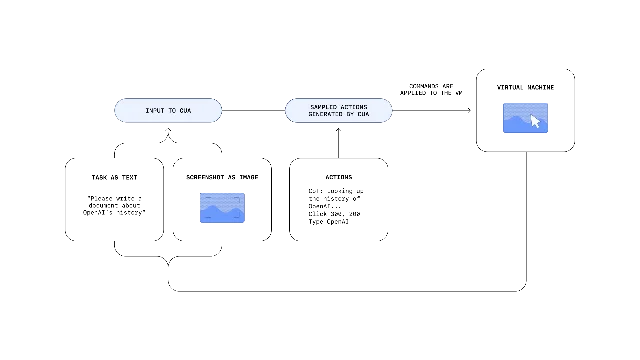
The roast writes itself because OpenAI published the punchline. The model behind Operator, Computer-Using Agent, scored 38.1% on OSWorld, the benchmark for full computer-use tasks. Humans scored 72.4%. On WebArena, it hit 58.1%. On WebVoyager, a simpler browser benchmark, it hit 87%. 2 Translation: it looks sharp in the browser demo, then eats pavement when the computer stops behaving like a demo.
The hype pitch: ChatGPT gets hands
OpenAI's story was clean. Operator could use the same graphical interfaces humans use: buttons, menus, text boxes, screenshots, mouse clicks, keyboard input. No custom API required. It would break a task into steps, self-correct when stuck, ask for help when needed, and hand control back for logins, payments, or CAPTCHAs. 1
MIT Technology Review saw the early demo: booking an OpenTable reservation, hunting StubHub tickets, and turning a handwritten grocery list into an Instacart order. The article also reported the business model reality: Operator launched to ChatGPT Pro users, OpenAI's $200-a-month tier. 3 So yes, for the price of a gym membership plus a phone bill, you too could watch a bot slowly click dropdowns in the cloud.
OpenAI framed this as the bridge from passive AI to active AI. The company said it was collaborating with DoorDash, Instacart, OpenTable, Priceline, StubHub, Thumbtack, Uber, and others. It also said Operator could help public-sector workflows, including city-service enrollment in Stockton. 1 Fine. The idea is real. Browser automation without brittle scripts would be useful.
But useful is not the same thing as ready. "Can click buttons" is not a job description. It is the first five minutes of an office onboarding.
The report card OpenAI buried in plain sight
Here is the part the launch video does not want sitting in a big font:
Those are not outsider hit jobs. Those numbers are from OpenAI's own CUA research post. 2 The company also admitted that WebVoyager contains relatively simple tasks, while CUA still needed improvement on more complex benchmarks like WebArena. 2
OpenAI's own Operator trial table makes the problem more concrete. Search Britannica for bear habitats? 10 out of 10. Add groceries to Todoist? 10 out of 10. Find a Seattle townhouse on Redfin with constraints? 3 out of 10. Use an unfamiliar HTML editor for precise text formatting? 4 out of 10. Use Tagvenue with one version of a prompt? 8 out of 10. Remove a few helpful UI hints? 3 out of 10. 2
That is not a digital employee. That is a demo that collapses when the website has opinions.
The independent tests were uglier
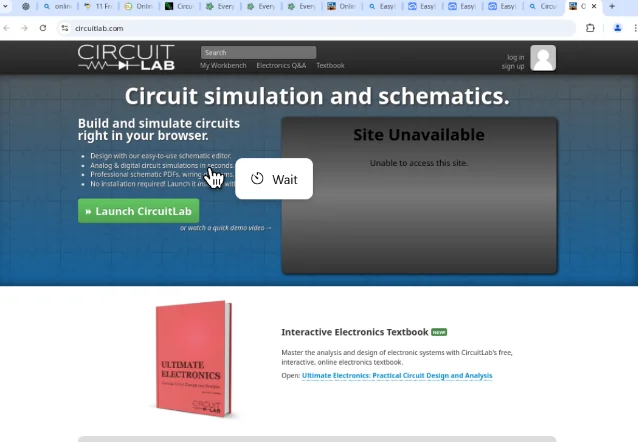
A Hugging Face community post by Zengyi Qin said an MIT team tested Operator on five computer-use tasks and "did not cherrypick." Operator failed all five. The failures were not exotic sci-fi edge cases. It entered the wrong brightness/contrast values, could not use online design tools, could not find a Lamar advanced trig question, could not find a specific problem in 3000 Solved Problems in Calculus, and could not use an online tool to design and analyze an RC low-pass filter. 4
The author's take was brutal and specific: Operator was good at visual grounding, but it did not fully understand interactive logic and appeared below a skilled user's level of computer use. 4 That distinction matters. Seeing the button is not understanding the workflow. A pigeon can see a touchscreen. That does not make it your operations team.
Antoine's hands-on review landed in the same place from the user side. He waited 15 minutes for Operator to find classical concerts in Berlin, then tried again and waited 33 minutes for URLs. The second run returned three concerts that were not what he wanted. For product research, he called the results "abysmal" after 10 minutes, saying the output was not detailed, contained incorrect information, and some parts did not make sense. 5
His diagnosis was not mysterious. Operator struggled with forms and navigation, used a lowest-effort search approach, failed to visit each product website, and produced very low-quality output. 5 This is the problem with browser agents: the web is not a clean benchmark. It is cookie banners, weird filters, JS modals, hostile forms, stale search results, and login walls wearing a trench coat.
The user complaint: slow, expensive, and making stuff up
The best real-world complaint came from a ChatGPT Pro user who tested Operator on a business task: gather 50 popular financial influencers from YouTube, find LinkedIn info and emails, summarize each channel, and format the results in a table. The user said they had a $200/month ChatGPT Pro subscription and wanted to test Operator immediately after launch. 6
The first five minutes looked cool. Then Operator tried Google Sheets and Excel, hit sign-in walls, did not ask for help, found another spreadsheet tool, and began hallucinating. After 20 minutes, the user told it to give up. The final spreadsheet had 18 influencers, not 50, and the LinkedIn profiles and emails were "entirely made up." 6
콘텐츠 카드를 불러오는 중…
That last part is the agent-shaped landmine. A chatbot hallucinating a fake email is annoying. A browser agent hallucinating contact data while operating a workflow is operational debt with a loading spinner. The user summed it up as "too slow, expensive, and error-prone," adding they could have done the task manually in 15 minutes with fewer mistakes. 6
A separate r/OpenAI thread framed the same anxiety around travel booking: if flight choices can cost real money, why leave them to a black box? One commenter asked why anyone would want high-cost travel decisions handled that way. 7 That is not Luddism. That is a normal person noticing that "agent" sounds cute until the agent can buy the wrong thing.
The catch: half-autonomy is the worst autonomy
Operator's safety design proves the core product tension. OpenAI trained it to ask for confirmation before significant actions, hand over control for sensitive information, refuse high-risk tasks, and require supervision on sensitive sites like email or financial services. 1 That is responsible. It is also an admission that the agent is not autonomous in the places autonomy would be most valuable.
This leaves the product in an awkward middle. Low-risk tasks are often too trivial to justify waiting around. High-risk tasks require supervision, which destroys the labor-saving pitch. Complex tasks expose brittle reasoning. Unfamiliar UIs expose brittle navigation. Login walls expose the VM problem. Bad outputs still require human review.
So what are you buying? Not a worker. Not even an intern. More like an intern using remote desktop over hotel Wi-Fi, except the intern occasionally invents LinkedIn profiles and needs applause for finding the search bar.
There are real use cases. Repetitive browser chores with clear steps, low consequences, and easy verification can work. OpenAI's own examples show stronger results on repeated simple interactions, and that category is worth automating. 2 If your task is "move these visible items through this visible web form," fine. Give the robot a spoon.
But do not hand it your travel plans, compliance workflow, CRM cleanup, purchasing process, lead list, customer email, or anything where a plausible-looking wrong answer costs money. The current failure mode is not "it refuses." The dangerous mode is "it continues confidently and leaves you to audit the wreckage."
Verdict: remote-control cosplay, not a digital employee
Operator was important because it showed where AI products are going: from chat windows toward tools that act. That direction is real. The shipping product, though, was not the promised office worker. It was a browser puppeteer with a 38.1% full-computer benchmark score, a $200/month velvet rope at launch, and enough documented failure modes to make "hands off keyboard" sound less like freedom and more like negligence.
The roast verdict: Operator is not useless. It is mis-sold. For low-risk, repetitive browser errands, it can save clicks. For anything messy, expensive, authenticated, or irreversible, it is a very expensive way to rediscover why humans invented QA.
OpenAI wanted to sell a computer-using agent. What it shipped was a computer-using liability with good stage presence.
참고 출처
- 1Introducing Operator
- 2Computer-Using Agent
- 3OpenAI launches Operator, an agent that can use a computer for you
- 4Failure Modes of OpenAI Operator
- 5OpenAI Operator review: Currently too limited but reasons to be hopeful
- 6I am among the first people to gain access to OpenAI's Operator Agent
- 7According to Bloomberg, Open AI Operator can't even book a simple flight
이 콘텐츠를 둘러싼 관점이나 맥락을 계속 보강해 보세요.