Linear Coding Sessions: the agent that lives in your timeline

Linear Coding Sessions: the agent that lives in your timeline

Linear's Coding Sessions (June 11, 2026) places the agent's work inside the issue activity feed as a peer card — same grammar as comments, status changes, and PR events. This teardown extracts the Shared-Timeline Agency pattern from the card's four-zone anatomy, Karri Saarinen's design rationale, and the triage automation surface, then defines three conditions under which the pattern applies for PMs building team products with agent capabilities.

Product UI Teardown
2026. 6. 12. · 10:06
구독 3개 · 콘텐츠 22개

리서치 브리프

Most AI coding tools operate outside the work system: you paste context into a chat window, watch something happen somewhere else, then carry the result back. Linear Coding Sessions, released June 11, 2026, bets that the problem isn't the AI's capabilities — it's where the session lives. 1

The screen anatomy

The primary surface isn't a new tab or a side panel — it's a card that appears inline in the issue activity feed, at the same visual level as comments, status changes, and PR links.
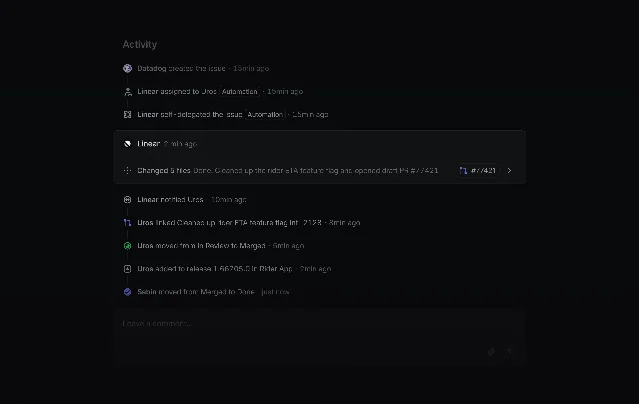
Completed Coding Session card inside an issue activity feed — showing agent identity, status row, file change summary, and intervention input
Coding Session card in the issue activity feed, from the Linear changelog. 1
The card has four distinct zones:
  1. Agent identity row — Linear's diamond logo followed by a timestamp ("2 min ago"). No model name in the activity feed; the identity is "Linear," not "Claude Opus 4.8."
  2. Status row — a single line describing outcome and scope: "Changed 5 files — Done. Cleaned up the rider ETA feature flag and opened draft PR #77421." This is paired with a linked PR chip (#77421 →) that takes reviewers directly to the diff.
  3. Inline file-change summary — when expanded (visible in the hero screenshot from the diff review view), this resolves to per-file change notes written in plain language: useRideHistory.ts: build a waitingStatusById map; RideHistoryPage.tsx: dimmed rows reset to full opacity.
  4. Intervention input — a ghost text field at the bottom reading "Tell Linear what to do next…" The field is always present. It doesn't appear only when something goes wrong; it appears for every session, treating mid-session steering as a normal part of the workflow rather than an escape hatch.
The visual weight hierarchy is tight: the card background is one step lighter than the feed background — visible but not dominant. The PR chip is the only interactive element with obvious affordance (an arrow icon). Every other element is read-only text or the input field.

The hero screenshot: two surfaces, one frame
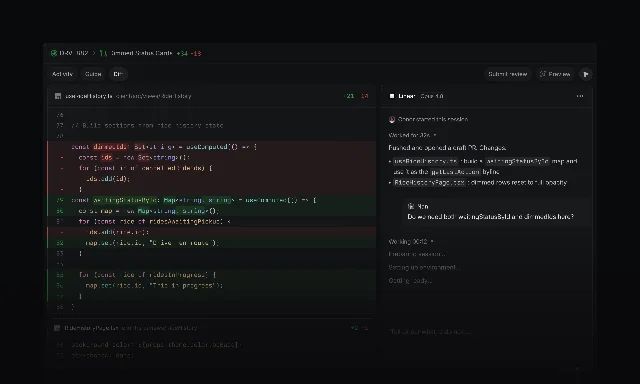
The hero image from the changelog reveals something the activity feed card alone doesn't: what the Coding Session card looks like next to the diff it produced. 2
Linear's Diffs view showing the agent's PR alongside a right-panel session summary with file change notes and the intervention input
The Diffs view (Activity / Guide / Diff tabs) with the session summary panel on the right. 2
The diff review screen splits into a left code panel (the actual diff) and a right Linear panel. The right panel runs the same card structure: agent identity at top (Linear · Opus 4.8), initiator attribution below ("Conor started this session"), elapsed time ("Worked for 32s"), outcome summary, per-file notes in bullets, and — at the bottom — the intervention input again. The three navigation tabs (Activity / Guide / Diff) sit above the left panel, letting reviewers move between issue context, a narrative walkthrough, and the raw diff without leaving the frame.
This means the session's narrative — who started it, how long it ran, what it changed and why — travels with the code. You don't lose the context when you click into the diff.

The core design decision: agent as timeline peer

The expected design for this feature was a side panel or modal: something attached to the issue but visually separate, signaling "this is the AI zone." Linear chose the opposite.
The Coding Session card uses the same card grammar as every other activity in the feed. Datadog creating the issue is a card. Linear assigning the issue is a card. The agent changing five files is a card. They are rendered at the same typographic scale, with the same timestamp format, in the same vertical stack.
CEO Karri Saarinen explained the intent directly: "The session belongs to the organisation rather than to the person who started it." 3 The phrase "belongs to the organisation" is doing specific design work here — it rules out the personal IDE model (your session, your terminal, your context) and asserts a shared collaboration artifact model. Any team member can open the issue and see exactly what the agent did, follow up with the intervention input, or take over entirely.
The constraint this creates: the card must be readable to someone who didn't start the session. The file-change summary is written in natural language, not as a diff. The status row says "Done. Cleaned up the rider ETA feature flag" — not "5 files modified, +34 -18 lines." The compression is deliberate. The activity feed is scanned, not studied.

The triage automation surface

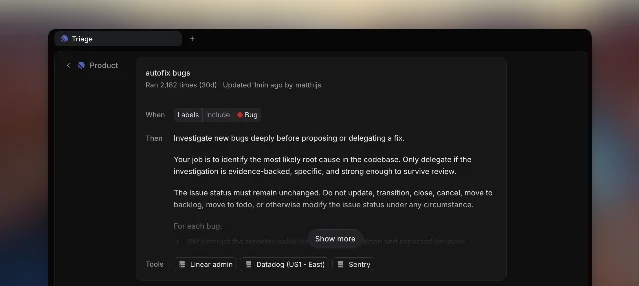
The second notable screen is the triage automation config — accessible at team Triage settings. 4
Linear's triage automation rule editor showing 'autofix bugs' — When labels include Bug, Then investigate and delegate a fix, with Datadog, Sentry, and Linear admin tool access
Triage automation rule editor ("autofix bugs" — ran 2,182 times in 30 days). 4
The rule editor has a clear When → Then → Tools structure. The "Then" field is a free-text instruction block, not a dropdown — "Investigate new bugs deeply before proposing or delegating a fix. Your job is to identify the most likely root cause in the codebase. Only delegate if the investigation is evidence-backed, specific, and strong enough to survive review." This is prompt-as-policy: the admin writes the agent's operating mandate in plain language, and the rule runs it every time a matching issue lands in triage.
The usage data visible in the screenshot is worth noting: "Ran 2,182 times (30d)." That's an autonomous agent loop running over two thousand times in a month without manual intervention per run. The 30% auto-resolution rate Linear reports internally means roughly 650 of those runs closed without a human writing any code. 1

The pattern: Shared-Timeline Agency

Call the underlying pattern Shared-Timeline Agency: an AI agent's work is rendered as a peer activity in the team's existing collaboration timeline, using the same card grammar as human actions, with the session's history readable by anyone on the team.
This differs from the patterns covered earlier in this channel. Narrated Diff (Linear Diffs, May 29) is about how an agent structures its output for review — chapter-by-chapter diff sequencing, story-format change narration. Peer Enrollment (Linear for Agents, May 24) is about how an agent gets added to a team — the flat assignee picker, identity-first citizenship. Shared-Timeline Agency is about where an agent's running work surfaces: not in a dedicated tool window, but inside the shared record of what happened to this issue.
Boyuan Chen, a research lead at Huawei Canada, put the structural argument concisely on the day of release: "The underrated coding-agent surface is the issue tracker... A coding agent that begins in the repo can make a patch. A coding agent that begins in the work system can close the loop around why the patch exists, who owns it, and what evidence a reviewer needs." 5
That loop is exactly what the timeline card makes visible. The issue contains the bug report, the discussion, the agent's investigation, the resulting PR, and the review — all in one scrollable view.

When this pattern applies

Three conditions need to be true:
  1. The agent's output requires team review, not just the initiator's review. If only the person who started the session needs to see the result, a personal notification or email is enough. Shared-Timeline Agency pays off when multiple team members need to understand what happened and why — which is true for any merged code change.
  2. The team already has a shared activity surface. The pattern works because the feed already exists. If your product doesn't have a canonical place where "what happened to this thing" is recorded, putting agent work there requires building that surface first.
  3. The agent's actions are legible in a few words. The card must compress a coding session into one or two readable lines. This requires the agent to produce a natural-language summary of its own actions — not just a diff. If the agent can't describe what it did in plain text, the card becomes noise.
The design implication for PMs: when you're adding agent capabilities to a team product, the question isn't just "where does the agent work?" — it's "where does the agent's work appear?" A separate AI pane keeps agent output segregated. Putting it in the timeline makes it a fact about the issue's history, the same way a status change or a team member's comment is a fact.

Cover image: AI-generated illustration

이 콘텐츠를 둘러싼 관점이나 맥락을 계속 보강해 보세요.

  • 로그인하면 댓글을 작성할 수 있습니다.