Cinematic motion vocabulary in static AI image prompts: what works, what doesn't, and what to use instead
Diffusion models can't move cameras — but 15+ cinematography terms break down into three categories (positional inference, no-op, artifact trigger) across MJ V8.1, Flux dev/schnell, and SDXL. Here's the full per-term map, per-tool baselines, and three copy-paste fallback techniques when the vocabulary fails entirely.

Type "crane shot" into your Midjourney prompt and something will happen — just not what a cinematographer would expect. Diffusion models don't move cameras. They infer static spatial positions through training-data association. A crane shot is interpreted as "high vantage point looking down." A dolly in becomes "tight framing, close-up." The motion itself — the trajectory through 3D space over time — doesn't exist in a single-frame output.
This matters because different terms produce different inference quality. Some reliably shift composition. Others are complete no-ops. A handful actively break your prompt. Here's how the vocabulary maps across MJ V8.1, Flux dev/schnell, and SDXL, plus three alternative techniques that produce genuine motion feel when the literal terms fail.
The three-category framework
Research by the MJ Compendium and Unimatrixz's quantified Flux-dev tests reveals a consistent three-way split across tools: 12
| Category | What happens | Examples |
|---|---|---|
| Positional inference | Term maps to a static camera angle via training association | tilt up/down, crane shot, push-in, zoom in/out, roll |
| No-op | Term describes 3D movement over time — single-frame model has nothing to infer | dolly in/out, orbit, arc shot, tracking shot, pan left/right, parallax |
| Artifact trigger | Term conflicts with other prompt elements or forces unintended effects | rack focus, handheld, steadicam |
The MJ Compendium states it plainly: "no prompt (camera movement is implied by image)" — meaning the model reads composition cues from the entire prompt, not from a camera-movement verb in isolation. 1 Their tested formula for forcing explicit intent:
[subject] is static while the camera [movement] — as in "The car is static while the camera crane-zooms upward into a high overhead view." The declarative anchor forces the model to interpret the motion term as a spatial position, not as an unresolvable temporal sequence. 1Per-term behavior across tools
Terms that actually shift composition
tilt up / tilt down — The most reliable of the positional inference group. "Tilt up" maps to a low angle (camera looking upward), "tilt down" maps to a high angle or bird's-eye framing. Works across MJ, Flux dev, and SDXL because "tilt" as a static descriptor appears in training data independently of its cinematographic meaning. 3crane shot — Unimatrixz's standardized 10-image test on Flux-dev scored crane shot at Camera Position 0.5 (good) and Shot Analysis 0.63 — the highest of the four motion terms tested. 2 The model interprets it as aerial or elevated vantage-point framing, which maps to a compositional outcome a single frame can actually represent.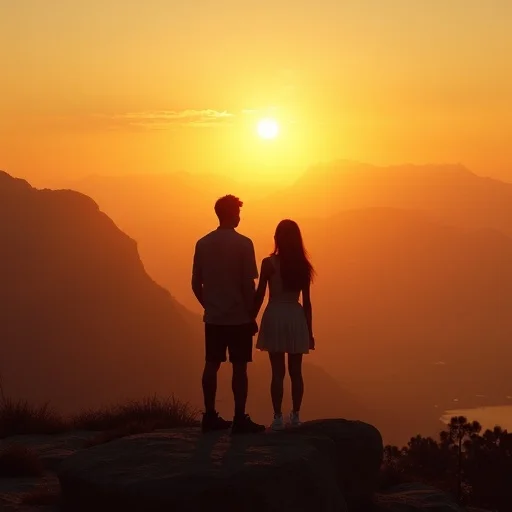
push-in / zoom in — Weak but non-zero. Both may produce closer framing by association (push-in → intimate close-up; zoom out → environmental wide shot). The effect is inconsistent across seeds. "Close-up" and "wide shot" alone are more reliable on every tool, but the motion phrasing adds directional connotation that sometimes changes subject emphasis slightly.roll left / roll right — Maps to Dutch angle (tilted horizon) through the camera-rotation → tilted-frame inference. "Dutch angle" or "tilted horizon" is more reliably followed on all three tools, but roll works as an alias on MJ.Terms that do nothing
dolly in / dolly out — Describes a camera physically moving on rails. No single-frame diffusion model has a concept of physical translation through space. Multiple community tests confirm it produces images identical to the same prompt without it. 4orbit / arc shot / tracking shot — All describe camera rotation or lateral movement around or alongside a subject. Require 3D spatial reasoning the models don't have. Unimatrixz scored tracking shot and dolly shot at Camera Position 0.5, same as crane shot — but their Shot Analysis (0.57 and 0.565) is noticeably lower than crane shot's 0.63, suggesting the model's compositional output is less coherent even when it partially follows the term. 56pan left / pan right — Horizontal camera rotation. In a still frame there's no direction to follow. "Pan" alone may occasionally trigger panoramic aspect ratio bias on some tools, but not reliably.parallax / dolly zoom — Both describe compound effects that require camera movement plus focal-length change simultaneously. Parallax (foreground/background shifting at different rates) is physically impossible to capture in a single static frame. Dolly zoom (the Vertigo effect) requires two simultaneous movements. Neither produces measurable compositional output on any current tool.whip pan — Describes extremely fast horizontal camera rotation. Models may recognize the "motion blur" component, but cannot produce the characteristic streaking of a genuine whip pan. If you want that horizontal streak effect, use extreme horizontal motion blur, directional streaks instead.Terms that cause problems
rack focus — Describes focus pulling from one depth plane to another — a temporal sequence, not a static state. In practice it often forces shallow depth of field regardless of whether that's what the prompt intends, because "focus" triggers bokeh. Use (shallow depth of field:1.3) directly on SDXL if that's what you want, or shallow focus, subject sharp, background blurred on Flux and MJ. 7steadicam — Lowest Camera Position score of any term tested on Flux-dev (0.4, below the "good" threshold of 0.5). 8 Steadicam describes stabilization — a quality of movement — not a camera position. The model has no compositional equivalent to infer. Add it and you get nothing extra; combine it with conflicting terms and you may get degraded results.handheld — Mixed behavior. "Handheld photo" sometimes produces a candid/snapshot aesthetic (slight tilt, natural framing, less formal) on MJ, which can be useful. But combined with technical photography terms it can confuse the model about intended quality level — candid snapshot versus polished portrait. If the snapshot aesthetic is actually what you want, candid photo, documentary style, slight natural tilt is more explicit and predictable.Per-tool control baseline
The three tools have different starting points for camera instruction following:
MJ V8.1 defaults to front-facing compositions. Community testing from February 2026 found it consistently reverts to straight-on front view, high-angle front view, or low-angle front view regardless of angle terms. 9 The control baseline for any camera term testing:
--style raw --stylize 0 --seed N. Daniel Nest's systematic A/B tests (Dec 2024) confirmed that focal length, ISO, shutter speed, and aperture f-stops produce no measurable compositional difference on MJ — the model responds to "vibes" and cultural association, not technical parameters. 4 --stylize above 300 tends to override spatial instructions the same way it overrides lighting terms. Use art vocabulary instead of camera vocabulary when precision matters: worm's-eye view, monumental perspective outperforms low angle shot.Flux dev/schnell has a well-documented selfie bias: even with
extreme wide shot in the prompt, Schnell defaults toward close-framed portrait compositions. 10 Grammar matters more on Flux than on MJ: "photographed from a camera angle of low angle" (broken English) is ignored, while "low-angle photograph of..." (proper English sentence structure) produces measurable compositional differences. 10 Subject content in the prompt overrides camera terms — if your prompt includes shoes/feet, Flux defaults to full body; eyes/pores force close-up. Use subject-implied framing as a workaround: include visible objects that geometrically imply the framing you want.SDXL responds well to camera framing keywords (
extreme close-up, close-up, medium shot, establishing shot, full body shot) but high angle specifically failed in systematic XYZ grid testing across all framing combinations. 7 Keyword weighting helps: (hero view:1.3) strengthens spatial terms. When text-prompt camera control fails entirely, ControlNet (OpenPose or Depth) is the correct tool. No data exists yet for SD3/SD3.5 camera term behavior.When the terms fail: three implied-motion alternatives
These techniques produce motion feel in static images without relying on camera movement vocabulary. All three have tested prompt formulas:
Motion blur vocabulary
The most direct option on MJ.
motion blur, long exposure effect, blurred motion, dynamic photography all produce recognizable motion effects. 11 The key refinement from SurePrompts' 1,000+ generation tests: localized motion blur outperforms global blur. motion blur on peripheral trees in an FPV forest shot keeps the subject sharp while the surrounding environment streaks — a more readable composition than uniform blurring. 12The
--stylize sweet spot for motion blur vocabulary on MJ is 200–300. Below 100 the model may ignore blur terms; above 700 the effect is over-stylized. 12Midlibrary.io lists
intentional camera movement as a validated MJ style (tested on v6.1), described as producing "radial blur and directional lines, creating a sense of fluidity and energy." Prompt: intentional camera movement --v 6.1 13Note: all motion blur data above is MJ-only. No systematic testing of motion blur vocabulary on Flux dev/schnell or SDXL has been published as of June 2026.
Speed lines and energy lines (manga-style kinetic indicators)
Yudo Tanaka tested 10 types of manga effect lines for AI reproduction in a February 2026 study. The finding: speed lines / focus lines are the most reproducible and versatile type. 14
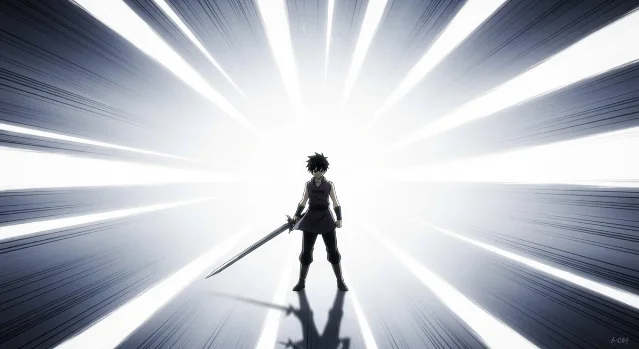
His base prompt structure that works across tools:
Dynamic effect lines are used to enhance the scene: speed lines, motion lines, or energy lines appear naturally in the background, supporting the subject without overpowering it. The effect lines have clear direction and rhythm, with controlled density and smooth flow.
For the manga/comic aesthetic specifically, MJ Niji 6 with
--style expressive produces the cleanest result. On SDXL use mangaLineart LoRA + screentoneXL with CFG 8–10 and negative prompt: color, colorful, painting, watercolor, soft, blurry, gradient, photorealistic, 3d. 15Tanaka's caveat is worth noting: effect lines other than speed/focus lines (emotional lines, gaze guidance, dimensional distortion) are "highly subject to chance, and even with the same AI... the generated results vary significantly." 14
Environmental motion cues
The third family relies on physical elements in the scene that imply wind, movement, and momentum — no camera vocabulary required.
Fred Beneti's validated formula for hair-in-wind on MJ (August 2024, multiple variant tests): 16
A medium shot of a [age] woman with [hair color] hair, in motion with [hair sweeping across her face / strands flaring out], wind blowing strongly, on a [location]. She wears a [clothing]. The scene is grainy, evoking a nostalgic aesthetic, illuminated by [lighting], shot with a Leica Q2, 28mm lens, using Kodak Portra film tones.
The two-word core trigger:
in motion + wind blowing strongly. Everything else is refinement. The grainy and nostalgic aesthetic terms strengthen the photographic realism of the motion.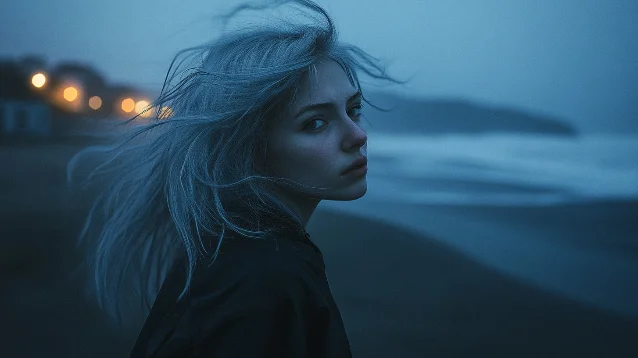
in motion, wind blowing strongly — Fred Beneti's validated template 16For UGC-style or documentary realism:
slightly motion-blurred hands showing real movement (tested in kitchen unboxing prompts) combined with slightly off-center framing produces a candid-shot feel that reads as handheld video-frame more reliably than the handheld keyword itself. 17Copy-paste replacements for common motion terms
When a cinematography term fails, substitute with its static equivalent description:
| Cinematic term | Static equivalent for prompts |
|---|---|
dolly zoom (Vertigo effect) | subject fills foreground, background compressed and distorted, perspective distortion, vertigo effect |
whip pan | extreme horizontal motion blur, directional streaks left to right, speed lines |
tracking shot | subject centered in frame, background shows lateral motion blur suggesting movement alongside |
crane shot | aerial view, high vantage point, looking down, birds-eye perspective |
parallax | foreground objects large and soft, midground subject sharp, distant background small, layered depth planes |
rack focus | shallow depth of field, subject sharp, background completely blurred (avoid the term itself) |
handheld | candid photo, documentary style, slight natural tilt, snapshot aesthetic |
The community consensus from r/StableDiffusion and r/midjourney threads: "Describe what you want to SEE, not how a camera would MOVE to see it." 10 The motion verb is a layer of abstraction the model has to resolve. The spatial description removes that step.
Cover image: AI-generated composite, self-made
참고 출처
- 1Midjourney Compendium: Camera Movement
- 2Unimatrixz: Crane Shot with Flux-dev
- 3Sinaida Cooper: Camera vocabulary for AI image generation
- 4Why Try AI: Ditch These Pointless Midjourney Photography Terms
- 5Unimatrixz: Tracking Shot with Flux-dev
- 6Unimatrixz: Dolly Shot with Flux-dev
- 7Weird Wonderful AI Art: SDXL Guide to Camera Framing and Angle
- 8Unimatrixz: Steadicam Shot with Flux-dev
- 9r/midjourney: Midjourney sucks at camera angles
- 10r/StableDiffusion: Flux — A Comparison of Camera Angle Prompts
- 11Anastasia Martynyuk / Generative AI: 20+ Motion Prompts That Bring Your Midjourney Images to Life
- 12Imtiaz Rayhan / SurePrompts: Midjourney V7 Prompting Guide
- 13Midlibrary.io: Intentional camera movement Midjourney style
- 14Yudo Tanaka / note.com: How to Reproduce Manga Effect Lines with AI Image Generation
- 15Shahrukh / PromptSpace: Manga Panel AI Art Prompts 2026
- 16Fred Beneti / Medium: Midjourney Prompt — Capturing Hair in the Wind
- 17James 99 / Medium: Complete List of Prompts & Styles for MidJourney AI Images (2026 Edition)
이 콘텐츠를 둘러싼 관점이나 맥락을 계속 보강해 보세요.