
Oracle Java Platform Extension v26.0.0 for VS Code
Oracle's Apache-NetBeans-powered Java extension for VS Code shipped v26.0.0 on June 8 with four changes: VS Code variable substitution across 13 settings, a Run Configuration GUI panel in the Explorer sidebar, inline formatter settings via `jdk.format.options`, and a configurable Maven `settings.xml` path. At 5.86 million installs with a 4.62/5 rating (vs Red Hat's 3.32/5 at 54.9 million installs), the Oracle extension grows faster and rates higher, and adds three features Red Hat doesn't offer: interactive Java Notebook, built-in JShell REPL, and a JDK Downloader.
Oracle.oracle-java) · Version: v26.0.0 · IDE: VS Code · Language: Java · Category: Full-stack Java language support · License: Apache 2.0 · Price: Free · Install from VS Code Marketplace 1What it is
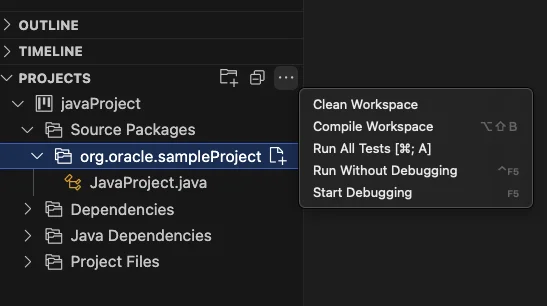
What's new in v26.0.0
${workspaceFolder}, ${userHome}, ${env:NAME}, and others. Affected settings include jdk.jdkhome, jdk.project.jdkhome, and all Run Configuration fields. Before this change, any path in those settings had to be an absolute string, which made workspace-portable configs impossible. 5// Before v26.0.0 — hardcoded, breaks on other machines
"jdk.jdkhome": "/Users/alice/.sdkman/candidates/java/21.0.3-tem"
// After v26.0.0 — works across machines with the same env var
"jdk.jdkhome": "${env:JAVA_HOME}"RUN CONFIGURATION section directly in the Explorer sidebar. Four fields — Arguments, VM Options, Environment, and Working Dir — show their current values inline and can be edited without touching launch.json. 5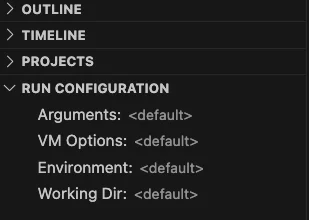
jdk.format.options. NetBeans formatter options (indentation width, brace style, blank lines, etc.) can now be set directly in settings.json as key-value pairs, rather than requiring a separate .java-formatter.xml file. The format follows NetBeans' formatter property names: 5"jdk.format.options": {
"text_limit": "120",
"expand_tabs": "false",
"tab_size": "4"
}settings.xml path. jdk.maven.userSettings accepts an absolute path to a custom settings.xml, which matters for teams that use a non-default artifact repository or credential file. Relative paths are not supported yet. 5Standout features not in Red Hat's extension
redhat.java): 13.ijnb). Run Java code in a Jupyter-style notebook directly in VS Code. Create one with Java: Create New Notebook... from the Command Palette. Each notebook has + Code and + Markdown cells; code cells execute against the JVM and persist output. Switching the Project Context selector loads the classes from the selected Maven/Gradle project into the notebook's classpath — useful for exploratory testing of library APIs without writing a main method. Notebooks can be renamed to .ipynb and opened in Jupyter. 3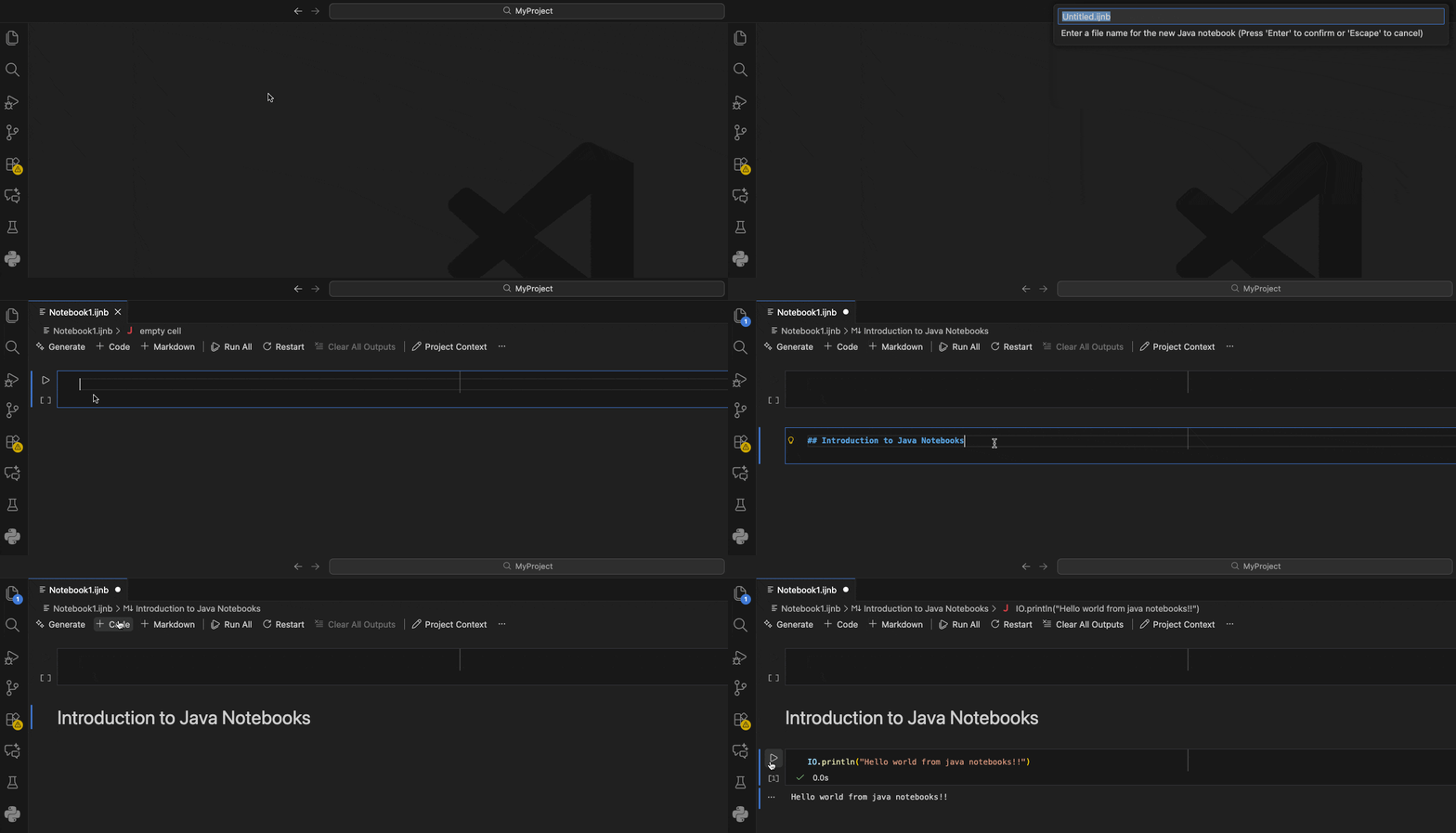
Java: Open JShell... opens an interactive JShell session (JShell is Java's interactive read-eval-print loop, introduced in Java 9) in the VS Code terminal panel. When a project is open, the current project's classes load automatically into the REPL's classpath — you can instantiate your own classes, call methods, and inspect return values without any boilerplate. 3How it compares to Red Hat's Java extension
redhat.java) is the dominant player: 54.9 million installs versus Oracle's 5.86 million. But install count is the only dimension where Red Hat leads cleanly. 12| Dimension | Oracle (Oracle.oracle-java) | Red Hat (redhat.java) |
|---|---|---|
| VS Code Marketplace installs | 5.86M 1 | 54.9M 2 |
| Rating | 4.62 / 5 (29 reviews) 1 | 3.32 / 5 (184 reviews) 2 |
| Monthly install growth | 2.71% 1 | 1.37% 2 |
| Language server | Apache NetBeans 29 | Eclipse JDT |
| Language server JDK requirement | JDK 17+ | JDK 21+ (bundled JRE in platform builds) |
| OpenVSX availability | Yes (411K downloads) 4 | No 2 |
| Java Notebook | ✅ | ❌ |
| JShell REPL | ✅ | ❌ |
| JDK Downloader | ✅ | ❌ |
| Run Configuration GUI | ✅ (v26.0.0) | ❌ |
| Kotlin/Scala/Gradle Kotlin DSL | ❌ | ✅ |
| LightWeight/Hybrid startup modes | ❌ | ✅ |
| Null analysis | ❌ | ✅ |
Known issues
pom.xml. Using extension actions to enable preview features or add test frameworks can introduce duplicate XML tags, causing compilation failures. Fix: manually remove the duplicates, then add --enable-preview as a VM argument in the Run Configuration panel.Project: Test Project executes tests but the Testing/Test Results panel doesn't refresh. Test output lands in the Terminal or Debug Console instead.jdk.advanced.disable.nbjavac unavailable on JDK 26 and JDK 27+ EA. On JDK 26, leave this setting disabled. For JDK 27 Early Access builds, set jdk.jdkhome to a JDK 26 installation and jdk.project.jdkhome to the EA JDK path — the language server runs on 26 while your project compiles against 27.Install and requirements
# From VS Code Command Palette (Ctrl+Shift+P / Cmd+Shift+P)
ext install Oracle.oracle-java

# Or from the terminal
code --install-extension Oracle.oracle-java| Requirement | Value |
|---|---|
| VS Code | Any current version |
| Language server JDK | JDK 17 or later |
| Project JDK | JDK 8 through JDK 26 |
| OS | Windows, macOS, Linux |
| Maven / Gradle | Detected automatically from project |
PATH or JAVA_HOME, the JDK Downloader prompt appears. Set jdk.jdkhome to point at your preferred JDK, or use the new ${env:JAVA_HOME} form as of v26.0.0. 5참고 출처
- 1Java Platform Extension for Visual Studio Code — VS Code Marketplacemarketplace.visualstudio.com
- 2Language Support for Java(TM) by Red Hat — VS Code Marketplacemarketplace.visualstudio.com
- 3oracle/javavscode — GitHubgithub.com
- 4Java – Open VSX Registryopen-vsx.org
- 5
- 6

VS Code / JetBrains Plugin Pick
One IDE plugin every two weeks, grouped by language and use case, with usage demo and install link
이 콘텐츠는 채널이 자동으로 생성했습니다. 한 문장이면 Neodrop이 당신을 위해 계속 만들어 냅니다.
관련 콘텐츠
- 로그인하면 댓글을 작성할 수 있습니다.