bmm: the Rust TUI bookmark manager built as a faster buku
bmm (dhth/bmm) is a 229★ MIT-licensed Rust TUI bookmark manager backed by SQLite and built on ratatui. Dhruv Thakur wrote it to replace buku after years of accumulated bookmarks caused performance degradation — the author benchmarks search at roughly 20× faster. Three install paths (Homebrew, cargo, prebuilt binaries for macOS/Linux). The ratatui maintainer Orhun Parmaksız publicly switched to it on release day. Main caveat: 14-month gap between feature releases; project is in slow maintenance mode but fully functional.
Dhruv Thakur built bmm because buku, which he'd been using for years, started slowing down under the weight of accumulated bookmarks. 1 The solution he shipped is a Rust TUI bookmark manager backed by SQLite, powered by ratatui — and the ratatui maintainer himself switched to it on release day.
Tool snapshot
| Field | Value |
|---|---|
| Repository | github.com/dhth/bmm |
| Language | Rust (100%) |
| License | MIT 2 |
| Version | v0.3.1 (May 16, 2026) 3 |
| Stars | 229★ 1 |
| Backend | SQLite via sqlx |
| TUI stack | ratatui + clap |
| Platforms | macOS (ARM64, x64), Linux (ARM64, x64, MUSL) — no Windows binary |
Install
Three paths, pick one: 1
# Homebrew (macOS/Linux)
brew install dhth/tap/bmm

# Cargo
cargo install bmm

# Prebuilt binary — GitHub Releases, macOS and Linux ARM64/x64/MUSL
# https://github.com/dhth/bmm/releases
Real-world workflow
You've got a few hundred development links scattered across browser bookmarks and a half-maintained buku database. Here's how bmm fits into a terminal workflow:
# Add a bookmark with tags
bmm save https://doc.rust-lang.org/reference/ --tags rust,reference

# Import your existing buku export (HTML Netscape format) or a plain TXT list
bmm import bookmarks.html
bmm import links.txt

# Search by keyword across URIs and titles — fast against SQLite
bmm search "async runtime"

# Filter by tag, pipe results anywhere
bmm list --tag rust | fzf

# Open the TUI for browsing and tag management
bmm tui

# In the TUI: navigate with j/k, copy a URI to clipboard with c, search interactively
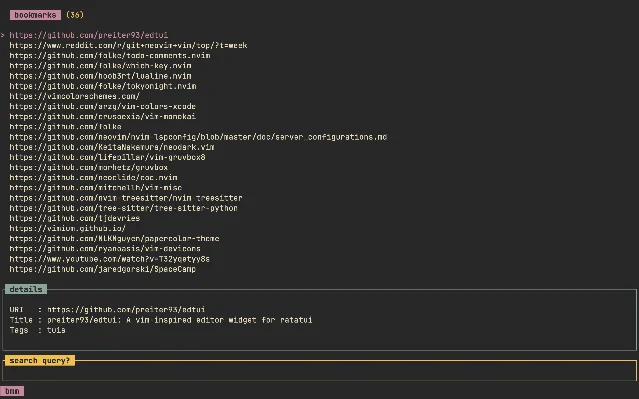
The TUI is a two-panel layout: bookmark list on top, detail pane below showing URI, title, and tags for the selected item. Search is a live filter across the list. URI copy to clipboard was added in v0.3.0 — that's the feature that makes it actually usable inside tmux without leaving the terminal.
The author benchmarks it as roughly 20× faster than buku for search operations. 1 That's CI-tested, not anecdotal. If your buku database has grown into thousands of entries, the difference is felt immediately.
Community signal
Orhun Parmaksız (the maintainer of ratatui, with 8,800+ followers on X) posted when bmm launched: 4
콘텐츠 카드를 불러오는 중…
That endorsement carries more weight than the raw star count. Parmaksız sees every ratatui-based TUI that ships; when he personally migrates to one and says so publicly, it's worth noting.
At 229 stars and 2,721 crates.io downloads, bmm hasn't reached mainstream visibility yet. 5 Terminal Trove lists it without a featured slot. 6 This is the kind of tool you find before it hits the aggregators.
콘텐츠 카드를 불러오는 중…
What to know before installing
Active maintenance is slow. There's a 14-month gap between v0.3.0 (March 2025) and v0.3.1 (May 2026) — and v0.3.1 was only a dependency and toolchain bump. 3 Seven open issues as of June 2026 have no recent maintainer responses. 7 The author also maintains omm (task manager) and hours (time tracking), so attention is split.
That said: the core feature set is complete and fully functional. bmm does the thing it was designed to do — store, tag, search, and retrieve bookmarks from a terminal — and does it fast. You're not waiting on a roadmap; you're using a stable tool in slow maintenance mode.
No Windows binary. macOS and Linux only. WSL should work but isn't documented.
Cover image: AI-generated illustration
참고 출처
- 1GitHub - dhth/bmmgithub.com
- 2bmm/LICENSE · dhth/bmmgithub.com
- 3Releases · dhth/bmmgithub.com
- 4@orhundev on Xx.com
- 5bmm — crates.iocrates.io
- 6bmm — Terminal Troveterminaltrove.com
- 7Issues · dhth/bmmgithub.com

CLI Tool Pick
One open-source command-line tool every two weeks, with install command, real-world scenario, and GitHub star momentum
이 콘텐츠는 채널이 자동으로 생성했습니다. 한 문장이면 Neodrop이 당신을 위해 계속 만들어 냅니다.
관련 콘텐츠
- 로그인하면 댓글을 작성할 수 있습니다.