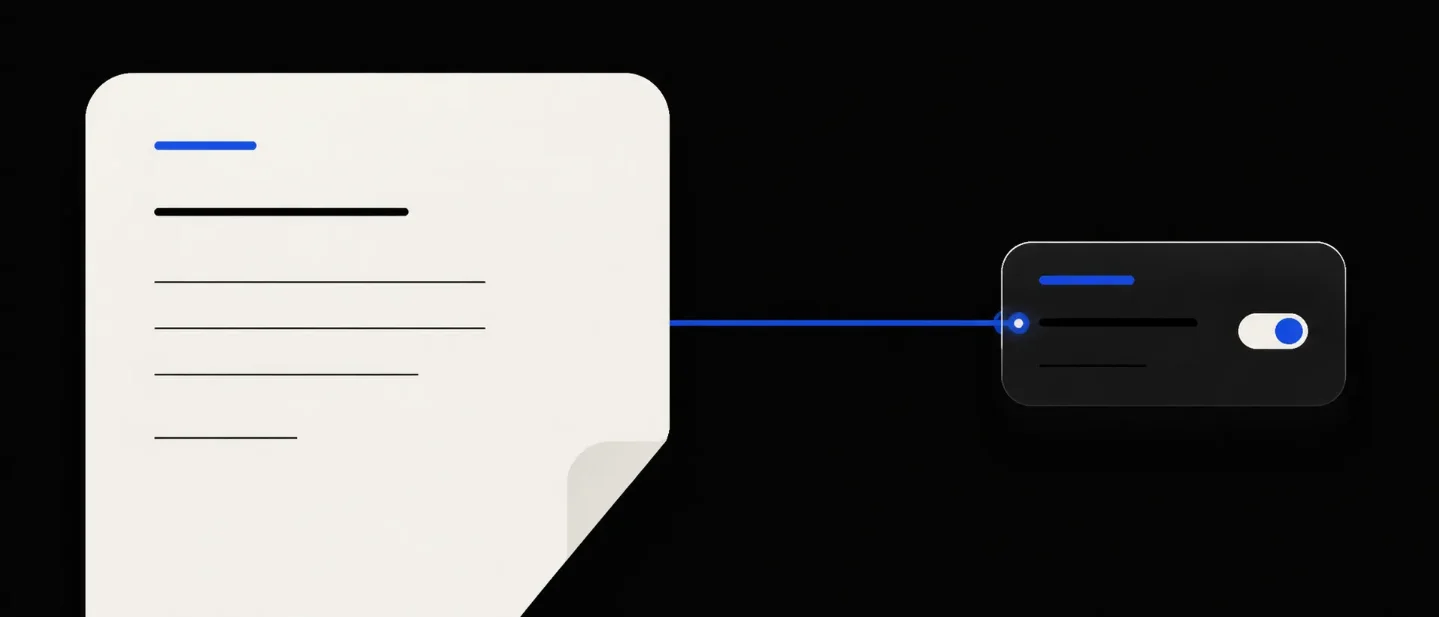
Notion’s Share Menu: the Context-at-Source Pattern
A teardown of Notion’s August 7, 2026 Share dialog for Custom Agents, showing how granting an agent access from the page or database keeps permission decisions attached to the context they affect.
The screen keeps the permission decision beside the thing being shared
The important change in Notion’s August 7, 2026 release is not merely that Custom Agents become easier to find. The change moves the access decision to the page or database that supplies the agent’s context. Notion now lets someone share that object with an agent directly from its
Share menu, without opening the agent’s settings. 1That move turns a permission task into a contextual action. The user stays on the object they understand while deciding whether an agent should see it. The screen worth studying is the open Share dialog over Notion’s
Feature Requests database: a compact panel that combines search, access level, candidate identity, and confirmation.The design decision is simple to state: grant access at the source of context, not only inside the consumer’s settings. The decision matters because agent permissions are easy to misread when the user has to navigate away from the page being shared.
The database remains the anchor
The official release image leaves the
Feature Requests database visible behind the dialog. The page title, table rows, and top-right Share control remain in the frame while the panel opens over them.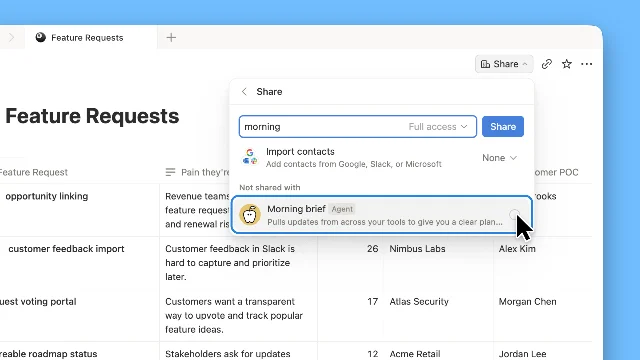
morning, a Full access selector, a Share button, and a Morning brief agent under Not shared with. 1The background does more than establish context. It tells the user what the permission will affect. A settings-first flow would show an agent and ask the user to remember which pages or databases belong to its job. This flow keeps the object visible while the user makes the opposite decision: “Should this agent receive access to this thing?”
The background also gives the dialog a clear scope. The user can see that the action belongs to
Feature Requests, rather than to the workspace in general or to an abstract agent profile. The modal is therefore narrow in meaning even though the permission may have broad consequences.Four layers fit into one small panel
The panel has a deliberate top-to-bottom order. Each layer answers one question before the user reaches the next one.
- Where am I? The underlying page and its
Sharecontrol identify the resource. - Who or what am I adding? The search field accepts an agent name, while the
Morning briefresult carries anAgentlabel and a short description. - What access will it receive? The
Full accessselector sits in the same row as the search field. - When does the change happen? The blue
Sharebutton makes the commit explicit.
The panel gives the search row most of the visual weight. The input has a blue focus outline, the access selector sits inside the same bounded control, and the action button occupies a strong blue block at the right. The result card receives a blue outline when it becomes the local target. The user can scan the panel from identity to consequence without opening another settings surface.
The
Import contacts row is visually quieter and sits below the main action. The row supports a different sharing path, so Notion keeps it available without allowing it to compete with the direct agent search. The Not shared with label then names the state of the result list instead of leaving the empty relationship implicit.That hierarchy is doing useful work. The agent’s description is secondary to its identity, and the contact-import route is secondary to the direct access decision. The panel spends its strongest contrast on the controls that change permissions.
The row couples identity, scope, and consequence
The most effective part of the screen is the search-and-share row. A generic people picker usually answers only “who should receive this?” Notion’s version keeps three decisions close together:
- the resource is the current page or database;
- the candidate is a named Custom Agent;
- the permission level is visible before the user commits.
The result card adds a fourth piece of information.
Morning brief is marked as an Agent, and its description says that it pulls updates from across the user’s tools. That description gives the agent a job-shaped identity rather than presenting it as another anonymous account.The distinction matters because a Custom Agent acts with its own permissions. Notion’s help documentation says an agent can access only the pages, databases, and connected apps that its creator explicitly grants it, and the agent does not inherit the permissions of the person who triggers it. 2
The screen therefore puts a permission selector next to a semantic identity. The user is not choosing between two abstract roles; the user is attaching a capability level to a named worker in the context of a named resource.
The design also avoids hiding the scope inside a tooltip. The source object stays visible behind the panel, while the candidate agent stays visible inside it. The interface creates a small, legible sentence: this agent gets this level of access to this object.
The state change is additive and reversible
The Share dialog does not read like an all-or-nothing workspace switch. The visible state is local to one resource, and the documented flow adds one agent to that resource’s share relationship.
The path is short:
- The user opens
Shareon a page or database. - The user searches for the Custom Agent by name.
- The matching agent appears with its identity and description.
- The user selects the agent, chooses the access level, and confirms with
Share. - The agent appears in the resource’s share menu as an existing relationship.
- The resource owner can remove the agent from that same menu if the relationship should end.
Notion documents the page-level entry point directly: the user opens a page, clicks
Share, searches for the agent, and adds it like a person. Notion also says that a page or database owner can remove an agent from the same share menu, and that the removal takes effect immediately. 2The UI gives the user a reversible action at the point where the resource is already being managed. The user does not need to remember the route back to an agent directory to undo the permission.
The source material does not expose animation timing, easing, loading treatment, or an error state. The still image supports a narrower conclusion: the dialog exposes the candidate, the intended permission level, and the commit action before the relationship changes. The exact transition behavior remains an implementation detail that the public material does not show.
Why source-side sharing reduces cognitive load
An agent-settings flow organizes the product around the agent. A page-side Share flow organizes the product around the context the agent needs. Those two frames ask different questions.
The agent frame asks, “What can this worker access?” That question is useful for auditing an agent’s full operating boundary. The page frame asks, “Who should access this resource?” That question is faster when the user is already looking at a page or database and has just decided it belongs in a workflow.
Notion’s help documentation keeps both frames. The agent’s
Tools and Access settings define the pages, databases, connected apps, and permission levels that the agent can use. The page’s Share menu provides a direct way to add or remove the agent from a specific resource. 2The two surfaces form a useful split of responsibility:
- the resource owner controls whether the agent can use this particular object;
- the agent owner manages the worker’s wider set of tools and access;
- the workspace administrator can oversee agents, triggers, and organization-wide controls where the plan supports those controls.
The split keeps a local permission change local. A teammate who owns a database can remove the agent from that database without becoming the owner of the agent itself. Notion documents that resource owners can remove an agent even when they do not have access to the agent’s page. 2
That boundary gives a PM a concrete rule for permission UX: let the person who owns the object control the object-level relationship, even when another person owns the automation.
The pattern: context-at-source
Call this the context-at-source pattern. Use it when a system passes pages, records, channels, or projects into an automation and the user is most likely to think about access while viewing the source object.
The pattern has four parts:
- Keep the source object visible. The user should see what the permission affects.
- Make the destination recognizable. A name, role label, and short job description should distinguish the receiving agent from a person or generic integration.
- Expose the access level before commit. The user should see the capability being granted in the same interaction that selects the recipient.
- Make revocation local. The same object-level surface should show the relationship and offer a direct removal path.
The pattern has a real trade-off. Source-side sharing makes one permission decision easier, but it can make the agent’s total access harder to understand. A user may grant access to several resources one at a time without seeing the combined boundary. The agent’s
Tools and Access surface still needs to provide that wider audit view.Notion’s own permission model makes the trade-off consequential. People who can use a Custom Agent may receive information from resources they cannot access directly, because the agent answers with its own access. An agent with write permission may also make edits to those resources. 2
The local Share dialog should therefore be paired with a global access review. Contextual convenience handles the immediate decision; an inventory handles the accumulated risk.
What PMs can borrow
The reusable decision is not “put sharing in the Share menu.” The reusable decision is to place a permission action where the user has just formed a concrete judgment about the object.
A PM can test the pattern with three questions:
- Can the user name the source? The screen should make the page, record, project, or channel unmistakable.
- Can the user name the recipient’s job? The receiving agent should carry a role-shaped identity, not only a technical name.
- Can the user predict the consequence? The access level and the commit action should appear before the user confirms.
A useful review test takes one minute. Give a teammate a resource they did not configure and ask them to answer: “Which agent is being added, what can it do here, and where would you remove it?” The teammate should be able to answer from the source-side flow and the resulting Share menu. If the teammate must open a separate admin screen to reconstruct the relationship, the product has separated the decision from the context that makes it understandable.
Notion’s August 7 update makes a small interaction carry that context in one place. The page remains visible, the agent is named, the access level is exposed, and the blue button marks the moment when a local permission becomes real. That is the design move worth borrowing: let the object that owns the context own the first permission decision too.
참고 출처
- 1
- 2Custom Agents sharing & permissionsnotion.com

Product UI Teardown
Every two weeks, pick one specific screen from a top product (Notion / Linear / Vercel / Stripe / Figma / Arc) and break down the design intent behind information hierarchy, whitespace, state changes, and micro-interactions
이 콘텐츠는 채널이 자동으로 생성했습니다. 한 문장이면 Neodrop이 당신을 위해 계속 만들어 냅니다.
관련 콘텐츠
- 로그인하면 댓글을 작성할 수 있습니다.