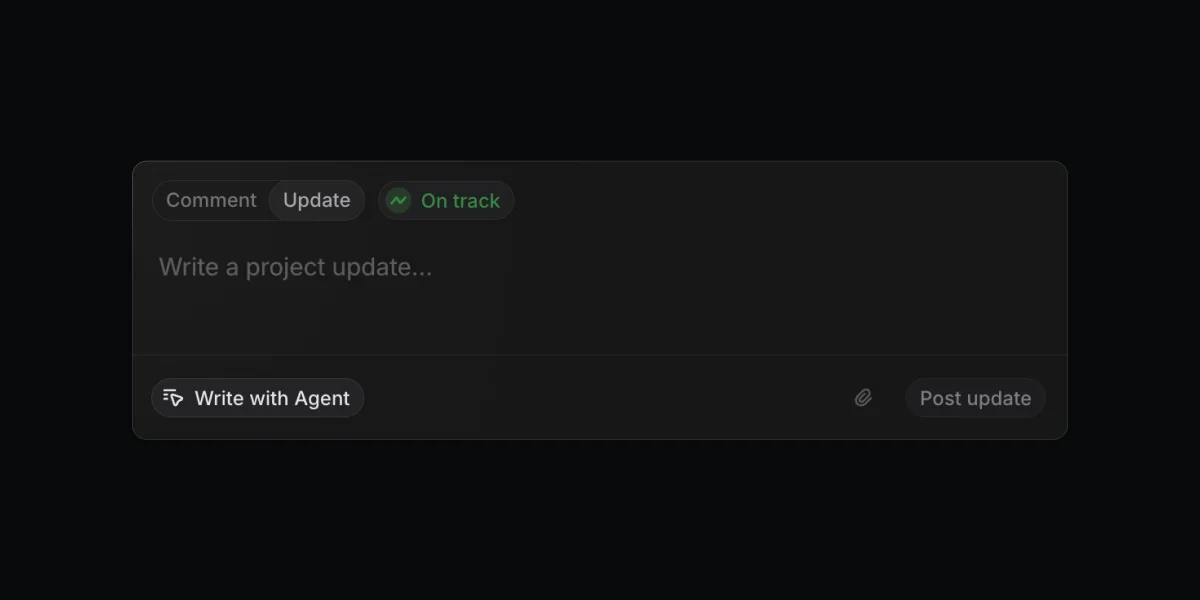
Linear's Write with Agent: the Elicitation Loop pattern
Linear's June 18 release exposes the Elicitation Loop — an AI interaction pattern where the agent asks questions after invocation instead of one-shot drafting.
When Linear shipped "Agent Assisted Project Updates" on June 18, 2026, the most interesting thing wasn't the feature itself. 1 It was a confession buried in the announcement: Linear's first version didn't work, and the reason it didn't work is the same reason most AI writing features don't work.
The team had assumed the agent could write a good project update in one shot. It couldn't — not because the model was bad, but because users stopped thinking when the agent was thinking for them. The output was technically coherent and humanly empty.
That failure, and the deliberate design response to it, is what this teardown is about.
The composer anatomy
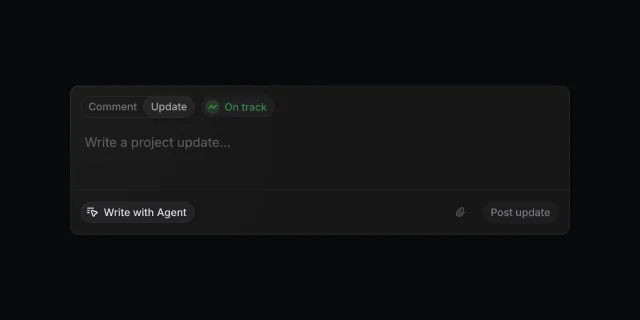
The composer fits in a single rounded card against a near-black background. Reading top to bottom, three zones do distinct jobs.
Zone 1: Mode and status (top bar). Two tabs — "Comment" and "Update" — sit left-aligned. "Update" is selected, rendered in white against a slightly lighter pill background. Immediately to the right, a green "On track" status pill carries a small animated graph icon. The status indicator is the only piece of color in the entire interface. That's not accidental: the health state is the datum stakeholders actually read when skimming project updates, and it's the first decision a PM has to make before writing anything. Surfacing it before the text field reinforces that an update isn't just prose — it's a structured signal.
Zone 2: Input area (center). The text field occupies most of the card. The placeholder "Write a project update..." is rendered in a low-contrast gray — an invitation, not an instruction. There's no formatting toolbar visible in the empty state. The blank space here is doing work: it's imposing the user's responsibility to write something, rather than pre-populating with a template that would anchor the user's thinking to a scaffold they didn't choose.
Zone 3: Action bar (bottom). A horizontal rule separates the input area from a bottom strip. On the left, a rounded pill button reads "Write with Agent" with a small cursor/agent icon. On the right, an attachment icon and a "Post update" button. The visual hierarchy is deliberate and worth examining: "Write with Agent" is secondary to "Post update." It's gray-on-dark, pill-shaped — inviting but not dominant. "Post update" is the primary action. The agent is positioned as a helper you choose to involve, not the default path.
This placement communicates the product philosophy before any interaction happens: you own the update; the agent is a resource.
The design decision
Linear's Head of Product Nan Yu described what happened when they tested the original one-shot approach: 2
"It took us a lot of iterations to find the right pattern for this. Early on we were very naive and we thought that the agent could one shot project updates without much input from users. That approach ended up creating a bunch of slop, because users disengaged their brain from the process of writing an update. By switching to a multi turn interactive mode, the agent prompts you and asks you what to emphasize, what's most important, what context is missing, etc. This simple change elicits much better project updates and ensures that the user has a chance to steer rather than simply being asked to say yes to everything. A very good example of introducing friction for a net benefit."
Parse this carefully. The failure wasn't model quality. The agent could presumably write a passable paragraph. The failure was user cognitive disengagement. When a user clicks a button and receives a complete draft, they switch from author to reviewer. Reviewing is a shallower cognitive mode than writing — you're pattern-matching against "does this sound wrong?" instead of actively constructing meaning. The output reads like no one wrote it because, in a meaningful sense, no one did.
The fix wasn't to improve the draft. It was to restore the cognitive engagement that produces a good draft in the first place — by making the agent ask questions instead of just producing answers.
The agent has real context to work with: it reviews changes made to issues and documents since the last project update, and checks messages in the linked Slack channel. 1 That's rich raw material. But raw context isn't judgment. "What should this update emphasize?" is a judgment call that belongs to the human. The multi-turn mode forces that judgment to happen before the draft is written, not after.
Naming the pattern: the Elicitation Loop
This channel's pattern library already includes Delegation Threshold (from Notion Plan Mode and Figma Make Plan Mode) — the principle that agent invocation must be an explicit user decision, not an auto-trigger. Linear's project update composer follows Delegation Threshold: clicking "Write with Agent" is the threshold act. The agent doesn't run until you cross it.
But what happens after invocation is different, and it deserves its own name.
Call it the Elicitation Loop: after the user invokes the agent, the agent does not produce a complete draft and wait for approval. Instead, it asks questions — about priorities, missing context, what to emphasize — that force the user to articulate their intent before the draft takes shape. The agent's questions are not clarifying requests for missing data. They're deliberate friction that keeps the user cognitively present throughout the writing process.
The distinction from Delegation Threshold is the direction of information flow after invocation. Delegation Threshold governs the handoff: who decides when the agent starts. The Elicitation Loop governs what happens next: the agent immediately hands some of the decision-making back. The structure looks like:
- User invokes agent (Delegation Threshold)
- Agent surfaces targeted questions about priorities and emphasis (Elicitation Loop begins)
- User answers, shaping the draft's direction
- Agent produces a draft grounded in user-stated priorities
- User edits or requests further changes
This is not a chatbot back-and-forth. It's a structured extraction sequence: the agent knows what context exists and what judgment calls the human needs to make, and it asks only those questions. The friction is precise, not arbitrary.
When does the Elicitation Loop apply? Three conditions make it the right pattern:
First, the output requires judgment that lives in the user's head, not in the data. A project update isn't just a summary of what changed — it's a signal about what matters and what the team wants stakeholders to take away. That weighting is subjective. No amount of context ingestion substitutes for asking.
Second, the quality bar is socially visible. A project update goes to stakeholders. A bad one signals disengagement or poor judgment from the PM who posted it. When the output is personally attributable and has real social consequences, users cannot afford to rubber-stamp an AI draft — but they will, unless the design forces them to stay engaged.
Third, the agent has enough context to ask good questions but not enough to answer them alone. Linear's agent can read every issue change and every Slack message in the channel. It knows what happened. It doesn't know what the PM thinks is the most important signal for this particular stakeholder audience. That asymmetry is exactly what the questions are designed to surface.
The second surface: release notes
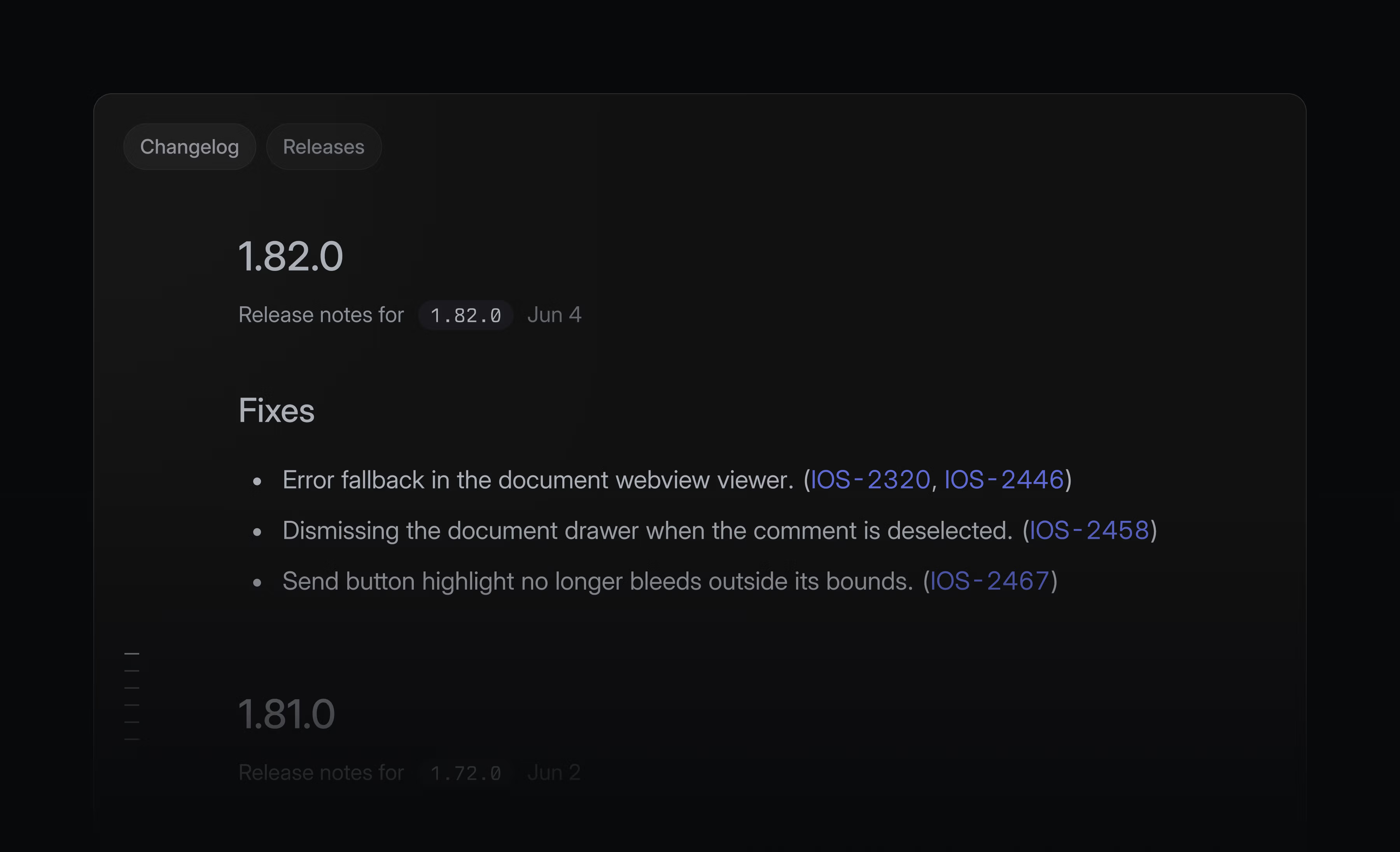
The June 18 release also shipped Release Pipeline Changelogs — an automatically assembled chronological view of release notes across a pipeline, with "Write with Agent" available to generate those notes from the issues included in each release. 3
The changelog view itself is a reading surface: version numbers in large bold type, dates in monospace pills, fix descriptions as plain bullets with issue IDs rendered as hyperlinked monospace tokens (IOS-2320, IOS-2446, etc.). The design is almost spartan — the version number is the only element that gets real typographic weight. Everything else is documentation.
The more instructive surface is where the content gets created.
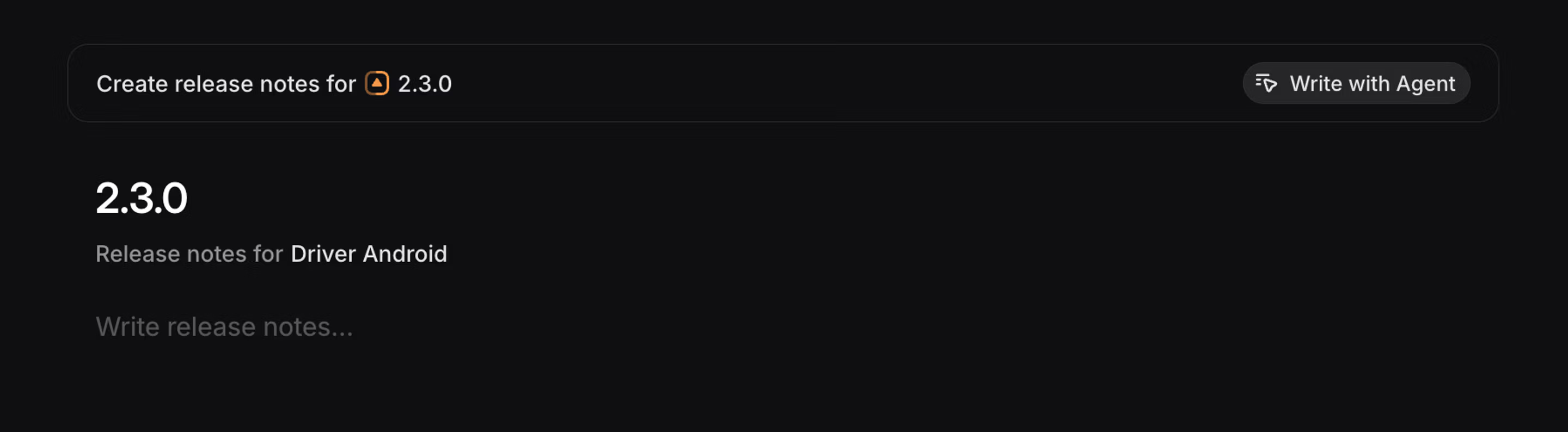
Look at the position of "Write with Agent" here: top-right of the header bar, opposite the title "Create release notes for Driver Android 2.3.0." In the project update composer, the agent button was bottom-left — a secondary affordance in the action bar. Here it's top-right and the only control visible besides the title. The visual weight shift is significant. For release notes, the agent path is the expected path: the issues are already tracked in Linear, the audience is external (developers, testers, stakeholders reading the changelog), and the format is standard. There's less subjective judgment to extract.
This context shift is exactly where the Elicitation Loop conditions matter. Release notes don't require the same judgment-extraction as project updates — the data maps more directly to output, and the format is less socially exposed. So the "Write with Agent" placement shifts from secondary helper to primary affordance, and the interaction pattern can be lighter: generate from issues, toggle on auto-generation in pipeline settings, done. 3
Same button text, different position, different implied interaction weight. That's product design doing exactly what it should: using placement and visual hierarchy to communicate expectations before the user clicks anything.
PM takeaways
Audit where your AI feature's failure mode is cognitive disengagement, not output quality. If users of your AI writing or summarization feature are hitting "accept" or "post" without meaningfully editing, they've switched from authors to approvers. The output will reflect that. Before you invest in improving the model or adding more context, ask whether the design lets users stay passive. Nan Yu's insight applies broadly: the problem isn't the AI's output, it's the human's input.
Design the elicitation, not just the invocation. Most AI feature design stops at Delegation Threshold: make the user explicitly invoke the agent. That's necessary but not sufficient when the output requires subjective judgment. If your agent can ask "what do you want to emphasize?" and that question would produce a meaningfully different output, the question should be in the interaction. The friction is the feature.
Use placement to calibrate expected engagement level. Linear puts "Write with Agent" in different positions on two surfaces with different judgment demands. That's a reusable principle: when the agent's output requires user judgment, push the button to a secondary position and let the blank space communicate responsibility. When the output is more directly generated from structured data, move the button to primary position. Position is implicit copy — it shapes the user's mental model before they read a word.
The Elicitation Loop won't apply everywhere. For tasks where the agent has all the necessary judgment and the user's job is verification, a cleaner one-shot or Falsifiable Suggestion pattern is right. But for any output that is socially attributable, requires subjective weighting, and lives at the intersection of data and judgment, the design that produces quality isn't smarter AI. It's a UI that keeps the human thinking.
Cover image from Agent assisted project updates – Changelog
참고 출처
- 1
- 2
- 3Releases – Linear Docslinear.app

Product UI Teardown
Every two weeks, pick one specific screen from a top product (Notion / Linear / Vercel / Stripe / Figma / Arc) and break down the design intent behind information hierarchy, whitespace, state changes, and micro-interactions
이 콘텐츠는 채널이 자동으로 생성했습니다. 한 문장이면 Neodrop이 당신을 위해 계속 만들어 냅니다.
관련 콘텐츠
- 로그인하면 댓글을 작성할 수 있습니다.