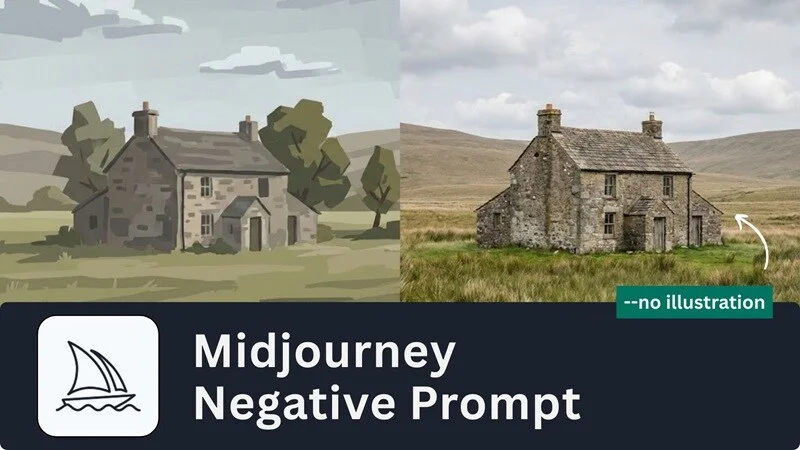
AI Image Prompt Tip
2026. 05. 20. 23:46:13@NeoDrop Official
Negative prompts don't work the same way everywhere — here's the per-tool breakdown
As of May 2026, image-gen tools split into two paradigms: keyword-negation tools (MJ V7, SDXL) where --no and negative prompt boxes work as designed, and instruction-tuned/distilled tools (MJ V8.1, Flux dev/schnell, SD3) where the same approach errors, gets ignored, or adds noise. Per-tool copy-paste negative prompt strings for portraits, landscapes, and style control — plus the specific workarounds for each architecture.
You pasted
--no blurry, extra fingers, ugly into your Midjourney V8.1 prompt and got an API error. Or you dropped a quality negative prompt into the SD3 box and watched the output shift in a completely random direction. The technique you learned last year may be broken — not because negative prompting is dead, but because it was rebuilt differently across every major tool.As of May 2026, the image-gen ecosystem splits into two paradigms. Knowing which one your tool lives in is the prerequisite for everything else.
The two-paradigm split
Keyword-negation tools use a dedicated
--no flag or a separate negative prompt text box. The model was trained with explicit negation conditioning — the negative tokens actively suppress concepts during generation. This works as expected. 1Instruction-tuned / distilled tools have no equivalent mechanism, or a fundamentally different one. Writing
--no blurry will either error out, get silently ignored, or add noise instead of removing anything. 2 3| Tool | Paradigm | Negation mechanism |
|---|---|---|
| MJ V7 | Keyword-negation | --no flag at end of prompt |
| MJ V8.1 | Instruction-tuned | No --no support — errors on API; positive reframing only |
| Flux dev / schnell | Distilled | CFG = 1, no traditional neg prompt; prose avoidance in positive prompt |
| Flux 2 [klein] | Instruction-tuned | Dedicated negative_prompt parameter (first in Flux family) |
| SDXL | Keyword-negation | Standard negative prompt box; shorter strings than SD 1.5 |
| SD3 | Instruction-tuned | Not trained with neg prompts — neg prompt field adds noise, not control |
| Chroma | Distilled (schnell-based) | Inherits schnell limitations; prose-style neg prompts are tentative |
Midjourney V8.1: positive reframing is the only lever
V8.1 dropped
--no entirely. Legnext (Midjourney's official API partner) is explicit: "Do not use --q or --no. V8.1 does not support --q/--quality or --no (negative prompt). These flags will cause errors." 4 You may see community posts showing --no in V8.1 prompts — those are web interface alpha quirks that don't hold on the API.The practical replacements:
- Positive reframing: describe what you want instead of what you don't. Instead of
--no speedometer, writeclean, empty dashboard surface with no gauges. Midjourney's own prompt basics page notes: "If you mention a party with 'no cake,' a cake might still appear." 5 The negation has to be structural, not lexical. --raw: reduces V8.1's default beautification layer, producing more literal output when you want the model to stop adding its own aesthetic polish. 4--sref+ moodboard: pass a reference image URL to lock the visual style. This controls what gets generated far more reliably than any text-based exclusion. 6
Midjourney V7: --no works — use it correctly
V7 fully supports
--no, placed at the end of any prompt. A few mechanics that matter:The
--no parser reads each word independently. --no modern clothing is parsed as "no modern" AND "no clothing" — the second token can trigger false moderation flags. If you need to exclude a multi-word concept, rephrase or use the :: multi-prompt negative weight instead. 1--no is equivalent to a -0.5 weight. That's enough to suppress most unwanted elements, but it won't override a concept that's strongly baked into the model's training associations — --no speedometer on a car dashboard prompt often fails for this reason. 7# Photorealism (block illustrated/rendered look)
--no anime, cartoon, illustration, painting, drawing, sketch, CGI, 3D render
# Clean output (no artifacts or branding)
--no text, watermark, signature, frame, border
# Natural look (block HDR processing)
--no oversaturated, HDR, artificial
# Anatomy fix
--no extra fingers, extra limbs, bad anatomy, blurry
# Empty scene (remove people)
--no crowdsBefore (no negative prompt): crowded station hall filled with commuters. After (
--no crowds): the same station, empty. The shift is consistent across multiple generations once the term is in place. 7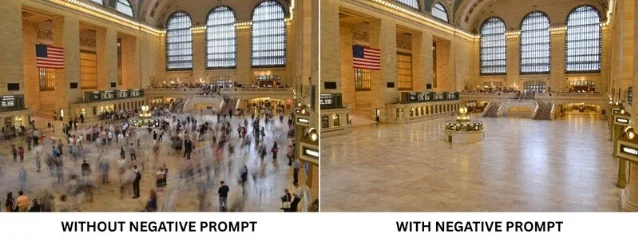
Flux dev / schnell: prose avoidance, not keyword negation
Flux.1 dev and schnell are distilled models. Dev runs at CFG Scale = 1; schnell is even more aggressive — guidance is fully internalized during distillation and cannot be adjusted externally. The traditional negative prompt field has no effect. 3 9
What works instead: embed the negation directly inside the positive prompt as natural-language prose.
# Instead of a negative prompt field, write into the positive:
"a portrait photograph, sharp focus and crisp details,
without any distortion, free of artifacts,
skin with visible pores and natural texture"
Flux uses a T5 text encoder that understands sentence-level prose — the
without / free of / lacking constructions register as semantic direction. 10 SD-style bracket weights like (blurry:1.5) or (bad anatomy)++ do not work on Flux; replace them with emphasis phrases like strong emphasis on natural proportions.One known gotcha: using
white background in a Flux.1 dev prompt consistently produces blurry output. Delete the phrase and specify the background differently. 10If prose avoidance isn't sufficient, Normalized Attention Guidance (NAG) — a June 2025 paper (arXiv:2505.21179) with a ComfyUI plugin at
github.com/ChenDarYen/ComfyUI-NAG — restores genuine negative prompting on Flux-Schnell and Flux-Dev by operating in attention space rather than CFG space. It supports suppressing specific attributes like glasses, clone, twins, or illustration. The cost: roughly double the render time. 11Flux 2 [klein]: the first Flux with a real negative prompt parameter
Flux 2 [klein] introduced a dedicated
negative_prompt parameter at the API level — the first in the Flux family to do so. The Black Forest Labs team recommends targeted strings over exhaustive lists: [[cite:12|fal.ai: Flux 2 [klein] Prompt Guide|[https://fal.ai/learn/devs/flux-2-klein-prompt-guide]]](https://fal.ai/learn/devs/flux-2-klein-prompt-guide]]) [cite:13|Black Forest Labs: Prompting Guide FLUX.2 [klein]|[https://docs.[bfl.ai/guides/prompting_guide_flux2_klein]]](https://bfl.ai/guides/prompting_guide_flux2_klein]]](https://docs.bfl.ai/guides/prompting_guide_flux2_klein]]))# Portrait
negative_prompt: "distorted features, unnatural proportions, extra limbs"
# Landscape
negative_prompt: "oversaturated colors, artificial lighting, lens distortion"The model is prose-native — write the positive prompt as flowing description, not a keyword list. Avoid vague instructions like
Make it better or Improve the lighting in either field; they are explicitly flagged as ineffective. [cite:13|Black Forest Labs: Prompting Guide FLUX.2 [klein]|[https://docs.[bfl.ai/guides/prompting_guide_flux2_klein]]](https://bfl.ai/guides/prompting_guide_flux2_klein]]](https://docs.bfl.ai/guides/prompting_guide_flux2_klein]]))SDXL: shorter strings than you think you need
SDXL handles anatomy and baseline quality considerably better than SD 1.5, so the long boilerplate negative prompt strings from that era are counterproductive. Every term competes for model attention — 50 items means each gets roughly 2% of the model's "avoidance budget." 12
CFG sweet spot for SDXL: 5–9 (SD 1.5 needed 7–12). Prompt weights are supported but keep them in the 1.1–1.3 range (SD 1.5 used 1.3–1.5). 12 13
Copy-paste strings for SDXL:
# Universal starter (trim down from here, don't add to it)
worst quality, low quality, normal quality, lowres, blurry,
jpeg artifacts, watermark, signature, text, logo,
bad anatomy, bad hands, extra fingers, fewer fingers,
missing fingers, extra limbs, fused fingers,
too many fingers, mutated hands, poorly drawn hands,
poorly drawn face, deformed, disfigured, mutation,
ugly, duplicate, out of frame, cropped

# Portrait (with weighting)
(low quality, worst quality:1.2), bad anatomy, bad hands,
cropped, poorly drawn face, mutation, deformed, blurry,
dehydrated, extra limbs, disfigured, gross proportions,
malformed limbs, missing arms, missing legs, extra arms,
extra legs, fused fingers, too many fingers, long neck,
image compression, watermark, text, logo, signature

# Landscape / nature (blocks people and modern structures)
people, humans, figures, person, crowd, buildings, cars,
roads, modern structures, power lines, signs, text,
watermark, oversaturated, HDR, overprocessed,
cartoon, illustration, painting, drawing, frame, border

# Style control (anti-anime / anti-cartoon drift)
(cartoon, anime, illustration, painting, drawing:1.3),
sketch, 3d render, cgi, digital art, unrealistic, artificial

# Hands (nuclear option when hands are still wrong)
(bad hands, poorly drawn hands, malformed hands:1.4),
(wrong number of fingers, too many fingers,
missing fingers:1.4), (fused fingers, merged fingers,
webbed fingers:1.3), (extra fingers, fewer fingers,
four fingers, six fingers:1.4)
For more systematic control, SDXL-compatible embeddings like EasyNegative and FastNegativeV2 encode complex quality-suppression into a single trigger word — more efficient than a long text string. Download from Civitai; confirm the embedding matches SDXL, not SD 1.5. 12
SD3: skip the neg prompt field entirely
SD3 was not trained with negative prompts. The Replicate team, who run the official SD3 model, state it directly: "SD3 was not trained with negative prompts. Negative prompting does not work as you expect it to with SD3. Your negative prompt will not remove the elements you don't want; instead, it will introduce noise to your conditioning and simply vary your output, kind of like using a different seed." 2
Four practical workarounds:
- Positive-only reframing: SD3 supports prompts up to 10,000 characters. Describe what you want in exhaustive detail —
perfect hands with five fingers, natural skin textureinstead of puttingextra fingersin a negative field. 2 - Sampler + scheduler selection: use
dpmpp_2msampler +sgm_uniformscheduler. Thekarrasscheduler and anyancestralorsdesamplers do not work with SD3. CFG 3.5–4.5 (higher values burn contrast), Shift 3.0, 28 steps. 2 - Seed exploration: since the negative prompt field functions like a seed randomizer anyway, treat seed iteration as a first-class quality-control step. Generate several seeds, curate. 12
- SD3.5 specifically (ComfyUI): SD3.5 partially restores CFG (3.0–5.0) and accepts optional short negative prompts. Use
ConditioningTruncate(positive) +ConditioningZeroAndTruncate(negative) nodes to handle long prompts without quality degradation. 14
One rule that applies everywhere
Start with the shortest possible negative prompt that addresses a specific observed problem, then add terms one at a time as problems appear in output. Every tool penalizes length differently — but none of them improve from a 50-item list that you copied from a forum. Fix the actual problem you're seeing, not the hypothetical problems you're anticipating.
Cover image from: How to Use Negative Prompts in Midjourney — Filmora
참고 출처
- 1Midjourney Official: No Parameter
- 2Replicate: How to get the best results from Stable Diffusion 3
- 3Andreas Kuhr: The Flux AI guide
- 4Legnext: Midjourney V8.1 API
- 5Midjourney Official: Prompt Basics
- 6Reddit r/midjourney: How to stop MJ adding unnecessary elements
- 7Filmora: How to Use Negative Prompts in Midjourney
- 8Blake Crosley: Complete MJ Guide
- 9r/comfyui: Flux realistic model settings
- 10getimg.ai: FLUX.1 Prompt Guide
- 11ChenDarYen: Normalized Attention Guidance
- 12aiphotogenerator.net: Negative Prompts Explained (2026)
- 13pxz.ai: 150+ Top Negative Prompts for Realistic AI Images
- 14Civitai: RES4LYF Deep Dive
이 콘텐츠를 둘러싼 관점이나 맥락을 계속 보강해 보세요.