Subject placement and depth layering: the per-tool syntax that actually works
A cross-tool guide to placing subjects off-center and building foreground/midground/background depth. Flux 2 maps percentage-zone language accurately; MJ V8.1 needs behavioral vocabulary or a wide-AR workaround; SDXL requires ControlNet or a composition LoRA. Three copy-paste depth-layering syntaxes with a full cross-tool reference table.

Write
off-center subject, rule of thirds into Midjourney and watch it produce a perfectly centered image anyway. The gap between what you type and what you get on subject placement is wider than almost any other composition dimension — because the underlying reason is architectural, not a matter of word choice. Each diffusion model treats spatial instructions differently, and no single syntax spans all of them.This guide covers the two core compositional problems where that gap shows up hardest: placing the subject off-center (and preserving negative space), and building true foreground-midground-background depth across a scene. Both problems have working solutions — they just require different prompts per tool.
Why "off-center" doesn't work (and what the models actually parse)
Diffusion models have a natural fill bias: empty canvas regions feel unfinished to the training distribution, so the model actively fills them. 1 This is the root cause of the centering problem. You're not fighting bad word choice; you're fighting the model's default prior.
The models respond to different instruction types:
Flux 2 interprets prompts like a design brief. It maps percentage and zone descriptions to spatial regions with real accuracy. 2 A phrase like
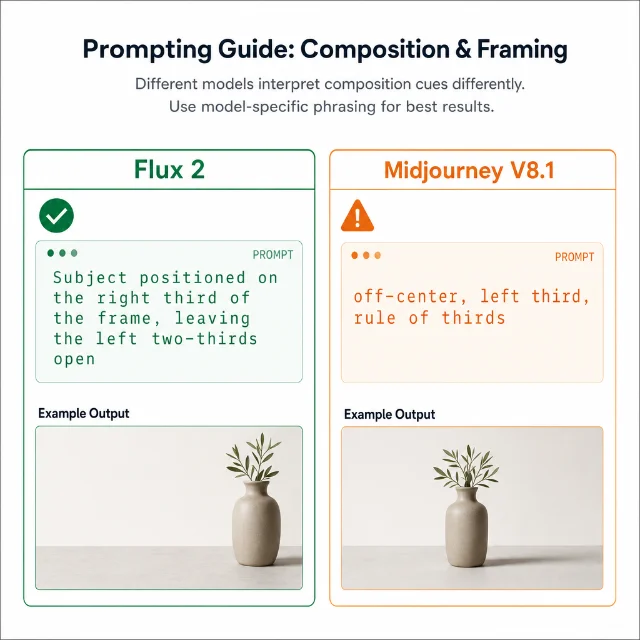
Subject positioned on the right third of the frame, leaving the left two-thirds open for text overlay reliably lands. Hannah Fischer-Lauder, writing in Impakter (May 2026), confirmed this is a commercially usable workflow advantage: "Use negative space deliberately. For commercial work where the image will hold text or composite elements, prompt for negative space explicitly." 2Midjourney V8.1 centers compulsively. Community testing confirms that
off-center, left third, and rule of thirds are largely ineffective as placement instructions — Midjourney's understanding of prepositional spatial phrases is limited by design. 3 4 Workarounds that do work: generating at a 3:1 aspect ratio then cropping to 16:9 (reported success rate lifting from ~50% to ~90%), 3 or using behavior-description vocabulary that implies emptiness rather than specifying coordinates: isolated subject, minimal background, wide framing, open sky, surrounded by mist. 5SDXL and SD3 largely ignore pure-text placement keywords. The community workarounds ranked by precision: ControlNet OpenPose (draw a stick figure to set exact position), the CivitAI Views & Composition LoRA (trigger words
comp_left, comp_right, comp_center), ComfyUI ConditioningSetArea (region-specific prompts), and a low-cost hack — specify a landscape aspect ratio and two subjects, which naturally pushes the main subject off-center. 4 6콘텐츠 카드를 불러오는 중…
The negative space fix per tool
When the goal is a clear empty region — for text overlay, breathing room, or compositional tension —
negative space as a standalone keyword is unreliable on every model. 1 The technique that works is instructing the model to create specific region content, rather than to leave something empty.Michael Torres (writing for Lovart in May 2026, with 12 years of art direction experience) systematized seven patterns. The most reliable, tested across tools:
1. Percentage split — "Percentages are unambiguous. The model can map percentage instructions to spatial regions with reasonable accuracy." 1 Copy-paste:
Composition: the left 60% contains the product image. The right 40% is a solid dark navy background for white text.2. Overlay bar — the most reliable pattern for text-over-image layouts. You're not asking the model to leave space; you're asking it to create a semi-transparent bar: 1
The bottom 25% of the image should be a solid dark overlay with 70% opacity, creating a dark bar for white headline text.3. Zone description — for commercial work where the empty region also needs visual quietness:
Subject positioned on the right third of the frame, leaving the left two-thirds open for text overlay. Studio lighting, clean background.One known failure mode across all three patterns: even with explicit instructions, some models place low-opacity textures or "ghost" elements in the empty zone. The fix is:
completely flat — no texture, no gradients, no elements, even at low opacity. Uniform solid color only. 1Directional language also matters.
one side, off to the side, and on the edge produce random placement. Use left, right, top, bottom — not vague spatial vocabulary. 1
Depth layering: the three syntaxes that work
Adding true foreground-midground-background depth is where Flux pulls ahead of every other model, but only if you use the right grammar. Three distinct syntaxes have been validated across sources:
Flux: narrative ordering syntax
Flux 2 and Flux 1.1 Pro respond best to prompts written in hierarchical narrative order, front to back. The order in which you write elements directly maps to how the model assigns depth planes. Agnieszka Zablotna from getimg.ai puts it plainly: "Be clear about what you want to see in each layer and convey it to the AI in an organized, hierarchical manner." 7
The critical rule: if you describe foreground, then background, then realize you want another foreground element — don't append it at the end. Go back and insert it in the foreground section. Appending out-of-order collapses elements into the same depth plane. 7 8
Copy-paste template (SurePrompts, validated): 9
In the foreground: a child's hand reaching up to release a red balloon.
In the midground: the balloon rising past the branches of a cherry blossom tree.
In the background: the balloon as a tiny dot against a vast cloudy sky.
Shot from below looking up, vertical composition, each layer at a different focus distance.
Note that Flux 1.1 [dev] and [schnell] do not support prompt weight syntax (
++, --, parenthetical weights). Use with emphasis on in natural language instead. 7Flux / SDXL: parenthetical shorthand syntax
For scenes with a compact main subject and simpler layering, the bracket notation is faster to write and easier to edit: 8
A fox (foreground), resting on moss (middle ground), with a misty forest (background)The parenthetical functions as a layer tag the model reads as a structural hint. Placing foreground elements at the end of the prompt — without the bracket tag — is one of the four most common Flux mistakes, per Filmora/Wondershare's guide, because it causes the model to render all elements at the same depth. 8
Midjourney V8/V8.1: multi-prompt :: weight syntax
Midjourney understands
foreground/midground/background layers as composition vocabulary, 10 but the stronger tool is the :: multi-prompt separator, which makes each layer an independent concept rather than a blended single description. Each section separated by :: is processed as a distinct visual concept, giving more precise control over how the model weights each element. 10/imagine fire breathing dragon:: medieval castle:: moonlit night sky --v 8.1Add numbers after
:: to weight each layer:/imagine portrait of a woman::2 neon cityscape background::1 --v 8.1This doubles the weight on the portrait relative to the background — useful when a complex environment keeps overpowering the subject.
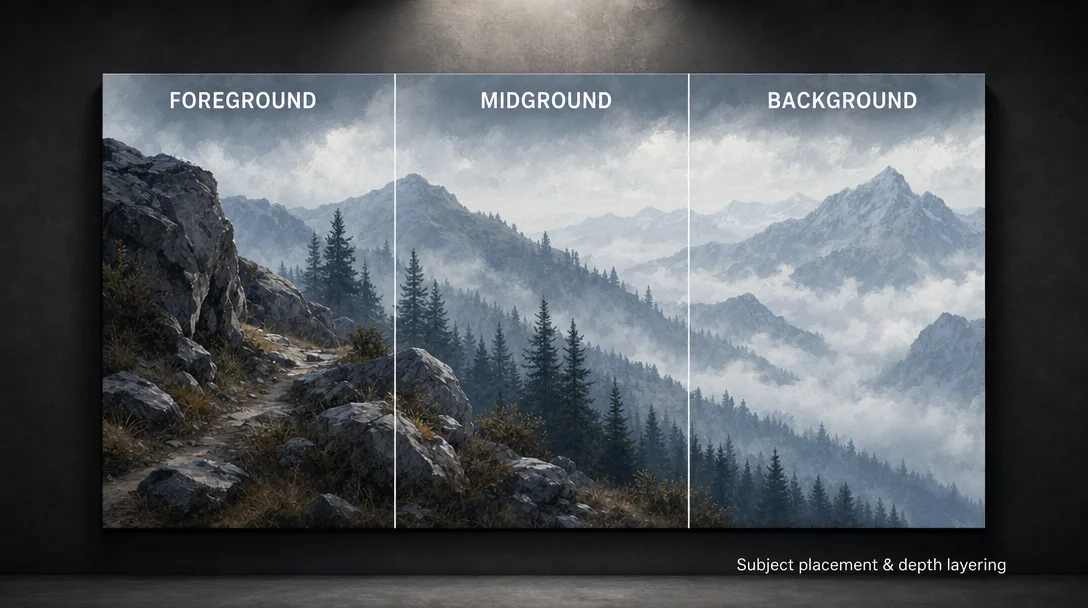
The three-layer model maps neatly to the depth zones in the cover image: close terrain, middle forest, distant fog-wrapped peaks — each answering a different visual question. What's immediate (foreground), what's contextual (midground), what's distant atmosphere (background).
Cross-tool reference table
| Tool | Subject placement | Negative space | Depth layering |
|---|---|---|---|
| Flux 2 | Percentage / zone syntax reliable 2 | Explicit zone + uniform solid color 1 | In the foreground… In the midground… In the background… ordered narrative 7 |
| Flux [dev] / [schnell] | Same as Flux 2; no weight syntax | Same patterns; no negative-prompt field exists | Parenthetical shorthand (foreground) or ordered narrative; no ++/-- weight syntax 7 |
| MJ V8.1 | Behavioral vocabulary: isolated, minimal background, wide framing, open sky 5; or wide AR + crop 3 | Behavioral terms; --style raw --stylize 0 for photorealism 11 | :: weight multi-prompt layer separation 10 |
| SDXL | Views & Composition LoRA (comp_left, comp_right) 12; ControlNet OpenPose; ConditioningSetArea | Parenthetical shorthand; bracket weights (element:1.3) | Traditional artists split layers and composite 4 |
| SD3.5 Large | Natural language works better than SDXL; CFG scale 4–7 13 | Natural language zone description | Natural language paragraph structure |
The failure mode to avoid on every tool
Layer order corruption is the single most common mistake across all three layering syntaxes. When a foreground element appears at the end of the prompt, the model has no depth context for it — it merges it with whatever depth plane the preceding description established. 7 8
The fix is mechanical: always write front-to-back. If you need to add a foreground detail mid-draft, scroll up and insert it in the foreground section rather than tacking it at the end. On Midjourney, the
:: separator partially mitigates this because each concept block is independent — but you still want the :: segments to read in spatial order for predictable outputs.One additional caveat on Flux: the
In the foreground… narrative syntax is validated for Flux 2 and Flux 1.1 Pro. Community reports from Flux 1.0's initial release (August 2024) noted weaker spatial reasoning for background/foreground terms specifically. 14 If you're on Flux 1.0 dev and getting flat results, the parenthetical shorthand tends to fare better than the narrative form.Quick-copy snippet reference
| Goal | Prompt | Tool |
|---|---|---|
| Subject right-third, text space left | Subject positioned on the right third of the frame, leaving the left two-thirds open for text overlay. Studio lighting, clean background. | Flux 2 2 |
| Product left, solid color right | Composition: the left 60% contains the product image. The right 40% is a solid dark navy background for white text. | Flux 2 1 |
| Overlay text bar | The bottom 25% of the image should be a solid dark overlay with 70% opacity, creating a dark bar for white headline text. | All tools 1 |
| Flat empty zone fix | completely flat — no texture, no gradients, no elements, even at low opacity. Uniform solid color only. | Append to any placement prompt 1 |
| MJ behavioral empty space | isolated subject, minimal background, wide framing, open sky, surrounded by mist | MJ V8.1 5 |
| MJ off-center via wide AR | Generate at --ar 3:1, crop to 16:9 in post | MJ V8.1 3 |
| SDXL position via LoRA | comp_left, d_medium, eye_level (requires Views & Composition LoRA) | SDXL 12 |
| Flux layered scene | In the foreground: [element]. In the midground: [element]. In the background: [element]. | Flux 2, Flux 1.1 Pro 9 |
| Flux parenthetical | A fox (foreground), resting on moss (middle ground), with a misty forest (background) | Flux, SDXL 8 |
| MJ layer separation | subject::2 environment::1 --v 8.1 | MJ V8/V8.1 10 |
Cover image: AI generated
참고 출처
- 1Creating Negative Space — How to Tell AI to Leave Room for Your Text
- 2A Creator's Guide to Better Prompting in Flux 2
- 3A trick to place the subject off to either side using Gen AI
- 4Non-centered subjects in SDXL or Flux?
- 5Combining Negative Space with Midjourney
- 6Views & Composition — Beta
- 7FLUX.1 Prompt Guide: Pro Tips and Common Mistakes to Avoid
- 8Flux AI Prompt Guide: Improve Results and Build Visual Stories
- 9How to Write AI Image Prompts: The 6-Part Formula (2026)
- 1010 Advanced Prompt Techniques for Midjourney V8 (2026 Guide)
- 11Tips for Breaking Free from AI-Looking Images 2026
- 12CivitAI
- 13SD 3.5 Large — Prompting Guide & Examples
- 14Things Flux Does Poorly?
이 콘텐츠를 둘러싼 관점이나 맥락을 계속 보강해 보세요.