Connect a custom MCP server to your Notion Custom Agent
Notion Custom Agents (Business/Enterprise only, available since May 13, 2026) can call external tools through MCP — 12 pre-configured OAuth servers plus any self-hosted MCP server. The article covers the three-layer tool architecture (built-in / MCP / Workers), the 4-step setup flow for custom servers, the unresolved Zod `.strict()` handshake bug that silently breaks strict-validation servers like Supabase's official MCP (open since Feb 25, 2026, no fix), the server-side `.strip()`/`.passthrough()` workaround, a Linear sprint-enrichment PM workflow walkthrough, an MCP-vs-Workers decision table, and 5 gotchas (DCR trap, one-connection-per-agent limit, opaque credits, write-tool confirmation defaults, silent credential revocation).

리서치 브리프
Required plan: Business or Enterprise. MCP connections are not available on Free or Plus plans. 1
Notion Custom Agents gained the ability to call external tools through the Model Context Protocol (MCP) — an open standard for connecting AI models to third-party services — when the Developer Platform shipped on May 13, 2026. 2 The setup takes five minutes for a pre-configured server. For a self-hosted server, there is one known bug that will silently break your connection unless you know where to look.
Prerequisites
| Requirement | Detail |
|---|---|
| Notion plan | Business or Enterprise |
| MCP access — pre-configured servers | Available immediately in agent Settings → Tools & Access |
| MCP access — custom/self-hosted servers | Workspace admin must enable: Settings → Notion AI → AI connectors → Enable Custom MCP servers 1 |
| Authentication | OAuth (if the MCP server supports Dynamic Client Registration) or header-based API key / bearer token |
| Credits | Each agent run that calls MCP tools consumes Notion Credits — $10 per 1,000 credits, Business/Enterprise only 3 |
What MCP integration means inside Custom Agents
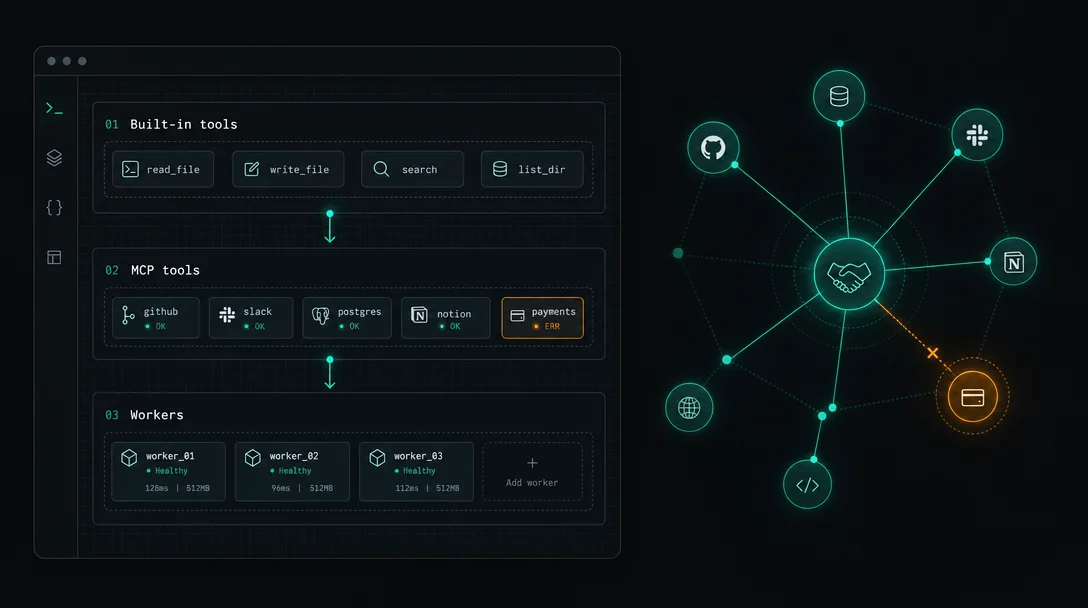
Custom Agents have three tool layers: 4
- Built-in tools — Notion page/database read/write, Slack, web search, Notion AI. No setup required.
- MCP tools — External services via the Model Context Protocol. The agent's LLM picks which tool to call at runtime. Twelve services ship pre-configured with one-click OAuth: Linear, Ramp, Figma, GitHub, Stripe, Sentry, Attio, HubSpot, Amplitude, Intercom, Wiz, n8n. 1
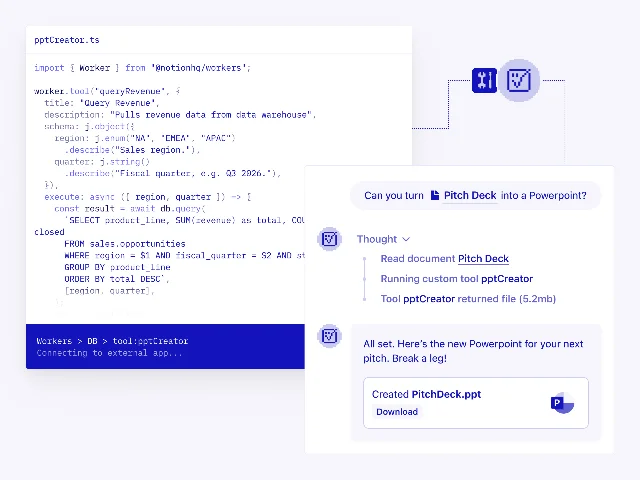
- Workers tools — TypeScript functions you deploy via the
ntnCLI, running as deterministic code. 「MCP is great for broad connectivity, but some workflows need predictable execution and custom logic that LLM-mediated tool calls can't always provide.」 — Max Schoening, Notion Head of Product. 4
MCP is right for broad third-party connectivity where a pre-built server exists. Workers are right when execution must be deterministic.
Connecting a pre-configured MCP server
For the 12 pre-configured services, the full setup is:
- Open the Custom Agent → Settings → Tools & Access → Add connection.
- Choose the service (e.g., Linear or GitHub) from the pre-configured list.
- Complete the OAuth sign-in flow.
That's it. Read-type tools (search, fetch, list, view) run automatically by default. Write-type tools (create, update, delete, send) require user confirmation before the agent executes them — you can override this per tool in the same panel. 1
Each MCP connection is owned by a single agent and uses the credentials of the person who authenticated it. An agent cannot share its MCP connection with another agent — each agent that needs GitHub access needs its own OAuth flow. 1
Connecting a custom MCP server — step by step
Step 0 — admin enablement (one-time)
A workspace admin must turn on custom MCP server support before anyone can add one: Settings → Notion AI → AI connectors → Enable Custom MCP servers. 1 This gate exists at the workspace level; toggling it once unlocks it for all agents.
Step 1 — open the agent's Tools & Access panel
Navigate to the Custom Agent → Settings → Tools & Access → Add connection → Custom MCP server.
Step 2 — enter the server URL
Paste the full MCP server endpoint, e.g.,
https://your-mcp-server.com/mcp.Step 3 — set a display name and authentication
The name appears in the agent's tool list and run logs. For auth, choose between OAuth (requires Dynamic Client Registration support — see DCR trap in Gotchas) or header-based (API key or bearer token, more reliably available). 1
Step 4 — save and toggle tools
Notion discovers the server's available tools after saving. Set each tool to
Run automatically or Always ask.The handshake bug that breaks strict-validation servers
Before you invest in OAuth setup for a self-hosted MCP server, check whether it uses strict schema validation. If it does, the connection will fail immediately with no useful error shown in the Notion UI.
What happens: During the MCP initialization handshake, Notion's Custom Agent sends three non-standard fields that are not part of the official MCP protocol:
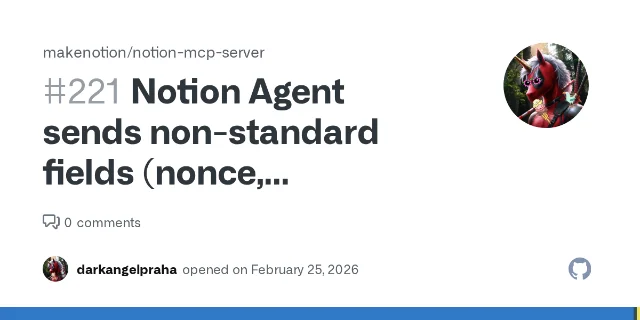
nonce, notion_user_id, and prompt. Any server using Zod .strict() or additionalProperties: false in its JSON Schema rejects them instantly and returns: 5{"message": "Unrecognized key(s) in object: 'nonce', 'notion_user_id', 'prompt'"}The Supabase-hosted MCP server (
mcp.supabase.com) is a confirmed casualty — its strict Zod schema blocks every Notion Agent connection. 6 As darkangelpraha, who filed both issues, put it: 「Any MCP server using strict schema validation is incompatible with Notion Agent. This blocks usage of official hosted MCP servers like Supabase's.」Both GitHub issues (
makenotion/notion-mcp-server#221 and supabase-community/supabase-mcp#226) were filed on February 25, 2026 and remain open with zero official response as of May 29, 2026. 5콘텐츠 카드를 불러오는 중…
The fix (server-side): If you control the MCP server's code, change your Zod schema from
.strict() to .strip() or .passthrough(). This silently drops the unknown fields and lets the handshake complete. 5// Before — breaks with Notion Agent
const requestSchema = z.object({ method: z.string() }).strict();
// After — ignores Notion's extra fields
const requestSchema = z.object({ method: z.string() }).strip();If you don't control the server (e.g., Supabase's hosted MCP), there is currently no workaround. Use a Workers tool to call the Supabase API directly instead.
PM workflow: Monday sprint enrichment with Linear MCP
Your team tracks epics in a Notion Roadmap database. Each Monday, you want an agent to pull the latest ticket statuses from Linear — open P0s, blocked items — and surface them in a sprint review page automatically.
- Connect the pre-configured Linear MCP via the OAuth flow above.
- Set the trigger to Scheduled — Monday 9:00 AM.
- In agent instructions, specify the Linear team, sprint cycle, and target Notion database.
- Set Linear query tools to
Run automatically. Set any write tools toAlways ask.
Because the connection uses your credentials, the agent sees exactly what you see in Linear. A teammate who shares the agent without authenticating their own Linear connection gets no Linear data. 1 That per-person scoping prevents over-permissioning by default. MCP tools work across all trigger types — scheduled, event-driven, and manual.
MCP vs Workers: when to use which
12 pre-configured servers connect via OAuth in one click. Custom servers are unlimited but subject to the Zod
.strict() check. Workers are free through August 11, 2026, then join Notion Credits billing. 4| Signal | Use MCP | Use Workers |
|---|---|---|
| Pre-built server exists for target tool | ✓ | |
| Primarily read / search / retrieval | ✓ | |
| Zero infrastructure to manage | ✓ | |
| Need LLM to decide which tool to call | ✓ | |
| Need deterministic output (code runs as written) | ✓ | |
| Custom logic beyond what MCP exposes | ✓ | |
| Token efficiency matters | ✓ | |
| No MCP server exists for target system | ✓ | |
| Webhook endpoint or scheduled data sync | ✓ |
The Notion developer docs put it plainly: 「Use a tool when an agent needs to perform an action that is not built into Notion or available through MCP, or apply custom validation that an MCP server does not provide.」 7
Gotchas
1. The DCR trap. Some OAuth MCP servers don't support Dynamic Client Registration. Notion must pre-register a client application with those services before OAuth will work. Notion's help center says directly: 「If the server you want to use doesn't support DCR, check its documentation to see if you can use an API key or bearer token instead. If neither option is available, the MCP server can't be used with Custom Agents.」 1 Always check header-based auth as a fallback before assuming an OAuth-only server is usable.
2. One connection per agent, always. Ten agents that need GitHub access require ten separate OAuth flows. Connection sharing across agents is not supported. 1
3. Credits are opaque and non-rolling. Notion tracks credits at the agent-run level — there is no breakdown showing how much individual MCP tool calls cost. Credits reset monthly with no carry-over; under-provisioning pauses every agent in the workspace. 3 Set per-agent credit limits to isolate runaway agents.
4. Write tools require confirmation by default. Any MCP tool categorized as a write action (create, update, delete, send, post) will stop the agent run and request human approval unless you explicitly set it to
Run automatically. For fully automated scheduled runs, you must pre-configure each write tool's confirmation setting. 15. Credential revocation breaks scheduled runs silently. If the person who authenticated an MCP connection leaves the team, scheduled runs that depend on that server will fail. The run log records the error, but the agent keeps running other steps. Document which team member owns each connection. 1
Cover image: AI-generated illustration
참고 출처
- 1Notion Help Center: MCP connections for Custom Agents
- 2Notion Release Notes: 2026-05-13
- 3Notion Help Center: Custom Agent Pricing
- 4Notion Blog: Introducing Notion's Developer Platform
- 5GitHub Issue #221: Notion Agent sends non-standard MCP fields
- 6GitHub Issue #226: Supabase MCP incompatible with Notion Agent
- 7Notion Developer Docs: How to write an agent tool
이 콘텐츠를 둘러싼 관점이나 맥락을 계속 보강해 보세요.