Turn Every Customer Conversation Into Roadmap Signal — Automatically
Build a Make.com + GPT-4 + Notion pipeline that automatically intercepts Intercom conversations, categorizes them as Bug / Feature Request / Use Case / Feedback, and writes structured rows into a searchable Notion database — saving ~5 hours per week.
Somewhere in your Intercom queue right now is a sentence that should be on your roadmap. The problem isn't that customers aren't telling you what they need — it's that no system is listening at the right altitude. By the time you've read the conversation, closed the tab, and moved on to the next standup, the signal is gone.
Yuval Karmi, founder of Glitter AI, ran into this wall while building his product. After processing over 2,000 customer conversations through a Make.com + ChatGPT + Notion pipeline, his take is direct: "I basically wanted a junior product manager who also did customer support. Something that could summarize every customer conversation, tag it as a bug, feature request, feedback, or use case, and drop it into a database I could search and prioritize later." 1
The result is a self-building database that saves him around 5 hours a week — and answers questions that used to be guesswork: what features people want most, what bugs to fix first, what UX problems exist. 1
Here's exactly how to build it.
The problem: conversations that never reach the roadmap
If your support volume is anything above 20–30 conversations a week, manual triage is already breaking. You read the conversation, maybe drop a note in a Notion page or Slack thread, and move on. Six weeks later, the third customer mentions the same export bug — and you have no data to show your engineering lead that it's worth fixing.
The categorization work itself isn't hard. What makes it expensive is the context-switching: leaving your roadmap tool, reading the conversation in full, making a judgment call, and then filing it somewhere useful. Do that 50 times a week and you've burned most of a work day on clerical work.
The automation below eliminates all of it. The PM's job becomes reviewing a structured Notion database rather than processing raw conversations.
How the pipeline works
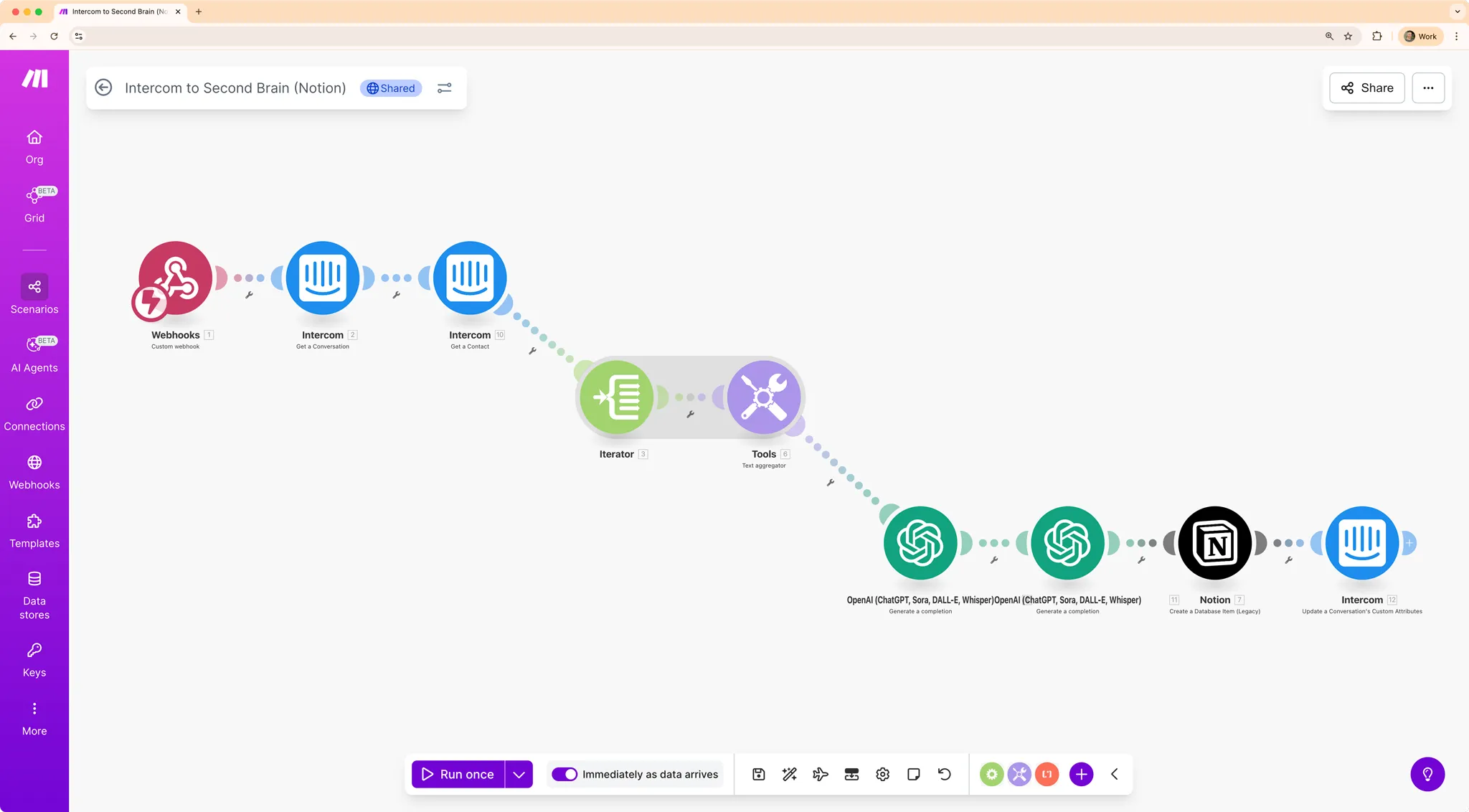
The data flow has five moves:
- A customer conversation ends in Intercom
- You trigger a Custom Action in Intercom (one keyboard shortcut — more on this below), which fires a webhook to Make.com
- Make.com fetches the full conversation text via the Intercom API
- OpenAI (GPT-4) categorizes it using a prompt tuned to think like a product manager: Bug, Feature Request, Use Case, or Feedback — plus a one-sentence summary
- Make.com writes the result as a new row in your Notion "Second Brain" database
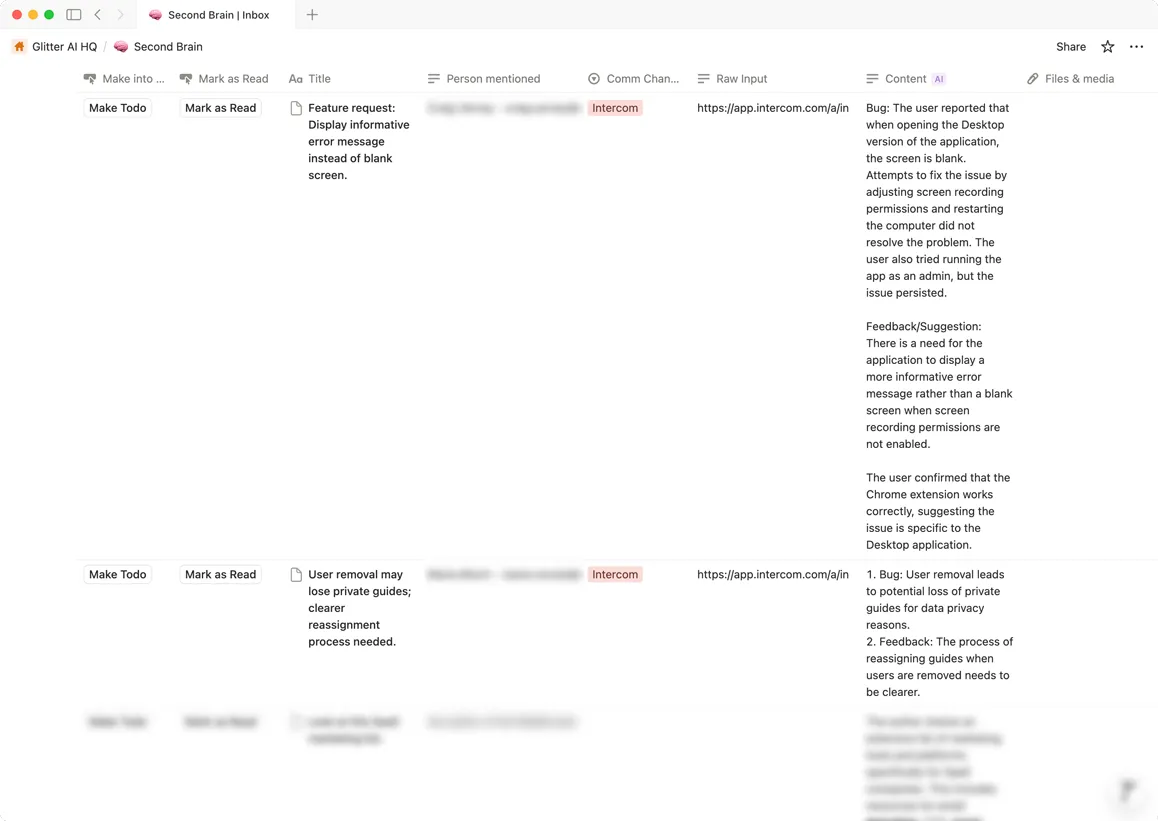
The Notion database gets four fields per row: Type (one of the four categories), Summary (the AI-generated one-liner), Source Link (direct URL back to the Intercom conversation), and Date. 1
If you use Zendesk, Freshdesk, or Help Scout instead of Intercom, the pattern is identical — all three support webhook triggers on conversation events.
Step-by-step setup
Estimated time: ~1 hour. Karmi provides a downloadable Make Scenario JSON template and a pre-built Notion template, so you won't be building from scratch. 1
Step 1 — Build the Notion database
Create a new Notion database with these four properties:
Type— Select field with options: Bug, Feature Request, Use Case, FeedbackSummary— Text fieldSource Link— URL fieldDate— Date field
Step 2 — Create the Make.com scenario
In Make.com, create a new Scenario with a Webhooks module as the trigger. Make.com will generate a unique HTTPS endpoint URL — copy it.
Step 3 — Wire up the Intercom Custom Action
In any Intercom conversation, press
CMD+Shift+J (macOS) to open the developer tools menu. Create a new Custom Action that fires a POST request to the webhook URL you copied. This is the trigger you'll click whenever you want to log a conversation.Step 4 — Add the Intercom API fetch step
Add an Intercom module in Make.com to retrieve the full conversation content. This gives GPT the complete text — not just the most recent message.
Step 5 — Add the OpenAI step
Add an OpenAI module. In the system prompt, instruct GPT to act as a product manager analyzing customer conversations. Ask it to return: a category (Bug / Feature Request / Use Case / Feedback) and a one-sentence summary. Keep the prompt tight — the output needs to land cleanly in your Notion fields.
Step 6 — Write to Notion
Add a Notion module with a "Create a record" action. Map GPT's output fields to your database properties. Include the Intercom conversation URL in the Source Link field so every row traces back to its origin.
Activate the scenario. Total Make.com operations per conversation: approximately 4–6, well within the Free tier's 1,000 ops/month.
What it costs and what you need
| Requirement | Tier needed | Cost |
|---|---|---|
| Make.com | Free tier | $0 |
| OpenAI API | Pay-as-you-go | $0.01–$0.03 per conversation |
| Notion | Any tier (Free works) | $0 |
| Intercom (or Zendesk / Freshdesk / Help Scout) | Existing account | — |
At Karmi's volume of 2,000+ conversations, total API spend came out to roughly $20–60. 1 For a PM at a typical growth-stage company running 200–300 support conversations a month, the monthly cost is under $10.
One important limitation: the system categorizes and logs — it does not auto-reply to customers. You still close conversations and write responses manually. The automation is purely inbound signal collection, not outbound communication.
From database to roadmap decision
The power of the database compounds over time. Once you have 200+ rows, the question shifts from "what do customers want?" to "how many times has each thing come up?"
Karmi's insight on this: "By counting how many times a feature gets requested, I know exactly what to build next." 1 That counting is what transforms the database into a lightweight RICE input — RICE (Reach, Impact, Confidence, Effort) is a prioritization framework common in product teams, and Reach becomes a number you can actually look up rather than estimate from memory.
To get there: add a
Count rollup or a grouped view in Notion filtered to Type = Feature Request, sorted by frequency. The conversations with 8+ mentions in a month are the ones that belong in your next sprint planning conversation.The whole system is still manual in one important way — you decide which conversations are worth logging. That's actually the right constraint. Not every support ticket is roadmap signal. The CMD+Shift+J shortcut keeps you in the loop as the judgment layer, while the pipeline handles everything downstream.
이 콘텐츠를 둘러싼 관점이나 맥락을 계속 보강해 보세요.