civitai.com
unaestheticXL | Negative TI — Civitai
The highest-download SDXL negative embedding on Civitai, with 10 style variants covering anime, semireal, and photorealistic workflows.
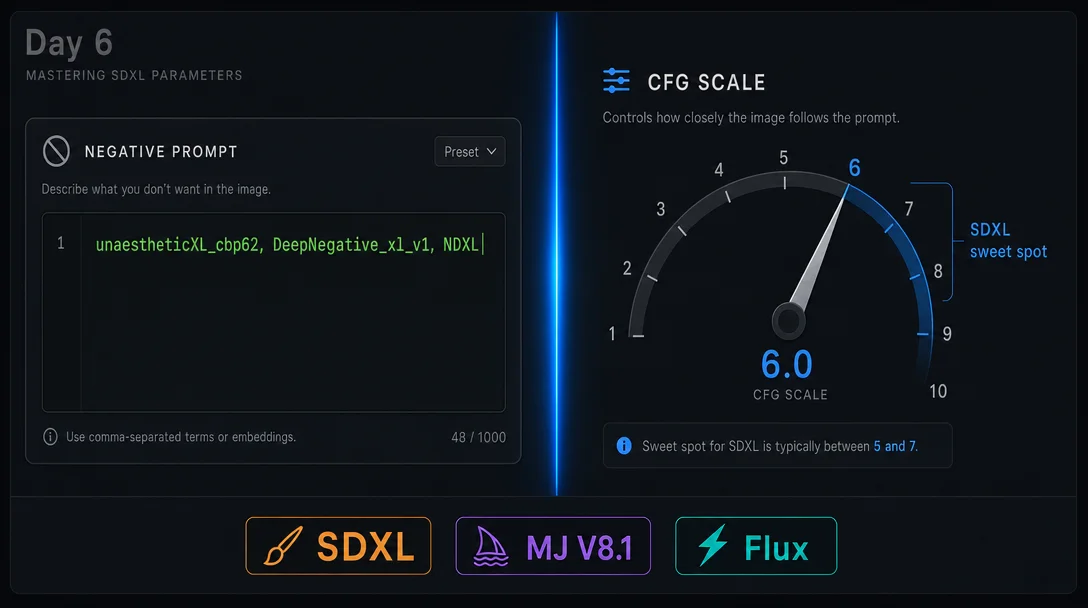
SDXL TI embeddings, CFG sweet spots, and MJ V8.1 ::-1 syntax — copy-paste ready

EasyNegative or badhandv4 into SDXL negative prompt fields and wondering why nothing changes, here's the short answer: those embeddings were trained on SD 1.5, and they're architecturally incompatible with SDXL. The best case is they do nothing. The worst case is they quietly degrade your outputs. 1::-1 syntax that replaces the removed --no in Midjourney V8.1.| Embedding | Trigger word | File size | Primary fix | Scope |
|---|---|---|---|---|
| unaestheticXL (Civitai) | unaestheticXL_cbp62 | 48 KB | General quality, style artifacts | 10 variants by style: anime, semireal, real, universal |
| Deep Negative XL (lenML) | DeepNegative_xl_v1 | 256 KB | Bad anatomy, color chaos, spatial disorder | General SDXL; also on HuggingFace |
| Negative Dynamics XL (NDXL) | NDXL | 80 KB | Limb proportion normalization | Must go first in the negative field |
| bad X (BadX) | BadX | 3.9 KB | Face mutations, hand deformity, skin texture | All SDXL including Pony SDXL |
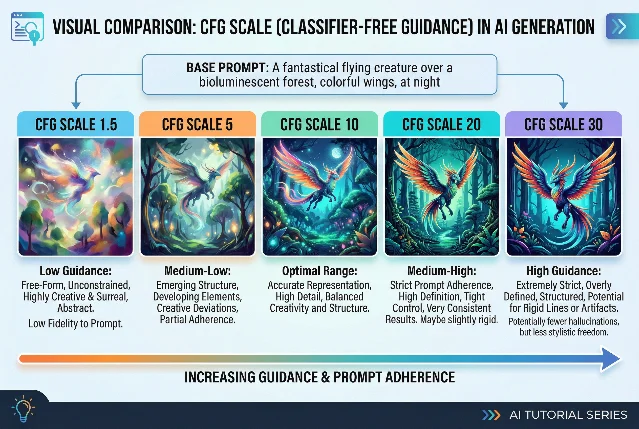
unaestheticXL_AYv1 as the only recommended SDXL negative embedding — it's the one to start with if you only install one. 6.safetensors file into embeddings/, then type the trigger word directly in the negative prompt fieldmodels/embeddings/, then use embedding:TRIGGER_WORD syntax in the negative CLIP text nodeNDXL, unaestheticXL_cbp62, DeepNegative_xl_v1, BadX, worst quality, low quality, watermark, text, logoNDXL first — the body normalizer needs priority position. The others can follow in any order.final_output = unconditional + CFG × (conditional − unconditional). Your negative prompt replaces the "unconditional" prediction, so CFG is a direct multiplier on how strongly the model steers away from it. 7 The result is that a heavy negative prompt string at CFG 12 will overcorrect — producing the "plastic skin" and "crunchy contrast" look that makes AI images feel processed. 8| Use case | SDXL CFG range | Notes |
|---|---|---|
| Portraits / photorealism | 4–6 | Below 4: image drifts from prompt. Above 6: "plastic" look |
| Landscape / environment | 5–7 | — |
| Anime / illustration | 5–8 | Stylized checkpoints tolerate the higher end |
| Complex multi-subject | 7–8 | Higher adherence needed |
| Artifact threshold | ≥ 10 | Avoid for SDXL 7 |
--no is gone, here are the three replacements--no as unsupported — removed alongside Omni Reference, Quality settings, Draft Mode, and Turbo. 13 You have three options, and the best choice depends on how specific the exclusion needs to be.::-1::-1 directly to the element you want to suppress. This is the closest functional replacement for --no.A weathered lighthouse on volcanic cliffs, dramatic storm clouds, crashing waves. people::-1 boats::-1 --v 8.1 --hd --raw::-1 weight tells V8.1 to steer away from that concept. The --raw flag is important: it limits V8.1's default aesthetic interpretation, making the prompt — and the negative weights — apply more literally. 13--raw, V8.1's style engine can partially absorb and soften the negative weights. With --raw, the suppression is more direct.An empty, solitary lighthouse on remote volcanic cliffs, only dramatic storm clouds and crashing waves, no human presence --v 8.1 --hd --rawempty, solitary, devoid of people, and without [element] work as positive-framing exclusions. 13--no — particularly for batch generation with consistent exclusions across many prompts — V7 still fully supports the parameter.A lighthouse on volcanic cliffs --no people boats --v 7--no works as expected.| Tool | Negative prompt support | Recommended approach | CFG / Guidance |
|---|---|---|---|
| SDXL | Full negative_prompt field | NDXL, unaestheticXL_cbp62, DeepNegative_xl_v1, BadX + keyword strings | CFG 5–8; portraits use 4–6 |
| SD 1.5 | Full negative_prompt field | EasyNegative, badhandv4 + keyword strings | CFG 7–9 |
| MJ V8.1 | --no removed | element::-1 --raw or positive phrasing | Not applicable |
| MJ V7 | --no supported | --no element1 element2 | Not applicable |
| Flux dev / schnell | No negative_prompt parameter | Positive prompt engineering only | CFG = 1.0; Guidance 2.5–4.0 |
| FLUX.2 [dev] | No negative_prompt in fal.ai API 14 | guidance_scale (0–20, default 2.5) + prompt only | CFG = 1.0 |
| SD3 / SD3.5 | Field exists but untrained 12 | Leave empty — use positive description instead | CFG 3.5–4.5 |
unaestheticXL_cbp62 + DeepNegative_xl_v1, keep CFG at 5–7, and drop it 1–2 points if outputs look processed. On MJ V8.1: use element::-1 --raw instead of --no. On Flux and FLUX.2: skip the negative prompt field entirely and write what you want more precisely.The highest-download SDXL negative embedding on Civitai, with 10 style variants covering anime, semireal, and photorealistic workflows.
Covers V8.1 parameter compatibility table, ::-1 negative-weight syntax examples, --raw mode behavior, and the three-strategy approach to element exclusion.
이 콘텐츠를 둘러싼 관점이나 맥락을 계속 보강해 보세요.