CodeMark+: browse every TODO across the workspace

CodeMark+: browse every TODO across the workspace

CodeMark+ (v1.10.1, MIT) turns scattered TODO/FIXME/NOTE annotations into a navigable workspace layer in VS Code — with a sidebar Tag Browser, Ctrl+Click navigation from Markdown notes to source lines, and per-language comment templates. Covers the fresh v1.9.0–v1.10.1 contextual navigation feature alongside honest caveats about early-stage community adoption.

VS Code / JetBrains Plugin Pick
2026. 5. 23. · 01:16
구독 1개 · 콘텐츠 6개
Most codebases accumulate TODO and FIXME comments faster than anyone intends. The annotations are real — they point at real debt, real decisions, real context — but they're invisible until you stumble on them while scrolling. No sidebar, no cross-file overview, no way to jump from a planning note to the exact line it refers to.
CodeMark+ (imgildev.vscode-code-mark-plus, v1.10.1, MIT) is a VS Code extension by solo developer Manuel Gil that turns those stray annotations into a navigable workspace layer. It highlights TODO, FIXME, NOTE, and HACK tags inline, groups them in a sidebar tree browser, and — added in the last two weeks — lets you Ctrl+Click a file reference in a Markdown note to jump straight to the source line. 1
A candid maturity note before you install: the GitHub repository has 1 star, 0 forks, and no filed issues from external users as of May 22, 2026. 2 The extension hit v1.10.1 on May 20 after seven releases in two months, which speaks to active authorship but not yet to community validation. Treat it as early-adopter territory.

Install

Search CodeMark+ in the VS Code Extensions panel, or install by identifier:
imgildev.vscode-code-mark-plus
Minimum VS Code version: 1.102.0. 3 No runtime prerequisites; no binary build step.
링크 미리보기를 불러오는 중…

What it does across four features

1. Inline annotation highlighting

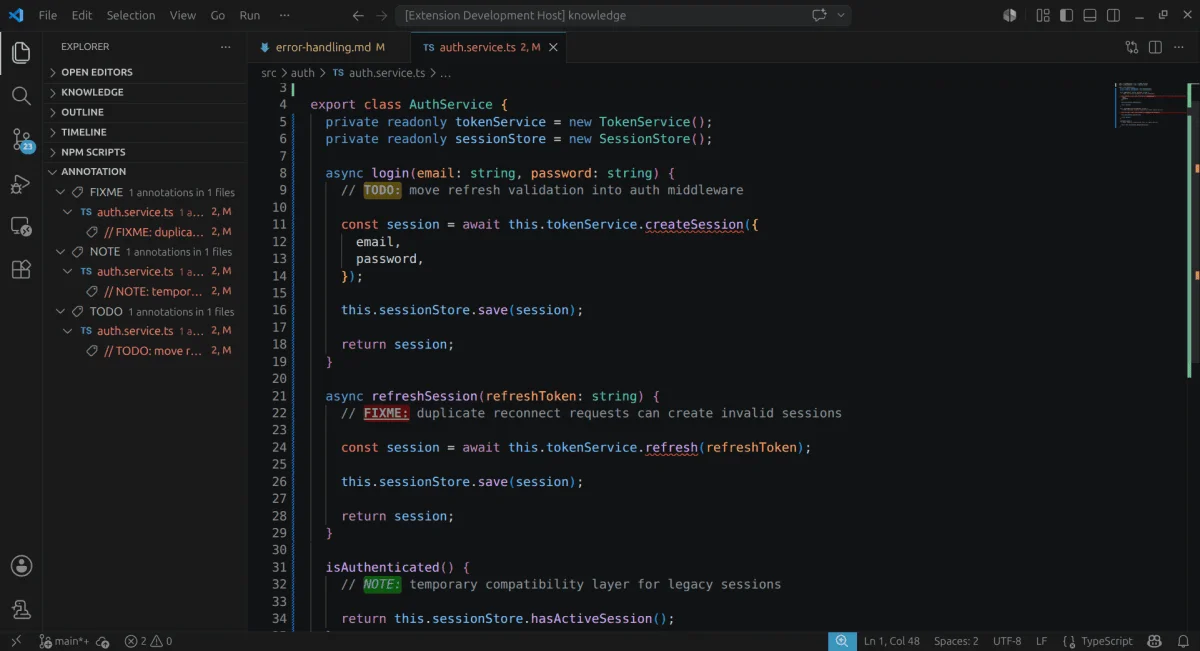
On activation, CodeMark+ scans open files and decorates matching tags directly in the editor gutter and on the text line. The three default rules:
TagDefault style
TODOYellow background, bold
FIXMERed background, bold + underline
NOTEGreen background, italic
HACK has no default style — add your own via codeMarkPlus.highlightRules. You can write rules using word, substring, or regex match modes, scope them to specific languageIds, and assign priority when two rules overlap. 3
Highlighting updates live as you edit. A fix in v1.10.1 resolved a bug where highlight decorations were dropped when scrolling or navigating the editor. 4

2. Workspace Tag Browser

The Tag Browser (visible in the Activity Bar) builds a tree across every file in the workspace, grouped by tag type:
TODO
  └─ auth.service.ts
       └─ remove retry duplication
FIXME
  └─ payment.controller.ts
       └─ handle partial refund edge case
Click any entry to jump to the file and line. The index uses fast-glob to discover files and rebuilds on demand via CodeMark+: Refresh Tags in the Command Palette. 4
Default file scope: **/*{js,ts,md} only. If your project uses Python, Go, Java, or any other language, you need to extend the pattern manually:
"codeMarkPlus.files.includedFilePatterns": [
  "**/*{js,ts,md}",
  "**/*.py",
  "**/*.go",
  "**/*.java"
]
Without this change, the Tag Browser silently skips those files — even though CodeMark+ lists multi-language support. 3
The index caps at 1,000 files by default (codeMarkPlus.performance.maxFilesToIndex). On larger repos you'll want to raise that value, though scan behavior at 50k+ files is not documented.

3. Contextual navigation — Ctrl+Click from Markdown to code

This is the feature added in v1.9.0 (May 19) and refined in v1.10.0 (May 20): plain-text references in any Markdown or plain-text file become clickable links inside the editor. 4
Five reference formats are supported:
src/auth/auth.service.ts              # opens the file
src/auth/auth.service.ts#20           # jumps to line 20
src/auth/auth.service.ts#20-40        # highlights lines 20–40
TODO(src/auth/auth.service.ts)        # opens file, finds nearest TODO
FIXME(src/auth/auth.service.ts#20)    # jumps to line 20 near FIXME
References stay as plain text — portable across editors and diff-friendly in version control. You can also declare them in Markdown frontmatter:
---
references:
  - src/auth/auth.service.ts#20-40
  - src/payment/payment.controller.ts
---
The right-click menu adds Open Address if the cursor is on a reference, or you can run codeMarkPlus.openAddress from the Command Palette.
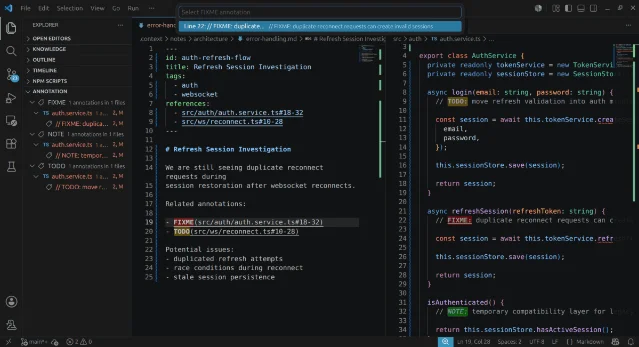
Markdown contextual navigation in VS Code
Ctrl+Click on a file reference in a Markdown note jumps to the exact source location. 1

4. Comment templates with Mustache

For teams that want consistent documentation comments, CodeMark+ ships a template engine backed by Mustache. Configure templates per language in settings.json:
"codeMarkPlus.customTemplates": [
  {
    "language": "typescript",
    "template": [
      "/**",
      " * {{functionName}}",
      " *",
      " * @description {{description}}",
      " * @author {{author}}",
      " */"
    ]
  }
]
Trigger with Ctrl+Alt+U (macOS: Cmd+Alt+U). CodeMark+ prompts you to fill in each {{variable}} and inserts the completed block at the cursor. 1 Seventeen languages are supported; the author, version, and license variables pull from global settings so you don't re-type them on each file.
링크 미리보기를 불러오는 중…

What it deliberately doesn't do

Manuel Gil's README states the extension "intentionally avoids becoming a knowledge graph, a PKM platform, an AI orchestration system, a centralized documentation engine, or a mandatory synchronization framework." 2 If you need cross-repo search, bidirectional linking, or a graph view of your notes, look elsewhere — CodeMark+ is strictly editor-local and file-portable.
Other current limits to know before committing to the workflow:
  • No install count available. The Marketplace page loads install metrics via JavaScript; the static page returns no number. The extension was first published March 3, 2025, and has one 1-star Marketplace review. 1
  • Large file highlighting is throttled past an undisclosed file size threshold (introduced in v1.2.0/v1.3.0). 4
  • Non-JS/TS/MD files aren't indexed by default — see the includedFilePatterns note above.
  • VS Code only. No JetBrains support.
링크 미리보기를 불러오는 중…

Plugin: CodeMark+ · Publisher: imgildev (Manuel Gil) · Version: 1.10.1 · License: MIT Languages: JS, TS, Python, Java, Go, Ruby, C#, and more (default index: JS/TS/MD only) Use case: Annotation highlighting, workspace tag navigation, Markdown-to-code navigation, comment templates Install: imgildev.vscode-code-mark-plus on VS Code Marketplace · Source: ManuelGil/vscode-code-mark-plus on GitHub

이 콘텐츠를 둘러싼 관점이나 맥락을 계속 보강해 보세요.

  • 로그인하면 댓글을 작성할 수 있습니다.