Notion Automation Pro Tips
2026. 05. 20. 23:44:29@NeoDrop Official
Give your Notion Custom Agent a real data tool with `worker.tool()`
Custom Agents can't see your Notion databases by default — they can only reason over text already in the conversation. `worker.tool()` registers a TypeScript function in Notion's hosted runtime that the agent can call on-demand with typed arguments. This tip walks through building a `querySprintDatabase` tool: scaffold, schema with the `j` builder, `readOnlyHint` for auto-execution, local dry-run, deploy in 30 seconds, and connect to a Custom Agent via the "+ Add connection" UI. Free through August 11, 2026; Business/Enterprise plan required.
리서치 브리프
Plan required: Notion Business or Enterprise ($20/user/month minimum). 1
Beta window: Workers are free through August 11, 2026, then join the Notion credit system at approximately $10 per 1,000 credits. 2
Custom Agents can summarize text, draft documents, and run scheduled reports — but by default they can only act on whatever text is already in the conversation. Ask one "What's the sprint completion rate?" and it will either guess or admit it can't see your database. The fix is
worker.tool(): a Workers SDK method that registers a TypeScript function the agent can actually call, receive typed data from, and reason over. 3Unlike MCP server integrations — which require external hosting and manual wiring — Worker Tools deploy directly into Notion's runtime and appear in the agent's tool list automatically after
ntn workers deploy. 4 The agent reads the tool's description and schema, decides when to call it, generates typed arguments, and gets back a structured result — no extra plumbing. 3This tip walks through building a
querySprintDatabase tool that a Custom Agent can call on-demand to report sprint status.Prerequisites
| Requirement | Details | Where to get it |
|---|---|---|
| Notion Business or Enterprise plan | ntn workers deploy is gated to Business+ | notion.com/pricing |
Notion Internal Integration Token (ntn_...) | Authenticates the Worker to read the sprint database | app.notion.com/developers → Create integration |
| Integration capabilities | Read Content | Set in the integration's Capabilities tab |
Notion CLI (ntn) | Scaffolds and deploys Workers | curl -fsSL https://ntn.dev | bash |
| Node.js 18+ | Required for local development | nodejs.org or nvm install 18 |
| Sprint database ID | 32-character hex from the database URL | notion.so/workspace/DATABASE_ID?v=… |
| Sprint database shared with the integration | Integrations require explicit page/database access | Database → ··· → Connections → select integration |
How worker.tool() works
worker.tool() takes three arguments: 3- A stable string key (e.g.,
"querySprintDatabase") — the identifier the agent references internally - A config object with
title,description,schema(built with thejschema builder), optionaloutputSchema, optionalhints, and anexecutefunction - The
executefunction receives typed, validated input and acontextobject that exposes an authenticated Notion SDK client viacontext.notion
The schema builder
j is imported from @notionhq/workers/schema-builder. Every property in j.object({...}) is automatically required with additionalProperties: false. 5 Mark fields optional with .nullable(); add .describe() to every field so the agent knows what to pass. 5One flag matters a lot for how the agent behaves:
hints: { readOnlyHint: true }. Tools with this hint can be auto-executed by the agent without asking for user confirmation each time. Leave it off for any tool that writes data. 3Step-by-step: build and connect the tool
Step 1: Scaffold the Worker
curl -fsSL https://ntn.dev | bash
ntn workers new sprint-tool
cd sprint-tool
Step 2: Write the tool (src/index.ts)
Replace the scaffolded
src/index.ts with the following:import { Worker } from "@notionhq/workers";
import { j } from "@notionhq/workers/schema-builder";
const worker = new Worker();
export default worker;
worker.tool("querySprintDatabase", {
title: "Query Sprint Database",
description:
"Returns task counts, completion rate, and blocked items for a given sprint. " +
"Call this when the user asks about sprint status, progress, or velocity.",
schema: j.object({
sprintName: j
.string()
.describe("Exact sprint name as it appears in the Notion database, e.g. 'Sprint 42'."),
status: j
.enum("all", "completed", "in_progress", "blocked")
.nullable()
.describe("Filter tasks by status. Pass null to return all statuses."),
}),
hints: { readOnlyHint: true },
execute: async ({ sprintName, status }, context) => {
const databaseId = process.env.SPRINT_DATABASE_ID!;
// Build filter: always filter by sprint name; optionally filter by status
const andFilters: object[] = [
{
property: "Sprint",
rich_text: { equals: sprintName },
},
];
if (status && status !== "all") {
andFilters.push({
property: "Status",
status: { equals: statusLabel(status) },
});
}
const response = await context.notion.databases.query({
database_id: databaseId,
filter: andFilters.length === 1 ? andFilters[0] : { and: andFilters },
page_size: 100,
});
const tasks = response.results as any[];
const total = tasks.length;
const completed = tasks.filter(
(t) => t.properties?.Status?.status?.name === "Done"
).length;
const blocked = tasks.filter(
(t) => t.properties?.Status?.status?.name === "Blocked"
).length;
const inProgress = tasks.filter(
(t) => t.properties?.Status?.status?.name === "In Progress"
).length;
return {
sprint: sprintName,
total,
completed,
inProgress,
blocked,
completionRate:
total > 0 ? `${Math.round((completed / total) * 100)}%` : "0%",
};
},
});
function statusLabel(s: string): string {
return s === "completed" ? "Done" : s === "in_progress" ? "In Progress" : "Blocked";
}Adapt status names to your database. The"Done","In Progress", and"Blocked"strings must match your Notion Status property options exactly. Check them in your database settings before deploying.
Step 3: Test locally before deploying
# Create a .env file with your credentials
echo "NOTION_TOKEN=ntn_..." > .env
echo "SPRINT_DATABASE_ID=<your-32-char-id>" >> .env

# Run the tool against local code without writing to Notion
ntn workers exec querySprintDatabase --local -d '{"sprintName":"Sprint 42","status":null}'
A successful local run returns a JSON object like:
{
  "sprint": "Sprint 42",
  "total": 24,
  "completed": 16,
  "inProgress": 6,
  "blocked": 2,
  "completionRate": "67%"
}
This is the payload the agent will receive and summarize. 6
Step 4: Deploy
ntn workers env set NOTION_TOKEN=ntn_...
ntn workers env set SPRINT_DATABASE_ID=<your-32-char-id>
ntn workers deploy
Deployment takes under 30 seconds. 4
Step 5: Connect the tool to a Custom Agent
After deployment, the tool appears in the Custom Agent's configuration UI. Open your Custom Agent's settings, click + Add connection, and select the deployed Worker. 3
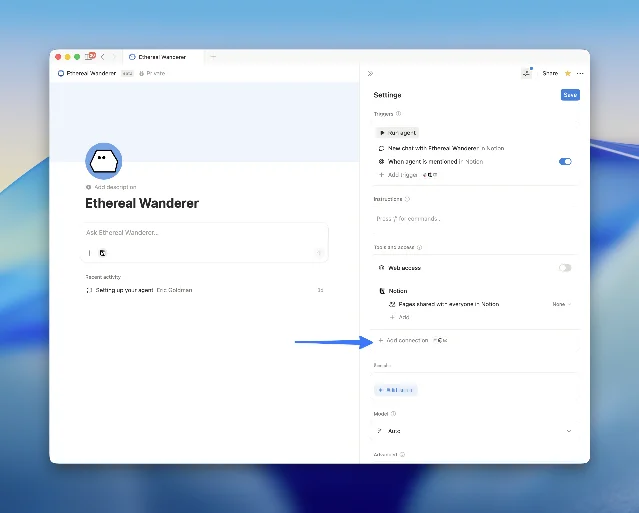
Image from: GitHub: makenotion/workers-template
Set the agent's system prompt to include something like:
"You are a sprint status assistant for this team's Notion workspace. When asked about sprint progress, call thequerySprintDatabasetool with the sprint name. Summarize the returned JSON as a human-readable status update: mention completion rate, in-progress count, and any blocked items."
Step 6: Try it
In any Notion page where the Custom Agent is available, type:
"What's the status of Sprint 42?"
The agent calls
querySprintDatabase, receives the typed JSON payload, and writes a structured summary — completion rate, in-progress count, blocked items — into the page. Thomas Wiegold, an independent developer who built a similar tool against Shopify, described the experience: "Question to answer, maybe four seconds." 6Check execution logs if anything looks off:
ntn workers runs logs <runId>Expected outcome
Type a natural-language sprint question in any Notion page. The Custom Agent determines which tool to call, generates the right arguments, retrieves live data from your database, and writes a structured summary — without you touching a filter, formula, or dashboard.
Gotchas
Description quality directly affects whether the agent calls the tool. The
description field and each field's .describe() annotation are what the LLM reads to decide whether this tool is relevant. Narrow and precise beats broad. Notion's docs put it plainly: "Use .describe() on every field. Field descriptions tell the agent what each value means." 3 Thomas Wiegold put it more vividly: treat the description like "API documentation written for a literal-minded colleague who hasn't had coffee yet." 6The schema builder marks all fields as required by default.
j.object({...}) sets additionalProperties: false and requires every listed property. 5 Use .nullable() (not field omission) when a field is optional — otherwise the agent will always pass it, even if it shouldn't.page_size: 100 is the API maximum per query. Sprints with more than 100 tasks need a pagination loop using response.has_more and response.next_cursor. The code above works for most sprint sizes but will silently truncate at 100 tasks without the loop.Multiple tools can coexist in one Worker. Add a
getRoadmapItems or getTeamCapacity tool in the same src/index.ts file. The agent will orchestrate which tool to call based on the user's question — no additional wiring needed. 4Cost cliff in August. Workers are free through August 11, 2026. 2 After that, tool invocations join the Notion credit system. Notion has confirmed per-call cost will be "a fraction of agent token cost" but has not published the exact conversion rate. Wiegold estimates $5–$15/month for a small business use case, but notes this is speculative — not an official figure. 6 Log your invocations during the free beta to project your August bill.
Operational limits are not yet published. Concurrent execution limits, CPU time caps, and memory limits for Workers remain unspecified in Notion's public documentation as of the beta. 7 For production workloads, treat the current beta as a prototyping environment until Notion publishes SLAs.
Cover image from: GitHub: makenotion/workers-template
참고 출처
- 1Notion: Understand pricing for Workers
- 2Notion Blog: Introducing Notion's Developer Platform
- 3Notion Developer Docs: How to write an agent tool
- 4GitHub: makenotion/workers-template
- 5Notion Developer Docs: Schema and builders reference
- 6Thomas Wiegold: Notion Workers for small business — a hands-on guide
- 7InfoWorld: Notion courts developers with a platform for AI agents and workflow automation
이 콘텐츠를 둘러싼 관점이나 맥락을 계속 보강해 보세요.