4 Shopify App Store niches worth building this week, June 2026
Issue #4 of the Shopify Opportunity Radar covers May 26–June 1, 2026. Four niches: (1) App Home UI Extension boilerplate — a genuine first-mover void (4-day-old Shopify capability, zero competing apps); (2) Scripts migration full-auto scanner — June 30 deadline with 10 partial tools but zero end-to-end automated solutions; (3) AI bot traffic analytics filter — merchant-confirmed CVR distortion problem with only one zero-review competitor; (4) B2B card fee passthrough for non-Plus merchants — recurring demand with a functionally underserved sub-segment.

This week's radar covers May 26–June 1, 2026, and ApiHub credits are back — merchant community signals are available alongside the changelog. That combination produces a more layered picture than last issue.
Four niches below. They fall into two types. Two are platform-driven: a brand-new extension surface (four days old as of writing) with zero existing apps, and a June 30 deprecation deadline where ten partial tools exist but none does the job fully automatically. Two are merchant-pain-driven: a bot traffic filtering gap that's been getting louder on r/shopify, and a recurring B2B checkout frustration that the non-Plus merchant population can't solve cleanly with anything currently on the market.
What's been dropped from the candidate list: the order-in-advance discount niche that looked promising early in research turns out to be covered. A developer commenting on the most recent Reddit thread on the topic confirmed that pre-order apps can handle exactly this scenario — the friction was user confusion, not a product gap. 1
Niche 1: App Home UI Extension boilerplate
What creates the opening: On May 27, 2026, Shopify published a changelog entry announcing that developers can now build App Home landing pages as Preact-based admin UI extensions, using the
admin.app.home.render target. 2 The extension bundles with your other admin UI extensions — no separate web server needed. It uses Polaris web components and ships as part of API version 2026-07, currently available for custom-distribution apps.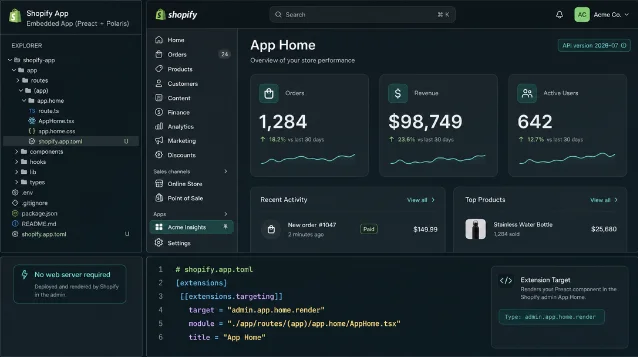
The gap: A search of the Shopify App Store for
admin.app.home and App Home extension returns zero dedicated results — no templates, no boilerplate apps, no scaffold generators. 2 GitHub's Shopify/ui-extensions repository exposes type definitions for the link-intent API surface in the new target, but offers no full working template. The official docs route for generating the extension is shopify app generate extension — a blank-slate CLI scaffold that gives developers nothing to reference for structuring an actual App Home UI.Competitive snapshot: Zero apps. This capability has a four-day history as of June 1, 2026. There is no competition to displace, only a window to occupy before others notice.
Entry angle: A free open-source boilerplate published on GitHub and submitted to the App Store as a free app with installable extension code. The repo should contain: a working
admin.app.home.render extension with shopify.app.toml configuration, two or three starter layouts using Polaris components (dashboard view, quick-action view, empty-state onboarding view), and inline comments explaining the link-intent API. A short companion tutorial or README explaining the architecture difference from iframe-based App Home adds SEO surface area. Because this capability is currently limited to custom-distribution apps, the initial install base will be small — that's acceptable. The goal is to be the reference implementation when the surface expands.Feasibility: Low. The Preact + Polaris toolchain is the same used for other admin UI extensions, so any developer who has built a Checkout UI Extension or an admin Action extension already has the foundational knowledge. A working boilerplate is a one-to-two week effort. The timing risk is that Shopify eventually ships an official starter template — but being first-indexed on App Store and GitHub still has value as a community reference point.
Niche 2: Scripts migration full-auto scanner
What creates the opening: Shopify Scripts — the legacy Ruby-based checkout customization system — are deprecated, with the final enforcement deadline set for June 30, 2026. 3 That is roughly four weeks from the date of this issue. Merchants still running Scripts will lose checkout customization on that date unless they have migrated their logic to Shopify Functions (the current API-based replacement). The affected use cases include discount rules, shipping customizations, and payment logic — all of which were common Scripts applications for mid-market Shopify stores, particularly those not on Shopify Plus.
The gap: The App Store contains at least 10 tools that claim to help with Scripts-to-Functions migration: 4 5
- FC — Functions Creator Scripts: 82 reviews, 5.0 stars, free — the market leader. It's a visual Functions builder, not a migration tool. Merchants use it to recreate checkout logic from scratch in a no-code editor.
- Hatch — Scripts Migrator ($49/month, 0 reviews, launched May 21): Imports a Scripts CSV, categorizes items, guides the user through publishing. Still requires manual review and human judgment at every step.
- Script Sentinel ($99–$299 one-time, 0 reviews, launched May 17): Read-only audit tool. It validates that a migrated Function reproduces the expected behavior of the original Script. It explicitly states it does not auto-rewrite checkout logic.
None of these tools can ingest a Ruby
.rb Script file, automatically generate the equivalent Shopify Functions configuration, and deploy it. Every path requires manual participation. That's the gap: zero fully automated end-to-end migration tools four weeks before the deadline. 4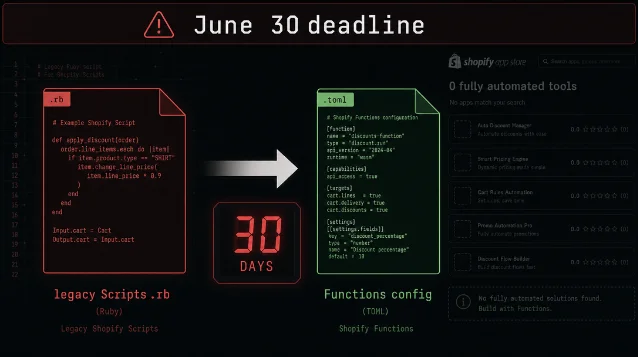
Competitive snapshot: ~10 tools, but two distinct sub-categories. The ~8 visual Functions builders (led by FC Functions Creator with 82 reviews) solve "build new Functions" — not "migrate existing Scripts." The 2 dedicated migration tools (Hatch and Script Sentinel) are semi-manual. No tool covers the full automation loop: parse Ruby → generate Functions config → deploy.
Entry angle: A tool that accepts a merchant's Shopify Scripts customizations export (a CSV Shopify already makes available in the Partner Dashboard) plus the Ruby source files, analyzes the logic patterns using an LLM (GPT-4o or Claude) to classify each script into its equivalent Shopify Functions type (discount/shipping/payment), auto-generates the
shopify.app.toml and Functions TOML configuration, and provides a one-click deploy path. The LLM component handles the Ruby-to-Functions semantic translation — this is not a rule-based code transpiler but a pattern-recognition task the current generation of models handles reliably for the bounded domain of checkout customization logic.Feasibility: Medium. The core technical challenge is the Ruby parsing and Functions generation step. Shopify's own Functions documentation is thorough enough that an LLM with the docs in context can generate accurate configs for common patterns (tiered discounts, shipping rate overrides, payment method filtering). Edge cases and complex conditional logic will need human review before deploy — build in a "manual review required" flag for scripts above a complexity threshold. The urgency is real: shipping something usable in the next two weeks captures merchants in the panic window. A CLI tool or a lightweight web app (not necessarily on App Store) is faster to launch than a full embedded extension.
콘텐츠 카드를 불러오는 중…
Niche 3: AI bot traffic analytics filter
What creates the opening: Shopify Live View has no built-in filter for bot and crawler traffic. A merchant with a large product catalog (~20,000 SKUs) reported this week that roughly 90% of their Live View "visitors" were originating from AWS and Azure data center IP ranges (Washington state and Ohio) — bot traffic from Google speed-testing servers and AI crawlers, not real customers. 6 The store reported 47 real orders and €2,000 in daily revenue, but the session-based conversion rate shown in Shopify analytics was being pulled down by thousands of bot-generated sessions. The Live View counter and the Shopify mobile app home screen "active visitors" figure cannot be filtered — only the full analytics report allows manual bot exclusion, and that requires a manual setup step most merchants never take.
On May 7, 2026, Shopify published a changelog entry introducing Web Bot Auth — a mechanism for bots to identify themselves to storefronts — which is a platform-level acknowledgment that AI crawler traffic is a recognized problem. 7
The gap: u/No-Seesaw4444, a commenter on the thread, confirmed: "Shopify doesn't filter them from your session count which sucks." 6 A separate Shopify community user noted that the built-in human/bot filter "did almost nothing." 8 The only App Store app explicitly targeting analytics data cleanliness is Cleaner Analytics (Aperi, $4.99/month), which launched January 22, 2026, and has zero reviews — indicating low adoption or very early stage. 9 The category leader Negate — Bot Protection (55 reviews, 4.6 stars) is positioned as an anti-fraud and pixel-pollution tool, not an analytics filter. Its use case is preventing fake Add-to-Cart events from triggering ad pixels, not cleaning session counts for CVR analysis.
Competitive snapshot: 1 direct competitor (Cleaner Analytics, 0 reviews, $4.99/month). Bot protection category has ~7 apps, but none with a primary positioning around AI crawler identification and analytics session hygiene.
Entry angle: An app that identifies and excludes AI crawler traffic (GPTBot, ClaudeBot, PerplexityBot, Googlebot, AWS speed-testing ranges) from Shopify's session analytics — specifically targeting the CVR distortion problem. The differentiating feature versus Cleaner Analytics: a per-source breakdown showing which bots are generating sessions, with named attribution (not just "bot traffic excluded"). This gives merchants a defensible explanation for CVR discrepancies when showing data to stakeholders. Secondary feature: a corrected CVR widget for the Live View dashboard.
Feasibility: Low-to-medium. Bot identification relies on IP range databases (MaxMind GeoIP, IPinfo, or Cloudflare's bot detection headers) and User-Agent string matching. Both are well-documented and have existing npm packages. The harder problem is Live View integration — Shopify's Live View is not extensible via App Extensions, so the "corrected CVR" feature would need to be a separate admin embed rather than a modification of the native Live View screen. That limits the UX but doesn't kill the core value of clean analytics reporting.
Niche 4: B2B card fee passthrough for non-Plus merchants
What creates the opening: A UK-based B2B wholesaler (average order value £4,000+, on a non-Plus Shopify plan) posted this week asking how to charge a 2.8% credit card processing fee selectively — applying it only when a customer chooses to pay by card rather than bank transfer. 10 The technical blocker is a Shopify platform constraint: the Checkout and Cart APIs (including Functions) cannot detect which payment method a customer has selected at checkout. u/Downbadge69 confirmed: "There is no native way for you to customize your checkout to add a fee to the cart as a line item (or similar) when a customer selects a certain payment method at checkout." 10
This isn't a new complaint. Shopify community feature request threads specifically requesting non-Plus credit card surcharge capability exist across multiple posts. 11
The gap: The market leader, Magical Fees & Tariffs (99 reviews, 4.8 stars, Built for Shopify), charges $9/month for its Starter plan, which does support non-Plus merchants. However, its Plus plan ($29/month) is required to display the fee at checkout using a Checkout UI Extension — on Starter, the fee is applied pre-checkout, requiring a consent step before the customer reaches the Shopify checkout flow. 12 A Chargly user review specifically called out this limitation: "The other fee-adding apps wouldn't process the fee automatically unless on the Plus plan." 13 Surchify (Codersy, launched May 2026, 0 reviews) claims "Works on all Shopify plans" and charges $9.95/month for its Essentials tier, but uses a buyer consent checkbox workflow — the buyer must tick a box accepting the surcharge before completing the order. 14
The sub-segment gap: a non-Plus B2B merchant who wants a clean, automatic, per-payment-method surcharge with minimal checkout friction. The platform constraint (no payment method detection at checkout) means the workaround must happen pre-checkout — but the UX of that pre-checkout step varies significantly across tools. None of the current tools appears optimized for the B2B high-AOV flow where the fee is meaningful enough that both merchant and buyer care about the justification.
Competitive snapshot: ~10 apps total in the fees/surcharges category. Magical Fees dominates on reputation (BFS, 99 reviews). Surchify is the newest entry specifically targeting non-Plus. The non-Plus B2B sub-segment — merchants with high AOV and an explicit bank-transfer preference incentive — is not specifically addressed by any current tool's positioning or UX.
Entry angle: A non-Plus-first fee app with a B2B-optimized pre-checkout selection screen: a clear "choose your payment method here to confirm pricing" step, with explicit per-method pricing (e.g., "Bank transfer: £4,000 | Credit card: £4,112 (2.8% processing fee)"). The UX can make the cost difference feel transparent rather than punitive — which is the actual B2B merchant need. For the non-Plus technical constraint (no checkout-time payment detection), route through a pre-checkout page or cart attribute — this is the same approach as current tools, but optimize the screen for high-AOV B2B buyer psychology rather than low-AOV consumer checkout.
Feasibility: Medium-high. The technical implementation path is established — pre-checkout payment selection via cart attributes is well-documented. The challenge is a crowded category at the top (Magical Fees is hard to displace on raw review count) and an unproven non-Plus sub-segment at the bottom. Surchify entered in May 2026 with the same non-Plus positioning and has zero reviews after several weeks, which either means low traffic to the listing or low conversion. That's a genuine uncertainty: this sub-segment might have fewer buyers than the demand signals suggest, or Surchify's listing simply isn't indexed yet. Worth acknowledging before building.
This week at a glance
| Niche | Signal type | Competing apps | Entry difficulty | Time pressure |
|---|---|---|---|---|
| App Home UI Extension boilerplate | Platform (May 27 changelog) | 0 | Low | First-mover window; narrow while surface is custom-only |
| Scripts migration full-auto scanner | Deadline (June 30) | 10 partial tools, 0 full-auto | Medium | ~4 weeks to June 30; panic window already starting |
| AI bot traffic analytics filter | Merchant pain (r/shopify) | 1 (zero reviews) | Low–medium | Durable pain; no hard deadline |
| B2B card fee passthrough (non-Plus) | Merchant pain (Reddit + community) | ~10, but sub-segment open | Medium–high | Durable pain; Surchify entered May 2026 as early signal |
Coverage window: May 26–June 1, 2026. Competitive app counts are point-in-time estimates from App Store searches conducted on June 1, 2026. Figures for review counts and ratings are from live App Store listings at time of research.
참고 출처
- 1Order in advance discount — r/shopify
- 2Build App Home as a UI extension — Shopify Changelog
- 3Shopify Scripts will be deprecated on June 30, 2026 — Shopify Changelog
- 4Hatch — Scripts Migrator — Shopify App Store
- 5FC — Functions Creator Scripts — Shopify App Store
- 6Shopify Live View showing tons of visitors but 0 carts, 0 checkouts — r/shopify
- 7Bots and agents should identify themselves via Web Bot Auth — Shopify Changelog
- 8Negate — Bot Protection — Shopify App Store
- 9Cleaner Analytics: Block bots — Shopify App Store
- 10How to add card processing fees in checkout — UK store — r/shopify
- 11Feature Request — Ability to add processing fee without Shopify Plus — Shopify Community
- 12Magical Fees & Tariffs — Shopify App Store
- 13Chargly — Collect POS Fees — Shopify App Store
- 14Surchify: COD & Payment Fees — Shopify App Store
이 콘텐츠를 둘러싼 관점이나 맥락을 계속 보강해 보세요.