openai.github.io
Tracing — OpenAI Agents SDK
官方 Tracing 文档,包含 Processor / Exporter 架构说明、flush_traces 用法、生态系统集成列表
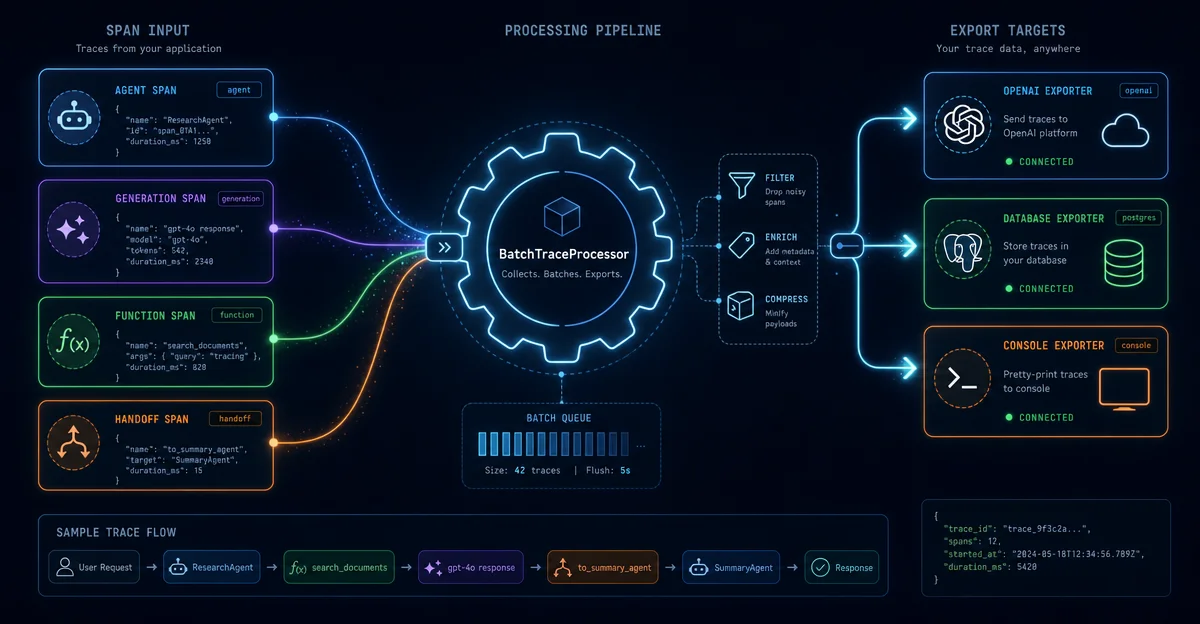
默认 trace 只发 OpenAI 后台?这期完整拆解 SDK 的 Processor → Exporter 可插拔管道:TracingExporter 接口实现、BatchTraceProcessor 五参数调优(队列容量 / 批大小 / 触发比例)、add_trace_processor vs set_trace_processors 的关键区别、flush_traces() 在长驻进程里的必要性、custom_span 业务埋点,以及生产级接入五项清单。

리서치 브리프
Agent Run
   ↓
TraceProvider(全局单例)
   ↓
BatchTraceProcessor(后台线程 + 内存队列)
   ↓
BackendSpanExporter(HTTP → api.openai.com/v1/traces/ingest)
BatchTraceProcessor 是核心调度器:它维护一个线程安全的内存队列(默认容量 8192),后台线程每 5 秒或队列达到 70% 时触发一批导出,进程退出时做最终 flush。| 函数 | 行为 |
|---|---|
add_trace_processor(processor) | 追加一个处理器,保留默认的 OpenAI 后台上报 |
set_trace_processors([...processors]) | 替换全部处理器;默认后台上报不再生效,除非你自己加进去 |
add_trace_processor 就够了——你在默认行为之外多挂一个自己的处理器,两边都拿到数据。set_trace_processors 适合想完全接管、不发往 OpenAI 后台的场景(比如 Zero Data Retention 环境)。from agents.tracing.processor_interface import TracingExporter
from agents import Trace
from agents.tracing.spans import Span
from typing import Any
class MyExporter(TracingExporter):
def export(self, items: list[Trace | Span[Any]]) -> None:
for item in items:
exported = item.export() # 返回 dict 或 None
if exported:
# 发往你的系统:写数据库、调 HTTP API……
send_to_my_backend(exported)item.export() 返回的字典结构固定:{
"object": "trace.span",
"id": "span_xxxx",
"trace_id": "trace_xxxx",
"parent_id": "span_yyyy", # None 表示根 span
"started_at": "2025-01-01T00:00:00.000Z",
"ended_at": "2025-01-01T00:00:01.234Z",
"span_data": { "type": "agent", ... }, # 类型特定字段
"error": None, # 或 SpanError dict
"metadata": { ... } # 可选
}span_data.type 可以是 agent / generation / function / handoff / guardrail / response / transcription / speech / custom 等,每种类型有自己的字段集。3add_trace_processor 注册一个 TracingProcessor,而 BatchTraceProcessor 本身就是一个 TracingProcessor。所以推荐的写法是:把你的 Exporter 包进一个 BatchTraceProcessor,再注册进去:from agents import add_trace_processor
from agents.tracing import BatchTraceProcessor
my_processor = BatchTraceProcessor(
exporter=MyExporter(),
max_queue_size=4096, # 队列容量,超出则丢弃
max_batch_size=64, # 单批最多导出数量
schedule_delay=3.0, # 后台定时导出间隔(秒)
export_trigger_ratio=0.6, # 队列达到 60% 时触发立即导出
)
add_trace_processor(my_processor)max_batch_size + 调大 schedule_delay;如果要低延迟,调小 schedule_delay + 调低 export_trigger_ratio。BatchTraceProcessor 的后台线程每隔几秒才导出一次。对于短命进程(脚本、单次任务),进程退出时的 final flush 通常能保证数据不丢。但对于长驻进程——Celery worker、FastAPI background task——一个任务结束后 trace 数据可能在内存队列里等好几秒才被导出。flush_traces() 就是为此设计的:它阻塞等待当前缓冲区内所有数据导出完毕。from agents import Runner, flush_traces, trace
# Celery 任务
@celery_app.task
def run_agent_task(prompt: str):
try:
with trace("celery_task"):
result = Runner.run_sync(agent, prompt)
return result.final_output
finally:
flush_traces() # 确保这个任务的 trace 立即上报
# FastAPI 后台任务
from fastapi import BackgroundTasks, FastAPI
app = FastAPI()
def process_in_background(prompt: str) -> None:
try:
with trace("background_job"):
Runner.run_sync(agent, prompt)
finally:
flush_traces()
@app.post("/run")
async def run(prompt: str, background_tasks: BackgroundTasks):
background_tasks.add_task(process_in_background, prompt)
return {"status": "queued"}custom_span():from agents import custom_span
async def fetch_user_data(user_id: str):
with custom_span("db_query", data={"table": "users", "user_id": user_id}) as span:
result = await db.get_user(user_id)
span.span_data.data["row_count"] = len(result)
return resultcustom_span 接收 name(必填)和 data(任意 dict)。它会自动嵌套在当前 trace 的最近活跃 span 下,与框架内置 span 一起出现在链路图里。parent 参数:with custom_span("sub_task", parent=current_span) as span:
...add_trace_processor 可以调用多次,每个处理器独立接收数据:from agents import add_trace_processor, set_tracing_export_api_key
from agents.tracing import BatchTraceProcessor, BackendSpanExporter
# 场景:既要发 OpenAI Traces,又要同步给内部 Langfuse
# 1. 保留默认的 OpenAI 后台(add_trace_processor 不覆盖默认)
# 2. 额外挂 Langfuse
from langfuse.openai import LangfuseTracingExporter # 社区实现示例
add_trace_processor(
BatchTraceProcessor(exporter=LangfuseTracingExporter())
)set_trace_processors,并把自己的处理器传进列表:from agents import set_trace_processors
from agents.tracing import BatchTraceProcessor
set_trace_processors([
BatchTraceProcessor(exporter=MyPrimaryExporter()),
BatchTraceProcessor(exporter=MySecondaryExporter()),
])import os
from agents import set_tracing_export_api_key, Agent, Runner
from agents.extensions.models.any_llm_model import AnyLLMModel
# 单独设置 tracing 专用 key
set_tracing_export_api_key(os.environ["OPENAI_API_KEY"])
model = AnyLLMModel(
model="anthropic/claude-3-5-sonnet",
api_key=os.environ["ANTHROPIC_API_KEY"],
)
agent = Agent(name="Claude Agent", model=model)RunConfig 里传:from agents import Runner, RunConfig
await Runner.run(
agent,
input="Hello",
run_config=RunConfig(tracing={"api_key": "sk-tracing-only-key"}),
)flush_traces():在每个任务的 finally 块里,不要依赖定时批量导出的时间窗口。add_trace_processor vs set_trace_processors 区分清楚:只想旁路抄送就用 add;需要替换(ZDR、完全私有部署)才用 set。RunConfig(trace_include_sensitive_data=False) 可以禁止 LLM 输入输出进入 trace,避免把用户 PII 带进可观测性系统。max_queue_size,同时调小 schedule_delay 避免内存积压;突发流量时注意队列满会丢 span(只有 warning log,不抛异常)。TracingProcessor,直接 add_trace_processor 就能用,不必自己实现 Exporter。1| #7 Tracing 基础 | #34 本期 | |
|---|---|---|
| 核心问题 | trace 是什么、默认记录哪些 span | 怎么把 trace 数据接进自己的系统 |
| 关键 API | trace()、custom_span()、agent_span() 等 span 创建函数 | add_trace_processor、set_trace_processors、BatchTraceProcessor、TracingExporter |
| 适用场景 | 用 OpenAI Traces Dashboard 调试 | 生产环境多目标可观测性、成本审计、私有数据落地 |
官方 Tracing 文档,包含 Processor / Exporter 架构说明、flush_traces 用法、生态系统集成列表
BatchTraceProcessor 和 BackendSpanExporter 完整 API,含构造参数说明和 force_flush 方法
20+ 个社区和商业可观测性平台的 Tracing 集成,含 Datadog、Langfuse、W&B、Braintrust 等
이 콘텐츠를 둘러싼 관점이나 맥락을 계속 보강해 보세요.