Linear for Agents: the Peer Enrollment pattern
A teardown of Linear's Assignee Picker (May 20, 2025) — the screen where AI agents appear interleaved with human teammates in a flat unsegmented list. Dissects the no-segmentation decision, the delegation model, and the activity transparency layer. Named pattern: Peer Enrollment.

리서치 브리프
Linear shipped Linear for Agents on May 20, 2025. 1 The headline feature was simple to describe and surprisingly hard to get right: AI agents — Devin (Cognition's coding agent), Sentry (the error-monitoring platform's agent), ChatPRD (the requirements-writing agent), Codegen — can now be assigned to issues, added to projects, and @mentioned in comments, just like any teammate on the workspace. The product decision that carries the most weight is not the agent API or the batch assignment flow. It's the assignee picker dropdown. Specifically, it's what Linear chose not to put in it.
Anatomy of the picker
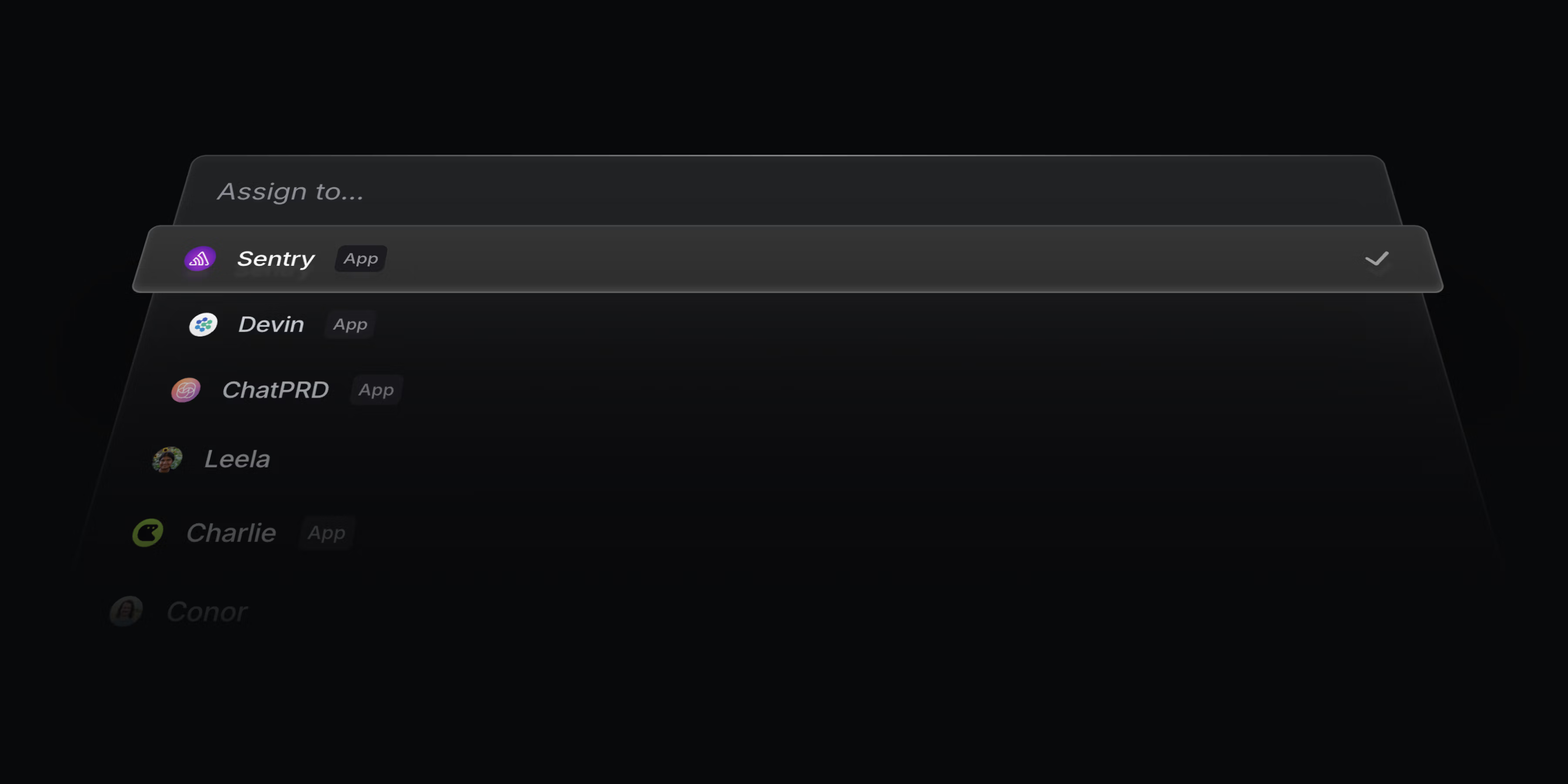
Open any Linear issue and click the Assignee field. The dropdown that appears is a flat, unsegmented list. 1 In the official launch screenshot — a 3,600×1,800 image from the changelog — you can read the list directly: Devin, Sentry, ChatPRD, Charlie, Leela, Conor, in that order. No divider line between the agents and the humans. No "Agents" section header above Devin. No "(AI)" suffix appended to the agent names.
Each entry in the list follows the same visual template: a circular avatar on the left, a name in the same typeface and weight at the same size. Agents use their service's brand icon as the avatar — Devin carries the Cognition cube mark, Sentry carries its familiar owl emblem. Humans have their profile photos. That's the only visual distinction the picker surfaces. Nothing about the list structure tells you which entries are agents and which are people.
Linear describes each agent as having "a full user profile and is clearly identified as an app user, so you can see what they are working on and track their progress." 2 The phrase "app user" is deliberate vocabulary. Linear isn't calling agents bots or integrations or assistants. An app user is an entity that uses the application — which is exactly the functional relationship an agent has with Linear when it reads issues, updates statuses, and comments on timelines.
The identity model matters because the picker inherits from it. If agents were integrations, they'd live in a separate integration configuration panel, not in the same list as Leela and Conor. If agents were bots, they'd get a distinct badge and a separate section. Linear's choice to surface them as app users means the picker has no category boundary to enforce.
The no-segmentation decision
Linear could have built the picker differently. Three alternatives were available:
| Approach | List structure | What the user sees |
|---|---|---|
| Flat list (Linear's choice) | Agents and humans in one unsegmented list | Identity-first: avatar + name only |
| Segmented list | "Agents" section header above agent entries | Category-first: type is the organizing principle |
| Suffix labeling | Agent names with "(Agent)" appended inline | Name-first with categorical annotation |
The segmented list is the more common pattern for tools introducing a new class of actor. It's also the safer one: it sets explicit user expectations before the first assignment, reduces confusion about who or what is being delegated work, and makes it easy to scan for only humans when that's what you want. Jira's Rovo agents, by contrast, are surfaced as a distinct "Rovo Agent" entity type in Atlassian's ecosystem.
Linear's Nan Yu (Head of Product, Linear) explained the reasoning directly: "Agents should be first-class employees. You should be able to add them to projects, assign them to issues, and mention in comments." 3 The framing is deliberate — "employees," not "tools." An employee doesn't get a separate section in your org chart labeled "Non-Human Employees." They're on the team page, in the directory. The picker is Linear's team page.
The flat list encodes a specific product bet: that users should form their mental model of each agent through their profile and track record — not through a categorical affordance at the moment of selection. If you don't know what Devin can do, the right response is to click into Devin's profile, read the capability description, review past assigned issues, and make a judgment — the same workflow you'd use to evaluate a contractor you haven't worked with before. Segmenting the list would short-circuit that, replacing "learn this agent's capabilities" with "this category of thing does AI work."
That bet has a cost. A new user who has never added an agent to their workspace and sees Devin in the same list as their coworkers will have to figure out — by hovering, clicking, or already knowing — that Devin is not a person. The flat list front-loads familiarity-building as a prerequisite to the picker working as intended. Linear accepted that cost.
The delegation model
Treating agents as first-class employees in the picker creates an obvious question: what happens to accountability when the "employee" is a piece of software? Linear's answer is structurally explicit.
When you assign an issue to an agent, the agent is added as a collaborator — not as the primary assignee. 2 The human who owns the issue remains the primary assignee. Responsibility stays with the person, not the agent. Linear's developer documentation states this directly: "an agent cannot be held accountable." 4 The picker looks flat, but the underlying data model is not. Agents get the social identity signal (presence in the same list as humans) without the accountability transfer that normally follows assignment in human team management.
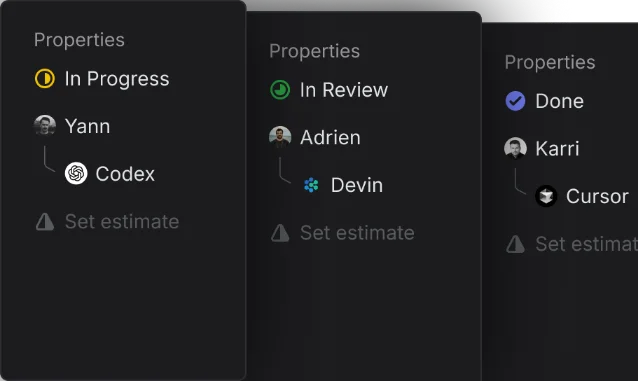
Mingjie Jiang (Product Engineer, Linear) described how this plays out in practice: "I usually delegate the issue to a coding agent directly within Linear. While the issue reflects the delegation, it remains assigned to him." 5 The phrasing is telling — "it remains assigned to him" — the human is still carrying the issue, even when the agent is doing the work.
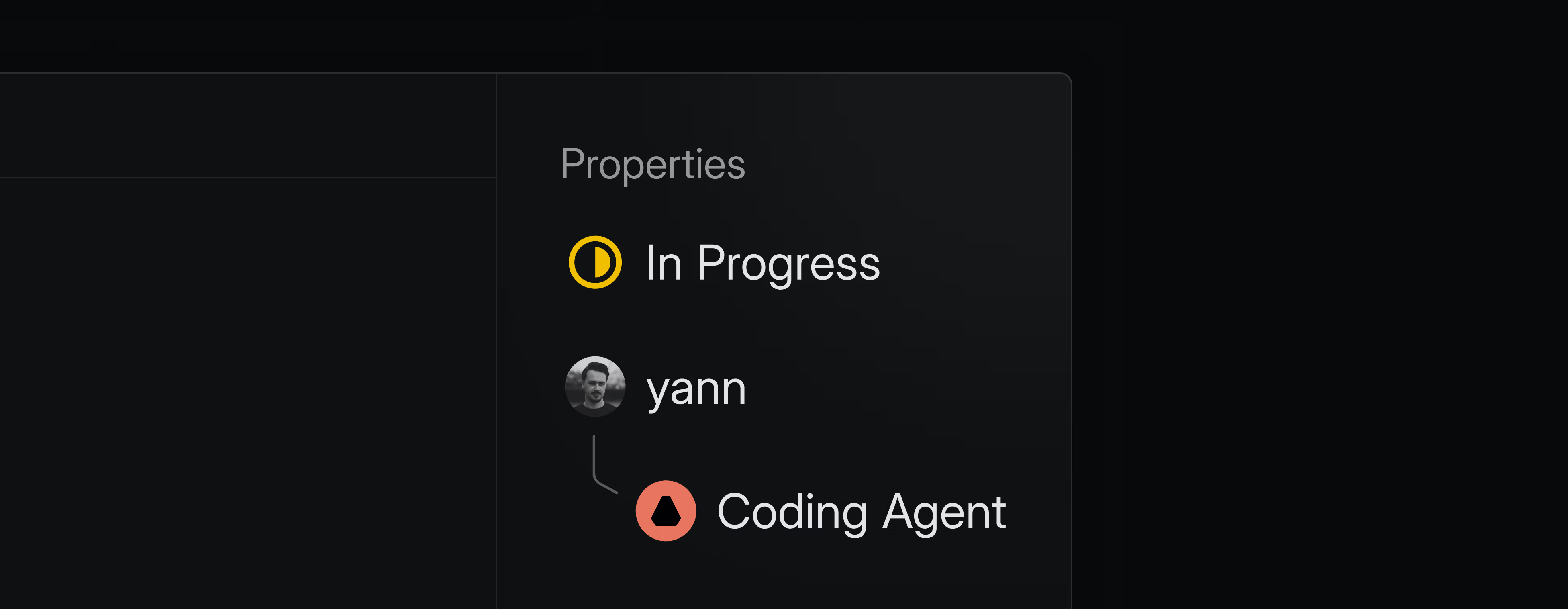
This design solves a genuine product problem. If you granted agents full primary-assignee status, two things break: first, your metrics (cycle time, team velocity) would now be counting agent-completed work as if it were human throughput; second, when the agent makes an error — and it will — there's no obvious human to own the correction. Keeping humans as the primary assignee thread preserves both the measurement semantics and the error correction pathway.
The visual parity in the picker (agent = peer) plus the data model asymmetry in assignment (agent ≠ responsible party) is not a contradiction. It's the core design argument: agents are peers in the work graph, not peers in the accountability graph.
Activity transparency: reasoning made visible
Assignment is the entry point. The issue timeline is where the agent's work becomes legible.
When an agent takes on an issue, every action it performs surfaces in the issue activity feed. 2 When Devin drafts a pull request, a summary of the code changes and a link to the draft PR appear in the timeline — posted by Devin, attributed to Devin, formatted like any other activity entry from a team member. Users can also access the agent's underlying reasoning: why it structured the work the way it did, what decisions it made along the way.
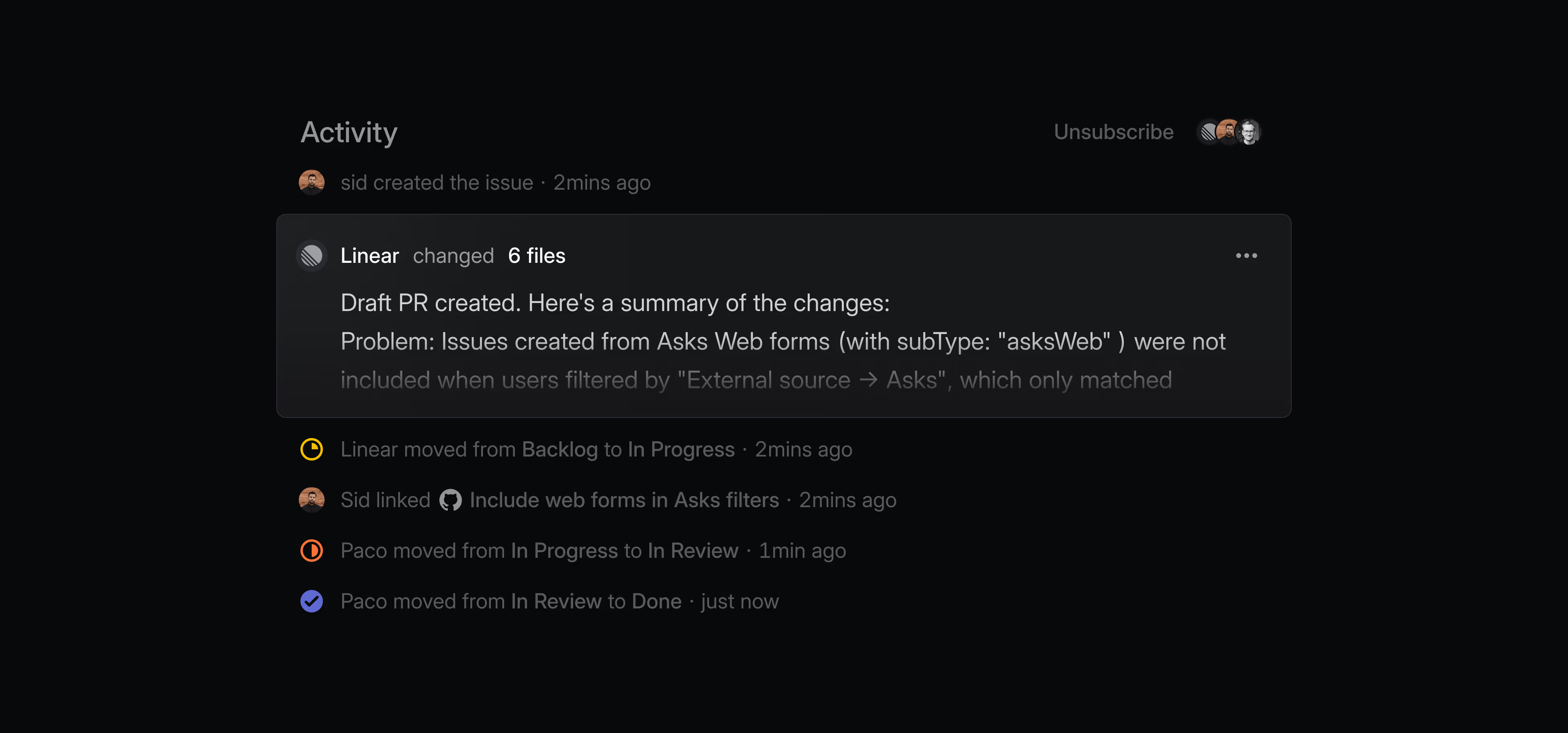
Mingjie Jiang described how this changes his relationship to agent-assigned work: "He sees even AI's mistakes as useful because it shows him potential failure modes as he works through the problem." 5 The transparency is not just for catching errors — it's for calibrating expectations about the agent's capabilities over time. An agent that consistently handles a certain class of task well is one you can assign more confidently; an agent whose reasoning trace reveals systematic misunderstandings is one you keep on a shorter review leash.
WorkOS, in an analysis of agent experience design, identified Linear's approach as a best-practice instance of "make the agent's reasoning visible" — a pattern in which products surface enough of the agent's decision process that users can intervene early, before the agent's intermediate choices compound into a large correction cost. 6 The alternative — showing only the final output — creates a black-box assignment dynamic that tends to erode trust when the first surprising output appears.
The transparency model is the third part of Linear's design argument. The picker gives agents social identity. The delegation model keeps humans accountable. The activity timeline keeps agent action legible. Together, they define what Linear means when it calls agents full workspace members.
The reusable pattern: Peer Enrollment
Named pattern for this teardown: Peer Enrollment.
Peer Enrollment is the design move of introducing a new class of non-human actor — an AI agent, an automation, a service integration — into a collaborative workflow surface through the same enrollment affordance used for human participants. The non-human actor gets a social identity (avatar, name, profile) that conforms to the same visual vocabulary as humans, and appears in the same selection UI alongside them, without a categorical divider.
Three design decisions make Peer Enrollment work:
Identity parity. The agent gets a profile that follows the same schema as a human profile — avatar, name, work history, current assignments. This is not decorative. It's the foundation of the flat list: if agents don't have profiles, there's nothing to explore instead of a "Bot" label, and the flat list stops being a reasonable design.
Accountability asymmetry in the data model. The social presence of agents in the picker is not matched by accountability parity in the underlying model. Responsibility always routes to a human. This constraint must be structurally enforced — not just documented — because users will otherwise assume that assigning work to an agent means handing it off completely. The constraint is what keeps Peer Enrollment from becoming false delegation.
Transparent action trace. Because the agent looks like a peer, its actions must be as legible as a peer's. If a human team member makes a change to an issue, it appears in the timeline with their name attached. The same standard applies to agents. Transparency is the mechanism that converts "this entity is trusted enough to appear in my picker" into "this entity's behavior can be verified and corrected."
The condition where Peer Enrollment fits: your product is a collaborative workspace where work is assigned to individuals, and you want to introduce AI agents as participants in that workflow without creating a separate "AI mode" that users have to explicitly enter. The moment of assignment — clicking on the picker — is the right place to establish the agent's identity, because it's the moment the user is already forming a working model of "who does this work."
The condition where it fails: when the agents you're introducing have such dramatically different capability ranges or risk profiles that undifferentiated presentation leads to harmful assignment choices. A coding agent that only handles scoped file edits and a coding agent that can modify infrastructure configuration are not interchangeable. If your agents fall into high-variance capability buckets, a flat list is the wrong interface — the segmentation or suffix approach is actually more honest about the category difference.
Linear's own evidence that the pattern scales: the integration directory grew from 3 agents at launch to more than 25 as of April 2026 — Codex, Cursor, GitHub Copilot, Factory, Sentry, Devin, and others. 7 The picker accommodates all of them in the same flat list. Nan Yu put it plainly: "It feels like the scope of what agents can handle is expanding every quarter. New models and harnesses are pushing the boundary from simple fixes to increasingly complex projects." 3 The flat list is a structural bet that this expansion is directionally predictable — toward more human-like capability — rather than toward a branching taxonomy that would require the picker to add new categories over time.
The PM-applicable version: when you're deciding where agent AI surfaces in your product, the enrollment moment — the first time a user chooses to involve an agent — is not a sidebar configuration screen. It's a statement about what kind of entity the agent is in your product. Linear's statement is: an entity capable of being assigned work, tracked on a timeline, and mentioned in conversation — in other words, a teammate. The picker is where that statement is made.
Cover image from Linear for Agents – Changelog
이 콘텐츠를 둘러싼 관점이나 맥락을 계속 보강해 보세요.