GPT-Realtime-2 定价概览
2026-05-08 上线,音频原生处理,GPT-5 级推理
本期系统拆解 OpenAI Agents Python SDK 中两套完全独立的语音子系统——Realtime Agents(WebSocket 音频直通流,Beta)与 Voice Pipeline(STT→Agent→TTS 三段流水线,正式版),通过架构对比、核心 API 详解、VAD 踩坑经验和延迟预算模型帮助开发者做出正确选型。以当日上线的 GPT-Realtime-2(GPT-5 级推理语音模型)为开篇钩子,结合国内四大厂商横评和打断逻辑实践建议收尾。
리서치 브리프
RealtimeAgent 还是 VoicePipeline?realtime/:RealtimeAgent、RealtimeRunner、RealtimeSessionvoice/:VoicePipeline、SingleAgentVoiceWorkflow、StreamedAudioResult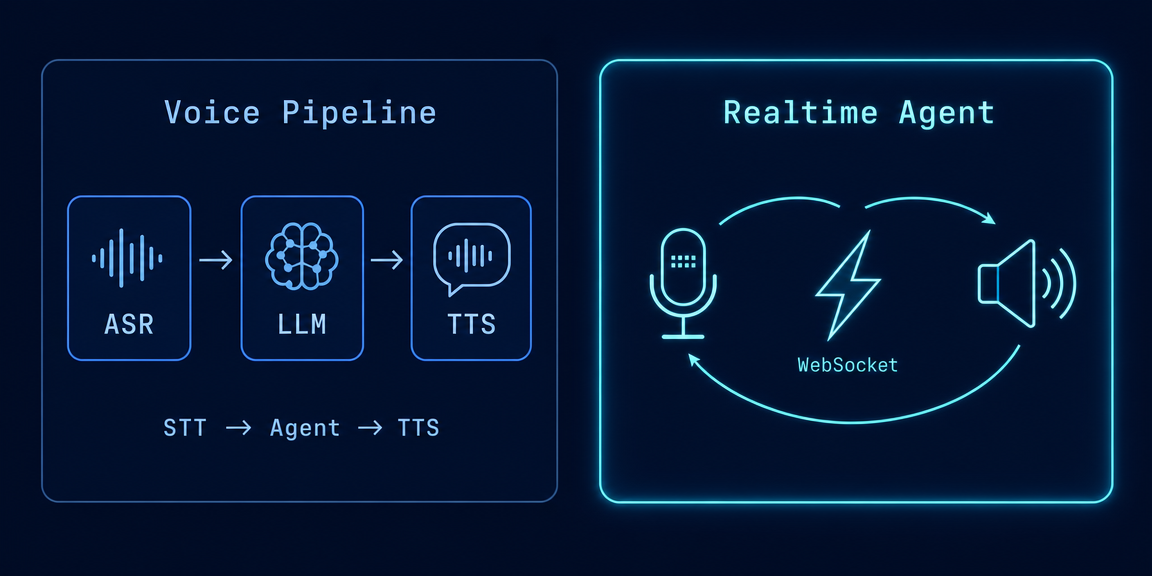
# pip install 'openai-agents[voice]'
from agents.voice import VoicePipeline, SingleAgentVoiceWorkflow
from agents import Agent

agent = Agent(name="助手", model="gpt-5.5", instructions="你是一个语音助手")
pipeline = VoicePipeline(workflow=SingleAgentVoiceWorkflow(agent))

# 静态模式:一次录音 → 一次回复
result = await pipeline.run(audio_input)
async for event in result.stream():
    if event.type == "audio":
player.play(event.data) # 流式播放 TTS 音频AudioInput:静态缓冲输入(默认 24000Hz/16bit/单声道)StreamedAudioInput:流式输入,通过 add_audio() 持续推送StreamedAudioResult.stream():返回 VoiceStreamEvent 异步迭代器,事件类型有 audio/lifecycle/errorinstructions 字段自定义 TTS 行为提示,speed 范围 0.25~4.0。7gpt-5.5 等成熟模型处理复杂逻辑from agents.realtime import RealtimeAgent, RealtimeRunner, RealtimeRunConfig
from agents.realtime import RealtimeModelConfig, RealtimeSessionConfig
agent = RealtimeAgent(
name="语音助手",
instructions="你是一个简洁的语音助手,回答要短。",
voice="alloy", # 首次发言后不能更改
handoffs=[support_agent], # 支持 handoff
tools=[lookup_order], # 支持工具调用
)
runner = RealtimeRunner(
agent,
run_config=RealtimeRunConfig(async_tool_calls=True), # 默认开启异步工具
model_config=RealtimeModelConfig(api_key=os.environ["OPENAI_API_KEY"]),
)
async with runner.run() as session:
# session 是 RealtimeSession,掌管一切
await session.send_audio(audio_chunk)
async for event in session:
if event.type == "audio":
player.play(event.data)
elif event.type == "tool_approval_required":
await session.approve_tool_call(event.approval_request)⚠️「这个比喻在付费方面不成立」:直通隧道听起来便宜,实际上 Realtime API 的定价远比三段式方案贵,$32/MTok 的音频输入成本需要仔细核算。
RealtimeAgent 的配置,忽略了 RealtimeSession 的重要性。| 方法 | 作用 |
|---|---|
send_message(text) | 发送文本消息 |
send_audio(bytes) | 推送音频数据块 |
send_event(raw) | 发送底层 raw event(用于高级操控) |
interrupt() | 主动打断模型的回复 |
approve_tool_call(req) | 审批工具调用 |
reject_tool_call(req) | 拒绝工具调用 |
update_agent(agent) | 在对话中切换 Agent |
audio / audio_interrupted / audio_end / agent_start/end / tool_start/end / tool_approval_required / handoff / history_added/updated / guardrail_tripped / error / raw_model_event。interrupt() + audio_interrupted 事件把这个问题收进了同一个运行时,统一处理。10# 推荐配置示例(来自官方 server.py)
model_settings = {
"audio": {
"input": {
"turn_detection": {
"type": "server_vad", # 或 "semantic_vad"
"interrupt_response": True, # 允许用户打断
"prefix_padding_ms": 300, # 防止截断开头
"silence_duration_ms": 500, # 500ms 静音才确认结束
},
"transcription": {
"model": "gpt-4o-transcribe" # 转录模型(可选)
}
},
"output": {
"voice": "alloy"
}
}
}server_vad:基于音量/能量检测,快但容易误触发;semantic_vad:语义感知,能理解「嗯……」不是说完的信号,但计算量更大。OpenAIRealtimeWebSocketModel(默认):服务器端 WebSocket,适合绝大多数后端服务OpenAIRealtimeSIPModel:SIP 电话集成,需要传 call_id 参数,适合 Twilio 等电话平台realtime-voice-component。| 目录 | 场景 |
|---|---|
app/ | FastAPI + WebSocket 完整 Web Demo |
cli/ | 命令行快速验证 |
twilio/ | Twilio Media Streams 集成 |
twilio_sip/ | SIP 电话集成 |
RealtimeAgent 有什么不支持的,要提前知道model 参数:模型由 Session 级统一管理,无法 per-agent 指定structured outputs:Realtime API 不走结构化输出流程toolUseBehavior:工具调用由 Runner 的 async_tool_calls 统一控制voice 首轮发言后不能更改:要换声线只能重开 sessionrealtime_handoff(agent) 或直接传 RealtimeAgent 列表debounce_text_length 默认 100 字符gpt-realtime-1.5 实现「说话控制网页 UI」:浏览器端麦克风 → WebRTC → Realtime API → 模型发 function call → 浏览器本地执行 UI 操作(点击/滚动/填写表单)。核心设计 GhostClick 能模拟点击、兼容屏幕阅读器,走的是声明式 UI 控制模式。voice/realtime/、voice/pipeline/、voice/tools/、voice/tracing/、voice/config/ 这五个 URL 全部 404。实际文档结构是 realtime/quickstart/、realtime/guide/、voice/quickstart/,API 参考在 ref/realtime/ 和 ref/voice/ 下。中文社区有不少文章引用了错误的文档路径,别被误导。19RealtimeAgent(WebSocket 模式)VoicePipeline + SingleAgentVoiceWorkflowgpt-5.5 文本 API 差距悬殊。上线前跑一遍实际使用量的预估,避免月底账单崩溃。interrupt()、清理未播放的历史音频 delta,这三件事要同时发生。只做前端停播,模型侧还在继续生成,下一轮对话的上下文就脏了——这是「假打断」,比不支持打断更难排查。
이 콘텐츠를 둘러싼 관점이나 맥락을 계속 보강해 보세요.