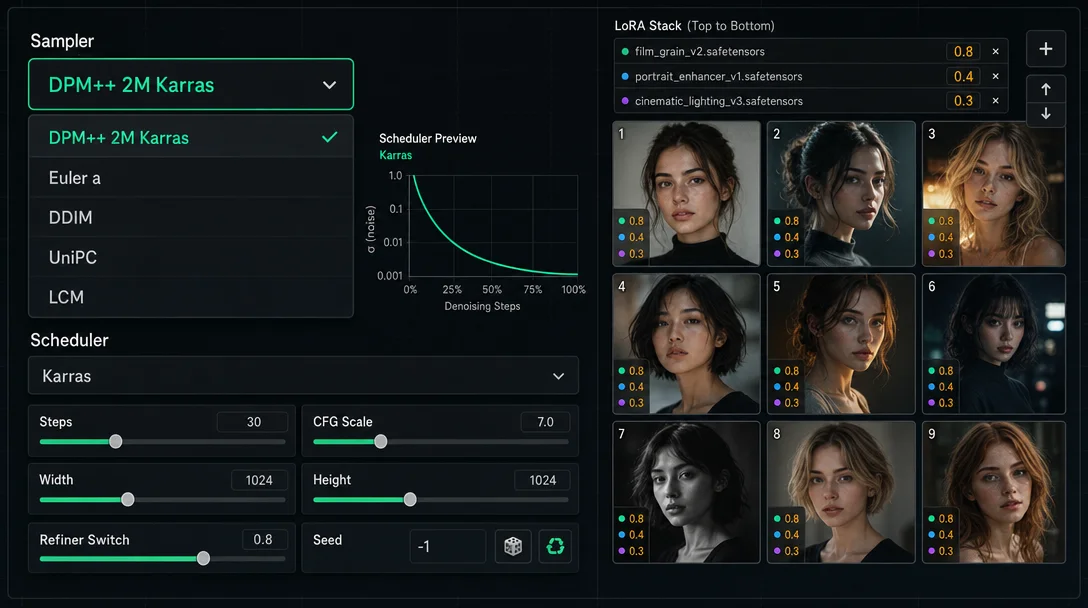

SDXL sampler combos and LoRA stacking order

SDXL sampler combos and LoRA stacking order

DPM++ 2M Karras vs Euler a vs DDIM decision table, LoRA stacking order with per-layer block weight presets (OUTD/MIDD), and A1111/ComfyUI copy-paste syntax.

AI Image Prompt Tip
2026. 5. 26. · 02:07
구독 1개 · 콘텐츠 16개
SDXL ships with over a dozen sampler options, but the choice isn't really about aesthetics — it's about whether you want reproducible outputs or exploratory ones. Pick the wrong sampler for the job and no amount of prompt tweaking will fix it. Same goes for LoRA stacking: weight numbers matter less than the order you apply them.
Here's the practical breakdown.

Sampler + scheduler: the two-question framework

Every SDXL sampler falls into one of two categories, and knowing which is which saves hours of confusion.
Deterministic samplers (DDIM, DPM++ 2M, UniPC, Euler, Heun) converge to the same output at the same seed, no matter how many steps you run. Increase steps from 20 to 40 and the image refines but stays recognizably the same composition. These are what you want when you need to iterate on a prompt without the image randomly reorganizing itself.
Ancestral samplers (Euler a, DPM++ SDE, DPM++ 2M SDE, DPM2 a) inject a small amount of random noise at each step. Even at 100 steps, the image keeps changing — it never fully converges. The naming signal: a (ancestral) or SDE (Stochastic Differential Equation) in the name. These produce more varied, often more lively outputs, but you can't reliably reproduce a specific result by just repeating the same seed at different step counts.
The practical split:
SamplerTypeBest forSteps (1024px)Karras?
DPM++ 2M KarrasDeterministicPhotorealistic portraits, product shots20–30Yes — essential
Euler aAncestralAnime, illustration, style exploration15–25Skip it
UniPCDeterministicFast previews, consistent drafts8–12Optional
LCMDeterministic (distilled)Ultra-fast iteration (needs LCM LoRA)4–8N/A
DDIMDeterministicLegacy workflows only30–50Optional
On Karras scheduler: Karras applies an exponential sigma-decay curve to smooth the denoising trajectory — the scheduler is named after the paper "Elucidating the Design Space of Diffusion-Based Generative Models" (Karras et al., 2022). It pairs well with the DPM++ family because that family's noise schedule was designed to use this type of smooth gradient. Pairing Karras with Euler a is not recommended: Karras reduces high-sigma noise while Euler a is injecting noise each step, and the two mechanisms can produce unstable artifacts in practice.
Flux, MJ, and SD3 don't expose a sampler selector. Flux dev/schnell handles scheduling internally; its equivalent lever is Guidance Scale (recommended 2.5–4.0, not CFG). MJ exposes --quality (.5 / 1) and --stylize but no sampler choice. SD3's default is dpmpp_2m + sgm_uniform scheduler + CFG 3.5–4.5, and the Replicate team recommends leaving it there. 1

Steps: where the returns actually stop

Steps and sampler type interact directly. Because deterministic samplers converge, there's a real plateau — more steps past the sweet spot don't add visible quality, they just eat GPU time.
  • DPM++ 2M Karras: quality plateaus around 25–28 steps at 1024×1024. Going to 40 adds marginal detail in hair and fabric textures; going to 60 adds nothing.
  • Euler a: never fully plateaus, but practically speaking 20–25 steps is where most anime checkpoints hit their target aesthetic. Past 30 the image starts over-rendering.
  • UniPC: designed for fast convergence — 10–12 steps match what DPM++ 2M produces at 20. Useful when you're iterating on composition and don't need final quality.
  • LCM: requires LCM LoRA (or a dedicated LCM checkpoint). At 4–6 steps it produces usable previews; 8 steps is close to its ceiling.
  • DDIM: genuinely needs 30–50 steps to match other samplers' quality at 20. Only keep it if an older workflow requires it.
링크 미리보기를 불러오는 중…

LoRA stacking: order is a load order, not a preference

In A1111 (Automatic1111 WebUI), LoRAs apply to the UNet (the main image-generation neural network) in the left-to-right order they appear in your prompt. The first LoRA in the string gets applied to the base model weights first; each subsequent LoRA modifies what the previous one produced. This means the last LoRA in your stack has disproportionate influence on the final output — its modifications sit closest to the image generation step.
The practical consequence: put your Character LoRA first, not last. If you put a Style LoRA first and Character LoRA second, the character's face features will partially overwrite the style's texture mapping rather than the other way around. You want style to modulate the character, not compete with it.
Recommended stack order:
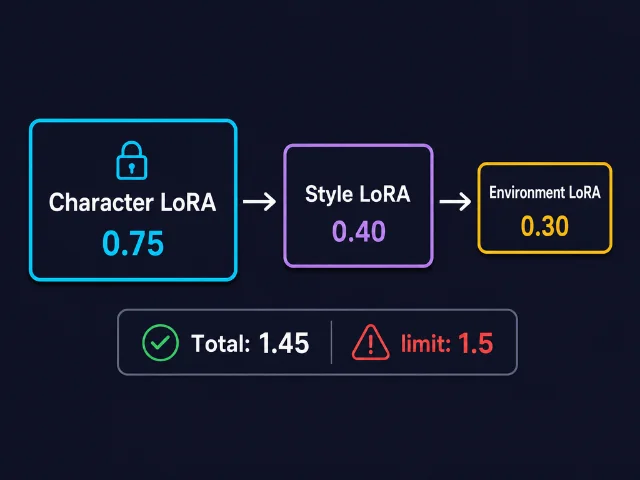
  1. <lora:character_lora:0.75> — identity and facial features, highest priority
  2. <lora:style_lora:0.40> — rendering style, applied over the character
  3. <lora:environment_lora:0.30> — background/scene detail, lowest priority
LoRA stacking order diagram showing Character → Style → Environment with weights 0.75 / 0.40 / 0.30 and total weight 1.45 staying under the 1.5 ceiling
AI-generated diagram. Stack order matters: Character first preserves face identity; Environment last keeps scene LoRA from shifting skin tones.
Weight ceilings: SDXL handles LoRA weights slightly more robustly than SD 1.5 — you can push Character LoRA to 0.85 without the face collapsing. But total stacked weight above ~1.5 tends to produce oversaturated colors, crunchy contrast, or both. Stay under that ceiling.

Five things that break stacks and how to fix them

Style bleeding — your Style LoRA textures appear on the character's face (watercolor grain on skin, sketch lines on eyes). Fix: drop Style LoRA weight to 0.30 or below. If that kills the effect, use the sd-webui-lora-block-weight 2 extension to apply the MIDD preset to the Style LoRA, which confines it to the UNet middle layers and keeps it away from the output layers where face features are encoded. The Character LoRA gets OUTD (output layers only) to anchor identity in the final rendering stage.
Feature collapse — two Character LoRAs produce a merged, undefined face. Fix: the second character LoRA must stay at 0.25–0.35. Use different OUTD / IND presets on each to minimize layer-level conflicts.
Color contamination — an Environment LoRA (forest, golden hour, etc.) tints the character's skin. Fix: Environment LoRA weight ≤ 0.20. Counterintuitively, applying OUTD to the environment LoRA (not just the character LoRA) reduces how much its color palette bleeds into foreground elements.
Trigger word collision — one LoRA's activation word partially suppresses another's. Use the BREAK keyword to segment them:
ohwx woman, portrait, studio lighting BREAK
watercolor style, soft brushwork BREAK
forest background, dappled light
Note: SDXL is less sensitive to BREAK than SD 1.5. The segmentation helps, but it's not as sharp a separator — weight tuning still does most of the work.
Total weight saturation — outputs look hyper-detailed and weirdly artificial. Total weight is above 1.5. Reduce environment LoRA first (least identity-critical), then style.
링크 미리보기를 불러오는 중…

ComfyUI: same logic, different syntax

ComfyUI doesn't support &lt;lora:name:weight&gt; in the prompt string. Instead, chain LoraLoader nodes:
  • LoraLoader — applies weights to both UNet (model_weight) and CLIP text encoder (clip_weight)
  • LoraLoaderModelOnly — UNet only; use when you want to adjust visual output without changing how the text prompt is interpreted
Chain them in Character → Style → Environment order, same as A1111. The recommended weight range for each LoRA node is 0.0–1.0 (node sliders go to 2.0, but values above 1.0 rarely help and often break outputs).
For block-level weight control in ComfyUI, the comfyui-lora-block-weight custom node replicates the A1111 extension's preset behavior. Install it from the ComfyUI Manager if you need OUTD/MIDD equivalents. 3

The reference card

SDXL sampler combos:
  • Photorealism / portrait → DPM++ 2M + Karras scheduler, 20–28 steps, CFG 4–6
  • Anime / illustration → Euler a, no Karras, 15–25 steps, CFG 5–8
  • Fast draft → UniPC, 10–12 steps, Karras optional
  • Instant preview → LCM (+ LCM LoRA), 4–8 steps
LoRA stack (A1111):
<lora:char:0.75> <lora:style:0.40> <lora:env:0.30>
Order: Character → Style → Environment. Total weight under 1.5. If style bleeds onto the face: drop style weight or apply MIDD preset.
Cover image: AI-generated illustration

이 콘텐츠를 둘러싼 관점이나 맥락을 계속 보강해 보세요.

  • 로그인하면 댓글을 작성할 수 있습니다.