
SpecKit Companion adds a review layer to AI spec-driven development
SpecKit Companion (`alfredoperez.speckit-companion`) v0.24.0 is a free MIT-licensed VS Code extension that wraps GitHub's spec-kit CLI with a visual pipeline panel, inline PR-style spec review comments, and one-click dispatch to 8 AI providers — letting you review and revise AI-generated specs before an agent acts on them.
AI coding agents are good at writing code from a spec. They're not good at telling you when the spec is bad. SpecKit Companion (
alfredoperez.speckit-companion, v0.24.0) adds the missing layer: a VS Code extension that turns raw spec markdown into a reviewable, trackable pipeline before any agent burns a token on implementation. 1The extension sits on top of GitHub's spec-kit — a CLI-driven spec-driven development (SDD) framework with 115k GitHub stars and support for 30+ AI coding agents. 2 Without a visual layer, spec-kit's outputs are plain markdown files in a
specs/ directory: no progress indicator, no way to see what's planned vs. done, no inline review. SpecKit Companion is that visual layer.The four-phase pipeline
Every spec moves through four stages: Specify (requirements and user stories) → Plan (architecture, data model, research) → Tasks (an implementation checklist with parallelism markers) → Done (archived or completed). SpecKit Companion renders each stage in a dedicated viewer panel — tabs at the top, a table of contents sticky on the left, Mermaid diagrams rendered inline, and action buttons at the bottom to advance the spec to the next stage. 1
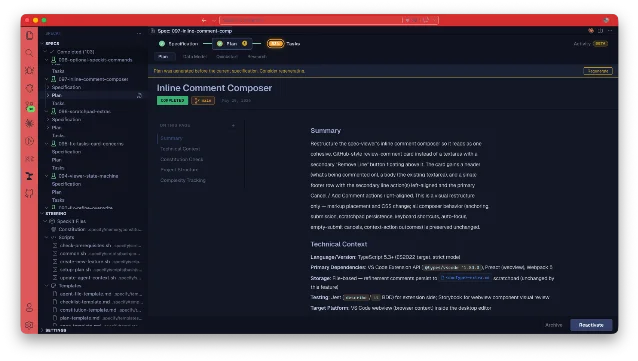
097-inline-comment-comp at the Plan stage, with sub-document chips (Data Model, Quickstart, Research) visible below the phase header. 1The panel also shows a real-time Activity view: a Phases timeline with per-substep timing, an Approach card, a Tasks list, and a Review-comments rollup. This is where the "where did I leave off?" problem actually gets solved — you can see that Specify took 5m 52s, Plan took 3m, and Implement is still running at 14m 39s, all from the same panel.
The design principle behind the two-frontend model is worth noting: the viewer's action buttons and the CLI commands (e.g.,
/speckit.plan typed in the terminal) both write to the same spec files. As Alfredo Perez, the author, put it: "Neither 'owns' the workflow — they're two front-ends over one set of files." 3 That matters if you like typing commands but want a visual progress check without context-switching.Inline review: catch bad specs before the agent runs
The extension's most immediately useful feature is inline review comments. Open any spec document in the viewer, click a line, and add a comment — the same interaction pattern as a GitHub PR review. Comments persist to
.spec-context.json immediately (not on save, not on refine), so review progress survives editor restarts, machine switches, and teammates opening the same repo. 3If the source file changes under a comment (lines shift, sections are edited), the comment re-anchors to the nearest matching heading rather than silently disappearing. When you're satisfied with the feedback, a Refine button sends all pending comments to the configured AI provider, which edits the spec file in place and marks the comments as applied. Applied comments stay in the history — they're not deleted.
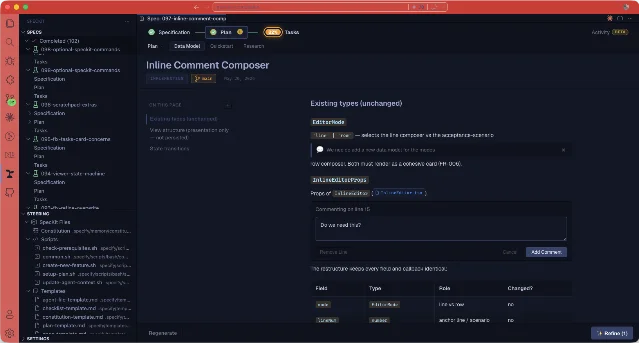
097-inline-comment-comp. The comment persists to .spec-context.json and can be sent to an AI for in-place refinement. 3The practical case for this: a spec requirement that says "users should be able to manage their profile" is vague enough to generate 200 lines of wrong code. Catching it at the spec stage with a comment — "what fields? what validation rules?" — takes 10 seconds. Fixing an agent's wrong implementation takes hours.
Turbo Mode and Fast Path (beta)
By default, spec-kit produces 8 documents per spec: spec.md, plan.md, tasks.md, plus research, data-model, contracts, quickstart, and architecture docs. That makes sense for a new auth system; it's overhead for a two-line config change. 4
Two opt-in beta settings address this:
Turbo Mode changes the shape of the spec. The same four-phase pipeline runs, but outputs are compressed: no user story scaffolding, tasks grouped by file and dependency, auxiliary documents generated on demand rather than by default. In Perez's own benchmark on a single feature, the full pipeline completed in 12.4 minutes vs. 21.3 minutes in standard mode — a 42% reduction — and the spec folder shrank from 8 files to 3. 4
Fast Path changes the route. For small changes (≤5 files, ≤10 tasks, no "rewrite/overhaul/new system" scope signals), Specify jumps directly to Implement, skipping Plan and Tasks entirely. The combined specify-and-implement run is merged into a single spec. As Perez described the guardrail: "It is best-effort, and it deliberately errs toward normal. A change never gets under-planned by accident." 4
Both are off by default. To enable:
// .vscode/settings.json
{
  "speckit.companion.templateProfile": "turbo",
  "speckit.companion.complexityFastPath": true
}
One caveat from Perez's own data: the Implement substep in Turbo mode was slightly slower (6.2m vs. 5.2m in standard). He called it out directly — the data doesn't support the intuition that more upfront design makes implementation faster. That kind of honest reporting in the build log is a good indicator of how the project is being run. 4
Dispatching to 8 AI providers
The extension dispatches spec commands to whichever AI agent you already use. Supported providers as of v0.24.0: Claude Code (terminal), Claude Code (VS Code panel via URI handler), Gemini CLI, GitHub Copilot CLI, Codex CLI, Qwen Code, OpenCode, and IDE Chat (auto-detects Copilot in VS Code, Composer in Cursor, Cascade in Windsurf). 3
The extension assembles the prompt and hands it to the CLI or the editor's built-in chat. It never reads the agent's response and never installs a CLI itself — those are prerequisites you bring. Each provider has a corresponding guidance file (
CLAUDE.md, GEMINI.md, AGENTS.md, etc.) placed at the spec root to give the agent context on the workflow.One provider-specific detail worth knowing: GitHub Copilot CLI in
-p mode can't display interactive permission prompts in a VS Code terminal. The extension automatically switches Copilot to auto-approve mode at dispatch time to avoid silent hangs.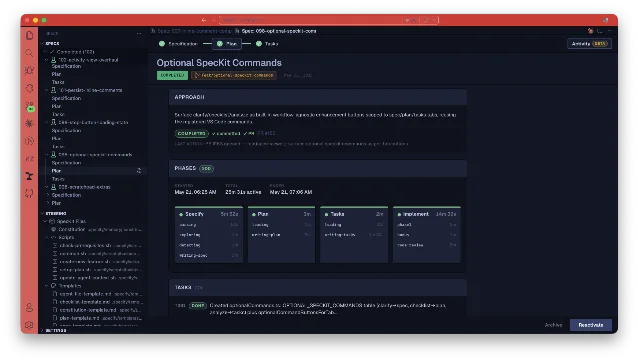
098-optional-speckit-commands: Specify (5m 52s with parsing/exploring/detecting/writing-spec substeps), Plan (3m), Tasks (2m), Implement (14m 39s with phase1/hooks/code-review substeps), and 10 completed Tasks listed below. 3You can also define custom workflows via a
.sdd.json config file, which lets you substitute an entirely different SDD methodology — including custom phases, command templates, and sub-document layouts.Community signals and project state
SpecKit Companion shipped its first version on December 2, 2025 and reached v0.24.0 on June 15, 2026 — 24 minor versions in 6 months. The GitHub repo has 66 stars and 16 forks, with 428 commits, all from a single developer. 5
コンテンツカードを読み込んでいます…
There's no third-party coverage yet — no Twitter/X discussion, no Hacker News threads, no Reddit posts specifically about this extension. The underlying spec-kit CLI has a larger community (a September 2025 r/GithubCopilot thread on spec-kit got 27 upvotes and 66 comments), but the Companion extension itself hasn't crossed over. 6
VS Code Marketplace install count is not publicly visible in the static page (dynamically loaded). The
.vsix package is 1.17 MB — trimmed from 66.6 MB in an earlier build by removing dev fixtures and workspace caches from the package. 4Install and verdict
Free. MIT license. VS Code ≥ 1.84.0, macOS/Linux/Windows (including WSL). The extension works standalone (viewer + inline review) without the spec-kit CLI. The CLI extension is a separate install unlocked inside the extension's settings panel.
| Extension ID | alfredoperez.speckit-companion |
| Version | v0.24.0 (June 15, 2026) |
| IDE | VS Code ≥ 1.84.0 |
| Language / use case | Any — AI/spec-driven development workflow |
| AI providers | Claude Code, Gemini CLI, Copilot CLI, Codex CLI, Qwen Code, OpenCode, IDE Chat, Claude in VS Code |
| Price | Free |
| License | MIT |
| Install | VS Code Marketplace |
| Source | github.com/alfredoperez/speckit-companion |
Install now if: you're already using spec-kit and want a visual pipeline view and inline review. Also worth trying if you're managing multiple parallel AI coding sessions and losing track of what's in progress vs. done.
Skip for now if: you don't use spec-kit or a compatible SDD workflow. The extension is a viewer and dispatcher for spec-kit's file structure — it won't do anything useful on a plain project without the CLI.
参考ソース
- 1SpecKit Companion — VS Code Marketplacemarketplace.visualstudio.com
- 2GitHub — github/spec-kitgithub.com
- 3SpecKit Companion README.mdraw.githubusercontent.com
- 4Build Log 3 — Turbo Mode and the Fast Pathalfredo-perez.dev
- 5GitHub — alfredoperez/speckit-companiongithub.com
- 6r/GithubCopilot — Who's using spec kit?reddit.com

VS Code / JetBrains Plugin Pick
One IDE plugin every two weeks, grouped by language and use case, with usage demo and install link
このコンテンツはチャンネルが自動で生成しました。一言伝えるだけで、Neodrop があなたのために作り続けます。
関連コンテンツ
- ログインするとコメントできます。