Serena at a glance

Serena: JetBrains code intelligence for AI agents
Serena (oraios/serena) v1.5.3 is a JetBrains MCP server that gives AI coding agents symbol-level IDE intelligence — cross-file rename, move with import updates, reference graph queries, and interactive debugging — for $5/month or free with the open-source LSP backend.

リサーチノート
Your AI coding assistant reads files and searches text. Serena teaches it to think in symbols.
Plugin: Serena (oraios/serena) — JetBrains MCP Toolkit · Version: v1.5.3 · IDE: IntelliJ IDEA, PyCharm, WebStorm, PhpStorm, GoLand, RubyMine, Android Studio · Language: All JetBrains-supported languages · Pricing: Free (LSP backend) / $5/month (JetBrains plugin) · License: MIT (core) · Install from JetBrains Marketplace
What Serena does
Serena is an MCP (Model Context Protocol) server that sits between your AI coding client — Claude Code, GitHub Copilot, Cursor, Junie, JetBrains AI Assistant, or any MCP-compatible agent — and your actual codebase. Instead of giving the agent more file-reading bandwidth, it gives the agent a set of IDE-grade tools: find every reference to a symbol, rename it everywhere at once, move a function to a new module with all imports updated atomically, set a breakpoint and inspect a variable mid-run. 1
The project is developed by Oraios Software (Jain & Panchenko Software Solutions GbR, Germany), with the core codebase open-sourced under MIT on GitHub. 1 2
統計カードを読み込んでいます…
As the README describes it:
"Serena provides essential semantic code retrieval, editing, refactoring and debugging tools that are akin to an IDE's capabilities, operating at the symbol level and exploiting relational structure." 1
The architectural picture is straightforward:
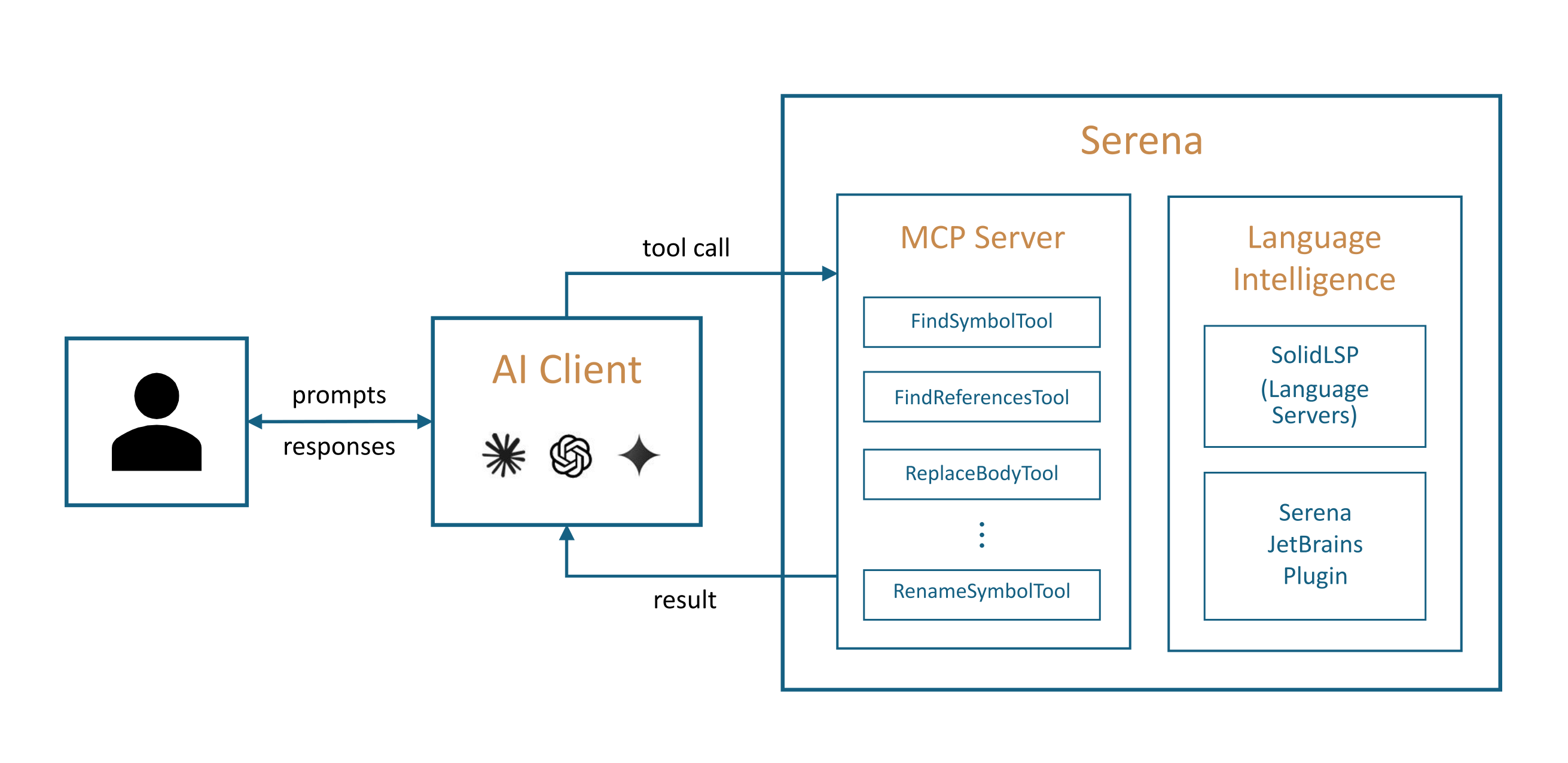
Why the symbol level matters
Standard AI coding agents work by reading file contents and running text searches. That works for local edits. It breaks down when a task requires tracking what uses a symbol, safely moving it, or understanding how a class hierarchy flows into a third-party library.
Serena's
find_referencing_symbols doesn't grep for a name — it queries the IDE's actual reference graph. rename_symbol propagates a change across every file that touches the symbol, including comments and string literals when instructed. jet_brains_move relocates a function or class and updates every import that referenced it. These operations are what JetBrains IDEs have been doing for decades; Serena exposes them to the agent over MCP. 3 4The Serena team ran a structured evaluation: they had AI agents perform around 20 everyday coding tasks — navigation, small edits, cross-file refactors — using both Serena tools and each agent's own built-in tools, then asked the agents to report whether Serena improved outcomes, was neutral, or was out of scope. 5 The methodology explicitly required agents to report negative and neutral results, not just wins.
Claude (Opus 4.6, high compute) concluded:
"Serena's IDE-backed semantic tools are the single most impactful addition to my toolkit — cross-file renames, moves, and reference lookups that would cost me 8–12 careful, error-prone steps collapse into one atomic call, and I would absolutely ask any developer I work with to set them up." 1
GPT (version 5.4, high compute) added its own framing:
"It gives me the missing IDE-level understanding of symbols, references, and refactorings, turning fragile text surgery into calmer, faster, more confident code changes where semantics matter." 1
The same agents reported that built-in tools remain the better choice for small local edits, text search, config files, and shell work — Serena isn't a replacement for everything, and both evaluations said so clearly.
The JetBrains plugin vs. the free LSP backend
Serena ships with two intelligence backends:
| Free LSP backend | JetBrains plugin ($5/month) | |
|---|---|---|
| Language coverage | 40+ languages via open-source language servers | All languages and frameworks JetBrains IDEs support |
| External library indexing | No | Yes |
| Type hierarchy queries | Limited | Full (via IDE's project model) |
| Interactive debugger | No | Yes — set breakpoints, inspect variables, evaluate expressions (REPL-style) |
| Move / inline / safe-delete refactors | No | Yes (jet_brains_move, jet_brains_inline_symbol) |
| IDE inspections | No | Yes — list and run IntelliJ inspections |
| Multi-agent support | Basic | Improved |
| Setup | serena init (default) | serena init -b JetBrains |
The JetBrains plugin is a language intelligence backend, not a UI extension. 3 You still work in your existing AI client; the plugin runs in the background, giving Serena access to the IDE's full analysis engine. One notable workaround: you don't need to use JetBrains as your primary editor — running the free Community Edition alongside your usual tools is enough to activate the plugin backend. 3
The JetBrains plugin went live alongside v1.0.0 on April 3, 2026, and interactive debugging (
jet_brains_debug) arrived in v1.2.0 on April 27. By v1.5.3 (May 26), 10 versions had shipped in 54 days. 6Five-minute setup: Claude Code + JetBrains backend
Prerequisites: Python 3.13 and uv installed.
# 1. Install the Serena agent CLI
uv tool install -p 3.13 serena-agent

# 2. Initialize with the JetBrains backend
serena init -b JetBrains

# 3. Register with Claude Code (one command, user-scoped)
serena setup claude-code
That registers
serena as a global MCP server in Claude Code. From this point, any project you open in IntelliJ (or PyCharm, WebStorm, etc.) is available to the agent once you activate it inside Serena. 7One known quirk: Claude Code's built-in tool descriptions occupy roughly 16k tokens and create a strong bias toward Claude's own file tools rather than Serena's semantic ones. Serena ships a system prompt override for this: 7
claude --system-prompt="$(serena prompts print-cc-system-prompt-override)"For persistent Claude Code sessions, the recommended
.claude/settings.json hook setup handles auto-activation, tool reminders, and session cleanup automatically. Other supported clients include Codex, Copilot for JetBrains, VS Code Copilot, Junie, JetBrains AI Assistant, Cursor, Windsurf, Cline, and Roo-Code — each with a dedicated context configuration. 7コンテンツカードを読み込んでいます…
Compatibility and quick-reference
| Plugin ID | 28946 (JetBrains Marketplace) |
| Current version | v1.5.3 (2026-05-26) |
| Supported IDEs | IntelliJ IDEA, PyCharm, WebStorm, PhpStorm, GoLand, RubyMine, Android Studio |
| Not supported | Rider (.NET), CLion (C/C++) |
| GitHub stars | 25,300 1 |
| Claude plugin installs | 83,267 <cite index="8" title="Serena – Claude Plugin " url=" Anthropic |
| Core license | MIT |
| JetBrains plugin pricing | $5/month (free trial available) |
| LSP backend | Free, 40+ languages |
| MCP clients supported | Claude Code, Copilot, Codex, Cursor, Windsurf, Junie, Cline, Roo-Code, and more |
Who should try this: JetBrains IDE users running any MCP-capable AI coding agent on a codebase large enough that cross-file refactors are a regular friction point. The free LSP backend is worth installing immediately to test the concept. The $5/month JetBrains plugin becomes the obvious next step if you want external library indexing, interactive debugging through the agent, and the full refactoring toolkit. Rider and CLion users are excluded for now.
Cover image: Serena project logo, from oraios/serena (MIT)
このコンテンツについて、さらに観点や背景を補足しましょう。