Notion AI now runs real code — here's what the community found before Notion announced it
On June 10, 2026, two r/Notion users independently confirmed an unannounced Notion AI feature: a live Amazon Linux 2023 sandbox (Python 3.13, Node 24, pandas, LibreOffice) plus a Sub Agents delegation panel. Neither is in any official changelog. Here's what each tool can do and what PMs should try — carefully — right now.

Spotted June 10, 2026. Not in any official changelog as of June 11.
Two r/Notion users posted screenshots yesterday showing something Notion hasn't announced: a live code sandbox inside Notion AI running on Amazon Linux 2023, plus a Sub Agents delegation panel. No press release, no changelog entry, no @NotionHQ tweet. 1 2 This appears to be an Alpha rollout limited to a subset of accounts — it may not be visible in yours yet. If it is, here's exactly what it can do.
Prerequisites
| Requirement | Detail |
|---|---|
| Notion plan | Unknown — Alpha rollout, not confirmed across all plans |
| Access status | Unannounced; visible to some accounts as of June 10, 2026 |
| Trigger phrase | Type load computer tools in any Notion AI chat |
| Sub Agents trigger | Type can i get a sub agent demo in any Notion AI chat |
| Stability | Alpha — feature may disappear or change without notice |
What the community found
Reddit user u/Small-Percentage-962 posted a gallery titled "Cool new things in Notion AI (Sandbox and Sub Agents)" on June 10, with two screenshots showing a sandbox description and a Sub Agents UI panel. 3 Hours later, u/adammillion posted a separate screenshot under "Computer Tools," writing: "Just tested this in Notion AI. Been waiting for the ability to run code." 4 Two independent sightings on the same day, zero official confirmation.
The Notion Developer Changelog's latest entry on June 10 covers only "Bots in people properties." 1 Releasebot.io's aggregated release notes show v7.21.0 (June 9) as the most recent build. 2 Neither mentions a sandbox.
The sandbox: a real Linux machine inside Notion AI
When Notion AI describes the sandbox, it's specific: "It's a real Amazon Linux 2023 machine I can drive — Python 3.13 and Node 24, working directory
/data." 3The terminal output in the screenshot confirms this isn't marketing copy:
=== whoami & system ===
vercel-sandbox
Linux 9a32ceb5-bca 5.10.174 #1 SMP Thu Jun 4 22:48:28 UTC 2026 x86_64 GNU/Linux

=== python & node ===
Python 3.13.13
v24.14.1

=== working dir ===
/vercel/sandbox

=== quick compute demo ===
mean: 18 | stdev: 12.32
The hostname
vercel-sandbox and path /vercel/sandbox suggest Vercel's infrastructure powers the execution environment, though Notion hasn't confirmed this. 3 The tab label in the UI reads Computer [Alpha] / Terminal, which makes the experimental status explicit.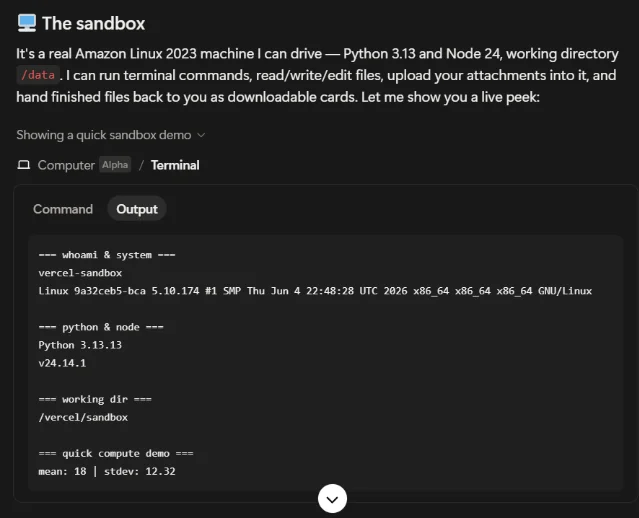
The computer tools API: five operations, serious package list
Typing
load computer tools surfaces the full sandbox API. 4 Five tools are available:| Tool | What it does |
|---|---|
terminal | Run shell commands (starts in /data) |
writeFile / editFile / applyPatch | Create and modify files |
readFile | Inspect file contents |
uploadFile | Pull conversation or Notion attachments into the sandbox |
downloadFile | Hand a finished file back as a downloadable card |
The preinstalled package list is the real PM unlock: pandas, openpyxl, python-docx / pptx, PDF tooling, ffmpeg, ImageMagick, LibreOffice, and Remotion are all present. 4
That combination means Notion AI can accept a CSV or Excel attachment, run pandas analysis, write results into a
.pptx or .docx, and hand the finished file back — without leaving Notion, without switching to Claude or ChatGPT Code Interpreter.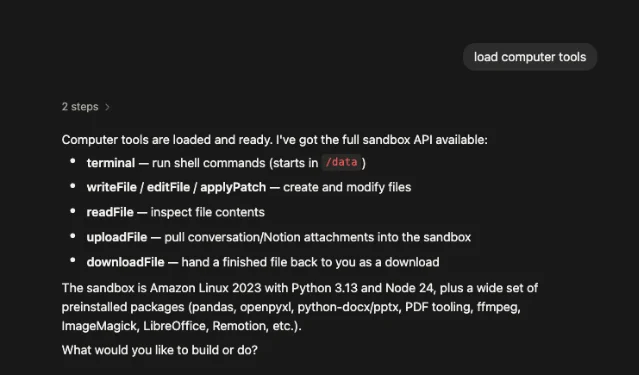
Sub Agents: Notion AI delegates tasks to specialist agents
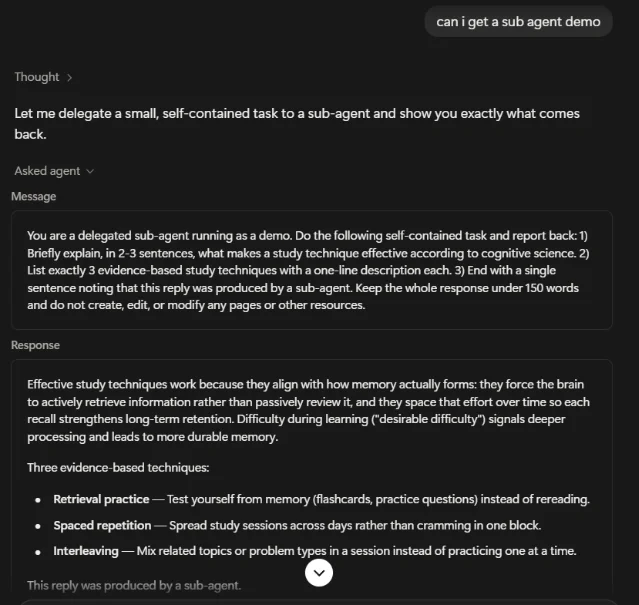
The second discovery is structurally different. When prompted, Notion AI's thought process reads: "Let me delegate a small, self-contained task to a sub-agent and show you exactly what comes back." The UI then shows an "Asked agent" panel containing the delegated prompt and the returned response, ending with: "This reply was produced by a sub-agent." 3
The demo task in the screenshot is deliberately minimal — a study-techniques question — but the architecture it reveals is not. The main Notion AI session formulated a structured prompt, dispatched it to a separate agent, received a structured response, and surfaced it inline. That's a multi-agent loop running inside a single Notion chat window.
What this could mean for PMs once it matures: one Notion AI session orchestrating specialized sub-agents — one that reads sprint data, one that drafts a stakeholder summary, one that formats the output into a page. Whether Notion intends Sub Agents to interact with Notion databases or stay sandboxed to the chat context is unknown; the current demo shows only a standalone text task.
Three PM workflows to try now (if you have access)
Sprint data analysis: Attach your sprint export CSV → prompt Notion AI to
load computer tools, upload the file, run pandas to calculate cycle time by assignee, and download a summary .xlsx. No external tool needed.Report generation: Prompt Notion AI to write sprint results into a
python-docx or python-pptx template and hand it back as a downloadable file. The preinstalled python-docx / pptx libraries handle formatting — tables, charts, styles.Sub-agent research delegation: If Sub Agents is visible in your account, try prompting: "can i get a sub agent demo" — then follow with a real task ("summarize the three highest-priority risks in this PRD"). Observe whether the delegated prompt shows up in the "Asked agent" panel and whether the returned response is structured enough to paste directly into a Notion page.
Gotchas
Alpha means it can disappear. The "Computer [Alpha]" label in the terminal tab is not a soft disclaimer — Alpha features at Notion have disappeared from UI before. Do not build a workflow dependency on this until it ships officially.
vercel-sandbox hostname suggests Vercel infrastructure. Execution environment details matter for security-conscious teams: files written to /vercel/sandbox during a session are not a Notion page — persistence across sessions is unconfirmed. Do not treat the sandbox as durable storage.uploadFile enables attachment-based workflows. Attaching a file via uploadFile pulls it into the sandbox filesystem, where Python can process it. This is functionally similar to Claude's file upload, but the file moves through Notion's servers. Verify your organization's data policy before uploading sensitive sprint data or customer data.No official usage limits disclosed. Claude's Code Interpreter has execution time caps; ChatGPT's has compute quotas. Notion hasn't published any equivalent limits for the sandbox, which means they could be introduced without warning.
Sub Agents scope is undefined. The current demo shows a text-only delegation. Whether Sub Agents can read or write Notion databases, invoke Workers, or call external APIs is unknown. Treat it as a preview of architecture, not a deployable feature.
Cover image: u/Small-Percentage-962 via r/Notion
このコンテンツについて、さらに観点や背景を補足しましょう。