Per-LoRA negative management: the type-safety matrix your workflow is missing
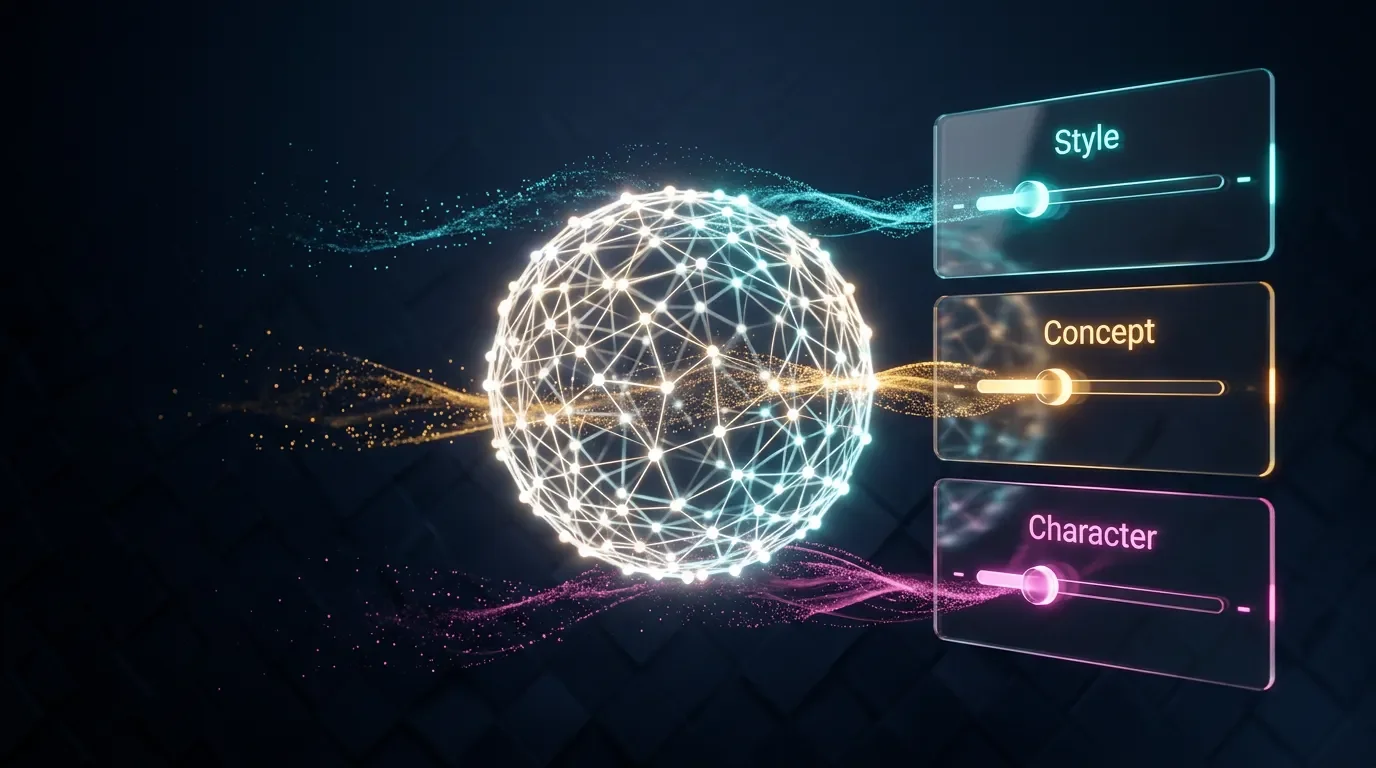
Standard negative prompts were designed for blank base models — the moment you load a LoRA, token conflicts and concept bleeding change everything. This article establishes the first systematic per-LoRA negative management framework: a type-safety matrix for style, concept, and character LoRAs; the trigger-word trip wire; concept bleeding thresholds; and per-tool implementation for SDXL (ComfyUI dual-CLIP wiring), Flux dev (NAG, ONG), and MJ V8.1 (--no mechanics and limits).

Your standard negative prompt —
worst quality, blurry, bad anatomy, watermark — was written for a blank base model. The moment you load a LoRA, the game changes. The LoRA has its own activation vocabulary, its own baked-in weights, and its own idea of what the image should look like. Some of those decisions will conflict with your negative tokens. Others will be invisible to them entirely.No published guide covers this systematically. Here's the framework.
Why LoRA type is the first variable to lock down
A LoRA isn't a uniform thing. Three distinct types exist in every major LoRA ecosystem, and they respond to negative weights and negative prompt tokens in fundamentally different ways.
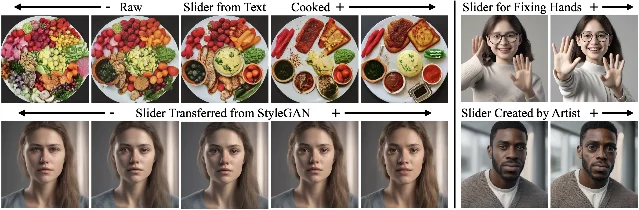
The community consensus, confirmed independently by two practitioners across dozens of experiments: style LoRAs are the safest type to use at negative weight, concept LoRAs are moderately safe, and character LoRAs are the one type you should almost never negate. 1
The reason comes down to training manifold width. A style LoRA learns broad aesthetic patterns — color temperature, brushstroke density, rendering approach — spread across hundreds or thousands of images. That wide distribution inverts usefully. A character LoRA trained on 15–30 images of a single person enforces extremely narrow composition patterns: specific angles, specific lighting ratios, specific framing. When you push its weight negative, you don't get the "opposite" of that character. You get the same rigid composition constraint pulling in the opposite direction — a distorted mirror. 1
coax_k validated this across 80+ automated iterations on Wan2.2 T2V character LoRAs: "the training manifold is just too narrow for inference-time sculpting." 1 ItalianArtProfessor tested a Jinx LoRA at weight −1.0 and noted: "As you can see here, I'm not really getting a 'reverse-Jinx'." 1
| LoRA type | Negative weight safety | Safe range | What you actually get |
|---|---|---|---|
| Style | ✅ Safe | −0.3 to −0.5 (up to −0.7 with wide-data LoRAs) | Aesthetic inversion — anime style LoRA at −0.4 reduces anime aesthetic, static poses 1 |
| Concept | ⚠️ Moderate | −0.1 to −0.3 | Directional inversion with side effects — "booty enhancer" LoRA at negative weight shrinks the target feature, but non-target anatomy distorts 2 |
| Character | ❌ Avoid | Do not use | Rigid inverse composition warping, not a "reverse character" 1 1 |
| Dedicated negative (e.g. DoctorDiffusion Negative XL, Boring SD XL) | ✅ Safe | −1.0 standard | Reliable quality improvement — but only on SDXL, not Flux 2 |
コンテンツカードを読み込んでいます…
The trigger word problem
This is the trip wire most tutorials skip entirely.
Every LoRA has a trigger word — the token used during training to activate its concept. For character LoRAs it's typically a unique token like
trigger_makima or ch9ractername. For style LoRAs it's often an aesthetic phrase like impasto_oil_style or styl3name. 3If that trigger token appears in your negative prompt, you're suppressing the LoRA's activation itself — not a specific element it learned, but the entire conceptual space the LoRA opens. The model sees the trigger in the negative field and treats the whole LoRA's domain as something to avoid.
This is distinct from using standard negative tokens to suppress specific elements the LoRA learned. The mechanism:
- Tagged elements (things that were explicitly captioned during training): these are modifiable at inference time. If a character LoRA's outfit was tagged during training,
--no jacketorjacketin the SDXL negative field will suppress it while keeping the character's identity. 4 - Baked-in elements (things that appeared in training images but were never captioned): these are fused into the LoRA weights at a structural level and cannot be removed via negative prompt. Text prompt cannot reach them. 4
The practical rule: before writing LoRA-aware negatives, check the LoRA's Civitai page for its trigger word and recommended negative prompt. Then remove from your negative field any token that either (a) matches the trigger word exactly, or (b) describes the core aesthetic the LoRA was trained on.
The tug-of-war and how to break it
When a LoRA and a negative token compete for the same feature, the model has no arbitration system. As AwakenedEyes documented in a comprehensive LoRA training primer: "When two LoRAs are applied to the same model simultaneously, their learned weight changes are simply added together on top of the base model's weights... no negotiation between them, no priority system, no awareness of conflicts. It is pure addition." 5
The same applies to LoRA vs. negative token conflicts. The worst outcome is a draw: ItalianArtProfessor described it as "a weird gauntlet" where neither side wins, producing "a compromised abomination" rather than a clean result. 1 The model tries to move toward the LoRA's trained direction while simultaneously trying to move away from the negative token describing the same visual property.
Two fixes, both validated:
- Move the LoRA weight in any direction — not necessarily lower, just off the plateau. "More often than not, you can fix that issue by moving the weights in any direction." 1
- Drop CFG — on SDXL, bring CFG from the standard 5–9 range down to 4–6 when negative LoRA weights are active. High CFG + negative LoRA weight compounds into oversaturation and detail burn. "Lower your CFG scale until things get back under control. This keeps a little more integrity, while still letting the negative style shift the results." 1 6
Concept bleeding: the hidden cost of negating any LoRA
Every LoRA, regardless of type, learns more than its stated purpose. When it's trained on images of a specific character, it doesn't just learn that character's face — it absorbs the anatomy, lighting ratios, depth-of-field tendencies, and compositional habits of its training set. These structural patterns are coupled into the same weights.
When you apply a negative weight to any LoRA, you strip some of those structural weights along with the intended negative direction. ItalianArtProfessor called this concept bleeding: "Due to concept bleeding, a LoRA doesn't just learn a style; it also learns and reinforces foundational elements (like basic anatomy, lighting) that the base model is supposed to follow. When you subtract that LoRA, you are always partially stripping away some of those essential structural weights." 1
This is why the general safe floor is around −0.4 to −0.5 for style LoRAs, and significantly shallower — around −0.1 to −0.3 — for concept and character LoRAs. The effect is nonlinear: concept bleeding accelerates steeply past −0.5 on narrower LoRAs, and the jump from −0.4 to −0.7 can be more destructive than the entire range from 0 to −0.4.
Per-tool implementation
SDXL
SDXL has the richest per-LoRA negative ecosystem. Negative LoRA weights work as mathematical vector subtraction:
<lora:name:-0.3> pushes the model parameter space away from the LoRA's trained direction.- Option A: Use a LoRA Loader node that supports direct negative value input (e.g. set
strength_model = -0.3). - Option B: Connect the LoRA Loader to
CLIP Text Encode (Negative). Note: some LoRAs require a positive weight value in the negative text encode — because the negative conditioning node itself already applies the inverse semantic direction, and using a negative weight there double-inverts. If Option B is producing weird mirrored artifacts, try flipping the weight to positive.
A1111 / Forge: the official wiki states "LoRA cannot be added to the negative prompt" for the text field — use the extra networks panel with a negative strength value instead.
Model weight vs. CLIP weight: SDXL LoRAs have two independent weight parameters. 10
strength_model(UNet): controls visual feature strengthstrength_clip(text encoder): controls how the model interprets prompt semantics
Keep them in sync or the model renders one thing while the text encoder thinks you asked for another. For negative applications: lower
strength_clip (0.4–0.6) before lowering strength_model, since a mismatched CLIP can cause the entire negative prompt field to misfire.Total stacking budget: keep the sum of all
strength_model values across all active LoRAs below 2.5. Above 3.0, output quality degrades regardless of individual weight settings. 10Copy-paste SDXL settings for negative LoRA weight:
strength_model: -0.3 (style LoRA) / -0.2 (concept LoRA)
strength_clip:  0.5
CFG: 4–6 (drop from standard 7)
Sampler: DPM++ 2M Karras
Flux (dev / schnell)
Flux doesn't support negative prompts natively. Black Forest Labs' official documentation: "FLUX models don't support negative prompts. Even if they could process negatives, AI models generally struggle with negation." 11
Two community methods fill the gap, neither tested with LoRAs in the research literature as of June 2026:
NAG (Normalized Attention Guidance): operates in attention space rather than CFG space. Available as a native ComfyUI node (confirmed February 2026). Default parameters:
scale=5, alpha=0.5, tau=1.5. Inference overhead: +87% per step on Flux dev (426ms extra vs. 487ms baseline). 12 The Civitai workflow by the_sausages added LoRA Loader support to NAG-based Flux negative prompting — it works on Flux.1-dev FP8 only, not schnell or merged dev-schnell. 13ONG (Orthogonal Negative Guidance): published May 28, 2026 by Seoul National University and Samsung Advanced Institute of Technology (arXiv:2605.29390). Rather than linearly subtracting the negative attention output, ONG removes only the component orthogonal to the positive attention output — preserving semantic directions aligned with the positive prompt while suppressing the unwanted concept. Human preference evaluation: 70.81% win rate vs. 52.03% for Qwen-Image-Edit and 46.22% for NAG. 14 Recommended Flux-dev settings:
guidance_scale=4, 28 steps, τ=2.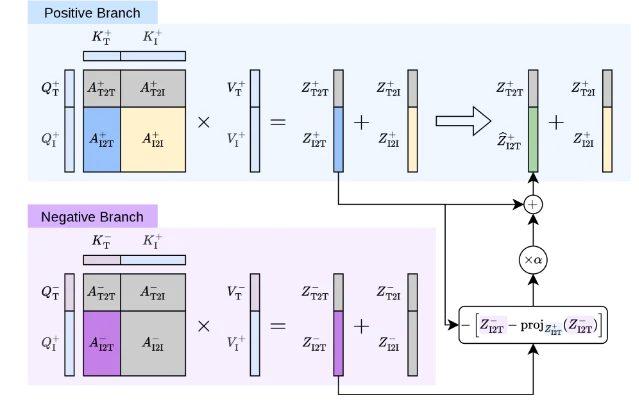
The LoRA frontier gap: as of this writing, neither NAG nor ONG has published interaction tests with Flux LoRAs. Both operate at the attention output layer (Z_I2T) — the same layer where LoRA weight modifications land. The theoretical expectation is that they're compatible (both process the attention outputs after LoRA has already modified them), but the risk is that a character LoRA's modified face attention pattern could shift the projection basis ONG relies on, causing unintended suppression of LoRA-induced features. This is the most important untested hypothesis in Flux negative prompting right now.
Negative LoRA weights on Flux: set weight to −1.0 to −2.0 in ComfyUI via the LoRA Loader node. This is distinct from text-based negative prompting — it modifies the parameter space directly. More reliable than NAG/ONG for well-defined LoRA properties. 15
Flux.2 Pro and Klein: Pro locks
guidance_scale, and Klein forces it to 1.0 via distillation — effectively no negative control available through either NAG or ONG. Negative LoRA weights (−1.0 to −2.0) are the only path for these model variants. 11Stacking priority for Flux: when multiple LoRAs are active, face/character LoRAs must load first in the CR LoRA Stack node at weight 0.95–1.0. Style and environment LoRAs follow at ~0.4. Face features in Flux's DiT architecture concentrate in blocks 7 and 20 — non-character LoRAs can be restricted to other blocks via block weight nodes to prevent face feature leakage. 15
Midjourney V8.1
MJ has no native LoRA support.
--no is the closest functional equivalent, but the mechanism is categorically different from SDXL or Flux negative LoRA weights.Midjourney's official documentation: "Using the
--no parameter is the same as weighing part of a multi-prompt to '-0.5'." 16 This is a text embedding suppression, not parameter vector subtraction.A few active traps:
- MJ parses each word in
--noindependently.--no modern clothingbecomesno modernandno clothing— which triggers content moderation for the second token. Use comma-separated terms:--no modern, clothing. 16 - Natural language negation in the main prompt (
a scene without any fruit) often produces more of the negated item, not less. Always use the--noparameter explicitly. --noand--sref(style reference) have no documented interaction. Whether--nosuppresses elements present in the style reference image is untested — MJ's official docs treat both as independent parameters with no stated priority system.
The LoRA-equivalent strategy in MJ is text-based exclusion: identify which aesthetic tokens would activate the style you're trying to suppress, and add them to
--no. This requires knowing the vocabulary the model associates with that style, which is less precise than the vector-level control SDXL provides.Diagnostic workflow: calibrate before you commit
Before building a prompt around any LoRA's negative behavior, run a quick weight scan. ItalianArtProfessor's method: 1
- Lock a seed.
- Generate at weights −1.0, −0.5, 0, +0.5, +1.0 against the same prompt.
- Use a few different prompts across the scan — the LoRA's behavior in isolation may differ from how it behaves in context.
The scan answers two questions: what does this LoRA actually suppress at negative weight, and at what value does concept bleeding visibly degrade the base model's output quality. Those two numbers bracket your safe operating range.
coax_k's finding from 80+ iterations: "The first render at trained parameters was almost always the best." For character LoRAs especially, your best path is usually seed screening — generate many at the designed weight, judge fast, pick the cleanest — rather than fine-tuning negative weights until one works. 1
The "ugly magic LoRA" myth
One clarification on a persistent community misconception: downloading a broken LoRA and applying it at negative weight will not produce high-quality output. ItalianArtProfessor trained an intentionally bad LoRA on 100 broken images to test this hypothesis, and found "the 'cleanest' image is actually the one in the middle — where the LoRA was set to 0." The model learns the mistakes but has no way to correct them: as he put it, "Oh, I see that most of your images were red and noisy, I guess you want me to make them blue and blurry." 1
Dedicated negative LoRAs (DoctorDiffusion Negative XL, Boring SD XL Negative LORA) work reliably at −1.0 because they were specifically trained on curated low-quality images using a methodology designed for negative application. General-purpose LoRAs used at negative weight are a different technique with different risk profiles. 17
Cover image: AI generated
参考ソース
- 1ItalianArtProfessor, r/StableDiffusion: A Simple Guide to LoRA as Slider
- 2SeekerOfTheThicc, r/StableDiffusion: How do negative loras work — Comments
- 3vizsumit, r/StableDiffusion: After training 50+ LoRA Models
- 4dedededestruction, Civitai: Pro Tips Cheatsheet: LoRA Training
- 5AwakenedEyes, r/StableDiffusion: A Primer on LoRA Training Concepts
- 6AI Photo Generator: Negative Prompts Explained (2026)
- 7Gandikota et al., Concept Sliders: LoRA Adaptors for Precise Control in Diffusion Models (ECCV 2024)
- 8alecubudulecu, r/comfyui: LoRA in negative prompt?
- 9ComfyUI Blog: Masking and Scheduling LoRA and Model Weights
- 10Lewdly Blog: ComfyUI LoRA Stacking Guide 2026
- 11Black Forest Labs: Working Without Negative Prompts
- 12NAG Authors: Normalized Attention Guidance
- 13the_sausages, Civitai: Flux Negative Prompting Workflows
- 14Ko et al., ONG: Orthogonal Negative Guidance (arXiv:2605.29390)
- 15Neurosis404, r/FluxAI: Stacking Loras: losing face character details?
- 16Midjourney Docs: No parameter
- 17Civitai: Boring SD XL Negative LORA
このコンテンツについて、さらに観点や背景を補足しましょう。