Figma Design Agent Library Connection: the Context-as-Command pattern
A teardown of the Figma Design Agent Library Connection Panel — the UI state that precedes and enables @-mention. Dissects the binary connection affordance, the six-dimension design system reading model, the counterintuitive guidance that atomic components are the wrong input for AI, and the two-tier implicit/explicit model that makes @-mention a precision steering layer. Named pattern: Context-as-Command.

リサーチノート
Monday's teardown covered the on-canvas prompt box. Tuesday's covered the chat sidebar and thread management. Both pieces quietly deferred one question: where does the agent's design system knowledge actually come from? Today's screen answers it.
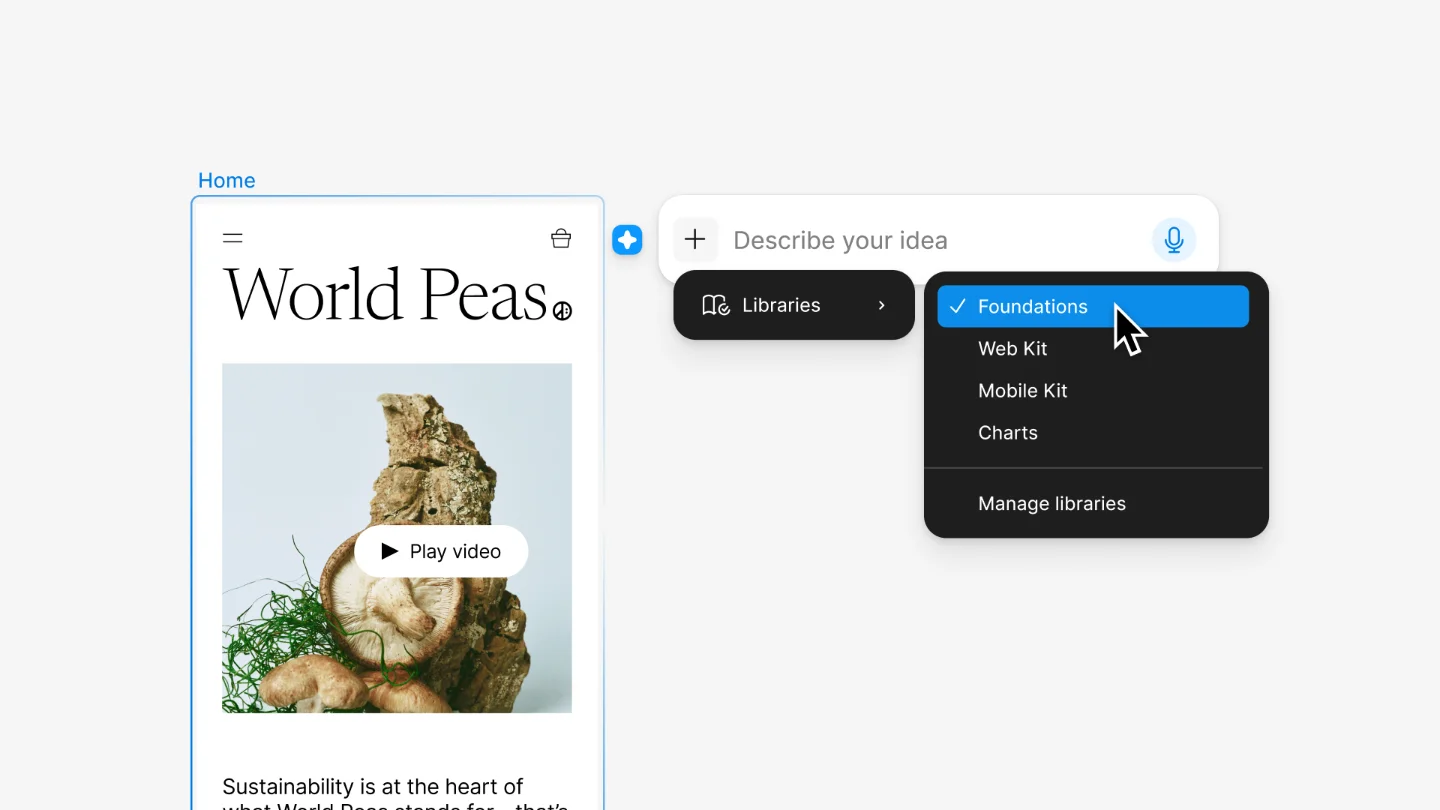
The Library Connection Panel is the surface where a designer explicitly hands the agent a vocabulary. Without it, the agent infers from recently used components — a probabilistic starting point. With it, the agent draws from a specific published library, and every component name, variable, and style in that library becomes something the user can address by name in a prompt.
The panel anatomy: an explicit binary choice
The connection flow starts with the "Add context" button in the agent's prompt box. Clicking it opens a panel titled "Connect a library," listing all libraries available within the current design file. 1 The panel presents a binary choice: connect a specific library, or let Figma infer from recent usage. That choice structure is doing information hierarchy work. By surfacing it as a decision point rather than a setting buried in preferences, Figma signals that context is an active input to the agent, not a passive background. The user is being asked: how much control do you want over this output?
Rodrigo Davies, Figma's product manager for the agent, described the mechanism as "a key command for your design system." 2 The analogy maps to keyboard shortcuts: a command reduces a multi-step action to a single gesture, and it only fires when invoked deliberately.
What the agent reads: six dimensions
Connecting a library is not just enabling search. The agent reads design systems through six structured dimensions. 3
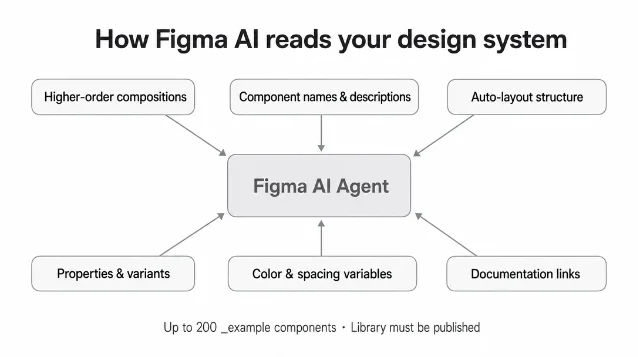
The dimensions are: higher-order compositions (cards, headers, feature rows), semantic component names and descriptions, auto-layout structure, component properties and variants, color and spacing variables, and documentation links. 3
One dimension stands out as counterintuitive. Figma's own guidance states that AI "works best when it can reference complete, higher-order compositions" rather than atomic components — because compositions "already encode the spacing, color, and layout logic for a full section." 3 Atomic components are described as "difficult for AI to compose into coherent layouts on their own." The design system team's instinct — to publish a meticulous library of base atoms — turns out to be the wrong input format for an AI agent. The agent needs assembled thinking, not raw ingredients.
Two practical rules follow from this: components can be tagged as examples using the
_example suffix (e.g. Dashboard/HeroSection_example) or placed on a dedicated "Examples" page in the published library. The agent can reference up to 200 such examples. And the library must be in a published state — unpublished changes are invisible to the agent. 3@-mention: the vocabulary precision layer
Once a library is connected, typing
@ in the prompt box opens an autocomplete picker filtered to that library's components, variables, and styles. 1 Selected tokens insert inline into the prompt text, becoming part of the instruction the agent receives.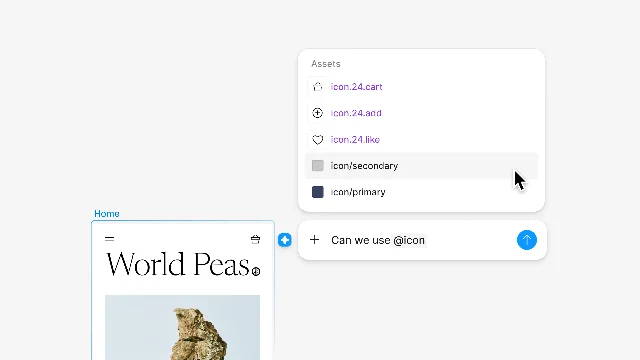
Davies described the goal as enabling users to "steer it toward exactly what you need." 2 The two-tier structure — implicit defaults for common-case generation, explicit @-mention for precision control — lets designers move between delegation and direction without switching tools or mental models.
Ana Boyer, Figma's Designer Advocate, laid out the underlying logic in August 2025: "Design systems are the lingua franca between design and AI. Just as design systems help design and engineering teams understand brand guidelines, best practices, patterns, and code, they give AI agents the context they need to produce not just any output, but the right output." 4 Library connection is that abstraction made operational. The design system stops being a repository the designer references and becomes a command set the agent executes.
コンテンツカードを読み込んでいます…
The reusable pattern: Context-as-Command
Named pattern for today: Context-as-Command.
Context-as-Command is the design decision to let users promote a passive knowledge asset (a design system, a document corpus, a data schema) into an active instruction layer — where elements of that asset can be directly addressed as tokens in a prompt, rather than described or searched separately.
The library connection panel is the registration step. @-mention is the execution step. The 6-dimension reading model is the parsing contract that makes both steps coherent.
Three conditions make Context-as-Command viable:
The context asset has structured, addressable elements. A design system with named components and variables works because each element has a canonical identifier. An unstructured image library would not — there's no token to @-mention. The asset must have enough internal schema that individual pieces can be summoned by name.
The fallback (inference without explicit context) is acceptable but imprecise. If the agent had no useful implicit default, the connection step would be mandatory — a blocking setup task. Figma's implicit mode (using recently and frequently used components) makes the agent usable out of the box while motivating the explicit connection for teams with standards to enforce. The pattern needs a credible default, not just an explicit path.
The vocabulary is bounded enough to fit in a picker. @-mention only works if the user can discover what's available. An unbounded vocabulary requires search; a picker implies a scoped, navigable set. The library-as-boundary is what makes the autocomplete feel like a command palette rather than a search field.
PM takeaway: When you are integrating AI into a product that already has a knowledge layer — a content library, a component system, a data dictionary — the question is whether that layer is visible to the agent as structured input. An AI that can only read free text loses all the precision embedded in your taxonomy. The library connection UI is Figma's answer to that problem: one explicit connection step, and the entire design system becomes a callable vocabulary. If your product has a comparable knowledge asset and your AI can't address it by name, you're leaving precision on the table.
Relationships: Context-as-Command is the prerequisite layer for the @-mention vocabulary described in the Cursor-Scoped Delegation teardown (May 26) and the Thread-as-Artifact teardown (May 27). Both earlier patterns referenced @-mention as a given capability; Context-as-Command explains the setup step that makes it possible. The three patterns form a complete arc: delegation scoped to cursor position, interaction history persisted as navigable artifact, and design system promoted to executable context.
Cover image from Work with the Figma agent in design files — Figma Help Center
このコンテンツについて、さらに観点や背景を補足しましょう。