Flux dev vs schnell vs Pro 1.1 — denoise decoded
Each Flux variant has a distinct parameter contract — Schnell requires guidance_scale=0 and hard-caps at 4 steps; Dev defaults to 3.5 and peaks at 20–25 steps; Pro 1.1 exposes tunable params via API. Plus a per-use-case denoising_strength reference table (face fix at 0.15–0.30 through heavy redraw at 0.70–1.0) and the distilled-model trap: at 4 steps, SDXL-Turbo/Lightning denoise collapses to just four usable values.

Set
num_inference_steps=50 on Flux Schnell and nothing breaks — but you also get zero extra quality. Set guidance_scale=0.5 on Flux Dev and your output goes flat and textureless. These aren't edge cases. They're the two most common parameter mistakes when someone switches between Flux variants, and they both trace back to a single fact: each Flux variant was distilled differently, so each one has a different parameter contract.This guide covers the parameter contract for each Flux variant, then explains how
denoising_strength behaves across SDXL, Flux, and distilled models in img2img — including one confirmed constraint from Stability AI's own model card that changes how you should think about the slider entirely.Flux variant parameter contracts at a glance
| Variant | guidance_scale | num_inference_steps | CFG | License |
|---|---|---|---|---|
| Flux.1 Schnell | Must be 0.0 (hard requirement) | 1–4 (designed for 4; more = no gain) | Must be 1 | Apache 2.0 |
| Flux.1 Dev | Default 3.5, range ~1.5–5.0 | 20–25 community sweet spot (official rec: 50) | Must be 1 | Non-commercial |
| Flux.1 Pro 1.1 | Tunable (undocumented default) | Tunable (SurePrompts rec: 40–50 for production) | Must be 1 | Commercial API |
The CFG=1 rule applies universally. As GPUStack's documentation puts it: "For FLUX models, it is recommended to disable CFG (CFG=1) for better results." 1 In ComfyUI, SwarmUI, and Forge, the slider labeled "CFG Scale" typically maps to Flux's
guidance_scale — not traditional CFG. The actual true_cfg_scale parameter must stay at 1.Why Schnell needs
guidance_scale=0: Schnell is timestep-distilled. During training, the guidance signal was folded into the model weights. Passing any nonzero guidance_scale at inference reapplies guidance on top of already-guided weights. The Hugging Face Diffusers docs are explicit: "guidance_scale needs to be 0." 2Why Dev's
guidance_scale range caps at ~5: Dev is guidance-distilled, which means it needs the guidance_scale signal at inference — but only within a calibrated range. Below 1.5, images go flat. Above 5.0, composition degrades. The Hugging Face docs confirm the default: "guidance_scale (float, optional, defaults to 3.5) — Embedded guidance scale is enabled by setting guidance_scale > 1." 2 For more realism, one r/StableDiffusion user reported dropping it to 1.5 in Forge's "Distilled CFG Scale" field and getting noticeably more photographic output.On Dev's step count: The official recommendation of 50 steps holds up in pixel-quality terms, but community testing consistently shows 20–25 steps produce results that are indistinguishable to most eyes. Reddit user Turkino summarized it: "Euler, normal, 20-25 steps are my go-to. I've seen very little improvement from going higher in steps." 3 Going above 50 steps occasionally over-sharpens portraits — some users report harsh shadow edges at 50 steps that soften when they drop to 25.

Copy-paste settings for Flux Dev:
guidance_scale: 3.5        # portraits; try 1.5 for more photorealistic output
num_inference_steps: 20-25 # 50 if you need maximum detail
sampler: euler
scheduler: normal (or discrete)
CFG (true_cfg_scale): 1
max_sequence_length: 512   # Schnell: 256 max
How denoising_strength actually works
Before getting to per-model values, the mechanics:
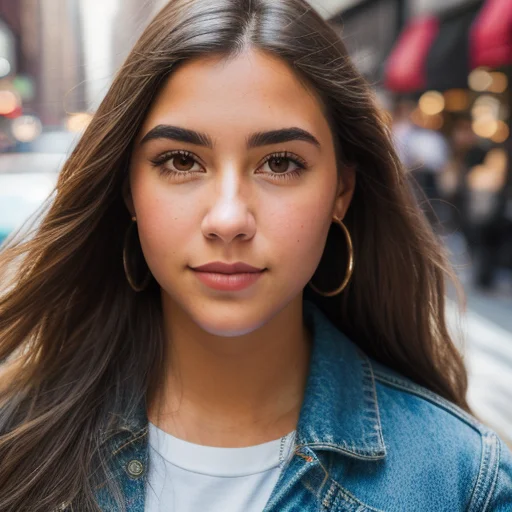
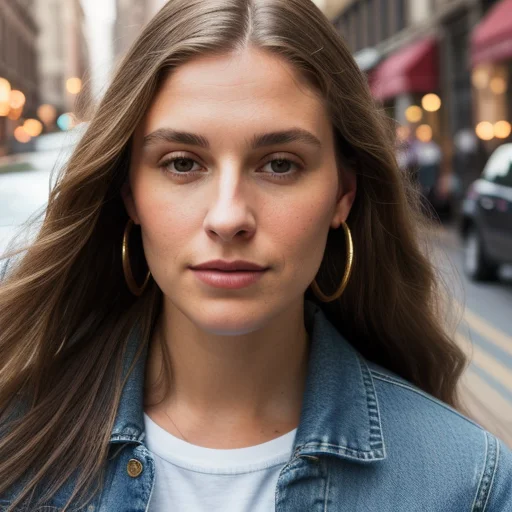
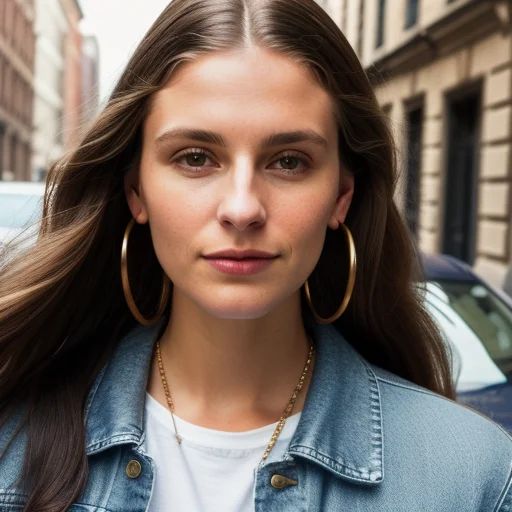
denoising_strength (called denoise in ComfyUI's KSampler node, denoising_strength in AUTOMATIC1111 and SD.Next) controls which timestep the diffusion process starts from. At 0, no noise is added — the output is identical to the input. At 1.0, the image is fully replaced with random noise and regenerated from scratch, equivalent to txt2img. Stable Diffusion Art's gradient test on the same portrait across six values makes this visible. 5At 0: the image below is unchanged. By 0.4, lighting and skin details shift. By 0.8, only the broad composition survives.
Per-use-case denoise reference (SDXL / standard models)
| Use case | Denoise range | What survives |
|---|---|---|
| Upscale refinement (pure upscale pass) | 0.05–0.07 | ~100% composition and identity |
| Face detailer / micro detail pass | 0.15–0.30 | ~95% pixels; smooths artifacts |
| Final quality touch-up | 0.1 (Z-Image pass) | Near-lossless quality bump |
| Tiled diffusion upscale | 0.25–0.35 | Composition intact, adds real detail |
| Portrait retouching / pose variation | 0.30–0.55 | Face recognizable; body repositions |
| Outfit change | 0.50–0.65 | Body shape / identity, new clothes |
| Style transfer (light) | 0.55–0.65 | Composition; style changes |
| New scene / background swap | 0.60–0.75 | Rough color and brightness |
| Heavy redraw | 0.70–1.0 | Loose prompt guidance only |
As Vera at 10b.ai put it: "Denoising strength is the single most abused control. Too low (≤0.2): barely changes anything. Too high (≥0.8): throws away your structure: hello, melted faces." 6 For most character-consistency or retouching work, 0.35–0.55 is the practical range.
One architecture note worth flagging: Flux uses 12× VAE compression, versus SDXL's 48×. In theory, Flux's latent space retains more of the original image's fine detail per denoise unit — meaning the same
denoising_strength=0.4 setting on Flux may preserve more micro-texture than on SDXL. Community-validated cross-architecture conversion tables don't exist yet, but it's reason to start slightly lower when trying Flux img2img for the first time. 2Distilled models break the continuous slider assumption
This is the part most tutorials skip.
On standard SDXL,
denoising_strength=0.37 and 0.38 produce meaningfully different outputs because the diffusion process runs 20–30 steps and can start at any of those timesteps. On a 4-step distilled model, the math collapses. Stability AI's official SDXL-Turbo model card states it directly: "make sure that num_inference_steps * strength is larger or equal to 1. The image-to-image pipeline will run for int(num_inference_steps * strength) steps." 8At 4 steps, that constraint produces exactly four useful denoise values: 0.25 (1 step), 0.5 (2 steps), 0.75 (3 steps), and 1.0 (4 steps). Everything in between rounds down. The slider isn't continuous — it's a 4-position switch.
SDXL-Lightning takes this further. ByteDance developer PeterL1n confirmed on HuggingFace that the img2img strength values are training-designed: "For 1/2/4-step model, the best img2img strength is 25%, 50%, or 75%. For 8-step model, the best img2img noise strength 12.5%, 25%, 37.5%, 50%, 62.5%, 75%, 87.5%. These settings are what the model was trained for." 9 Setting 0.6 on a 4-step Lightning checkpoint doesn't give you something between 50% and 75% — it gives you the 2-step equivalent.
LCM-LoRA: different rules again
LCM-LoRA (Latent Consistency Model LoRA, developed by Hugging Face) doesn't follow the same step-quantization logic as Turbo or Lightning. The official Diffusers img2img example uses
guidance_scale=7.5, strength=0.5, num_inference_steps=4. 10 The notable difference: LCM-LoRA's guidance_scale operates in the 3–13 range — much higher than Turbo's 0–1.2 or Lightning's fixed 0. LCM uses guidance embeddings (not CFG doubling), which is why higher values are safe. In ComfyUI, use LCM sampler + sgm_uniform scheduler at 2–8 steps with CFG 1–2.Avoiding "detail soup" on turbo models
Community reports across r/StableDiffusion identify a consistent failure mode: run img2img on a distilled model at
denoising_strength > 0.4–0.5 and the output piles meaningless texture on top of the source image rather than reinterpreting it. Reddit user Quiet-Conscious265 described it directly: "The 'detail soup' thing with turbo models in img2img is pretty common and usually comes down to denoise strength being too high. turbo models are aggressive even at lower values." 11The four fixes, in order of simplicity:
- Keep denoise ≤ 0.30 on turbo models
- Run a second pass at 0.1–0.4 denoise after the first (two-stage refine)
- Switch to
eulerordpmpp_2msampler and cap steps at 4–6 - Post-process with SeedVR2 node (1.5–2× upsampling for noise suppression)
Quick decision reference
Picking a Flux variant:
- Need fastest output, don't care about tuning → Flux Schnell (
guidance_scale=0, 4 steps, CFG=1) - Best local quality, non-commercial use → Flux Dev (
guidance_scale=3.5, 20–25 steps, CFG=1) - Production / commercial, want speed + quality → Flux Pro 1.1 API (~40–50 steps,
guidance_scaleper SurePrompts: 2.5–3.5) 12
Setting img2img denoise:
- Light retouch / face fix → 0.15–0.30 (SDXL/Flux); or 0.25 on Lightning 4-step
- Pose / outfit change → 0.35–0.55 (SDXL); keep at 0.25 or 0.50 on Lightning
- Style transfer → 0.55–0.65 (SDXL); stay ≤ 0.30 on turbo models to avoid soup
- Upscale refine pass → 0.05–0.07 pure upscale; 0.25–0.35 with tiled diffusion
- 4-step distilled model → use only 0.25 / 0.50 / 0.75 / 1.0; nothing in between is reliable
Cover image: comparison grid from Stable Diffusion Tutorials
参考ソース
- 1GPUStack — Recommended Parameters for Image Generation Models
- 2Hugging Face Diffusers — Flux Pipeline Documentation
- 3Reddit r/StableDiffusion — What are your preferred Flux settings?
- 4Stable Diffusion Tutorials — Flux Dev vs Schnell vs Pro
- 5Stable Diffusion Art — What is denoising strength?
- 610b.ai — Fix Blurry / Dirty Img2Img Results
- 7prompting.systems — Creating Consistent Characters in AI Art
- 8Stability AI — SDXL-Turbo Model Card
- 9ByteDance — SDXL-Lightning Img2Img Discussion
- 10Hugging Face Diffusers — Latent Consistency Model
- 11Reddit r/StableDiffusion — img2img workflows for Z-Image Turbo
- 12SurePrompts — Flux Pro Prompting Guide
このコンテンツについて、さらに観点や背景を補足しましょう。