Linear Diffs Guided Review: the Narrated Diff pattern
Linear's Guided Review re-sequences a PR into author-intent order — core change first, consequences next, glue code last — making a 2,000-line diff readable top to bottom. Named pattern: Narrated Diff.

編集者ノート
The standard code review interface presents a pull request the same way a filesystem presents files: in whatever order the commit touched them. The result is that orientation — understanding what this PR is trying to do before reading any line — falls entirely on the reviewer. For small PRs, that's fine. For a 2,000-line change, it means the reviewer spends the first third of the review reconstructing context that the author already had.
Linear's Guided Review, shipped May 28, 2026, takes a different position. 1 The AI doesn't summarize the PR and hand you back the diff. It re-sequences the diff into the order a good engineer would verbally explain it, with a sentence of intent at every step.
The screen anatomy
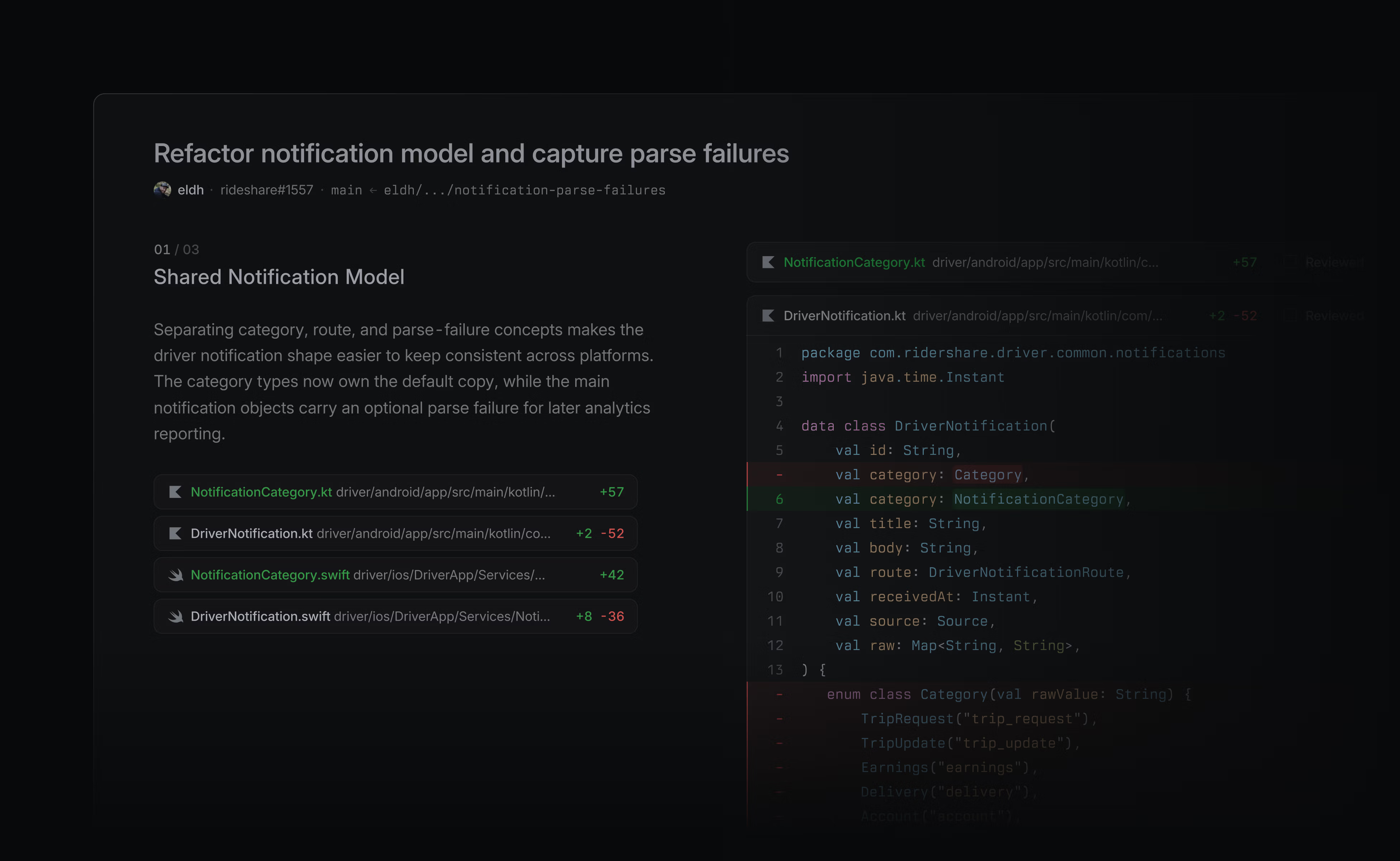
The Guided Review surface is a dual-panel layout. 1 The left panel is narrower — roughly a third of the horizontal space — and contains the chapter list: each chapter is a named section of the change, with one sentence of explanation and the files that belong to it. The right panel holds the code diff itself.
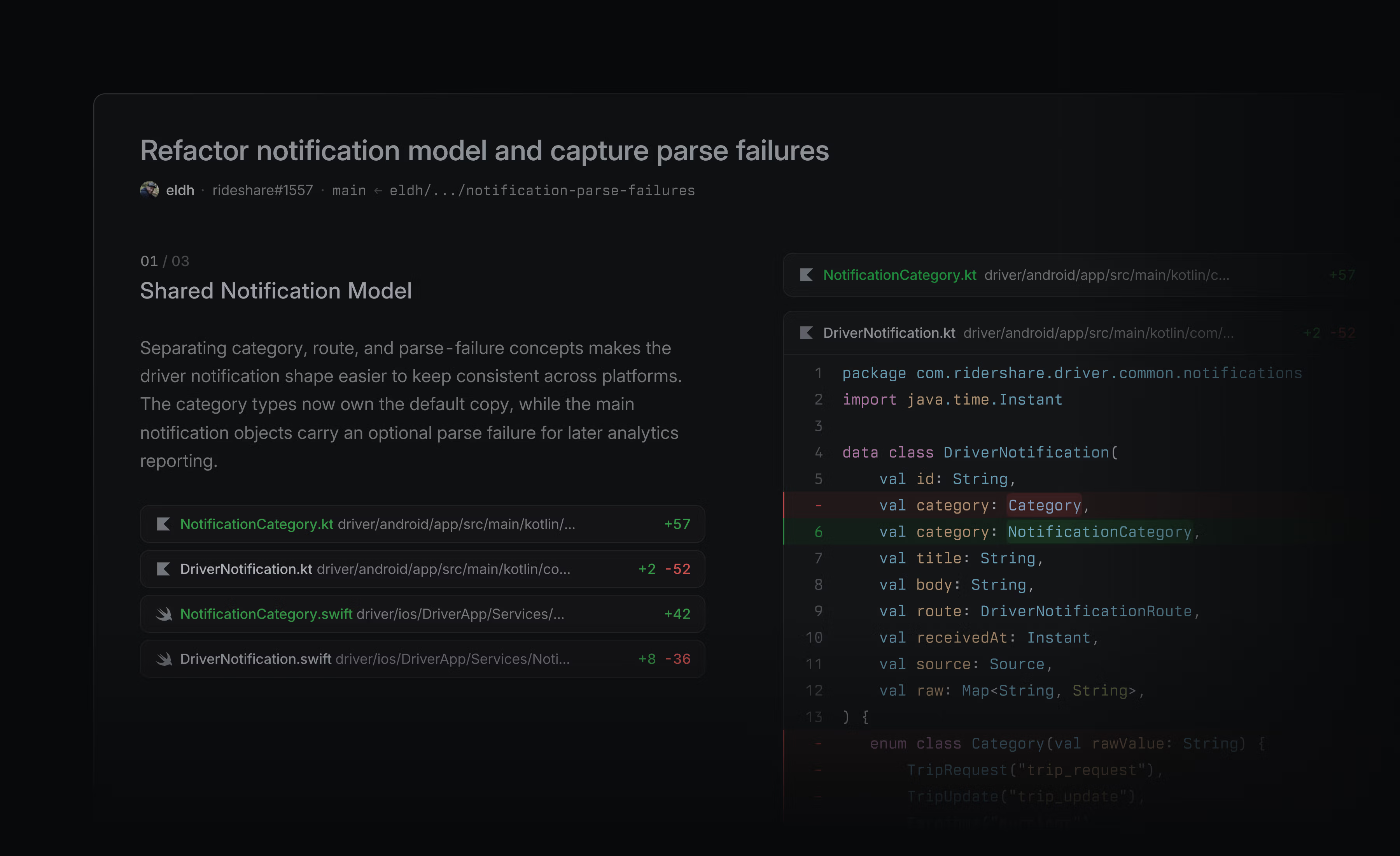
What the left panel isn't: a file tree. A file tree organizes by directory structure, which is a concern of the codebase's authors, not the PR's reviewers. What the left panel is: an editorial table of contents, organized by intent.
The chapter explanations follow a consistent two-beat structure. 1 As Linear's changelog describes it: "Each section of diffs has an explanation — starting with what the change is, then moving into its consequences." Beat one anchors you in the change itself. Beat two tells you what that change causes downstream. The two beats together answer the only question that matters before you read a line: why does this code exist?
The sequencing decision
The chapter ordering is the most deliberate design decision in this screen. Guided Review organizes changes in what Linear calls a "story format": core change first, consequences next, auxiliary changes and glue code collapsed or deprioritized. 2
That ordering mirrors how a thoughtful engineer would walk a colleague through a PR in person. They wouldn't start with the test file changes or the import reordering. They'd start with the one file where the decision was made, explain what it does and why, then show how everything else follows from it. The conventional diff view — sorted by file path or commit order — inverts this. The "consequence" files often appear before the "cause" file alphabetically.
Tuomas Artman (Linear co-founder) described the effect directly: "A 2,000-line PR becomes legible in a single sitting." 2 The claim is specifically about legibility in sequence, not just comprehension of any individual file. The linear top-to-bottom read is the goal; the chapter ordering is what makes it achievable.
Structural diff highlighting: the noise filter
The sequencing decision only works if the right panel contains signal, not formatting churn. A PR that reformats 300 lines while changing 40 lines of logic would produce chapters that are mostly about whitespace. Structural Diff Highlighting addresses this directly. 2
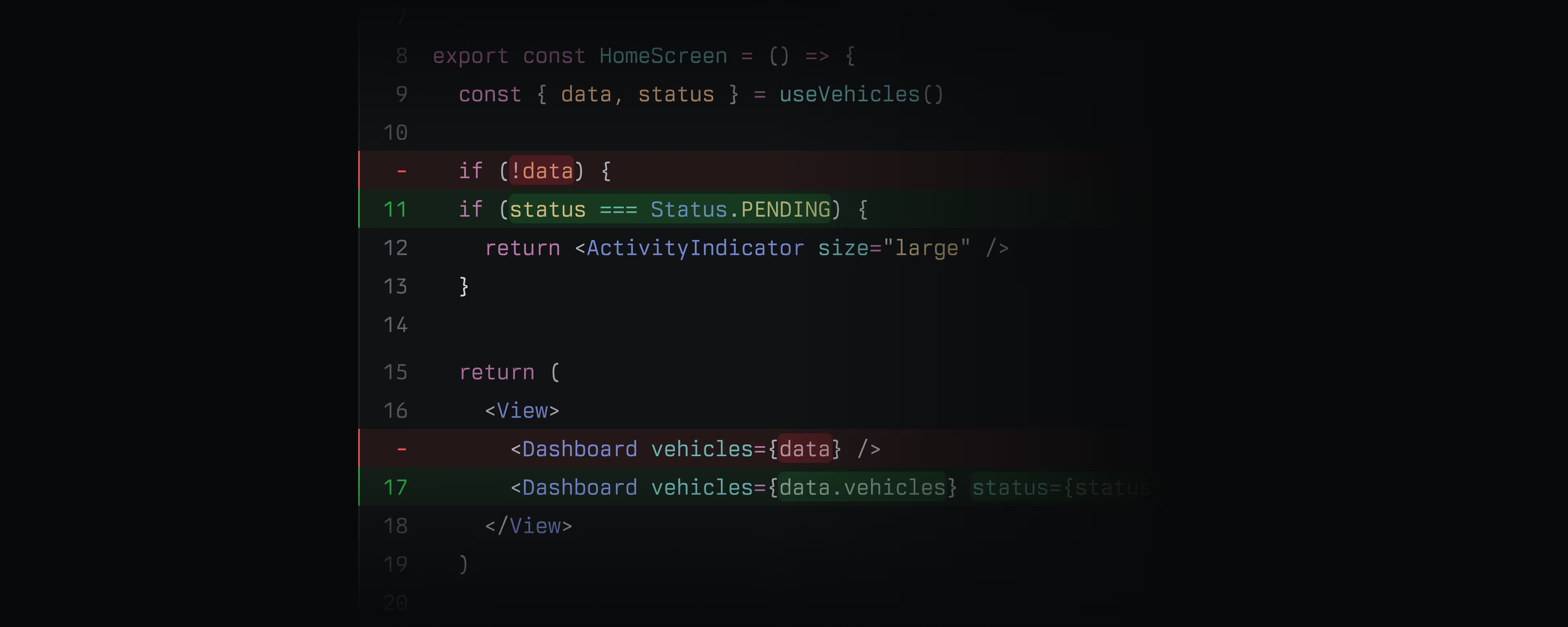
As Artman put it: "Structural diff highlighting strips the formatting changes that have nothing to do with what the program does, so what is left on the page is the actual change rather than the noise around it." 2 The feature is a toggleable display option, not a permanent filter — you can turn it off if you need to verify whitespace handling specifically.
The design implication: Structural Diff Highlighting and the Guided Review chapter ordering solve different layers of the same problem. Chapters solve orientation (reading order). Structural highlighting solves signal density (what you're actually reading once you're oriented). Both have to work for the top-to-bottom legible read to land.
Context: the diff alongside the issue
The third design belief articulated in Linear's launch materials is "In context" — code sits alongside the issue, project, and customer signal that motivated it. 2 This isn't a feature of the Guided Review pane itself; it's a feature of where the pane lives.
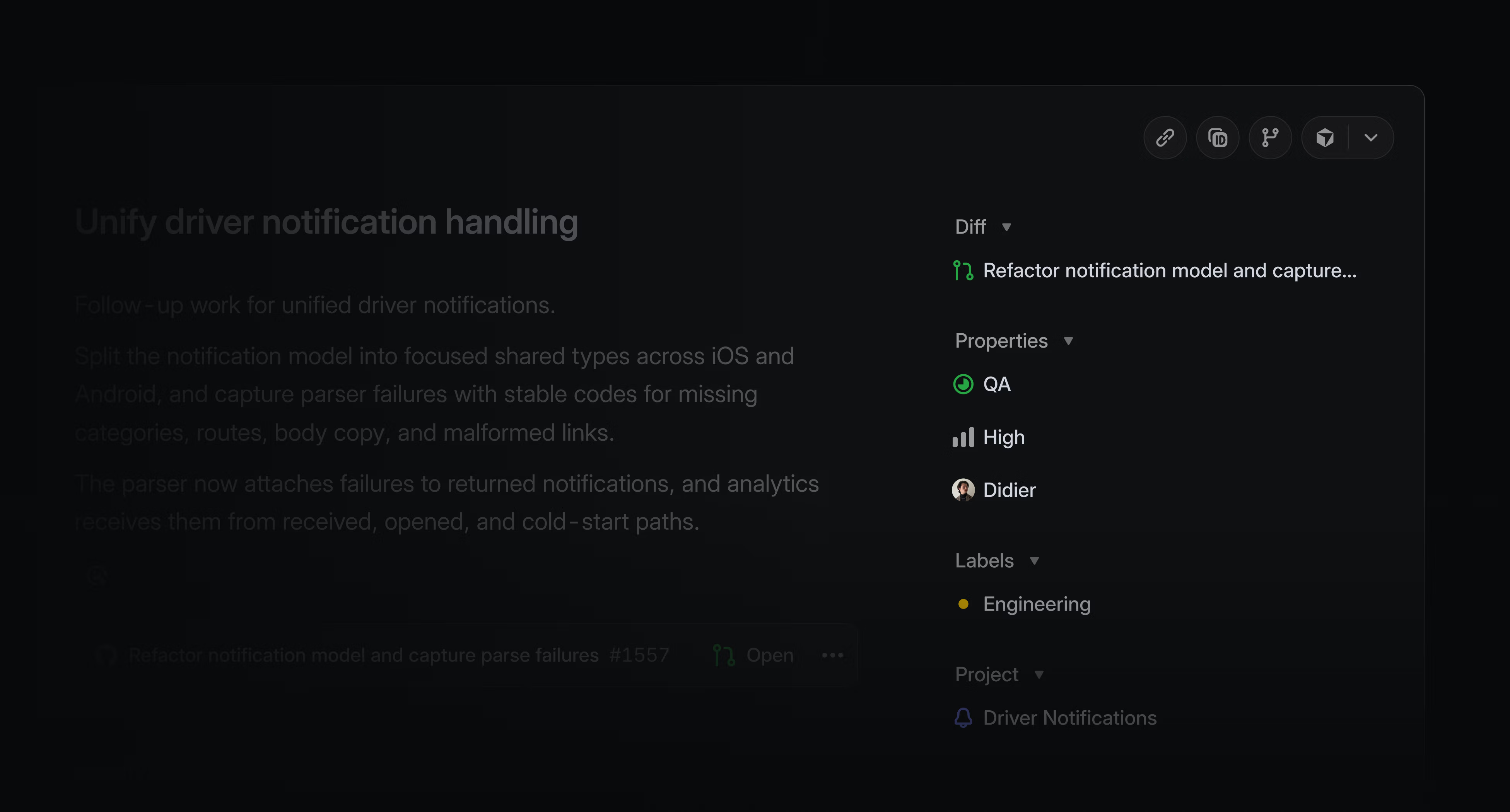
Karri Saarinen (Linear CEO) explained the integration decision: "Integrating code reviews directly to the place where you have context, plan, work with agents, made a lot of sense." 3 A reviewer who needs to check the original issue doesn't switch to GitHub, find the linked Jira, find the linked document. It's a tab away in the same product.
The Review Inbox feeds this further. 1 It's a dedicated sidebar tab that surfaces PRs needing review, sorted by "what's closest to shipping" — not by time-received, not alphabetically. The sort order is an explicit product decision: it ranks reviews by shipping velocity risk, surfacing the PRs that are blocking release cycles before the ones that are already blocked. The changelog states: "The default focus ordering sorts reviews by what's closest to shipping, so the work that needs your attention most rises to the top." 1
Agent-in-Diff: reviewer becomes editor
The last surface in this teardown is Agent-in-Diff: reviewers can ask a background coding agent to make changes directly from the diff interface, and the diff updates in real-time to reflect the result. 1
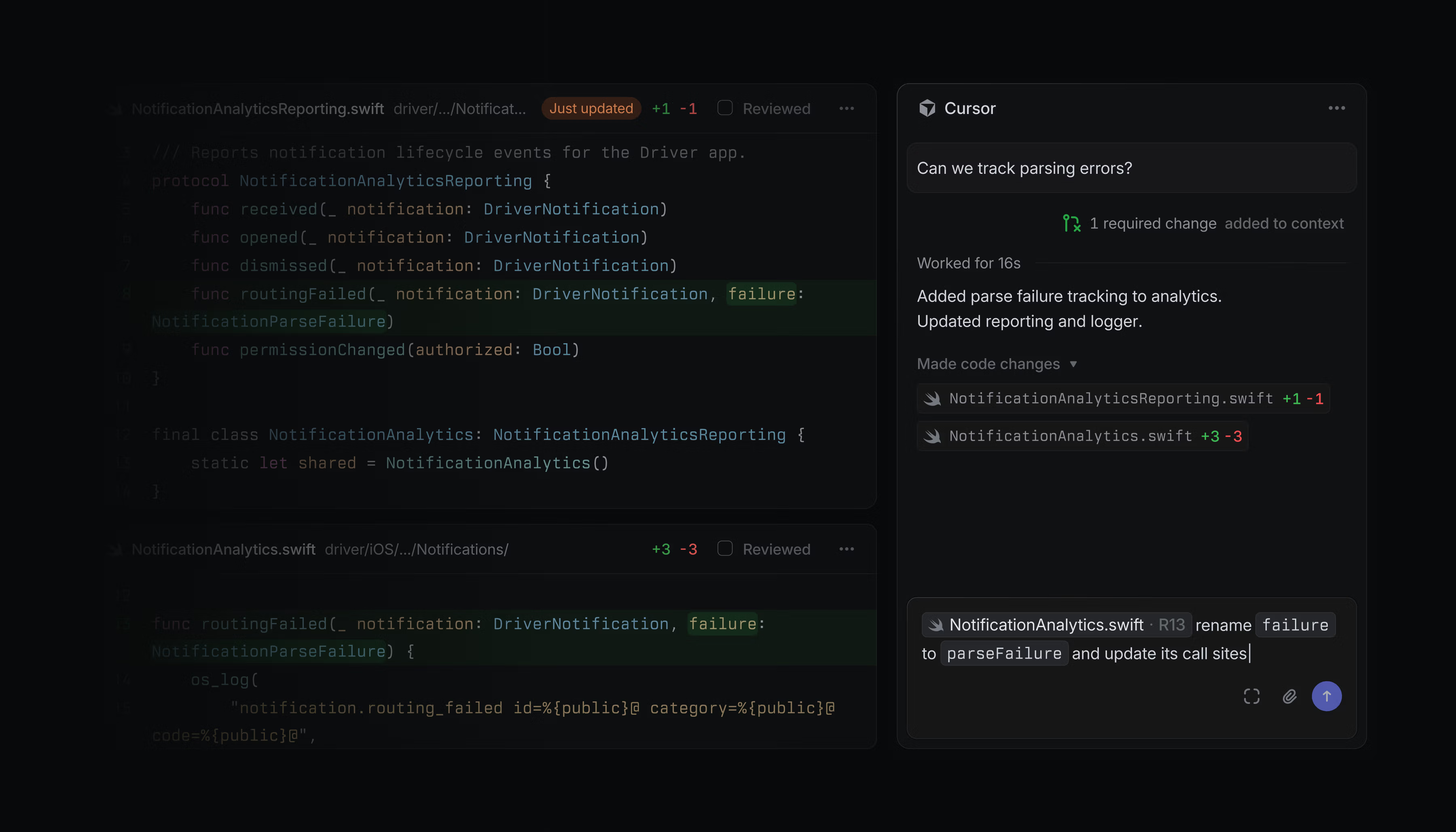
The conventional review workflow has a local checkout as the necessary intermediate step: reviewer spots an issue, author or reviewer checks out the branch, makes the fix, pushes, reviewer re-opens the PR. Agent-in-Diff removes the checkout step. The agent is already running against the branch; it makes the change, the diff reflects it, the reviewer confirms.
The YouTube walkthrough narration captures what changes: "I'll work with a coding agent to resolve some of these small pieces of feedback directly without having to context switch to check the work locally. As soon as our agent makes that change, our diff will reflect the update." 4
This shifts the reviewer's role slightly. In the standard model, the reviewer comments and waits. Here, the reviewer can iterate. The surface that used to be read-only becomes partially editable — via delegation, not direct text entry, but the boundary between "review" and "edit" blurs.
コンテンツカードを読み込んでいます…
The reusable pattern: Narrated Diff
Named pattern for today: Narrated Diff.
Narrated Diff is the design decision to interpose an AI-authored editorial layer between raw data and the user's working view of that data — not to filter the data (noise reduction), not to summarize it (summary replaces data), but to resequence and annotate it according to the intent behind it. The user still reads the original data; they just read it in the order that matches how the author thought about it, with a sentence of intent at each stage.
The Guided Review chapter list is the narration. The code diff is the original data. The narration doesn't replace the diff; it organizes the reader's path through it.
Three conditions make Narrated Diff applicable:
The raw data has an intended reading order that differs from its stored order. Git diffs are stored by file path. The intended reading order is by causal sequence. That gap is where Narrated Diff operates. If your data's natural sort order already matches the optimal reading order, you don't need narrative resequencing — you need better filtering (which is what Structural Diff Highlighting does, and it's available as a separate toggle for exactly this reason).
The data has enough internal structure for AI to infer intent groupings. Code changes have a causal graph — this file changed because that class changed, that class changed because this interface changed. That graph is the raw material for the chapter ordering. The AI isn't inventing meaning; it's reading structure that's already there. In domains where data is truly unstructured (free-form logs, raw sensor data), Narrated Diff breaks down because there's no recoverable intent to annotate.
The user needs to make a judgment, not just find information. Code review is a judgment task — approve or request changes. A Narrated Diff helps because the reviewer's bottleneck is orientation, not recall. Compare to a scenario where the user is searching for a specific line: there, narrative order is irrelevant and search is the right tool. Narrated Diff adds value when the user must understand the whole before assessing any part.
PM takeaway: The Narrated Diff pattern is most directly applicable to any product where users review AI-generated or system-generated output before acting on it. That includes AI-written code, AI-written proposals, AI-generated data pipelines, or any review workflow where the "raw output" arrives in an arbitrary order that doesn't match the sequence in which a human would explain it. The question to ask is: does the AI that produced this output understand why it made its decisions in that order? If yes, that intent can be made visible as narrative. The UI surface for this is simpler than it looks: a left-rail chapter list with one sentence per section is enough.
Artman's design brief for Diffs has three components — Fast, Focused, In context 2 — and each maps to a distinct design decision in this surface. Fast is an infrastructure claim (the diff opens near-instantly). Focused is what Structural Diff Highlighting handles. In context is the inbox placement and the issue sidebar. Narrated Diff is Focused extended one layer up: not just what noise to strip, but what sequence to read the signal in.
Cover image from Code review should be fast – Linear
このコンテンツについて、さらに観点や背景を補足しましょう。