Fix the Zod handshake bug — build a Notion-ready MCP server in 60 lines
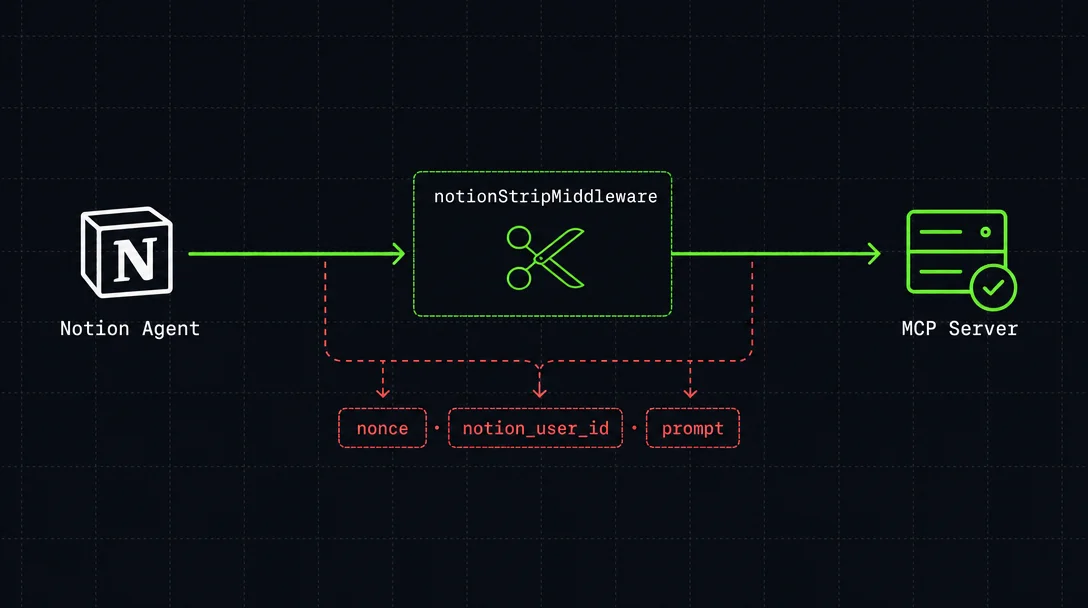
Notion's Custom Agent silently kills any MCP server with strict Zod validation by injecting three undocumented non-standard fields during the initialization handshake. A 6-line Express middleware — notionStripMiddleware — strips them before the SDK transport ever parses the request. The article explains why .strip() and .passthrough() alone don't reach the failure point, provides a complete copy-pasteable 60-line server with stateless transport mode, a deployment quick-reference table, two verification signals, and four production gotchas.

Required: Business or Enterprise plan, Node.js ≥ 20. 1
Yesterday's tip covered connecting a custom MCP server to a Notion Custom Agent — and surfaced the silent connection killer: Notion's Agent sends three non-standard fields (
nonce, notion_user_id, prompt) during the MCP initialization handshake that aren't part of the official protocol. Any server using strict schema validation rejects them immediately, and Notion's UI shows no useful error. 2Today's tip is the fix. One Express middleware, 6 lines, placed before the SDK ever touches the request body.
コンテンツカードを読み込んでいます…
Why .strip() or .passthrough() alone won't save you
The natural instinct — change your Zod schema from
.strict() to .strip() — doesn't work here. The .strict() call that rejects Notion's extra fields lives inside the MCP TypeScript SDK itself, in JSONRPCRequestSchema within @modelcontextprotocol/core. You can't reach it from your own code. 3The exact failure point is
NodeStreamableHTTPServerTransport.handleRequest() → JSONRPCMessageSchema.parse(rawMessage). Notion's extra fields hit .strict() at parse time and the entire message is rejected before your tool logic ever runs.There are only two layers where you control the bytes: before the parse call, or after. Before is the only viable option. The fix: strip the three extra fields from
req.body in an Express middleware before handing the request to the SDK transport.The 6-line fix
// Place this BEFORE app.post('/mcp', ...)
const NOTION_EXTRA_FIELDS = ['nonce', 'notion_user_id', 'prompt'] as const;

function notionStripMiddleware(req: Request, _res: Response, next: Function) {
  if (req.body && typeof req.body === 'object') {
    for (const field of NOTION_EXTRA_FIELDS) {
      delete (req.body as Record<string, unknown>)[field];
    }
  }
  next();
}
That's the entire workaround. The middleware is a no-op when those fields are absent, so if Notion ever ships a fix on their end, this code becomes inert — it won't break anything.
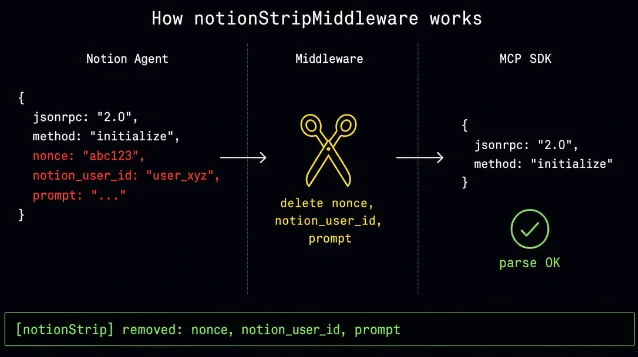
notionStripMiddleware. The three Notion-specific fields are removed before JSONRPCMessageSchema.parse() runs. 2The fields (
nonce and prompt) are OIDC-spec parameters; Supabase's engineering team noted that silently dropping them without documentation gives clients a false impression they were handled. 4 To stay honest about it, log a one-liner when fields are stripped — that gives you a diagnostic signal and makes the workaround visible in your server logs.Complete copy-pasteable server
The full server below wires up the middleware, registers an example
query-dashboard tool, and handles both POST and GET at /mcp. Replace the mock dashboard data with your actual data source.// server.ts — Notion-compatible MCP server
import { createMcpExpressApp } from '@modelcontextprotocol/express';
import { NodeStreamableHTTPServerTransport } from '@modelcontextprotocol/node';
import { McpServer } from '@modelcontextprotocol/server';
import type { Request, Response } from 'express';
import * as z from 'zod/v4';
// ── 1. The middleware ──────────────────────────────────────────────────────
const NOTION_EXTRA_FIELDS = ['nonce', 'notion_user_id', 'prompt'] as const;
function notionStripMiddleware(req: Request, _res: Response, next: Function) {
if (req.body && typeof req.body === 'object') {
const body = req.body as Record<string, unknown>;
const stripped = NOTION_EXTRA_FIELDS.filter(f => f in body);
if (stripped.length) {
console.log('[notionStrip] removed:', stripped.join(', '));
for (const field of stripped) delete body[field];
}
}
next();
}
// ── 2. Tool definition ─────────────────────────────────────────────────────
function createServer(): McpServer {
const server = new McpServer(
{ name: 'pm-dashboard', version: '1.0.0' },
{ capabilities: { logging: {} } }
);
server.registerTool(
'query-dashboard',
{
title: 'Query Dashboard',
description: 'Fetch key product metrics',
inputSchema: z.object({
metric: z.enum(['dau', 'mau', 'revenue', 'retention', 'nps']),
period: z.enum(['7d', '30d', '90d']).default('7d'),
}),
},
async ({ metric, period }) => {
// Replace with your real data source
const data: Record<string, { value: number; change: number }> = {
dau: { value: 482000, change: 3.2 },
mau: { value: 2800000, change: 1.8 },
revenue: { value: 12400000, change: -0.5 },
retention: { value: 62.4, change: 0.3 },
nps: { value: 47, change: 2.1 },
};
const d = data[metric] ?? { value: 0, change: 0 };
return {
content: [{
type: 'text',
text: `${metric.toUpperCase()} (${period}): ${d.value} (${d.change > 0 ? '+' : ''}${d.change}%)`,
}],
};
}
);
return server;
}
// ── 3. Express wiring ──────────────────────────────────────────────────────
const app = createMcpExpressApp();
app.post('/mcp', notionStripMiddleware, async (req: Request, res: Response) => {
const server = createServer();
try {
const transport = new NodeStreamableHTTPServerTransport({
sessionIdGenerator: undefined, // stateless — required for Notion
});
await server.connect(transport);
await transport.handleRequest(req, res, req.body);
res.on('close', () => { transport.close(); server.close(); });
} catch (err) {
console.error('MCP error:', err);
if (!res.headersSent) {
res.status(500).json({
jsonrpc: '2.0',
error: { code: -32603, message: 'Internal server error' },
id: null,
});
}
}
});
// GET /mcp — Notion probes this; return 405 for stateless servers
app.get('/mcp', (_req: Request, res: Response) => {
res.writeHead(405).end(JSON.stringify({
jsonrpc: '2.0',
error: { code: -32000, message: 'Use POST.' },
id: null,
}));
});
const PORT = parseInt(process.env.PORT ?? '3000', 10);
app.listen(PORT, () => console.log(`MCP server on http://localhost:${PORT}/mcp`));
process.on('SIGINT', () => process.exit(0));// package.json
{
"name": "notion-mcp-server",
"version": "1.0.0",
"type": "module",
"scripts": { "start": "tsx server.ts", "dev": "tsx watch server.ts" },
"dependencies": {
"@modelcontextprotocol/express": "^2.0.0-alpha.2",
"@modelcontextprotocol/node": "^2.0.0-alpha.2",
"@modelcontextprotocol/server": "^2.0.0-alpha.2",
"express": "^4.21.0",
"zod": "^4.0.0"
},
"devDependencies": { "tsx": "^4.16.0", "typescript": "^5.9.0" }
}The server uses stateless mode (
sessionIdGenerator: undefined). Each POST creates a fresh transport instance — Notion's agent doesn't maintain session IDs between calls, so stateful mode would cause every request after the first to fail. 5Deploying and connecting to Notion
Notion's Custom Agent won't reach
localhost. The server needs a public HTTPS URL. 1 Quick options:| Deployment path | Time to live URL | Cost |
|---|---|---|
| Railway / Render | ~3 minutes | Free tier available |
| Fly.io | ~5 minutes | Free tier available |
| Cloudflare Tunnel | ~2 minutes | Free (proxies localhost) |
Once deployed, connect it to your Custom Agent: Settings → Tools & Access → Add connection → Custom MCP server → paste
https://your-server.com/mcp. Use header-based auth (API key / bearer token) rather than OAuth — Dynamic Client Registration is not supported by Notion Custom Agents, so OAuth-only servers require Notion to pre-register a client application on their end before they'll connect. 1Verifying it worked
After saving the connection, check two signals:
- Tool enumeration: Expand the MCP connection entry in the agent's settings. If
query-dashboardappears in the tool list, the handshake completed — the middleware worked. - Log confirmation: Your server console should show
[notionStrip] removed: nonce, notion_user_id, prompton the first request. If that line appears, the three fields were present and stripped correctly.
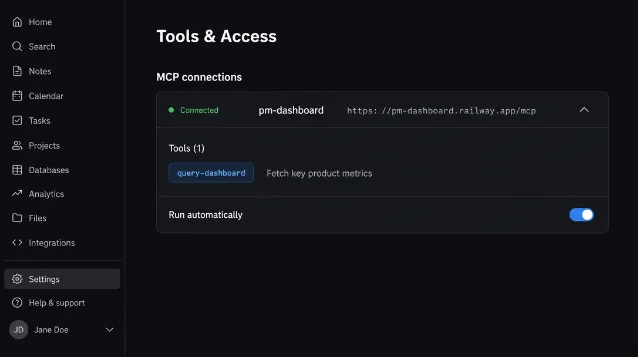
If the connection still fails, run through this order: HTTPS reachable → Business/Enterprise plan confirmed → server log shows the strip line → SDK version is
2.0.0-alpha.2.4 gotchas specific to this setup
SDK v2 is pre-alpha. The
@modelcontextprotocol/server package README states: "This is the main branch which contains v2 of the SDK (currently in development, pre-alpha)." 3 For production workloads, pin to a specific alpha tag and test upgrades before deploying, or use v1.x. 3Notion may add more non-standard fields. Only
nonce, notion_user_id, and prompt are confirmed as of May 30, 2026 — they haven't been formally documented anywhere in Notion's help center. 1 The stripped.length log line in notionStripMiddleware will surface any future additions before they silently break the connection.No community-verified working example exists yet. As of May 30, 2026, a search across GitHub (258+ issues mentioning Notion + MCP), Reddit, and Google found no independently verified custom MCP server running successfully inside Notion Custom Agents. 2 Supabase's MCP server remains blocked by a separate HTTP status code issue (returns 201 where Notion expects 200, fix scheduled for June 1, 2026). 6 This pattern is early-adopter territory.
OAuth token expiry is a separate pain. If you choose OAuth auth instead of an API key, expect re-authentication every 1–2 days — GitHub issue #225 has users reporting token lifetimes as short as 30–90 minutes, with no silent refresh mechanism. 7 API key auth sidesteps this entirely.
Cover image: AI-generated illustration
参考ソース
- 1Notion Help Center: MCP connections for Custom Agents
- 2GitHub Issue #221: Notion Agent sends non-standard MCP fields
- 3MCP TypeScript SDK — types/schemas.ts (JSONRPCRequestSchema)
- 4GitHub Issue #226: Supabase MCP incompatible with Notion Agent
- 5MCP TypeScript SDK — stateless Streamable HTTP example
- 6Supabase Breaking Change: OAuth token endpoint 200 vs 201
- 7GitHub Issue #225: OAuth token expires too frequently
このコンテンツについて、さらに観点や背景を補足しましょう。