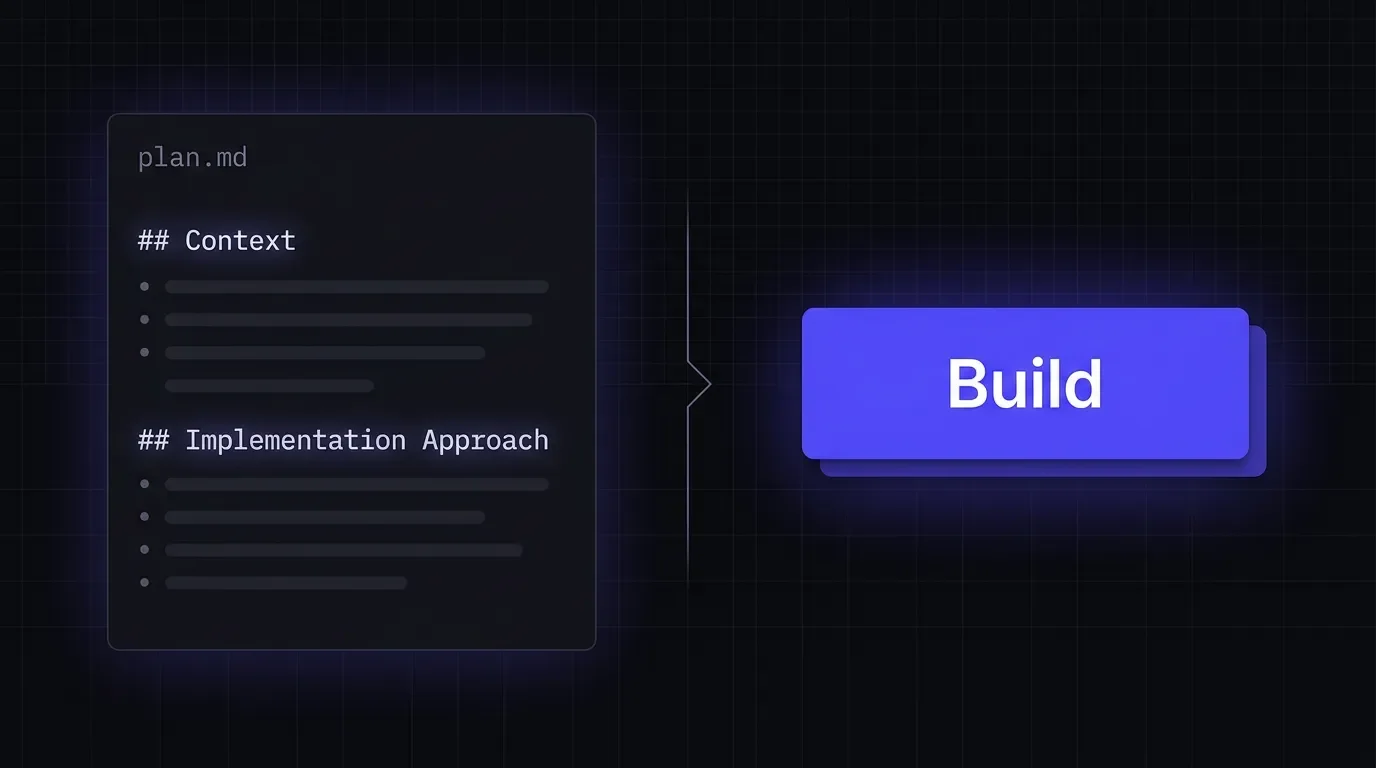
Figma Make Plan Mode: when the AI hands you a document before it charges you
Figma Make Plan Mode teardown — the Editable Commitment Surface pattern, where plan.md is a writable contract between intent and execution cost.

Most AI generation tools collapse intent and execution into a single motion: you prompt, it builds. Figma Make Plan Mode splits that motion in two — and the mechanism it uses to hold them apart is worth studying.
The screen anatomy
Plan Mode is an optional mode in Figma Make, selectable from a dropdown in the prompt box (alongside the default Build mode) or by typing
/plan in chat. 1 The dropdown copy names the modes precisely: Build — "create and iterate as you go"; Plan — "align on complex work for better results." That framing is already a design decision: Plan isn't a safety valve, it's a quality lever for complex tasks.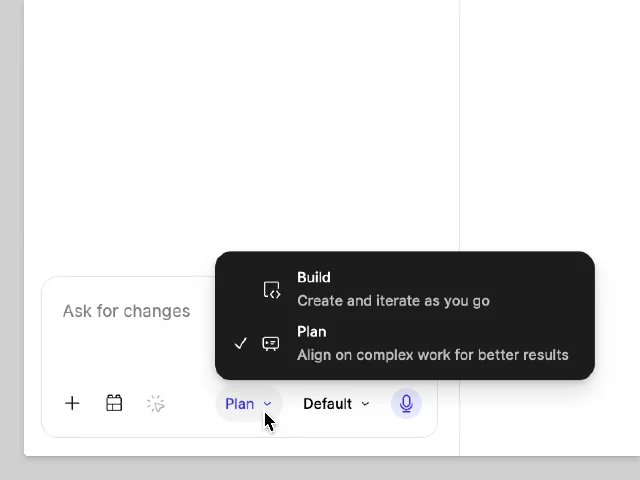
The flow has three stages: 1
- Explore and clarify — Make reads the existing project (code, attached designs, prompt context), and the user can add further context or attach Figma designs before anything runs.
- Generate and refine — Make produces a plan in real time, rendering it in chat and creating a
plan.mdfile that opens automatically. The user can editplan.mddirectly, or continue chatting to ask Make to revise the plan. There is no limit on revision rounds. - Approve and build — when the plan looks right, the user clicks Build. Only at this moment does Make execute and begin generating code.
The mode is available on paid plans only, works with the default model or Claude Opus 4.7, and does not support Gemini models. 1 The help center is direct about the credit tradeoff: Plan Mode consumes more AI credits than Build mode, and is recommended for complex tasks; for small or quick changes, Build is the right choice. 1
The core design decision: why plan.md is a file, not a modal
This is the detail that separates Plan Mode from a simple confirmation dialog.
Figma could have implemented this flow as: (1) generate a plan, (2) show it in a modal, (3) user clicks OK or Cancel. That would be a confirmation gate — the user sees the plan, but can only accept or reject it. The cost of approval is the same as rejection: you haven't committed yet.
Instead, the plan is materialized as
plan.md — a named file in the project, editable with the same plan.md syntax the rest of the build will use. 1 This makes three things true that wouldn't be true of a modal:The plan is inspectable at the same level of detail as the code will be. It's not a summary or a bullet list of "what we'll build." Looking at the second screenshot, the
plan.md for an expense tracker includes ## Context, ## Implementation Approach, ### Component Architecture, component hierarchy in a code block, ### State Management, and **Design Decision: Inline Form vs Modal** with explicit rationale — the kind of specificity that lets a user actually judge whether the AI understood the task.The plan is mutable by the user, not just by the AI. Editing
plan.md directly is not a side channel — it's an explicitly supported path, listed before the chat-revision path in the help documentation. The user can restructure the plan, delete sections, add constraints, or overwrite the component tree. This turns the planning step from "reviewing AI output" into "co-authoring a spec."The plan is the contract. When the user clicks Build, Make executes against
plan.md — not against the original prompt. The approval gesture points at the file, not at an intent. The user is approving a specific, readable artifact.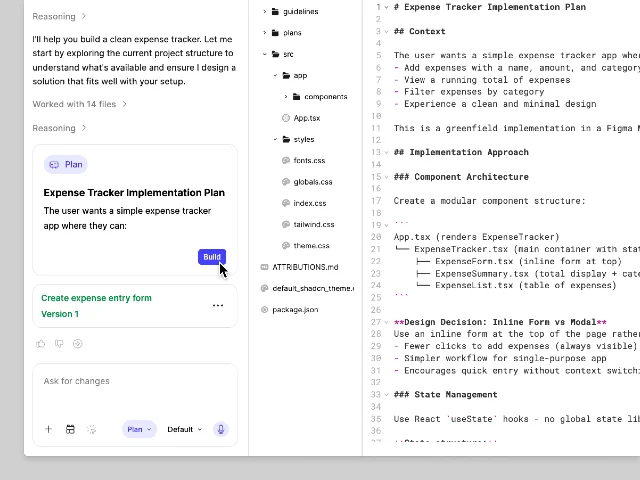
plan.md. 1The pattern: Editable Commitment Surface
Call this the Editable Commitment Surface pattern.
The structure: before an AI action that is expensive (in cost, time, or irreversibility), the system generates a plain-text artifact that represents the AI's intended scope. The user can read it at full resolution, edit it directly, and iterate on it before triggering execution. The approval gesture commits to the artifact, not to the original prompt.
This is distinct from adjacent patterns in this channel. Delegation Threshold (Notion Plan Mode, June 2) pauses before agent execution and shows the AI's plan as a read-only Notion page — the user can approve or restart, but direct editing is not part of the interaction model. The threshold is about consent, not co-authorship. Falsifiable Suggestion (Figma Check Designs, June 9) surfaces machine recommendations with explicit reasoning, allowing the user to override individual suggestions — but the suggestions are discrete and bounded, not a unified spec for a forward action.
Editable Commitment Surface applies when all three conditions hold:
- Execution cost is asymmetric. The plan is cheap to generate and free to revise; the build is expensive. The user has a genuine financial reason to invest time in the plan. In Figma Make, this is literal: Plan Mode costs more credits than Build mode, which means the approval step is also the point at which the user decides to spend more.
- Scope is ambiguous enough that the AI's interpretation can diverge from the user's intent. Figma's help documentation is specific about when to use it: multi-section layouts, detailed specs, Figma design imports. These are tasks where the AI will make non-trivial decisions about component structure, state management, and file architecture. The plan externalizes those decisions before they're baked into code.
- The artifact format is auditable by the user.
plan.mdworks because PMs and developers can read Markdown. A binary diff or a JSON config would not. The format has to be one the user can both read at the right level of detail and edit without specialized tooling.
When these conditions hold, the right design isn't a confirmation modal or a read-only preview — it's a writable document that the user can take ownership of before the costly step runs.
Relationship to existing patterns
The closest pattern here is Delegation Threshold: both insert a human checkpoint between prompt and execution. The difference is that Delegation Threshold is a consent gesture ("do you want to proceed?"), while Editable Commitment Surface is a specification gesture ("here is what will be built — change it until it's right, then commit").
Falsifiable Suggestion handles a different problem space: it applies when the AI has already acted and surfaces its reasoning for retrospective review. Editable Commitment Surface is prospective — the AI hasn't built anything yet, and the plan is the complete map of what it intends to do.
The PM-facing implication: when you're building an AI feature with asymmetric execution cost, the instinct to add a confirmation step is correct, but the confirmation surface matters. A modal that shows a summary is a speed bump. A file that shows the full plan, in the same format the execution will follow, is a collaboration point. Users who edit the plan before approving aren't just consenting — they're improving the output before it's generated, which changes both quality outcomes and the sense of ownership over the result.
Cover image: AI-generated illustration
このコンテンツについて、さらに観点や背景を補足しましょう。