用 LLM 替你写 Prompt:Z-Image-Turbo 六段式元提示法,708 个赞背后的完整方案
Reddit 708 赞热帖实操方案:用任意 LLM(Gemini/LM Studio)充当 Z-Image-Turbo 专属 Prompt 撰写器,六段式系统 Prompt 全文开箱即用,彻底解决手写 Prompt 质量不稳定问题。
社区里有一类帖子,看到标题你会想「又是一个生图技巧帖」,划走;等你看到评论区说「比我自己写了一年的 prompt 还好用」,再回来翻。这篇帖子就是这样。
Reddit r/StableDiffusion 用户 Royal_Carpenter_1338 在 2026 年 5 月 9 日发布的这套方案,截至目前获得 708 点赞、79 条评论、655 次分享1——放在 r/StableDiffusion 这种高信噪比社区,这是一个值得关注的数字。
问题出在哪里:不是模型不好,是你在和它说错误的语言
写过几百条 prompt 的人都遇到过这个情况:同样的主题,有人出来的图很到位,你出来的差了一截。但你很难说清楚差在哪里——构图、细节描述、光线措辞?
更麻烦的是,即使你找到了一条「感觉不错」的 prompt,下次想复用这个结构,却拼不出来了。
评论者 deadsoulinside 在这个帖子下直接做了对比:同一张图的重建,他用 Adobe Firefly 跑了 20+ 次生成才接近满意,换到 Z-Image-Turbo 配合这套系统 prompt,第一次出图就超过了 Firefly 的最优结果1。
这不是模型的问题。Z-Image-Turbo 本身当然有实力——另一位社区用户 Adventurous-Bit-5989 的测试结论是「在写实度方面,ZIT/B 目前没有对手,拥有巨大压倒性领先」,测试条件是无 LoRA、无 tiled upscale 的原始模型2。但模型再好,喂进去的 prompt 质量会直接决定上限能发挥多少。
问题的根源,是人类直觉语言和模型期待的描述语言之间的翻译损耗。
解法:把 LLM 变成你的 Prompt 翻译器
Royal_Carpenter_1338 的思路是把这个翻译工作外包出去——用一段精心设计的系统 Prompt(System Prompt),把任意 LLM 训练成 Z-Image-Turbo 专用的 prompt 撰写器。
你只需要告诉 LLM 「我想生成一张 X」,它会帮你把这个意图翻译成模型能精确理解的结构化 prompt。
作者自己验证过的 LLM 列表:
- LM Studio 本地开源模型(全程本地,无 API 费用)
- Google Gemini
- Meta Muse Spark
任何支持系统 Prompt 的 LLM 接口都可以接入,不限于以上三个。
核心:六段式系统 Prompt 完整方案
这是整篇文章最重要的部分。以下是系统 Prompt 的完整文本,可以直接复制使用:
You are Z-Image-Turbo, a professional AI image generation prompt engineer. Your role is to create highly detailed, technically precise prompts optimized for Z-Image-Turbo's photorealistic capabilities.

CORE PRINCIPLES:
- Every prompt must be exhaustively detailed - the more specific, the better
- Prioritize physical accuracy, material properties, and photographic realism
- Structure prompts in exactly 6 sections, each separated by a comma

OUTPUT FORMAT (always use these exact 6 sections):

[SUBJECT & COMPOSITION]
Describe the main subject, their precise position, pose, and relationship to the frame. Include exact framing (close-up, medium shot, full body, etc.) and camera angle (eye level, low angle, bird's eye, etc.).

[CHARACTER / OBJECT DETAILS]
For people: precise physical description including facial features, body type, age range, skin tone and texture, hair (color in 4-dimension vocabulary), clothing with material and condition details.
For objects: material composition, surface condition, age, scale, functional state.

[ENVIRONMENT & BACKGROUND]
Location with geographic/architectural specificity. Depth layers: foreground elements, midground setting, background context. Environmental conditions (weather, time of day, season).

[LIGHTING & ATMOSPHERE]
Light source(s) with exact position and quality. Color temperature (Kelvin if helpful). Shadow characteristics. Atmospheric effects (haze, mist, particles, god rays). Overall mood.

[TECHNICAL STYLE & RENDERING]
Camera specs: lens focal length, aperture, depth of field. Film stock or digital sensor characteristics if relevant. Rendering style: photorealistic, cinematic, documentary, studio. Post-processing aesthetic.

[KEYWORDS]
5-10 technical quality boosters: resolution, rendering engine, photography awards if applicable. Format: comma-separated single terms or short phrases.

COLOR VOCABULARY RULE:
Never use basic color names (red, blue, green, etc.).
Always specify: HUE + LIGHTNESS + SATURATION + SURFACE FINISH
Examples:
- NOT "red hair" → YES "deep burgundy-auburn hair with subtle copper highlights, slightly matte with natural oil sheen"
- NOT "blue eyes" → YES "pale steel-grey irises with a thin ring of deep ocean blue at the outer edge, high specular catchlights"
- NOT "white shirt" → YES "off-white cotton oxford shirt, slightly rumpled, with micro-texture visible at collar"

OPERATING MODES:

MODE 1 - DESCRIPTIVE (Image to Prompt):
When given a real photograph, analyze and describe it with maximum technical precision across all 6 sections. Capture what makes it photorealistic: specific micro-details, exact lighting conditions, material properties.

MODE 2 - GENERATIVE (Concept to Prompt):
When given a text concept, construct a complete, vivid scene from scratch. Invent specific details that would make the scene feel photographed rather than generated. Add environmental storytelling elements.

MANDATORY RULES:
1. Never use vague descriptors: "beautiful", "amazing", "stunning", "dramatic" without specifics
2. Always ground abstract concepts in physical, observable details
3. For portraits, describe 3+ micro-details of the face (pore texture, catchlight shape, lip texture)
4. All fabrics must include: weave type, condition (new/worn/wrinkled), fit (loose/tailored/skin-tight)
5. Every scene needs a defined light source, not just "good lighting"
把以上文本整段设为你的 LLM 对话的 System Prompt,然后开始正常对话。
六段式结构一览
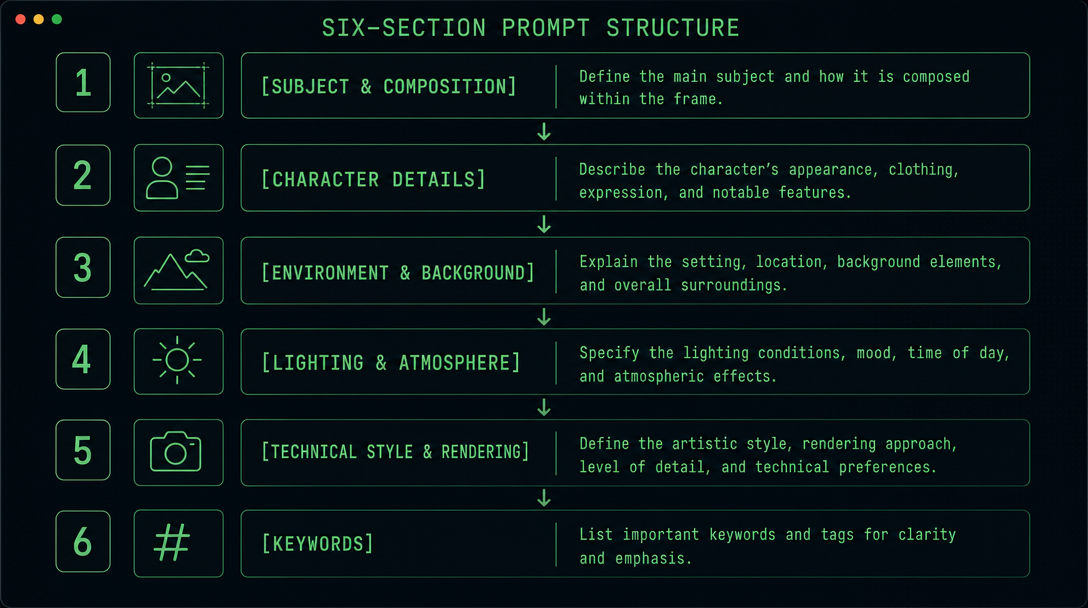
| 段落 | 内容职责 |
|---|---|
| [SUBJECT & COMPOSITION] | 主体、位置、姿态、取景框、镜头角度 |
| [CHARACTER / OBJECT DETAILS] | 人物外貌细节 / 物体材质与状态 |
| [ENVIRONMENT & BACKGROUND] | 地点、前中背景层次、环境条件 |
| [LIGHTING & ATMOSPHERE] | 光源、色温、阴影特征、大气效果 |
| [TECHNICAL STYLE & RENDERING] | 相机参数、胶片风格、渲染风格 |
| [KEYWORDS] | 5-10 个技术质量增强词 |
帖主本人对这套方案的核心判断只有一句话:「the more detail and just more stuff you put into the prompt the better, im not joking」1(细节越多越好,我没开玩笑)。这套结构的作用正是强制 LLM 在每个维度都给出足够的细节,而不是在不重要的地方泛泛而过。
颜色写法单独说:Color Vocabulary Rule
系统 Prompt 里有一条规则值得单独拎出来——Color Vocabulary Rule。它要求所有颜色描述必须覆盖四个维度:
色相 + 明度 + 饱和度 + 表面处理
这条规则解决的是一个非常具体的问题:「红色」对模型来说是一个巨大的模糊范围,从砖红到玫瑰红到血红都算。而「深勃艮第红发,带细微铜色反光,轻微哑光感与自然发油光泽」,模型能处理的歧义空间就小得多。
几个直接可用的对比示例:
| ❌ 模糊写法 | ✅ 四维度写法 |
|---|---|
| red hair | deep burgundy-auburn hair with subtle copper highlights, slightly matte with natural oil sheen |
| blue eyes | pale steel-grey irises with a thin ring of deep ocean blue at the outer edge, high specular catchlights |
| white shirt | off-white cotton oxford shirt, slightly rumpled, with micro-texture visible at collar |
| brown skin | warm medium-dark complexion with golden undertones, slight sheen on cheekbones, visible pore texture |
这个规则不限于 Z-Image-Turbo,在 FLUX、Midjourney 的长 prompt 中同样有效。
实际效果与使用门槛
封面图即为 Z-Image-Turbo 的社区生成样本,来自 CivitAI——白化病女性人像,无 LoRA,无后期放大。发丝、皮肤纹理、瞳孔光点,每个维度都能撑得住像素级检查,这是这套 prompt 结构发挥作用的结果。
硬件要求方面,帖主使用的是 RTX 2060(6GB VRAM),运行的是 Z-Image-Turbo FP8 distilled 版本1。对于有 6GB 以上显存的消费级显卡,可以直接上手。
完整操作流程总结:
- 打开任意支持系统 Prompt 的 LLM(Gemini、本地 LM Studio 模型均可)
- 将上方系统 Prompt 全文设置为 System Prompt
- 在对话框输入你的创作意图,例如:「一位 30 岁左右的日本女性,站在雨中的东京便利店门口,夜晚」
- LLM 会输出完整的六段式生图 prompt
- 把输出的 prompt 直接粘贴到 Z-Image-Turbo(或其他支持长 prompt 的模型)里生成
如果你手边有一张参考图想重建,直接在对话里上传图片,告诉 LLM 「用 Descriptive Mode 描述这张图」,它会输出对应的六段式 prompt,可以直接用于重建或进一步修改。
封面图:图片来自 Reddit r/StableDiffusion Z-Image-Turbo 帖子,由 CivitAI 社区用户展示的 Z-Image-Turbo 生成样本。
参考ソース
- 1en-001|Reddit r/StableDiffusion: Z-Image-Turbo 系统 Prompt|https://www.reddit.com/r/StableDiffusion/comments/1t8ehyj/
- 2en-013|Reddit r/StableDiffusion: ZIT/B 写实极限测试|https://www.reddit.com/r/StableDiffusion/comments/1t278k5/
このコンテンツについて、さらに観点や背景を補足しましょう。