Notion Admin Guardrails: the Governance-as-Product pattern
Notion shipped three admin control surfaces for Custom Agents on May 5, 2026 — a permission panel, a credits spend dashboard with forward projection, and four auto-guardrail mechanisms. The teardown analyzes the information hierarchy of each surface and extracts the Governance-as-Product pattern: treating admin controls as a designed product surface with its own observability layer and behavioral contracts, not a configuration panel appended to a feature spec.

Custom Agents launched on Notion in roughly March 2026. By the time the admin guardrails shipped on May 5, teams had already created more than a million of them. 1 That scale is not a success metric to celebrate and move on from — it is an admin problem. A workspace with a thousand agents is a budget exposure, an access-control question, and an audit obligation all at once.
Standard IT admin patterns — a toggle to enable/disable a feature, a settings page with one or two global limits — do not translate well to agent infrastructure. What Notion shipped instead is architecturally different: three distinct UI surfaces, each solving a different slice of the governance problem, each carrying the information hierarchy you would normally only see in user-facing products.
Surface 1: Permission panel — creation as a gateable capability
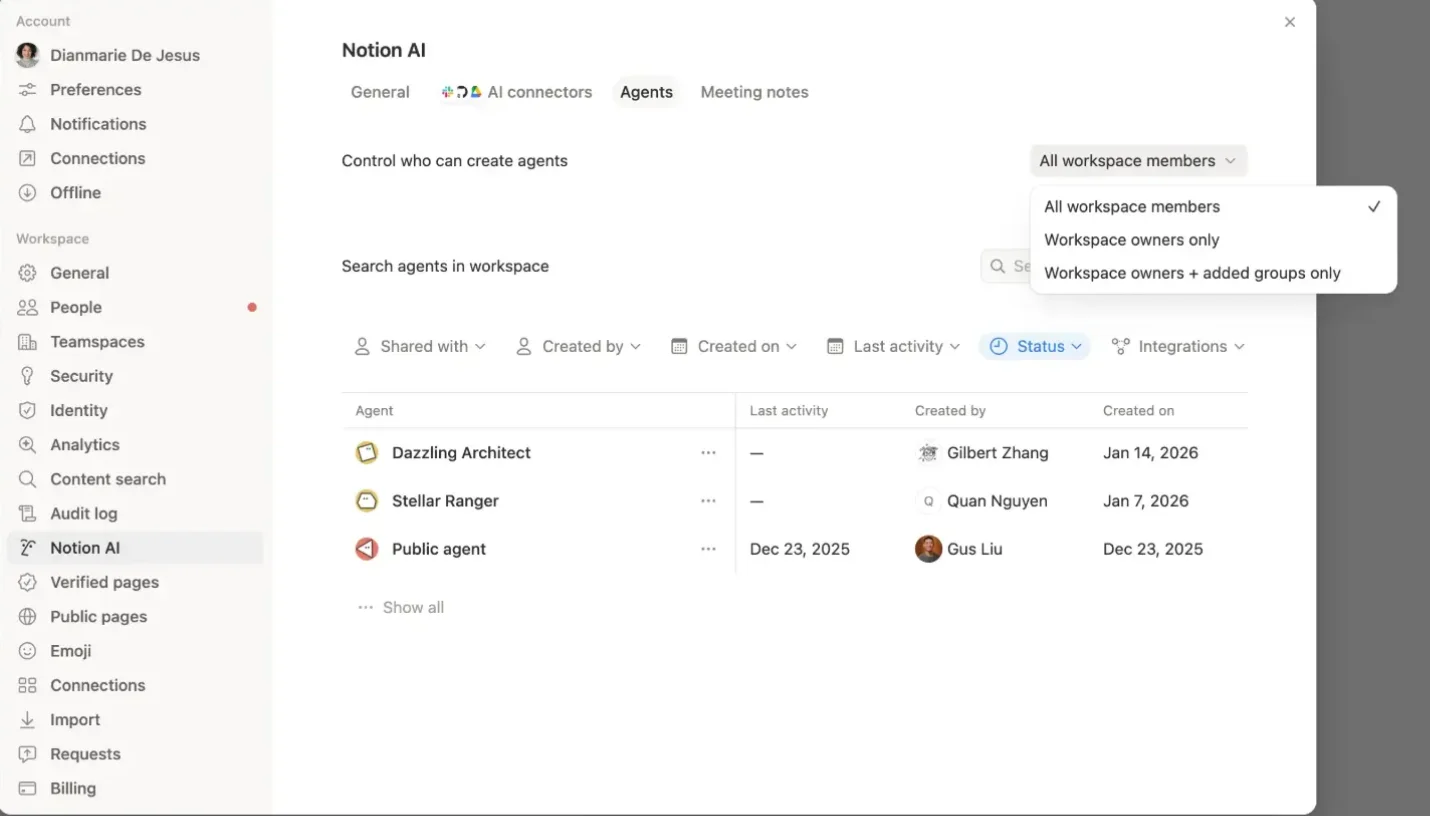
The permission panel sits at Settings → Notion AI → Agents → "Control who can create agents." 2 The UI is a single dropdown.
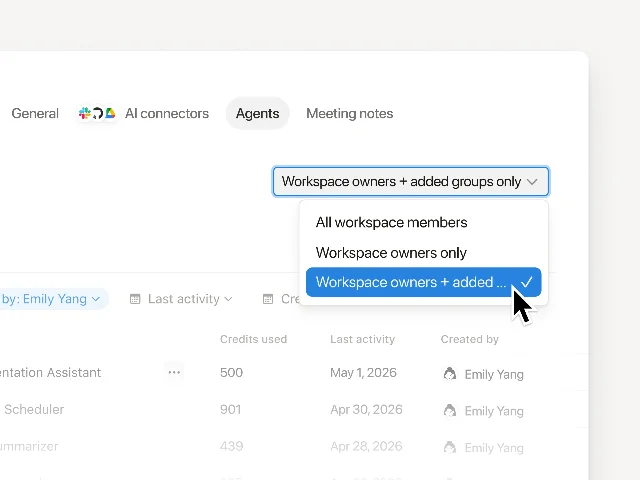
Three tiers: All workspace members (the default), Workspace owners only, and Workspace owners + added groups only. The third option is the operative one — it is the only tier that allows gradual, controlled expansion. You add a cohort of trusted team leads, watch how they build, then add the next group.
All three options are equally weighted visually (same font, same line height), but they represent fundamentally different trust models. "All workspace members" is a default-open policy. "Workspace owners only" is a lockdown. "Workspace owners + added groups" is an expansion protocol — designed to grow over time rather than flip between states.
Notion's admin guide makes the intent explicit: "Start small: Begin with a handful of team leads, with clear automation use cases. Give them space to build and refine the first agents. Scale with confidence: Expand gradually so each new creator builds on proven patterns and your team can move faster over time." 3 That recommendation is not separate from the design — it is the third dropdown option made legible.
Below the permission control, the same settings panel contains the Agent Directory: a table showing agent name, credits used, last activity, and created by. 2 Admins can filter, search, and disable/enable editing, chatting, or triggers per agent. The directory is the operational counterpart to the permission control: the dropdown decides who can create; the directory shows what was created and lets you act on it.
Enterprise plan adds one more capability: admins can change permissions or delete any agent without needing explicit access from the creator. 2 That is a break-glass mechanism — not the normal path, but essential when an agent's creator has left the company.
Surface 2: Credits dashboard — financial observability with forward projection
The credits dashboard lives at Settings → Access & billing → Notion credits. 4 The page title is simply "Notion credits." The first element below the title is a headline number.
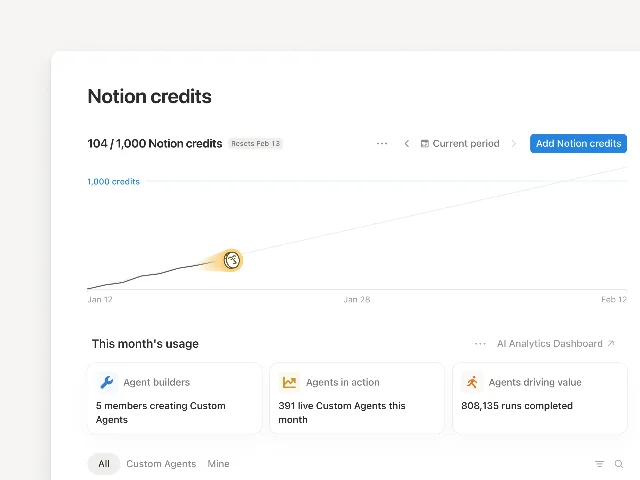
In the screenshot, that headline reads 104 / 1,000 Notion credits, with "Resets Feb 13" as a secondary label and an "Add Notion credits" button in the top-right corner. The header compresses three pieces of information into one line — current burn, total budget, and the reset date — without any of them requiring a second read.
The chart beneath it is the more interesting design decision. It shows two lines: Current (actual credits spent to date in the period) and Estimated (projected usage by the reset date, extrapolated from current consumption patterns). 4 In the screenshot, the Current line is flat and well below the 1,000-credit ceiling; the Estimated line slopes upward and will reach roughly the ceiling by the period end.
The distinction matters. Without the Estimated line, an admin checking in mid-cycle sees a single number: "104 used, 896 remaining." That number carries no urgency. With the Estimated line, the same 104-credit burn might project to a shortfall by day 20, and the chart makes that visible before it becomes a problem. The forward projection converts a balance display into a planning tool.
Below the chart, three summary cards describe workspace-level activity: Agent builders (members currently creating agents), Agents in action (live agents running this month), and Agents driving value (total runs completed). 4 "Agents driving value" is not a neutral metric name — it is an editorial choice that frames run completion as an outcome, not just an operational event. That framing matters when admins are deciding whether to increase budgets.
Below the cards, a table breaks down usage by individual agent: credits consumed, runs completed, current status, creator. An "AI Analytics Dashboard" link in the top-right corner of this section opens a deeper view with per-agent cost and adoption charts over time.
Credits cost $10 per 1,000 per month, reset monthly, and unused credits do not carry over. 4 The "Add Notion credits" button at the top of the page lets admins purchase additional credits in pre-set tiers without leaving the dashboard. That placement is deliberate: the moment an admin identifies a projected shortfall in the chart, the remediation action is one click away.
Surface 3: Auto-guardrails — behavioral contracts that run without manual intervention
The third surface is the most distinct in purpose. The credits dashboard requires an admin to log in and look. The auto-guardrails operate whether or not anyone is watching.
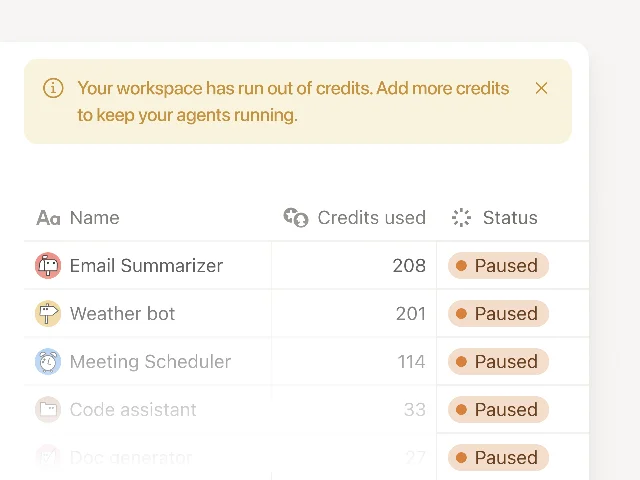
The screenshot shows the paused state: a warm amber banner reads "Your workspace has run out of credits. Add more credits to keep your agents running," with a close button. Below it, five agents are listed, each with a credits-used number and an amber "Paused" badge. The page is calm — no red alerts, no cascading error states. The color choice (soft amber rather than red) and the single-action prompt ("Add more credits") communicate that this is a recoverable operational state, not a failure.
- Credit threshold notifications — email and in-app alerts at 80% and 100% of credit usage
- Auto-pause on exhaustion — all agents pause when credits run out; they resume when the admin adds more or the monthly cycle resets
- Anomaly detection — if a new agent starts spending credits unusually fast, Notion pauses it and notifies the creator: "If a new agent starts spending unusually fast, we'll pause it and notify the creator to review." 1
- Admin approval for limit increases — a creator can request a higher credit limit from within the product; nothing increases without the admin approving it
The notification sequence — 80% alert, then 100% alert, then auto-pause — is where most of the design thinking lives. The 80% mark is the one that gives admins "time to act before anything pauses." 3 The 100% alert is a confirmation that the window closed. Auto-pause is the enforcement backstop if neither alert triggered action. By the time agents pause, two notifications have already fired. The pause is not a surprise.
Notion's admin guide describes this as a distributed ownership model: "Share ownership with creators: Creators can set limits on their own agents, so it's not all on you." 3 This reframes the admin role. The guardrails are not a way to centralize control — they are a way to delegate responsibility without losing accountability. An agent creator who sets their own credit limit is a creator who has committed to a budget. The admin approves limit increases; the creator manages within them.
The named pattern: Governance-as-Product
Governance-as-Product is the design decision to treat admin controls as a product surface — with their own information hierarchy, progressive disclosure, and automated behavioral contracts — rather than as a configuration panel bolted onto the end of a feature spec.
The concrete difference: a configuration panel answers "what can admins turn on or off?" A governance product surface answers "what does the admin need to understand, what can they do about it right now, and what will the system do automatically on their behalf?"
Notion's three surfaces map onto those three questions in order. The permission panel answers the first: who can create agents and at what scale of access. The credits dashboard answers the second: what is happening right now, where is it going, and what action is one click away. The auto-guardrails answer the third: here is what the system will do without you.
Three conditions where this pattern applies:
The supervised resource can be depleted unpredictably. Agent credits are different from a subscription seat: seats are purchased in advance and consumed slowly; credits are consumed dynamically by agent behavior that the admin did not script. A depleting pool with variable consumption velocity requires a forward projection and an automated floor — neither a standard billing screen nor a simple toggle provides those.
Delegation spans multiple principals with different trust levels. Workspace owners, workspace owners plus groups, individual creators — the trust hierarchy is not flat. A governance surface has to operate at multiple levels simultaneously: the admin sees the aggregate; the creator sees their agent's behavior; the system enforces the contracts between them. A single settings panel designed only for the admin flattens that hierarchy and either over-restricts creators or under-protects the admin.
The governed system can act without a human in the loop. A product that requires manual action from a user before anything happens does not need governance infrastructure. Agents that run on triggers, scheduled automations, or background tasks can consume resources, access data, and produce outputs without anyone watching. The auto-guardrails are a response to that asynchrony: when humans are not in the loop, the system needs behavioral contracts to act in their place.
PM takeaway: If you are building AI-powered features where an agent can act on shared resources — databases, documents, budgets, external APIs — audit your current admin surface against these three questions: Does it show where the resource is going, not just where it is? Does it operate at multiple trust levels simultaneously? Does it enforce limits automatically, or does it rely on admins manually catching problems? A configuration panel that only answers the first question leaves the other two as operational debt.
Cover image: Notion official release page for Custom Agent Admin Guardrails
このコンテンツについて、さらに観点や背景を補足しましょう。