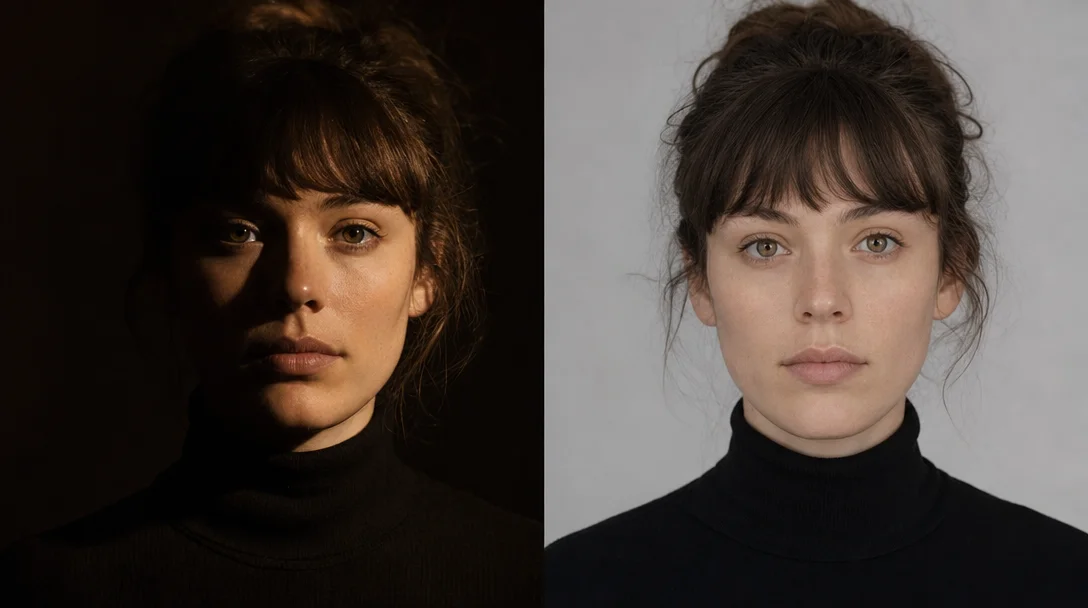
Light direction vocabulary — the prompts that actually move shadows
A complete working vocabulary of direction terms (side light, back light, rim light, Rembrandt, top light) and shadow quality descriptors (chiaroscuro, low-key/high-key, window light, no-shadows) — each with copy-paste snippets tested across MJ V8.1, Flux dev/schnell, and SDXL. Includes per-tool quirk table: Flux's golden-hour backlight bias and three workarounds, MJ V8.1's --stylize override threshold, and the Flux.2 Klein 9B vs 4B lighting physics gap.

Drop
"soft cinematic lighting" into any model and you get the same flat, diffuse, nothing output. Light direction vocabulary is different. Terms like side lighting from the left or rim light from behind tell the model where the light source sits — and a model that knows the geometry casts real shadows.This is Cycle 5's first lighting entry: a working vocabulary of direction terms and shadow descriptors, with tested snippets for MJ V8.1, Flux, and SDXL, plus the tool-specific quirks that will break your results if you ignore them.
Direction terms: where you put the light
Six direction terms cover nearly every portrait and product lighting scenario. Each one shifts the shadow geometry in a distinct, reproducible way.
Side light — the half-lit face. One cheek bright, the other in shadow. The most effective direction term for adding facial depth and avoiding the AI default of flat, frontal exposure. Artlist's cross-model test confirmed that
strong side light coming from the left, visible shadows on the right side of the face, higher contrast, sculpted lighting produces noticeably deeper results than portrait lighting alone. 1 Atlas Cloud ran the same comparison using side lighting from the left, soft shadows on the right side of the face, subtle ambient light from the background and found it "suddenly gives images volume." 2Back light + rim light — separation and silhouette. Backlighting places the light source behind the subject;
rim light is what you call the glowing edge it produces. rim light is the most cross-tool universal lighting term in this entire vocabulary — confirmed effective on MJ, Flux, SD, and PixAI independently. 3 4 The terms hair light and edge light are synonyms — use whichever fits your context. 4Rembrandt lighting — the classic portrait formula. One side bright, the other in shadow, with a triangular highlight on the shadowed cheek. Three independent sources (Atlas Cloud, QuestStudio, and PixAI) all confirm this term works without long qualification —
Rembrandt lighting alone is sufficient for basic effect, and extending it to Rembrandt lighting, single key light high and to the side, dramatic contrast, triangle cheek highlight gives you full control. 3 2 5 Atlas Cloud's point on this: "Three-point lighting. Rim lighting. Rembrandt lighting. These are not just fancy terms. They are patterns the model saw thousands of times during training." 2Top light — overhead and oppressive. Forehead, nose bridge, and shoulders catch the light; eye sockets and jaw fall into shadow. PixAI's 2026 guide lists it as one of 10 core lighting types:
top light as a standalone term works. For harder, more dramatic overhead shadow, harsh midday sun from above is the MJ V8-validated alternative. 5 6Front light — even, flat, and intentional. Not a failure state:
soft natural light coming from the front, evenly lit face, minimal shadows, low contrast is the right choice for product photography and brand visuals where consistency matters more than drama. 1Precision angle vocabulary — when you need a specific shadow direction, specify the geometry. The most granular tested template, from outdoorlifestyle's 2026 guide:
golden hour, 17:45 in summer, sun at 15-degree angle, warm orange-golden light from the right side, long shadows extending to the left. 7 For product or portrait work, single key light from camera-left at 45 degrees, minimal fill, consistent shadow direction is a cleaner, faster approach. 3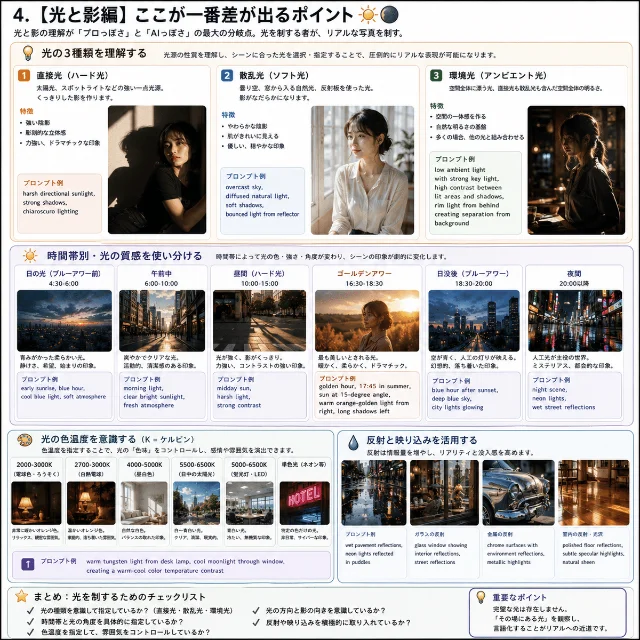
Shadow quality vocabulary
Direction tells the model where the light comes from. Shadow vocabulary tells it what the shadows look like.
Hard shadow — sharp edges, high contrast. The most effective prompt combines light type, direction, and shadow quality together:
harsh directional sunlight, strong shadows, chiaroscuro lighting. 7 Artlist's per-model test: portrait lit by a single hard light source from the side, sharp shadows, high contrast, defined facial structure, dramatic but realistic lighting. 1 One known caveat: Flux 2.0 Pro "follows the direction but softens the shadows, making the lighting feel less dramatic" — so on Flux, hard-shadow prompts produce softer results than the same prompts on Midjourney or GPT Image. 1Soft shadow / diffused light — graduated edges, gentle falloff.
soft diffused light, overcast, and softbox all trigger soft-shadow behavior. The canonical snippet from note.com: overcast sky, diffused natural light, soft shadows, bounced light from reflector. 7 For a studio version: large softbox key light at 45 degrees, soft wrap, subtle fill, clean shadow edges. 3Chiaroscuro — this Renaissance term is understood by all three whitelist tools as "strong light-dark contrast with dramatic shadows." It's not MJ-specific slang. In practice it functions as a contrast-ratio modifier on top of whatever direction term you specify. DesignHero explicitly pairs it with Rembrandt:
Rembrandt lighting setup, deep shadows on one side of face, triangle of light on opposite cheek, chiaroscuro, 10-bit color grade. 8 QuestStudio uses it standalone: chiaroscuro portrait lighting, deep shadows, soft falloff, warm highlights. 3Low-key / high-key — these are lighting ratios, not exposure settings. Low-key means pools of light in darkness — the model should keep most of the frame dark while sculpting the subject with a focused beam. High-key means bright, even, low-contrast. If you just write
dark portrait, you get underexposed images. If you write low-key portrait with minimal light, deep shadows, dark background, focused light on the face, cinematic contrast, realistic lighting, you get intentional chiaroscuro with correct zone distribution. 1 For high-key: high-key lighting portrait, bright and airy, minimal shadows, white background, soft diffused light, ethereal atmosphere. 9Window light — directional and soft by nature. The phrase only works when you specify direction:
window light from left side, indoor natural lighting is precise; window lighting alone is vague. The direction-plus-quality combination validates across MJ, Flux, and SD. 7 Artlist's version: soft daylight coming from a large window on the left, gentle shadows, evenly lit face. 1No shadows / shadowless — for product shots on white backgrounds:
zero shadows, crisp detail + clean white background (DesignHero, commercial product context). 8 Or: evenly diffused neutral studio lighting, no shadows, no stylization. One important Flux note: Flux has no native negative prompt, so "no shadows" must appear as a positive term in the main prompt — you cannot exclude it via a negative field that doesn't exist. 8A word on two terms that don't work as standalone keywords:
cast shadow and drop shadow are not well-supported as prompt inputs across MJ, Flux, or SD. 8 10 Use narrative descriptions instead: casting long shadows, casting geometric shadows across the floor.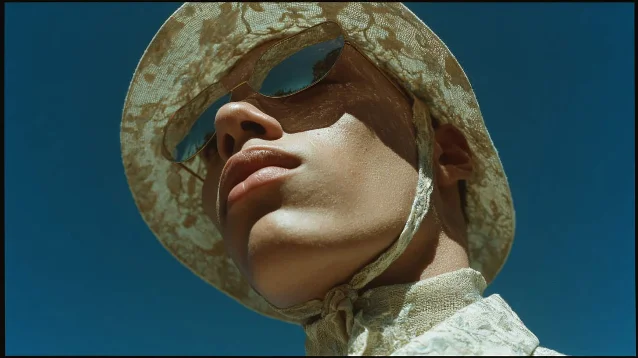
harsh midday sun from above in action — eye socket shadows, bright nose bridge, hard shoulder highlights. 8Tool behavior differences — what fights your prompts
This is where direction vocabulary can break. Each tool has a default lighting tendency that actively resists certain prompt terms.
| Tool | Lighting default | Known interference | Fix |
|---|---|---|---|
| MJ V8.1 | Literal (V8 won't add drama automatically) | --stylize >300 overrides explicit direction terms 11 | --s 50–150 --raw for maximum direction control 12 |
| Flux dev / schnell | Golden-hour backlight bias | Flux is "heavily biased towards golden hour backlit portraits" especially when model, fashion photography, or gorgeous appears in the prompt 13 | Avoid fashion trigger words; use skin is fully immersed in bright midday sunlight instead of sunlight from [direction]; add dark background elements to force front-lit reads 13 |
| Flux.2 Klein | 9B is the better lighting model | 4B lighting is "flatter" with "artificial studio aesthetic" vs 9B which "correctly identifies light direction, creating natural shadows and highlights that mimic a real camera sensor" 14 | Use 9B if maximum lighting physics accuracy matters |
| SDXL | Yellow tone + low contrast | Systematic yellow cast, limited dynamic range, overall brightness — "insufferable, odious and unpleasant" per community consensus 15 | Add explicit color temperature overrides and contrast terms; consider ControlNet for precise direction control |
Two things about Flux's behavior are worth holding onto. First, Flux consistently softens shadows system-wide — this is Flux's default pipeline behavior, not your prompt. Adding explicit shadow contrast terms (
deep shadows on one side of face, hard shadows on the opposite side) can partially counteract it, but you're fighting the model. 1 Second, the note about MJ V8.1 and --stylize: MindStudio's V8 guide is direct on this point — "V8 will not add dramatic or interesting lighting automatically. You need to name it." 6 V8's literalness is a feature for lighting control — but --stylize >300 hands creative interpretation back to the model, undoing your explicit direction terms. Keep --s below 200 for any shot where light direction matters.콘텐츠 카드를 불러오는 중…
Master copy-paste reference
Full validated snippets by lighting type, tested across tools. Drop these directly into your prompt — they're building blocks, not complete prompts.
| Lighting type | Snippet | Validated on |
|---|---|---|
| Side light (portrait) | side lighting from the left, soft shadows on the right side of the face, subtle ambient light from the background | GPT Image (Atlas Cloud 2) |
| Side light (high contrast) | strong side light coming from the left, visible shadows on the right side of the face, higher contrast, sculpted lighting | Nano Banana Pro (Artlist 1) |
| Back light | backlighting from behind the subject, subtle rim light outlining the shoulders, darker foreground, low-key lighting | Nano Banana Pro (Artlist 1) |
| Rim light | rim light from behind, clean edge highlight around hair and shoulders, controlled spill | Cross-tool (QuestStudio 3) |
| Rembrandt | Rembrandt lighting, single key light high and to the side, dramatic contrast, triangle cheek highlight | Cross-tool (QuestStudio 3) |
| Top light | top light or harsh midday sun from above | PixAI 5 / MJ V8 6 |
| Frontal soft | soft natural light coming from the front, evenly lit face, minimal shadows, low contrast | Nano Banana Pro (Artlist 1) |
| Precision angle | single key light from camera-left at 45 degrees, minimal fill, consistent shadow direction | Cross-tool (QuestStudio 3) |
| Hard shadow | single hard light source from the side, sharp shadows, high contrast, defined facial structure | Artlist 1 |
| Soft shadow | overcast sky, diffused natural light, soft shadows, bounced light from reflector | Cross-tool (note.com 7) |
| Chiaroscuro | chiaroscuro portrait lighting, deep shadows, soft falloff, warm highlights | Cross-tool (QuestStudio 3) |
| Low-key | low-key portrait with minimal light, deep shadows, dark background, focused light on the face, cinematic contrast | Artlist 1 |
| High-key | high-key lighting portrait, bright and airy, minimal shadows, white background, soft diffused light | Medium guide 9 |
| Window light | soft daylight coming from a large window on the left, gentle shadows, evenly lit face | Artlist 1 |
| No shadows | zero shadows, crisp detail, clean white background | DesignHero 16 |
Artlist's bottom line on model choice: "The model matters, but clear prompts matter more." 1 A precise direction term on Flux will outperform a vague one on MJ V8.1. Fix the vocabulary first; then tune for the tool.
Cover image: AI generated
참고 출처
- 1Artlist — How to prompt lighting in AI images
- 2Atlas Cloud — 7 Advanced GPT Image Tips
- 3QuestStudio — Camera + Lighting Prompt Cheatsheet
- 4Most Sublime — Five photographic lighting prompts
- 5PixAI — Cinematic Lighting & Depth in AI Art
- 6MindStudio — How to Get the Best Results from MJ V8 Alpha
- 7outdoorlifestyle (note.com) — Tips for Breaking Free from AI-Looking Images 2026
- 8DesignHero — 7 Prompts for Professional Realism
- 9Medium (Serge Angéloz) — Lighting & Atmospheric Styles Guide for AI Photography
- 10r/StableDiffusion (u/tppiel) — Prompting Guide: Light and Shadow without LoRAs
- 11Midjourney — Stylize Documentation
- 12Blake Crosley — Midjourney V8.1 Reference
- 13r/StableDiffusion (u/ArtyfacialIntelagent) — Flux lighting bias analysis
- 14r/comfyui (u/EmilyRendered) — Flux Klein 9B vs 4B comparison
- 15r/StableDiffusion (u/pumukidelfuturo) — SDXL lighting issues
- 16DesignHero
이 콘텐츠를 둘러싼 관점이나 맥락을 계속 보강해 보세요.