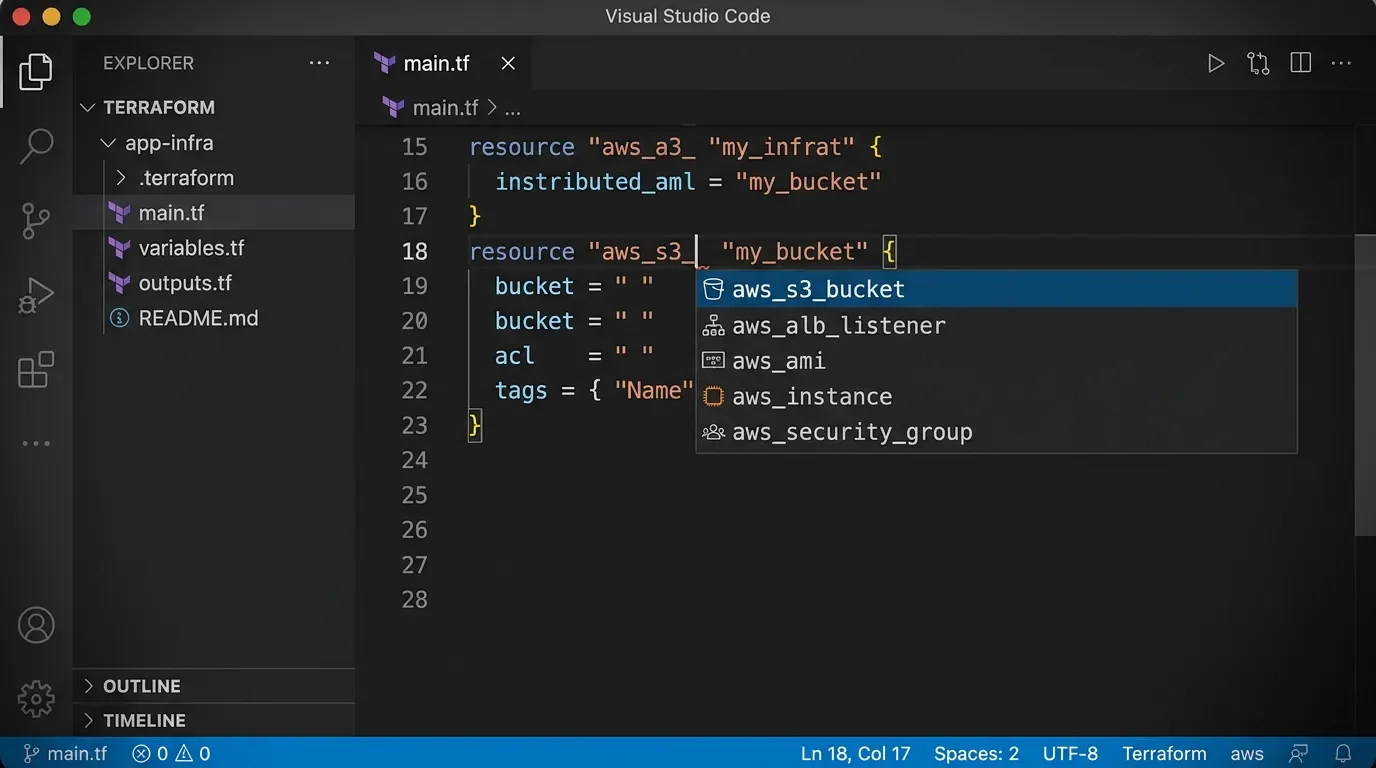
HashiCorp Terraform for VS Code: two settings that cut provider-doc lookups
HashiCorp Terraform for VS Code (v2.39.3, 6.4M installs) ships two off-by-default settings worth enabling: `prefillRequiredFields` auto-inserts every required resource attribute as a tab-stop snippet, and `mcp.server.enable` wires GitHub Copilot to live Terraform Registry data via a containerized MCP server — eliminating training-data guesses on provider schemas.

Most developers who install the HashiCorp Terraform extension (
HashiCorp.terraform, 6.4 million installs 1) leave two features disabled by default. One auto-populates every required attribute when you autocomplete a resource block. The other wires GitHub Copilot (or Cursor) directly to live Terraform Registry data, so the AI stops guessing at provider schemas.Both are off. Both are worth turning on.
Extension ID:
HashiCorp.terraform · Publisher: HashiCorp · Version: v2.39.3 (released 2026-03-04) · License: MPL-2.0 · Install on VS Code MarketplaceThe pre-fill trick: tab through required fields instead of typing them
Every time you write a new resource block, you need to know which attributes are required and what they're called. The workflow is to open the provider docs, read the schema, type the attribute names, then type placeholder values. On a busy day that lookup happens a dozen times.
terraform.experimentalFeatures.prefillRequiredFields changes that. 1 When it's enabled, completing a resource block inserts all required fields as a snippet — each attribute pre-named, each value a tab stop. You tab through them in order, filling in only the actual values.Add these two lines to your
settings.json:"terraform.experimentalFeatures.prefillRequiredFields": true,
"editor.suggest.preview": trueThe second setting enables the inline ghost-text preview so you can see the full block structure before accepting the suggestion. 1
Here's what it looks like before you press Tab:
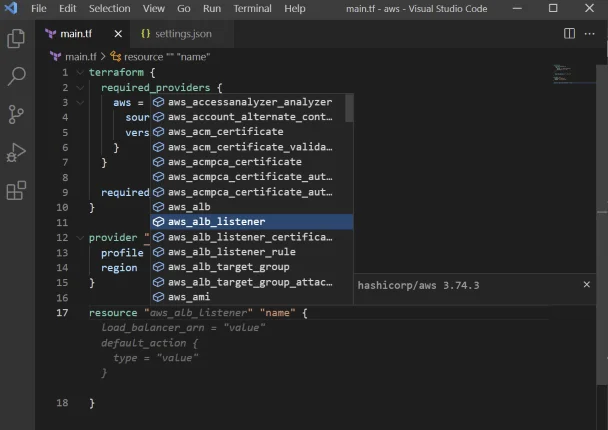
load_balancer_arn, default_action, port, and protocol. 1And after accepting:
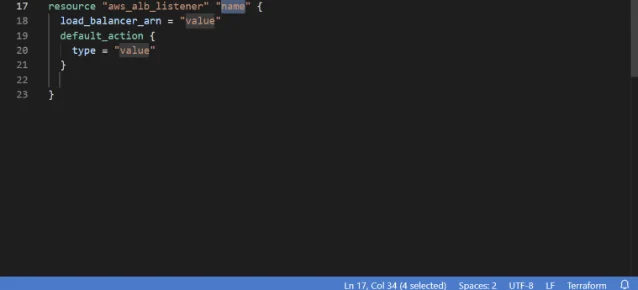
This works for
resource, data, provider, variable, output, module, and Terraform Stacks components. The attribute list comes from terraform-ls (the bundled language server) reading the provider schema, so it's accurate to whichever provider version you have initialized. 2One caveat worth knowing: the feature is tagged
experimentalFeatures for a reason. It's stable for common AWS/GCP/Azure resources, but edge cases with complex nested blocks or custom providers occasionally drop you into a partial snippet. That's the trade-off — provider-doc lookup every time vs. tab-through with occasional cleanup.MCP Server: give Copilot live Registry data instead of training guesses
The second setting is more recent and has a hard prerequisite: Docker or Podman must be installed and running.
"terraform.mcp.server.enable": trueThis launches
hashicorp/terraform-mcp-server:1.0.0 3 as a container and registers it with VS Code's MCP layer. GitHub Copilot in Agent mode can then call 46 tools — 9 for querying the public Terraform Registry (providers, modules, policies), 4 for private registry lookups, and 27 for HCP Terraform workspace management. 3Loading content card…
Why does this matter? By default, Copilot generates Terraform from its training data — which means it produces plausible-looking HCL with attribute names that may not exist in the current provider version, or misses new arguments added after its cutoff. The MCP server intercepts those queries and answers them with live Registry responses.
HashiCorp's own advice in their blog on the MCP server updates: "start your prompt with
#terraform or #vault. This forces the AI to check the MCP server for the real answer." 4 Without the prefix, the model may generate from training data and skip the tool call.A prompt like this in Copilot Chat:
#terraform Create an AWS S3 bucket with versioning enabled and server-side encryption using the latest AWS providerroutes through
search_providers → get_latest_provider_version → get_provider_capabilities before generating HCL — the output reflects the current provider schema rather than a snapshot from training. 5Both settings together: copy-paste config
The full settings.json block combining both features:
{
"terraform.mcp.server.enable": true,
"terraform.experimentalFeatures.prefillRequiredFields": true,
"editor.suggest.preview": true,
"[terraform]": {
"editor.defaultFormatter": "hashicorp.terraform",
"editor.formatOnSave": true,
"editor.formatOnSaveMode": "file"
},
"[terraform-vars]": {
"editor.defaultFormatter": "hashicorp.terraform",
"editor.formatOnSave": true,
"editor.formatOnSaveMode": "file"
}
}The
formatOnSave block is optional but recommended — it runs terraform fmt on every save. One note: set formatOnSaveMode to "file" explicitly. The modifications and modificationsIfAvailable modes don't work with the Terraform formatter. 1To share MCP Server config with a team, commit a
.vscode/mcp.json to the repository:{
"servers": {
"terraform": {
"command": "docker",
"args": ["run", "-i", "--rm", "hashicorp/terraform-mcp-server:1.0.0"],
"type": "stdio"
}
}
}What to watch out for
Docker is non-negotiable for the MCP Server. The extension auto-detects Docker first, then Podman as a fallback. If neither is running,
terraform.mcp.server.enable silently does nothing. 1Large directories index slowly. GitHub Issue #1557 ("Performance Improvement Plan") has 37 reactions — the highest of any open issue in the repo. 6 Background indexing scans all
.tf files and their module dependencies; opening a workspace with hundreds of nested modules will spike CPU and memory until indexing completes. One documented workaround: add your modules/ directory to the terraform-ls ignore list in settings. Code Lens (reference counts above blocks) also has a known performance cost on large projects, so disable it if you notice slowdowns. 1tfenv users: pin your binaries. Several community reports flag format-on-save becoming unreliable when
tfenv manages the Terraform version — the formatter intermittently loses its path to the terraform binary. 7 Pointing terraform.languageServer.terraform.path directly at a fixed binary path (rather than the tfenv shim) resolves the issue for most users.OpenTofu is a separate extension. The HashiCorp extension targets HashiCorp Terraform only. If you've migrated to OpenTofu, use
OpenTofu.vscode-opentofu (v0.6.2) instead — it ships its own tofu-ls language server and provides equivalent HCL features, though it has no HCP Terraform integration or MCP Server support. 8Compatibility at a glance
| Extension ID | HashiCorp.terraform |
| Current version | v2.39.3 (2026-03-04) |
| VS Code minimum | v1.86 |
| Terraform CLI minimum | v0.12 |
| Bundled language server | terraform-ls v0.38.7 (2026-06-08) |
| MCP Server Docker image | hashicorp/terraform-mcp-server:1.0.0 |
| MCP prerequisite | Docker or Podman (local, running) |
| License | MPL-2.0 (free) |
| Marketplace installs | 6,395,390 |
| OpenVSX | Available (Cursor / Windsurf compatible) |
References
- 1HashiCorp Terraform — VS Code Marketplace
- 2hashicorp/terraform-ls — GitHub
- 3hashicorp/terraform-mcp-server — GitHub
- 4Terraform MCP server updates: Stacks support, new tools, and tips — HashiCorp Blog
- 5Setting up VSCode and Copilot for Terraform code generation — DefinIT
- 6Performance Improvement Plan · Issue #1557 — GitHub
- 7Terraform Formatting Not Working on Save in VS Code — Reddit
- 8OpenTofu (official) — VS Code Marketplace
Add more perspectives or context around this Post.