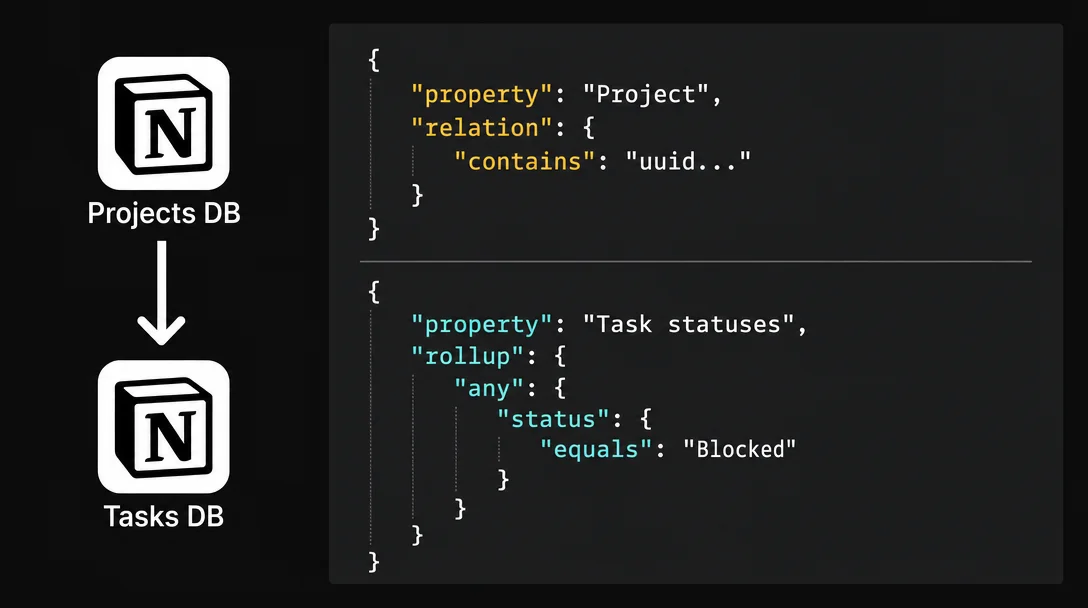
Query tasks across linked Notion databases with relation and rollup filters
The Notion API's `relation.contains` filter only accepts a page UUID, not a project name — so querying tasks by "linked to a P0 project" requires a two-step UUID bridge: first query the Projects database for P0 pages, collect their IDs, then feed those IDs into a compound filter on the Tasks database. Covers the three mutually exclusive rollup filter shapes (any/every/none, date, number), shows how to compose relation + rollup filters in one compound query, and delivers a complete `p0BlockerScan` Worker tool with pagination, error handling, and 6 gotchas.

Required plan: Business or Enterprise (Notion Workers free beta through August 11, 2026). 1 The filter patterns themselves work on any plan via the REST API; the Worker wrapper requires Business/Enterprise.
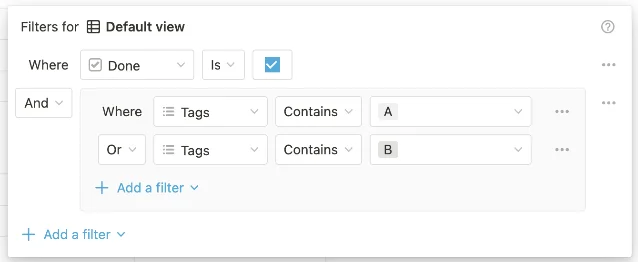
Compound
and/or filters work within a single database. This tip extends that into cross-database territory: filtering tasks by properties that live in a related database — specifically, querying a Tasks database for everything linked to P0-priority projects, with rollup conditions layered on top.The mechanic that makes this work is a two-step UUID bridge.
Why relation.contains requires a UUID, not a project name
When you filter a Notion database on a relation property via the API, the
contains and does_not_contain operators only accept a 32-character page UUID — not a project name, not a database title. 2{
"filter": {
"property": "Project",
"relation": { "contains": "dd456007-6c66-4bba-957e-ea501dcda3a6" }
}
}This is unlike
select or multi_select filters, which match by option name. The value here must be the UUID of a page in the related database.To filter tasks by "linked to a P0 project," you can't write
relation.contains("P0"). You first query the Projects database to find pages where Priority = "P0", collect their UUIDs, then use those UUIDs in the Tasks filter. That's the bridge.Four relation filter operators available:
contains (page is linked), does_not_contain (page is not linked), is_empty (no relations at all), is_not_empty (at least one relation exists). 2One constraint: each
contains or does_not_contain call accepts exactly one UUID. To match multiple projects, use an or compound filter with individual contains clauses per UUID — there is no array syntax.Prerequisites
| Requirement | Detail |
|---|---|
| Notion plan | Business or Enterprise (for Workers deployment) |
| Databases | Tasks DB with Name (Title), Project (Relation → Projects), Status (Status), Due (Date) |
| Projects DB | Name (Title), Priority (Select with a "P0" option) |
| Integration | Internal integration with read access to both databases |
| CLI | Node.js 18+, npm install -g ntn, ntn workers new p0-blocker-scanner |
Both databases must be shared with the integration. If the Projects database is not connected, the relation filter returns zero results with no error — a silent failure that wastes time to debug. 3
The two-step query pattern
Step 1 — resolve P0 project UUIDs:
const p0Response = await notion.dataSources.query({
  data_source_id: process.env.NOTION_PROJECTS_DATABASE_ID,
  filter: {
    property: "Priority",
    select: { equals: "P0" },
  },
  page_size: 100,
});
const p0Uuids = p0Response.results.map((page) => page.id);
// e.g. ["dd456007-...", "0c1f7cb2-...", "a3b2c1d0-..."]
Step 2 — build the compound filter and query tasks:
const filter = {
  and: [
    // Match any task linked to one of the P0 projects
    p0Uuids.length === 1
      ? { property: "Project", relation: { contains: p0Uuids[0] } }
      : { or: p0Uuids.map((uuid) => ({ property: "Project", relation: { contains: uuid } })) },
    // AND (blocked OR past due)
    {
      or: [
        { property: "Status", status: { equals: ["Blocked", "On Hold"] } },
        { property: "Due", date: { before: "today" } },
      ],
    },
  ],
};
This filter uses exactly two nesting levels — the API maximum. 4 The outer
and is level one; the inner or arrays are level two. Adding a third level triggers a 400 validation error.The
status.equals operator accepts an array value here to match multiple statuses without consuming an extra nesting level.Adding a rollup layer
Rollup filters work differently depending on what the rollup computes. The API enforces three mutually exclusive filter shapes, each tied to the rollup's output type: 2
| Rollup function | Output type | Filter key | Example use |
|---|---|---|---|
show_original, show_unique, unique | array | any / every / none | Find projects where any linked task is "Blocked" |
earliest_date, latest_date, date_range | date | date | Find projects whose latest task is past due |
sum, count, average, percent_checked, etc. (18 functions) | number | number | Find projects with completion rate < 50% |
Using the wrong key for your rollup's function type returns a validation error.
Example — filter Projects where any linked task is "Blocked" (rollup function:
show_original):{
"filter": {
"property": "Task statuses",
"rollup": {
"any": {
"status": { "equals": "Blocked" }
}
}
}
}Example — filter Projects where all tasks are done (rollup function:
show_original, every operator):{
"filter": {
"property": "Task statuses",
"rollup": {
"every": {
"status": { "equals": "Done" }
}
}
}
}Example — filter Projects where completion rate is below 50% (rollup function:
percent_checked):{
"filter": {
"property": "Task completion rate",
"rollup": {
"number": { "less_than": 50 }
}
}
}Rollup and relation filters compose freely inside
and/or compound chains. A single query can say: "linked to P0 project AND completion rate < 50%."Rollup values cannot be written via the API — configuration changes must go through the Notion UI. 3
Complete Worker: P0 blocker scanner
This Worker tool implements the full two-step query — dynamically resolves P0 project UUIDs, builds the compound filter, paginates results, and returns a structured summary callable from any Notion Custom Agent.
コンテンツカードを読み込んでいます…
import { Worker } from "@notionhq/workers";
import { j } from "@notionhq/workers/schema-builder";

const worker = new Worker();
export default worker;

const BLOCKED_STATUSES = ["Blocked", "On Hold"] as const;

worker.tool("p0BlockerScan", {
  title: "Scan P0 Blockers",
  description:
    "Find all tasks linked to P0-priority projects that are blocked or past due. " +
    "Requires NOTION_TASKS_DATABASE_ID and NOTION_PROJECTS_DATABASE_ID env vars.",
  schema: j.object({
    maxResults: j.number().nullable().describe("Limit results. Default: 250."),
  }),
  execute: async (input, context) => {
    const tasksDbId   = process.env.NOTION_TASKS_DATABASE_ID!;
    const projectsDbId = process.env.NOTION_PROJECTS_DATABASE_ID!;

// Step 1: resolve P0 project UUIDs
    const p0Projects: { id: string; name: string }[] = [];
    let hasMore = true, cursor: string | undefined;
    while (hasMore) {
      const res = await context.notion.dataSources.query({
        data_source_id: projectsDbId,
        filter: { property: "Priority", select: { equals: "P0" } },
        start_cursor: cursor,
        page_size: 100,
      });
      for (const page of res.results) {
        p0Projects.push({
          id: page.id,
          name: page.properties?.Name?.title?.[0]?.plain_text ?? "Unnamed",
        });
      }
      hasMore = res.has_more;
      cursor = res.next_cursor ?? undefined;
      if (hasMore) await new Promise((r) => setTimeout(r, 350));
    }

if (p0Projects.length === 0) {
      return { summary: "No P0 projects found.", tasks: [], total: 0 };
    }

// Step 2: build compound filter and query tasks
    const uuids = p0Projects.map((p) => p.id);
    const filter = {
      and: [
        uuids.length === 1
          ? { property: "Project", relation: { contains: uuids[0] } }
          : { or: uuids.map((id) => ({ property: "Project", relation: { contains: id } })) },
        {
          or: [
            { property: "Status", status: { equals: BLOCKED_STATUSES } },
            { property: "Due", date: { before: "today" } },
          ],
        },
      ],
    };

const maxResults = Math.min(input.maxResults ?? 250, 500);
    const tasks: { title: string; status: string; dueDate: string | null; url: string }[] = [];
    let taskHasMore = true, taskCursor: string | undefined;

while (taskHasMore && tasks.length < maxResults) {
      const res = await context.notion.dataSources.query({
        data_source_id: tasksDbId,
        filter,
        sorts: [{ property: "Due", direction: "ascending" }],
        start_cursor: taskCursor,
        page_size: 100,
      });
      for (const page of res.results) {
        const props = page.properties ?? {};
        tasks.push({
          title: props.Name?.title?.[0]?.plain_text ?? "Unnamed Task",
          status: props.Status?.status?.name ?? "Unknown",
          dueDate: props.Due?.date?.start ?? null,
          url: page.url,
        });
      }
      taskHasMore = res.has_more;
      taskCursor = res.next_cursor ?? undefined;
      if (taskHasMore) await new Promise((r) => setTimeout(r, 350));
    }

return {
      summary: `Found ${tasks.length} blocked/past-due tasks across ${p0Projects.length} P0 projects.`,
      tasks,
      total: tasks.length,
    };
  },
});
Deploy and test:
ntn workers env set NOTION_TASKS_DATABASE_ID=<32-char-uuid>
ntn workers env set NOTION_PROJECTS_DATABASE_ID=<32-char-uuid>
ntn workers deploy

# Smoke test locally before connecting to an Agent
ntn workers exec p0BlockerScan --local -d '{}'
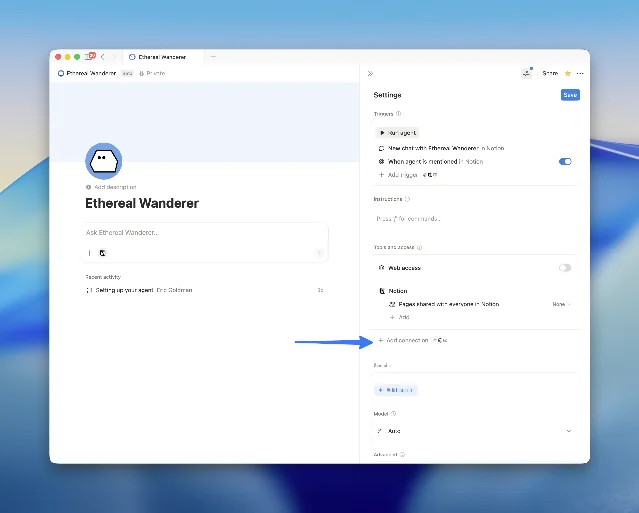
After deployment, connect the tool to a Custom Agent in Settings → AI → Agents → [your agent] → Tools → Add connection, then ask: "Scan P0 blockers."
Cost: free through August 11, 2026 on Business/Enterprise plans. After that, approximately $0.0023 per run — a daily team standup usage of 30 runs/month costs roughly $0.07. 1
Gotchas
1.
"me" returns nothing in a Worker context. Workers use internal integrations, which have no associated user. people.contains: "me" always produces an empty result set. 2 Store the PM's Notion user UUID as an env var (NOTION_PM_USER_ID) and pass it explicitly instead.2. The related database must be shared separately. Sharing the Tasks database with your integration is not enough — the Projects database must also be connected. When it isn't, the relation filter silently returns zero results (no 404, no error). 3 Pre-check with a
page_size: 1 query to the Projects database before building the compound filter.3. Date filters resolve in UTC.
"before": "today" means midnight UTC of the current date. A 10 pm query from a UTC−7 timezone runs against what is already tomorrow in UTC. 4 When timezone accuracy matters, pass an explicit ISO 8601 string with offset: new Date().toISOString().split("T")[0] gives UTC date; for local midnight, compute new Date(Date.now() - tzOffsetMs).toISOString().split("T")[0].4. Rollup filter key must match the computation type. If your "Task statuses" rollup is configured as
show_original (array output), using rollup.number returns a 400 error. Check the rollup's function setting in the Notion UI before writing the filter. 25. Compound nesting stops at two levels.
and → or → and is the deepest legal shape. The Status filter's native array support (equals: ["Blocked", "On Hold"]) is useful here — it replaces one level of OR nesting without consuming a nesting slot. 46. Rollup
incomplete state. When a rollup spans more than 25 linked pages, context.notion.pages.retrieve() truncates the relation list. The rollup may enter an incomplete state in the API response. For the P0 scanner, this is unlikely — but if your Projects database links hundreds of tasks per project, use notion.pages.properties.retrieve() to paginate the full relation list before filtering. 3Cover image: AI-generated illustration
このコンテンツについて、さらに観点や背景を補足しましょう。