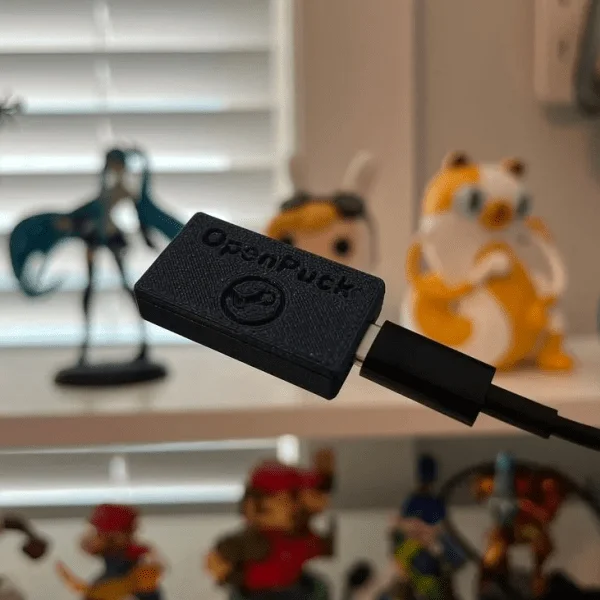
Build OpenPuck: an $8 Steam Controller receiver with console modes
OpenPuck turns a supported nRF52840 board into a documented Steam Controller 2 receiver with Xbox, Switch, PlayStation, and desktop-input modes, for roughly $11–16 before an optional case.

The pick
This week’s pick is OpenPuck, an open-source replacement for the Steam Controller 2’s otherwise hard-to-buy wireless puck. Flash a small nRF52840 development board, pair it with the controller, and you get the normal Steam receiver plus Xbox, Switch, Hori, DualSense, DualShock 4, and PS3 personalities. The project also has a lizard mode that turns the controller into a keyboard-and-mouse style desktop input device when Steam is not driving it. 1
The timing qualifies for this week’s window: the GitHub project’s latest listed firmware release, 0.9.31, was published on July 10, 2026, and Hackaday’s project feature followed on July 13. 23
What makes it worth building is the split between a cheap, replaceable board and a genuinely interesting software problem. OpenPuck reimplements both sides of the puck: the USB HID device that the host computer sees and the 2.4 GHz radio link to the controller. That gives you a useful weekend build without asking you to manufacture a custom RF board.
What you need
The base build is intentionally small. The price below is a planning estimate rather than a live shopping quote; the repository itself calls out an $8 Pro Micro NRF52840 price on Amazon. 2
| Part | Qty. | Planning cost | Notes |
|---|---|---|---|
| Pro Micro NRF52840 development board | 1 | $8 | Use a board supported by the Adafruit nRF52 Arduino core. A UF2 bootloader is the easiest flashing path. |
| Data-capable USB cable matching the board | 1 | $3–8 | Needed for flashing, pairing, and normal operation. Charge-only cables will not work. |
| 3D-printed OpenPuck case | 0 or 1 | $0 if self-printed; roughly $5–12 outsourced | Optional. The README links several cases for this board footprint. |
| Second nRF52840 board | 0 or 1 | About $8 and up | Optional, only if you also want to build ReversePuck, the Steam Deck-side controller emulator. |
That puts the required receiver at roughly $11–16, or $16–28 with a printed case. The board is the only price anchored by the project documentation, so treat the cable and case allowances as a budget, not a promise. The exact nRF52840 board matters more than saving a few dollars: the build instructions assume the Adafruit nRF52 core, and the UF2 workflow is described for boards with an Adafruit nRF52 bootloader. 4
There is no soldering, battery, mains wiring, or custom PCB in the base build. If you use the released firmware, the only physical work is plugging in the board and, optionally, putting it in a case.
How the hardware works
OpenPuck is not a new controller. It is a receiver and protocol translator for the Steam Controller 2. The nRF52840 board handles the USB connection to the host and uses its Nordic radio in a raw 2.4 GHz configuration that matches the controller’s puck link. The project’s protocol document records a 2 Mbit/s BLE PHY setting, dynamic-length packets, a five-byte address, CRC-16-CCITT, and the discovery channel and address used to find a controller. 5
On the USB side, Steam mode exposes four independent bond slots, matching the real puck’s ability to manage up to four controllers. A bond record is 24 bytes, and the firmware persists those records so a reflash does not automatically erase pairing data. 54
The interesting design choice is that the RF side stays the same when you switch personalities. OpenPuck reads the controller’s input report, then presents it to the host as the selected USB device. Steam mode uses the puck-compatible HID identity; Xbox mode exposes an XInput-compatible personality; Switch mode uses a clean Hori-style controller interface that the project says has been accepted by a real Switch. The README also documents DualSense, DualShock 4, and PS3 modes, with gyro and trackpad support where available. 2
That clean USB re-enumeration is why the project is more than a simple Bluetooth dongle. Windows and a real Switch console expect different device identities and interface layouts. OpenPuck tears down and rebuilds its USB configuration when you change mode rather than presenting every personality as one composite device. 5
Firmware and software
You have two viable build paths.
Fast path: flash a release. Download the 0.9.31
.uf2 file from the release, double-tap the board’s reset button so it mounts as a UF2 boot drive, and copy the file across. The release includes standard and factory-reset firmware, plus separate ReversePuck images. 34Source path: build it yourself. The repository contains the OpenPuck firmware, a Makefile, protocol documentation, the WebUSB configuration app, and the ReversePuck software. The documented toolchain is
arduino-cli, the Adafruit nRF52 Arduino core, and the adafruit-nrfutil Python package. The firmware is primarily C++ and C; the optional ReversePuck tooling includes Python. 24After flashing, plug the board and the Steam Controller 2 into the same host with data-capable USB cables, start Steam, and pair through the controller settings if the prompt does not appear automatically. The WebUSB panel then lets you change mode and remap the four back buttons. Chrome or Edge is required for that configuration page. 24
One operational caveat is easy to miss: Switch mode requires the Switch’s Pro Controller Wired Communication option to be enabled. The OpenPuck README also says the replacement does not charge the controller; charging still happens over the controller’s USB-C connection. 12
Schematic and PCB status
There is no custom schematic, PCB layout, or Gerber step to reproduce for the base receiver. The published build uses the Pro Micro board as-is; the repository tree is firmware, protocol, configuration, and tooling rather than a board design. That is a strength for a weekend build, but it also means you cannot fix a marginal RF layout or USB issue by changing the PCB. Your hardware choice is the board and its bootloader.
The protocol documentation is the project’s circuit-level substitute: it explains the bond records, USB reports, radio physical layer, discovery beacon, polling loop, and the required mode-specific USB descriptors. Anyone attempting a clean-room reimplementation can use its nine-step checklist, but that is a much larger project than flashing OpenPuck. 5
Difficulty: intermediate
Build time: about 1–2 hours with a supported board and the release
.uf2; reserve a half day if you want to build from source, troubleshoot WebUSB, or package a case.The physical assembly is beginner-friendly: no SMD work, no through-hole soldering, and no PCB ordering. I rate the complete project intermediate because the hard part is integration. You need to identify a compatible nRF52840 board, get it into DFU mode, use the correct firmware image, pair the controller, and understand which host mode works on which target. Linux users may also need to follow the repository’s WebUSB permissions notes. 4
Before committing a weekend to it, check three things:
- You own a Steam Controller 2. OpenPuck is a receiver for that controller, not a general-purpose gamepad adapter.
- Your board is a supported nRF52840 variant with a usable USB bootloader.
- Your target is actually supported. The README documents strong results for PC, Switch, PS3, PS4, and PS5 modes, but platform-specific USB behavior still matters.
Does it work well enough?
The project has more validation than a typical just-posted maker build. At the time of checking, its GitHub page showed 469 stars and 27 forks, and the latest release included a fix for a multi-controller reconnection issue. 23
A July 13 announcement in r/SteamController scored 70 with a 97.3% upvote ratio and drew 24 comments. The discussion is useful because it surfaces the real constraint: the project has roughly the same range as the official puck, so it does not magically solve a long-distance Moonlight setup. 6
There is also an independent latency test, scored 101 with a 99.0% upvote ratio. The tester reported two 400-sample runs per mode. Their averages were 5.44 ms stick and 6.72 ms button latency in Xbox mode, 6.75 ms and 7.72 ms in the default Steam mode, and 6.71 ms and 8.01 ms for the OEM puck under the same Steam Input test. The post also reports a serious limitation: the tester lost working direct-HID comparison behavior on the OEM puck after the project setup, so these numbers are useful community evidence, not a controlled laboratory benchmark. 7
Weekend verdict
Build OpenPuck if you already have the Steam Controller 2 and want one small receiver to cover Steam, desktop control, Switch, and several console-style USB modes. It is unusually actionable for a project that began with protocol reverse engineering: the board is cheap, the firmware is released, the build instructions are explicit, and the failure modes are visible.
Skip it if you want a self-contained wireless controller, a custom PCB to solder, or native compatibility with platforms the project does not document. For the right reader, though, this is a clean weekend experiment: flash one board, learn how USB personalities are negotiated, and end up with a receiver that does more than the original puck.
Contenido relacionado
- Inicia sesión para comentar.