
Enterprise-managed auth turns MCP connectors into an IT control plane
Anthropic's June 18 enterprise-managed authorization launch is not just fewer OAuth prompts. It moves MCP connector access into the identity-provider layer, giving enterprise admins a standard control plane for provisioning, policy enforcement, revocation, and audit across Claude chat, Claude Code, Cowork, and compatible MCP clients.

Enterprise-managed authorization is Anthropic's answer to a very practical MCP problem: connectors are powerful only after employees connect them, but per-user OAuth does not scale cleanly across a company. On June 18, 2026, Anthropic said Claude admins can now provision MCP connectors once through an identity provider, starting with Okta, so users inherit connector access automatically when they first log in to Claude. 1
That sounds like an admin convenience feature. It is closer to a control-plane change. If MCP is becoming the standard way to let agents reach work systems, then the question shifts from "can this agent call a tool?" to "who governs the identity, scope, revocation, and audit trail behind that tool call?"
What changed
Before this launch, Anthropic describes connector rollout as a two-step process: an admin enabled the connector for the organization, then each individual user still had to authorize it personally. 1 Enterprise-managed authorization removes the second step for approved connectors. The admin authorizes a connector once; users receive access through the groups and roles their organization already maintains in its identity provider. 1
Anthropic says the same managed access applies across Claude chat, Claude Code, and Cowork. 1 That detail matters because Claude is no longer a single chat product. The same connector authorization can follow a user from conversational work, to coding sessions, to agentic workplace flows.
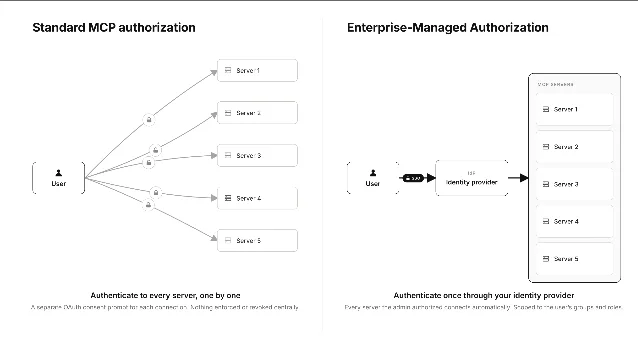
The launch is also the first implementation of the Enterprise-Managed Authorization extension to the Model Context Protocol, according to Anthropic. 1 The MCP project separately says the extension is now stable and lets organizations centrally manage MCP server access through a trusted identity provider. 2
| Layer | Old connector model | Enterprise-managed model |
|---|---|---|
| User onboarding | Each employee authorizes each MCP server individually. 2 | Users get approved servers on first login, with no per-app OAuth step. 2 |
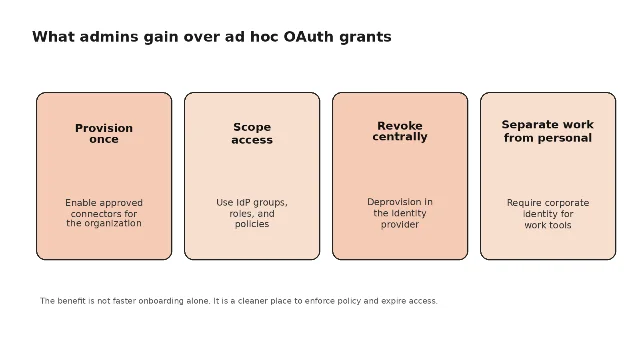
| Policy | Security teams cannot enforce one consistent policy if consent is scattered user by user. 3 | The IdP grants or denies access based on group membership, roles, and conditional access rules. 3 |
| Offboarding | Access has to be revoked across services individually. 3 | Revocation happens at the IdP level and applies across MCP clients. 3 |
| Account boundary | Personal and work accounts can blur when users choose accounts interactively. 2 | Admins can require a connector to connect only through the IdP, keeping personal accounts out of work tools. 1 |
Why this is more than fewer prompts
The easy reading is that Anthropic reduced friction. That is true, but incomplete. The harder problem is that MCP turns many SaaS products into tool surfaces for agents. If every employee grants every connector separately, the organization has little confidence that access reflects current policy.
The new flow makes the IdP the authority. In the MCP specification, the client requests an Identity Assertion JWT Authorization Grant from the enterprise identity provider, then exchanges it for an access token from the MCP server's authorization server. 3 The user is not sent through a separate consent screen for every server. 2
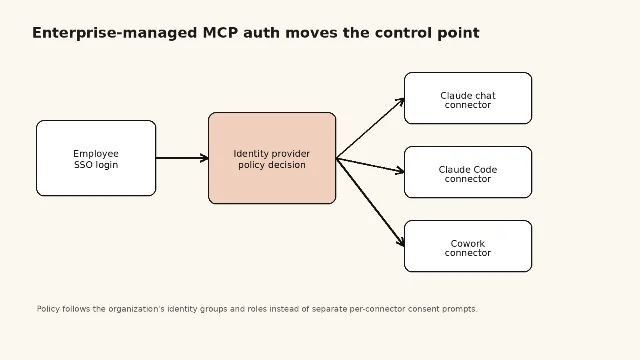
This changes the default failure mode. With scattered OAuth grants, old access can linger in places IT no longer watches. With IdP-governed authorization, deprovisioning, group changes, and conditional access rules become part of the connector story. Anthropic explicitly points to shorter access token lifetimes as a practical benefit: because checking access with the IdP is low-friction, admins can make tokens expire faster without making employees reauthorize constantly. 1
The support article adds an important boundary. Claude relays authorization issued by the identity provider; access decisions, scoping, and the data a connector can reach are governed by the IdP policies and the connected service's permissions, not by Anthropic. 4 That means managed auth does not magically solve data governance. It relocates the control point to systems enterprises already use.
The launch roster shows what Anthropic wants MCP to become
Anthropic is not shipping this as a one-off Claude feature. It is presenting managed auth as an ecosystem standard. Okta is supported at launch; Anthropic says more identity providers are coming. 1 The first MCP providers listed are Asana, Atlassian, Canva, Figma, Granola, Linear, and Supabase, with Slack coming soon. 1 Claude customers named in the rollout include Hubspot, Ramp, and Webflow. 1
The mix is revealing. These are not only data stores. They include work tracking, design, meetings, engineering workflows, databases, and collaboration systems. Enterprise-managed authorization is useful only if many connectors adopt it. Otherwise admins still face the same fragmented permission surface, only with a nicer story around one subset.
The MCP project says Visual Studio Code has also added support for the extension in the IDE. 2 That points to the larger strategic move: MCP authorization should not depend on whether the agent is running inside Claude, a developer tool, or another enterprise client. The identity layer should travel with the user and the organization.
The trade-off: cleaner governance, less individual consent
There is a real tension here. Standard MCP authorization is user-driven by design. The MCP specification says that model works well for consumer applications because individuals decide what accesses their data. 3 Enterprise deployment flips the priority. The organization wants uniform policy, auditable access, and fast offboarding.
Anthropic keeps a partial escape hatch: the help article says employees can still add personal connectors on top of what the organization provisions. 4 But the direction of travel is clear. For work connectors, consent becomes less like an individual pop-up and more like an enterprise entitlement.
That is probably necessary if Claude is going to operate inside regulated or large-company workflows. A connector that can read Jira, Confluence, Figma, Supabase, or Slack data cannot be governed like a browser extension installed by each user. It needs the same lifecycle as any other enterprise application: provision, scope, audit, revoke.
What to watch next
This beta is available for Claude Team and Enterprise customers, according to the help center. 4 The next test is adoption breadth. If only Okta and a small set of connectors support the extension, it remains a useful Claude rollout feature. If more IdPs, MCP servers, and clients implement it, MCP gets something closer to a standard enterprise permission layer.
For Anthropic, that matters because its product surface is increasingly connector-heavy. Claude Code artifacts made agent output easier to review. Claude Design moved brand state into shared workflows. Enterprise-managed MCP authorization now attacks the access layer underneath those workflows. The pattern is consistent: Anthropic is turning Claude from a capable model into governed workplace infrastructure.
Añade más opiniones o contexto en torno a este contenido.