swiftui-expert-skill: the SwiftUI agent skill that finishes what Xcode 27 started
v4.0.0 absorbs Apple's built-in SwiftUI skill and adds the 11 domains Apple left out — 3.1K stars, 16.6K weekly installs, MIT.
Fuentes:...

Vistazo a la investigación
Apple's Xcode 27 ships with its own SwiftUI agent skill. Antoine van der Lee, the author of SwiftLee Weekly (72.7K followers on X), read it carefully and found 11 missing domains: Accessibility, Navigation, Layout, Scrolling, Liquid Glass (iOS 26+), macOS, Swift Charts, Image Optimization, Previews, Instruments performance tooling, and Animation beyond
@Animatable. His response was v4.0.0 of swiftui-expert-skill, released June 16 — it absorbs Apple's content and covers everything Apple left out. 1The skill now has 3,100 GitHub stars, 24.5K cumulative installs on skills.sh, and 16.6K weekly installs — the strongest adoption signal in the Agent Skills ecosystem this week. 2 3
What it does
swiftui-expert-skill is a SKILL.md-format agent skill that teaches your coding agent SwiftUI best practices for correctness and performance — without imposing an architecture. The skill's README is explicit: "Non-opinionated: focuses on correctness and performance, not architecture or code style." 4 MVVM, TCA, VIPER — the skill doesn't care. It steers the agent away from patterns known to cause bugs or unnecessary view invalidations.The SKILL.md entry point contains a Task Workflow router with five scenarios the agent follows automatically: Review, Improve, Implement, Record Trace, and Trace-driven Improvement. 5 Each scenario routes to one or more of 26 reference files loaded on demand — only the files relevant to your current task consume tokens.
The 26 references cover:
- State management, view composition, performance, animations (including Transitions, Phase Animatables, Keyframe Animatables)
- Swift Charts, Liquid Glass (iOS 26+), macOS, Accessibility, Navigation & sheets, Layout, Scrolling & Focus
- Previews, Image Optimization, Instruments Trace Toolchain
The 15-item Correctness Checklist in SKILL.md functions as a set of hard rules the agent verifies on every code review. 5
What Apple's built-in skill covers — and where it stops
Apple's
swiftui-specialist was released with Xcode 27. It ships 9 reference files focusing on the SwiftUI invalidation model: the core idea that a view is the smallest unit of invalidation, and that performance problems stem from unnecessarily large invalidation scope. 1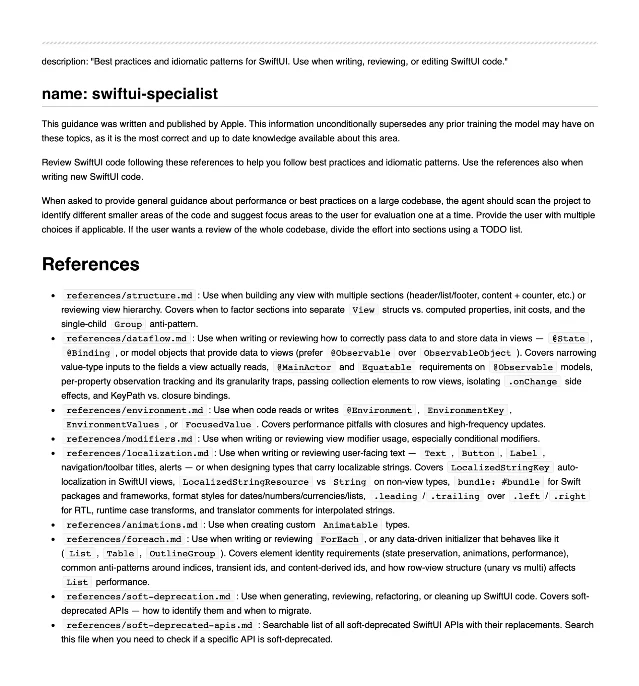
swiftui-specialist: 9 reference files, strong on the invalidation model and localization, silent on Accessibility, Charts, Instruments, macOS, and Liquid Glass 1Antoine describes Apple's design choice directly: "Apple's skill is deliberately narrow. It optimizes for token cost, so it sticks to correctness and the invalidation model." 1 Where Apple goes deeper than the community skill: localization (
LocalizedStringKey vs String on non-view types, bundle-scoped strings) and soft-deprecated API tracking. v4.0.0 pulled both of those in. 6On token overhead — Antoine's counterargument: "You'll waste more tokens to correct invalid code patterns if you don't use a knowledge skill." A broader skill prevents the agent from generating code the model knows is wrong but hasn't been corrected for. 1
The Instruments trace toolchain
The most distinct capability in
swiftui-expert-skill has no equivalent in Apple's built-in skill: a Python-based Instruments trace toolchain bundled in scripts/. 5 4scripts/record_trace.py wraps xctrace to attach to a running app on device and record a trace. scripts/analyze_trace.py parses the .trace file and outputs diagnostic metrics, with main_running_coverage_pct as the key signal: below 25% means the main thread is blocked (I/O or a lock), at or above 75% means CPU-bound work. The distinction determines two different remediation paths. Pol Piella (@polpielladev), who contributed the feature in v3.0.0, said: "A big part of my day...is diving into Instruments to optimize performance. To speed things up, I'm adding trace recording + analysis to @twannl's SwiftUI Agent Skill." 7The only prerequisite is macOS with Xcode installed —
xctrace ships with Xcode.Install
Supported agents: Claude Code, Cursor, Codex/OpenAI, and anything that reads skills from a directory. 4
Recommended path — skills.sh:
npx skills add https://github.com/avdlee/swiftui-agent-skill --skill swiftui-expert-skillClaude Code plugin:
/plugin marketplace add AvdLee/SwiftUI-Agent-Skill
/plugin install swiftui-expert@swiftui-expert-skill
Writes to
.claude/settings.json for project-scoped configuration. 4Cursor: The repo packages a Cursor plugin; see
cursor.com/docs/plugins for the install step. 4Codex / OpenAI:
cp -R swiftui-expert-skill/ "$CODEX_HOME/skills/swiftui-expert-skill"The repo includes an
agents/openai.yaml manifest. 4Manual: clone the repo, symlink
swiftui-expert-skill/ to your agent's skills directory. 4Security: skills.sh runs three independent audits (Gen Agent Trust Hub, Socket, Snyk) — all pass. 3 License: MIT. 2
Usage
The skill activates when you reference it by name in a prompt. Three concrete examples from the README: 4
Code review:
Use the swiftui expert skill and review the current SwiftUI code
for state-management and performance improvements
Trace analysis (requires the
.trace file already on disk):Analyse ~/Desktop/MyApp.trace and tell me what's wrong.
Which of my SwiftUI views is responsible for the hang around 6s?Live trace recording (agent attaches while you reproduce the issue):
Record a new trace: attach to MyApp on my iPhone — I'll tell you when I'm done.The agent invokes
record_trace.py, waits for your signal, then runs analyze_trace.py and reports which views are causing the slowdown. 5Community signal
Peter Friese (Google Firebase Developer Advocate) posted the original recommendation in January: "Teach your AI agent SwiftUI best practices! @twannl and Omar Elsayed released an Agent Skill to help AI tools review and write better SwiftUI code." 8 That post drew 107 likes, 159 bookmarks, and 8,594 views. 8
Cargando tarjeta de contenido…
Cargando tarjeta de contenido…
On the v4.0.0 release, Paul Solt (formerly Apple, GoPro, Microsoft) wrote: "Version 4 of SwiftUI Agent Skill from Antoine! This fills in the gaps from Apple's own Xcode 27 skills. Grab it today!" 9 SwiftLee Weekly Issue 328 (9,056 subscribers) framed it as: "Combine Xcode 27's SwiftUI Agent Skill with best practices Apple didn't cover." 10
Independent developer indyfromoz put it simply: "SwiftUI Liquid Glass skill by @Dimillian & SwiftUI agent skill by @twannl is all I use." 11 A Reddit thread in r/iOSProgramming titled "The secret to buttery smooth SwiftUI" (188 upvotes, 20 comments) recommended the skill as a primary reference. 12 Snyk's "Top 8 Claude Skills for AR/VR Developers" list (published June 10) placed it 4th, noting its coverage of iOS 26+ and visionOS development scenarios. 13
Caveats
Two open GitHub issues as of June 22: 14
- #69 (opened May 31):
analyze_trace.pyfails intermittently on certain.tracefiles. The trace toolchain is the newest and least battle-tested part of the skill. - #68 (opened May 29): iOS 18+ scroll APIs are not yet covered in the scrolling reference file.
The broader community validation picture is thinner than the install numbers suggest. Most visible endorsements come from developers with existing relationships to the authors. Independent deep-dives from anonymous engineers haven't appeared on Reddit or Hacker News yet — the Agent Skills ecosystem is still young enough that "3,100 stars" reflects early-adopter concentration rather than broad validation. That said, the skill has 20 contributors and 262 commits over five months, which is a meaningful maintenance signal. 2
Antoine also maintains five companion skills — Swift Concurrency Expert, Core Data Expert, Swift Testing Expert, Xcode Build Optimization, and Xcode Simulator AI Control — which suggests the broader ecosystem around this skill will continue to grow. 4
Quick reference
| Skill name | swiftui-expert-skill |
| Repository | AvdLee/SwiftUI-Agent-Skill |
| License | MIT |
| Current version | v4.0.0 (June 16, 2026) |
| GitHub stars | 3,100 2 |
| Weekly installs | 16,600 3 |
| Supported agents | Claude Code, Cursor, Codex, pi, any skills-directory agent 4 |
| Prerequisites | macOS + Xcode (for trace toolchain); skill itself has no other deps |
| Security audits | 3/3 pass (Gen Agent Trust Hub, Socket, Snyk) 3 |
| Open issues | 2 (trace intermittent failure, iOS 18+ scroll APIs missing) 14 |
Install if you write SwiftUI code with Claude Code, Cursor, or Codex and want your agent to catch the correctness and performance errors it currently misses. The v4.0.0 content absorbs Apple's official guidance and extends it to every domain Apple excluded — running both skills side-by-side is now redundant.
Hold if your SwiftUI work stays entirely within iOS 18 (no Liquid Glass, macOS, or Swift Charts targets) and your main concern is token overhead. Apple's built-in
swiftui-specialist covers the invalidation model well for that narrower scope.Cover image: AI-generated illustration
Fuentes de referencia
- 1SwiftUI Best Practices from Apple's Xcode 27 Agent Skill — SwiftLee
- 2AvdLee/SwiftUI-Agent-Skill — GitHub
- 3swiftui-expert-skill — skills.sh
- 4SwiftUI Expert Skill README
- 5swiftui-expert-skill/SKILL.md
- 6v4.0.0 release — AvdLee/SwiftUI-Agent-Skill
- 7@polpielladev on X
- 8@peterfriese on X
- 9@PaulSolt on X
- 10SwiftLee Weekly Issue 328 — LinkedIn
- 11@indyfromoz on X
- 12r/iOSProgramming — The secret to buttery smooth SwiftUI
- 13Snyk — Top 8 Claude Skills for AR/VR Developers
- 14Issues — AvdLee/SwiftUI-Agent-Skill
Añade más opiniones o contexto en torno a este contenido.