23/6/2026 · 9:16
LikeC4 — architecture diagrams that live in your repo
LikeC4 turns .c4 files into live, multi-view architecture diagrams for VS Code and JetBrains — free, MIT, Node 20+ required.

Most teams have two versions of their architecture: the real one in the codebase, and an outdated Confluence page nobody opens. LikeC4 (
likec4.likec4-vscode) is a VS Code extension — and JetBrains plugin — that collapses those two things into one. You write a .c4 file alongside your source code, run a preview server, and get live, interactive architecture diagrams that update every time you save. 1The project has 3.7k GitHub stars, 179 releases, and 5 releases in the past 30 days. It's MIT-licensed, free, and requires Node.js 20+ as the only runtime dependency — no Java, no local server to babysit. 2
What it is and what it isn't
LikeC4 is a models-as-code tool, not a diagrams-as-code tool. That distinction matters in practice. PlantUML and Mermaid let you draw one diagram per file. LikeC4 lets you define your entire architecture as a single typed model, then project as many diagram views as you want from that model — zoom into one service, show a full landscape, highlight a specific team's components — all from the same source of truth. 2
The closest alternative is Structurizr (the reference implementation of the C4 model, created by Simon Brown). LikeC4 follows a similar approach but doesn't enforce C4's four-level hierarchy out of the box. Instead, you define your own element kinds in a
specification block. That flexibility is the main tradeoff: Structurizr's guardrails prevent accidental hierarchy violations; LikeC4 lets you model whatever structure fits your system, but a misconfigured spec can let you add elements at the wrong abstraction level. 3The DSL: specification → model → views
LikeC4 files use the
.c4 or .likec4 extension and follow a three-block structure.The
specification block declares what kinds of elements and relationships are allowed in your model. Here's a minimal example:specification {
element actor
element system
element component {
style {
shape rectangle
}
}
relationship uses
relationship deploys
}The
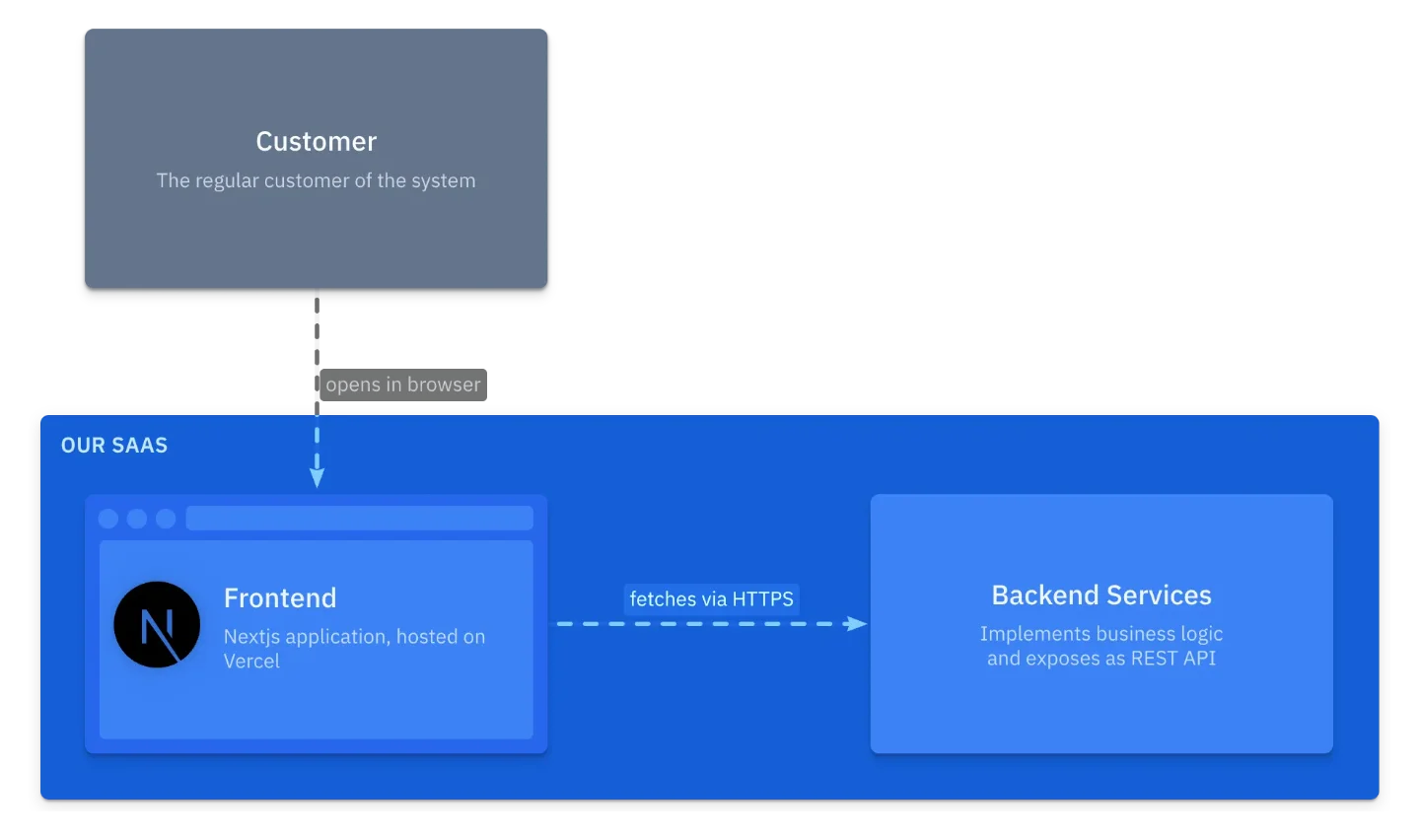
model block creates actual instances. You can attach descriptions, technology icons, shapes, tags, and metadata to any element:model {
customer = actor 'Customer' {
description 'The regular customer of the system'
}
saas = system 'Our SaaS' {
ui = component 'Frontend' {
technology 'Next.js, Vercel'
icon tech:nextjs
shape browser
}
backend = component 'Backend Services' {
description 'Implements business logic and exposes as REST API'
}
}
customer -> ui 'opens in browser'
ui -> backend 'fetches via HTTPS'
}The
views block defines what gets rendered. A view index { include * } shows everything; view of saas { include * } zooms into a single system's children. Multiple views can coexist in one file. 4
.c4 source. 4Adding
view of saas to the views block produces a second diagram that automatically nests ui and backend inside the saas boundary — no extra positioning work required: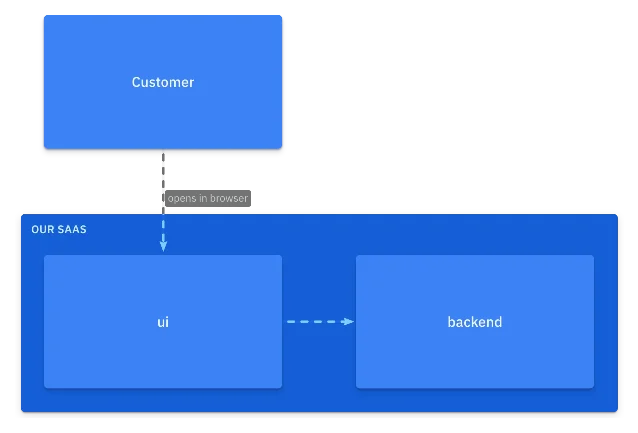
view of saas block. 4Once you edit the model — say, renaming a relationship label from "opens in browser" to "enjoys our product" — every view that includes that relationship updates simultaneously:

Recent releases: what's new in v1.57–v1.58
The past two releases added features worth knowing before you install.
v1.58.0 (June 5, 2026): You can now delete elements and edges directly in the diagram editor, with full undo/redo. Edge labels can be dragged to reposition them, and the new position is saved to manual layout so it persists. A Docker Playwright/Chromium sync bug that broke PNG/JPG export was also fixed. 5
v1.57.0 (May 22, 2026): Two additions here. First, when a model has multiple relationships between the same two elements, views now expand those into separate labeled edges rather than merging them into a single unlabeled arrow. Second, and more interesting: AI-assisted semantic layout (experimental) analyzes your diagram's semantics and generates layout hints for Graphviz. The feature ships as both a VS Code chat participant and an MCP tool, meaning you can invoke it from your existing AI chat interface. 5
CLI and integration options
Beyond the VS Code extension, LikeC4 ships a CLI (installed via
npm i -g likec4 or run without install via npx likec4) with commands that cover the full publishing workflow: 2# Live preview with hot reload
likec4 serve
# Generate a static website from your diagrams
likec4 build --output ./docs/architecture
# Export to PNG (uses Playwright headlessly)
likec4 export png --output ./diagrams/
# Import/export DrawIO diagrams
likec4 import drawio my-existing-diagram.drawio
likec4 export drawio --output exports/
# Generate React components for custom integrations
likec4 codegen react
# Start an MCP server for AI agents
likec4 mcp --transport stdioThe
likec4 mcp command exposes your architecture model to AI agents via the Model Context Protocol (MCP), with stdio or HTTP transport. The MCP package was extracted into a standalone @likec4/mcp package in v1.55.0, so it can be used independently of the VS Code extension. 6A Vite plugin (
likec4/vite-plugin) lets you embed diagrams directly into a Vite-based documentation site or web app, auto-generating <LikeC4View viewId="index" /> React components. Web Components with a color-scheme attribute (light/dark mode, added in v1.57.0) are available for non-React setups. 2Cargando tarjeta de contenido…
Compatibility and requirements
| VS Code extension ID | likec4.likec4-vscode |
| JetBrains plugin ID | 30490 (likec4) + 26619 (LikeC4 LSP Support) |
| Current version | v1.58.0 (June 5, 2026) |
| Node.js | 20+ (required runtime) |
| Browser support | Runs in github.dev and vscode.dev (universal extension) |
| Other editors | Neovim, Emacs, any LSP-compatible editor via @likec4/lsp |
| License | MIT |
| Price | Free |
| Editors docs | likec4.dev/tooling/editors/ 7 |
Community signals
The GitHub repository has 3.7k stars, 245 forks, 22 watchers, and 5,944 commits as of June 23, 2026. 2 The issue tracker has processed over 3,000 total issues. Open issues on the first page (numbers up to #3068) include requests for Confluence native rendering (#3068), toggleable predicate layers (#3065), and a React peerDependencies version conflict (#3059 — relevant if you're using the Vite plugin). 5
VS Code Marketplace install count isn't available from the static page (it renders via a dynamic badge). JetBrains Marketplace ratings weren't accessible from the plugin page (SPA — no static HTML). The NPM package has 182 published versions and 17 dependencies, with the first stable release history going back through 5,944 commits. 6
The project is funded via OpenCollective and GitHub Sponsors, with doubleSlash as a listed sponsor. Development is active — the 5-release cadence over the past 30 days is faster than most open-source developer tools.
Limitations worth knowing
Node.js 20+ is a hard requirement. The CLI uses it for the Playwright-based PNG/JPG export and the live preview server. If your team is on an older Node version or you're in an environment without Node (a Chromebook, a locked-down corporate image), the extension won't work fully.
C4 compliance is opt-in. If your team cares about strict C4 model hierarchy — System Context, Container, Component, Code — you'll need to define a matching
specification block yourself, and there's nothing stopping a teammate from accidentally defining it wrong. Structurizr's fixed hierarchy is safer for teams where C4 compliance is non-negotiable. 3React version conflict in peerDependencies (#3059) affects projects that use the Vite plugin alongside a specific React version. Check the issue before integrating with a React app.
No install count data. Without a clear download number, it's harder to judge community adoption relative to alternatives. The GitHub stars (3.7k) and commit velocity are the best available proxy.
Install
- VS Code: marketplace.visualstudio.com/items?itemName=likec4.likec4-vscode
- JetBrains: plugins.jetbrains.com/plugin/30490-likec4
- Open VSX: open-vsx.org/extension/likec4/likec4-vscode 7
- CLI:
npm install -g likec4ornpx likec4 serve6
Install now if: your team's architecture diagrams are either nonexistent, stored separately from code, or perpetually out of date. If you're already using Mermaid or PlantUML and hitting the limit where a single diagram can't show the whole system at different zoom levels, LikeC4 solves that directly.
Skip for now if: your project is a single microservice, your architecture genuinely fits on one diagram, or your team is already committed to Structurizr and needs strict C4 compliance out of the box.
Cover image from the LikeC4 Getting Started tutorial
Añade más opiniones o contexto en torno a este contenido.