Notion API now lets bots write to People properties — here's the audit trail it unlocks
On June 10, 2026, Notion removed the validation_error that blocked bot user objects from being written to people properties and user rich text mentions. This tip shows the 4-step "Bot Identity Attribution" pattern: each integration stamps its own bot UUID into a custom People property on every PATCH, and a database Property edited automation fires on detection — bridging the API-to-automation gap that previously had no native solution. Includes JSON payloads, a prerequisites table, 3 PM workflow patterns, and gotchas covering the Custom Agent exclusion, human-edit noise, and webhook action limits.

Shipped June 10, 2026. One changelog entry. Zero community coverage yet.
Before June 10, if your Zapier integration patched a Notion page and you tried to stamp that integration's identity into a
people property, the API returned validation_error. Not a permissions error, not a 404 — a flat rejection of the bot user object. 1That's gone. Bots that appear as user objects in API responses can now be assigned to
people property values and referenced in user rich text mentions. 1 For PMs running multi-integration Notion setups, this unlocks something that was previously impossible to build natively: a machine-readable record of which integration last touched a page — and an automation chain that fires when it does.The problem this solves
last_edited_by already shows the bot that modified a page, but it's a read-only system field. You can't filter a database view by it, trigger a database automation from it, or use it as a routing condition in an automation.The new capability gives you a writable equivalent. Each integration writes its own bot UUID into a custom
People property — call it Last Modified By (Integration) — as part of every PATCH call. From there, database automations can watch that property using the Property edited trigger and route accordingly.API writes are not database automations. That distinction matters: the rule that "automations can't be triggered by other automations" does not apply here. 2 An API PATCH that sets a
people property value is a valid trigger source for a subsequent automation. The chain works.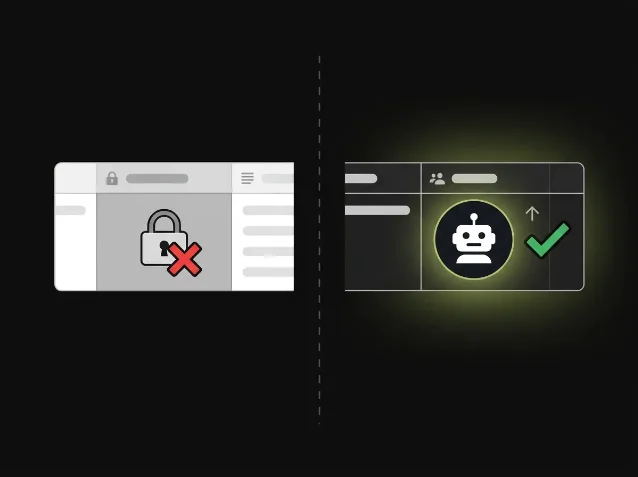
last_edited_by (left) can't be filtered or used as an automation trigger — the new writable People property (right) can. AI-generated diagram. Prerequisites
| Requirement | Detail |
|---|---|
| Notion plan | Business or Enterprise (database automations required) |
| Integration type | Any OAuth public integration or Notion Worker — must appear as a user object in API responses |
| Excluded integrations | Notion-internal bots powering database automations and Custom Agents — these still return validation_error 1 |
| New property needed | A People-type property added to the target database |
How to set it up
Step 1: Add a People property to your database
In your target database, add a new
People property. Name it something that makes the integration source obvious — Synced by, Last bot action, or Integration actor work well. Leave it empty for now.Step 2: Get your integration's bot UUID
Call
GET /v1/users/me with your integration token. The response returns a user object where type is "bot". Grab the id field — that's the UUID you'll stamp. 3{
"object": "user",
"id": "a1b2c3d4-...",
"type": "bot",
"bot": {
"owner": { "type": "workspace" },
"workspace_name": "Acme PM"
}
}Step 3: Write the bot UUID into the People property on every PATCH
Add this to your integration's
PATCH /v1/pages/{page_id} payload alongside whatever properties you already update: 4{
"properties": {
"Synced by": {
"people": [
{ "object": "user", "id": "a1b2c3d4-YOUR-BOT-UUID" }
]
}
}
}The bot's
name field — whatever you set in the integration's Notion settings — will render as a human-readable label in the database cell. Zapier shows as "Zapier Bot," a custom Worker shows as whatever you named it.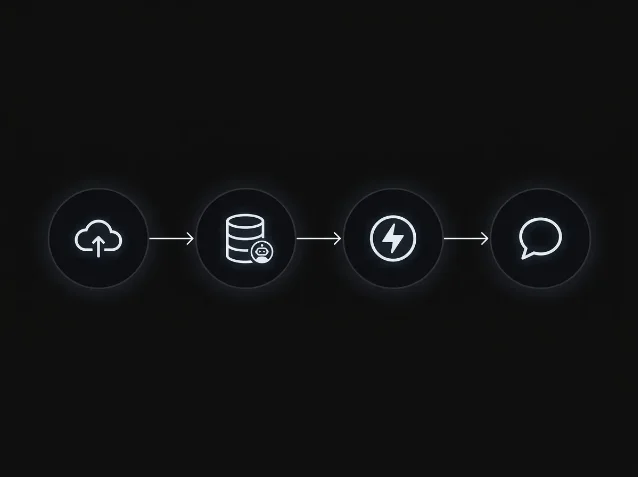
Property edited trigger fires → automation sends a notification. AI-generated diagram. Step 4: Wire up the database automation
In the database, open Automations → New automation:
- Trigger:
Property edited→ selectSynced by→ condition:is set to→ pick your bot from the People picker - Action: choose from
Send notification,Send Slack notification,Send mail,Send webhook, orEdit property2
For a multi-integration setup, create one automation per bot. Each fires independently, so Zapier updates and n8n updates get different downstream actions — Slack alerts to different channels, webhooks to different endpoints, or property rewrites that tag the record with a source label.
What you can build with this
A few PM-relevant patterns that become straightforward with this chain:
- Integration audit trail: every time your CRM sync, sprint importer, or roadmap fetcher touches a record, the
Synced byproperty logs which system did it and when the automation fired - Conflict detection: if two integrations both write to a page within a short window, the second PATCH overwrites the first bot's UUID — your automation can fire a Slack alert to flag concurrent writes
- Source-aware routing: an automation that detects a Zapier bot write routes the record to a
Review queueview; a Worker write marks itAuto-processed— without any manual tagging

Gotchas
The excluded integrations list is important. Notion's internal bots — the ones that power database automations and Custom Agents — are never exposed as user objects. Attempting to write their IDs still returns
validation_error. This affects nothing for OAuth integrations and Workers, but if you're trying to attribute a Custom Agent action, the stamp won't work. 1Property edited fires on any edit to that property, not just bot writes. If a human team member is also able to set the Synced by field manually, the automation will fire for them too. Lock the property to integration-write-only by adjusting database member permissions if you need clean signal.Automation action limits apply. Database automations allow up to 50 actions per automation and a maximum of 5 webhook actions per automation. 5 For high-volume integrations patching hundreds of records per minute, the automation queue will process these in sequence — test your throughput before relying on this for real-time alerting.
User mention variant is available too. If you'd rather embed the bot identity inside page content rather than a structured property, the
user rich text mention format now accepts bot UUIDs in the same way: { "type": "mention", "mention": { "type": "user", "user": { "object": "user", "id": "..." } } }. 6 Useful for writing an inline attribution note directly into a page body rather than stamping a database column.
Añade más opiniones o contexto en torno a este contenido.