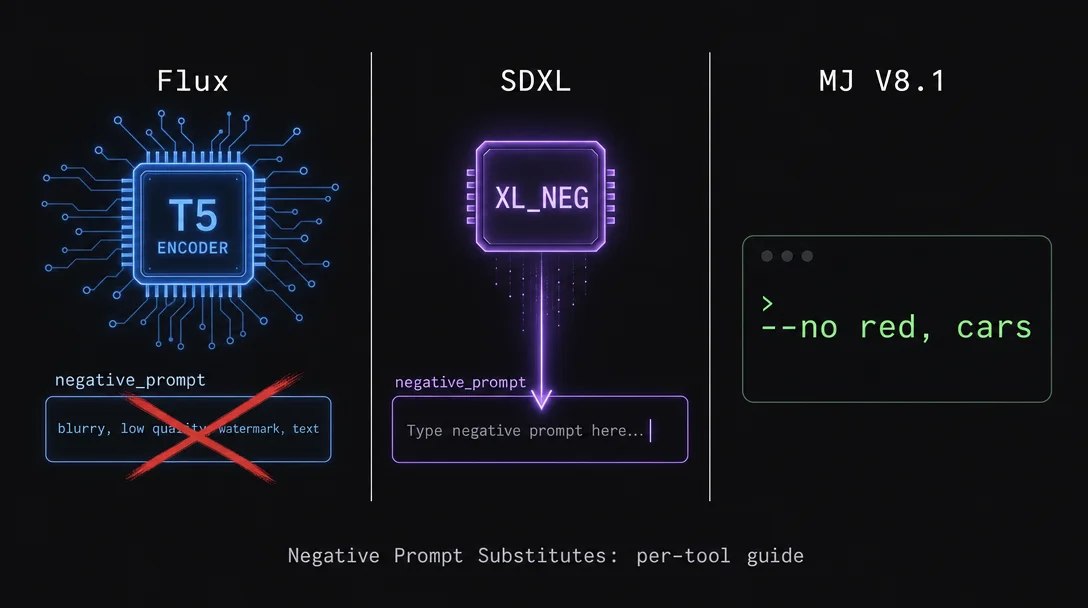
Negative prompt substitutes: what actually works on Flux, SDXL, and MJ V8.1
A cross-tool guide to negative prompt substitutes: Flux's hidden NAG option, SDXL's TI embedding ecosystem (XL_NEG, Pony PDXL V3), and MJ V8.1's --no syntax with the moderation trap you need to know.

The
negative_prompt field does not behave the same way — or even exist — across the three most widely-used image generation tools. Copying a workflow from one tool to another and expecting the negative prompt to carry over is one of the fastest ways to waste a generation budget. Each tool has a different architecture driving its suppression mechanism, and the practical workarounds diverge sharply.This guide maps what works, what doesn't, and the exact syntax to use on each tool today.
Flux: no negative prompt field, no suppression LoRA ecosystem — three real options
Flux does not support negative prompts in any meaningful way at default settings. The HuggingFace Diffusers
FluxPipeline.__call__() method (v0.38.0) does expose a negative_prompt parameter alongside true_cfg_scale, but the documentation is explicit: it is "ignored when not using guidance (i.e., ignored if true_cfg_scale is not greater than 1)." 1 The default value of true_cfg_scale is 1.0, which means the negative prompt is silently discarded.Community testing confirmed this is not a documentation edge case. A user testing the SRPO HuggingFace Space tried entering "man" in the negative prompt field with a
guidance_scale of 1.0 and a true_cfg_scale of 3 — and concluded: "enabling true_cfg_scale produces unreliable results with a negative prompt." 2 The Space maintainer subsequently removed the negative prompt field from the demo.There is also no community ecosystem of negative embeddings or suppression LoRAs for Flux. Searches across HuggingFace and Civitai return zero Flux-specific textual inversions or content-suppression LoRAs. 3 The root cause is architectural: Flux uses a T5-XXL text encoder (the large-scale language model Google developed for text-to-text tasks) instead of the CLIP text encoder used by SD 1.5 and SDXL. The entire ecosystem of CLIP-based negative embeddings — EasyNegative, BadDream, and similar — is fundamentally incompatible with T5-XXL's embedding space.
Flux 2 Pro (the 32B hosted version) makes this restriction official: it uses a Mistral-3 24B visual-language model instead of T5, and the single prompt field does not accept negative prompts at all. 4 Flux 2 Klein (9B, step-distilled to 4 steps with Qwen3 8B embedder) runs at
guidance_scale=1.0 by default, making negative prompts architecturally incompatible. 5Three options exist for actual suppression on Flux, ordered by accessibility:
Option 1: positive reframing — the only universal option that works on every Flux variant including the hosted APIs. Instead of "no blur," write "sharp focus, crisp detail." Instead of "no extra fingers," write "perfect hands with five fingers." 6 Flux's strong prompt adherence means detailed positive descriptions are more effective than they are on SDXL.
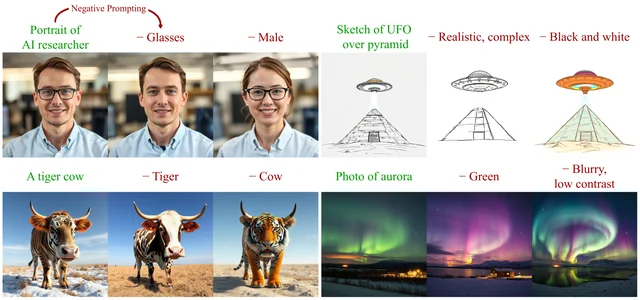
Option 2: NAG (Normalized Attention Guidance) — the most technically sound option for ComfyUI users. Published by Dar-Yen Chen, Hmrishav Bandyopadhyay, Kai Zou, and Yi-Zhe Song (arXiv: 2505.21179, May 2025), NAG operates in attention space rather than diffusion space. 7 It works at CFG=1 — meaning it doesn't require raising
true_cfg_scale and doesn't risk the color saturation collapse associated with CFG > 1 on Flux.prompt = "Portrait of AI researcher."
nag_negative_prompt = "Glasses."
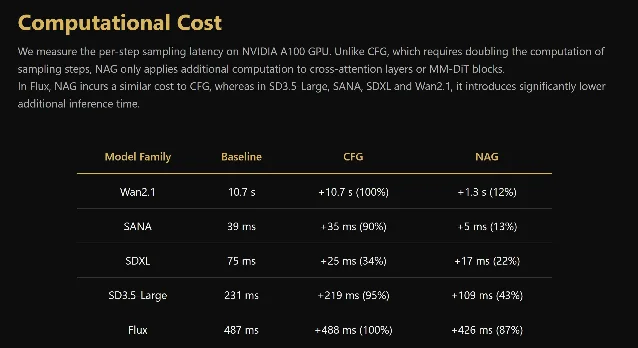
nag_scale = 5.0NAG is available via ComfyUI-NAG and Kijai's WanVideoWrapper, with HuggingFace demo Spaces for Flux-Schnell, Flux-Dev, and Flux-Kontext. 8 One confirmed tradeoff: on Flux, NAG adds roughly the same per-step overhead as CFG (~+426 ms on A100 per step), unlike on SDXL or Wan2.1 where NAG is significantly cheaper than CFG.
Option 3: sd-dynamic-thresholding + raised CFG — the original ComfyUI hack posted on r/StableDiffusion in August 2024 (350 upvotes). 9 This approach raises
true_cfg_scale above 1.0 and uses dynamic thresholding (via the mcmonkeyprojects/sd-dynamic-thresholding ComfyUI extension) to prevent the output collapse that normally happens when CFG > 1 on Flux. Forge WebUI integrated this natively in August 2024.The recommended settings after XY plot testing:
mimic_mode + cfg_mode = "Half Cosine Up" for both; interpolate_phi = 0.7 with "enable." Community results are mixed — at least one user reported uncertainty about whether improvements were a placebo effect. NAG is the cleaner solution if you can install a custom node.SDXL (non-distilled): TI embeddings only — zero suppression LoRAs exist
For SDXL base (not Turbo, Lightning, or LCM variants — those run at CFG=1 by default, which disables the negative prompt mechanism entirely), Textual Inversion (TI) negative embeddings are the correct suppression mechanism. There are no SDXL suppression-specific LoRAs on Civitai as of June 2026 — the absence is structural, not a gap in search coverage. 10
The reason TI dominates: TI embeddings modify CLIP text encoder token vectors (text embedding space), are 184 KB–600 KB files, and add negligible VRAM overhead. LoRAs modify UNet attention layer weights (image generation space), weigh 10 MB–200 MB+, require careful dataset curation to train, and carry overfitting risk. No one has released a LoRA trained to suppress content on SDXL — and in practice, TI embeddings handle this use case well enough that there's no demand.
The embeddings to know, sorted by base model compatibility:
For base SDXL 1.0 checkpoints
XL_NEG (Civitai #1070219, by ktiseos_nyx) — 2,614 downloads, 41.6k generations, 222 reviews (Very Positive). 10 Unlike most TI embeddings, it was not trained on images. Instead, it combines pre-existing SDXL tokens for "low quality," "blurry," "distorted," and similar concepts into a single composite negative token. This makes it checkpoint-agnostic — it works across all SDXL base checkpoints and styles.
Suppresses: blurriness, low detail, distortions, and common generation artifacts.
# ComfyUI (negative CLIP Text Encode node):
embedding:XL_NEG

# A1111 / Forge (negative prompt box):
XL_NEG
Weighted:
embedding:(XL_NEG:1.2) in ComfyUI; (XL_NEG:1.2) in A1111.Known limitation: ADetailer produces grey squares with some VAE combinations when XL_NEG is active.
For Pony SDXL checkpoints
Pony PDXL Negative Embeddings V3 (Civitai #332646, by Pandoras Heart) — 225,100 downloads, 7,184 reviews (Overwhelmingly Positive). 12 This is the most-downloaded SDXL-compatible negative TI and the only one with an explicit NSFW suppression variant. Four variants, select intentionally:
| Variant | Token | Use case |
|---|---|---|
| High Quality V3 | zPDXL3 | Quality improvement, removes censoring artifacts |
| XXX Rating | (separate ID) | Enables NSFW content |
| PG Rating | zPDXL3-pg | Suppresses NSFW content — safe-output generation |
| Photo Real | zPDXL3-pr | Steers toward realistic renders vs. cartoon/anime |
Recommended strength: 1.0 to 2.0. These are Pony-only — they don't work on non-Pony SDXL checkpoints.
CyberRealistic Negative Pony v2.0 (Civitai #77976, by Cyberdelia, updated March 2026) — 55,600 downloads. 13 Designed for CyberRealistic Pony v9 and similar realistic Pony variants.
# ComfyUI:
embedding:CyberRealistic_Negative_PONY_V2

# A1111 / Forge:
CyberRealistic_Negative_PONY_V2
The embedding: prefix confusion
The most common syntax error when migrating from A1111 to ComfyUI: the
embedding: prefix is ComfyUI-specific. 11 In A1111 and Forge, just type the filename directly (e.g., XL_NEG) — no prefix. ComfyUI requires embedding:XL_NEG. Writing XL_NEG in a ComfyUI prompt node without the prefix will either do nothing or throw an error depending on the node version.Place the
.safetensors file in stable-diffusion-webui/embeddings/ for A1111/Forge, or models/embeddings/ for ComfyUI.Midjourney V8.1: --no works, but read the moderation trap first
Midjourney V8.1 uses
--no as its suppression parameter, placed at the end of the prompt followed by a comma-separated list. 14 Under the hood, it is functionally equivalent to a multi-prompt weight of -0.5: 15vibrant tulip fields --no red
# equivalent to:
vibrant tulip fields:: red::-0.5In V8.1 (released April 14, 2026),
--no follows instructions more reliably than in earlier versions. 16 The syntax works identically on the web UI and Discord.A confirmed V8.1 example from u/Zenchilada on r/midjourney (June 5, 2026, 94 upvotes): 17
googie sci-fi city --ar 16:9 --v 8.1 --no carsCargando tarjeta de contenido…
The moderation trap: --no modern clothing triggers nudity filter
Midjourney's moderation system reads every word in
--no independently — not as a phrase. 14 This means:--no modern clothing → parsed as "no modern" AND "no clothing" → nudity filter triggeredThe official fix: when you want period-accurate costume, describe the clothing you do want in the positive prompt instead of using
--no for it. 14 The same logic applies to any multi-word phrase where one of the words is a category that Midjourney flags — check each word independently before using it in --no.Double --no causes glitch artifacts
Using two separate
--no flags (e.g., --no river --no clouds) produces severe glitch artifacts: resolution mixing, pixelated ghosts, black-and-white voids, and distorted edges. 18 This was documented in 2023 and the behavior in V8.1 is undocumented — treat it as undefined. The correct syntax is always a single --no with comma-separated terms:# ✅ Correct:
/imagine forest path --no cars, buildings, people --v 8.1
# ❌ Wrong (glitch artifacts):
/imagine forest path --no cars --no buildings --v 8.1Practical --no templates for V8.1
MindStudio's V8 guide recommends building a reusable
--no library for common output types: 16# Background cleanup:
--no cluttered background, text, watermarks
# Portrait cleanup:
--no earrings, necklace, hat
# Flat/graphic output:
--no blur, depth of field
# Clean text-safe output:
--no text, watermark, logoAdding
--style raw --s 50 alongside --no gives the most literal interpretation of the exclusion list — V8.1's default aesthetic processing can soften suppression effects at high --stylize values.Cross-tool reference
| Flux.1 dev/schnell | Flux 2 Pro / Klein | SDXL (non-distilled) | MJ V8.1 | |
|---|---|---|---|---|
Native negative_prompt | Exposed but silently ignored at true_cfg_scale=1.0 1 | Not supported 4 | Fully supported | Via --no parameter 14 |
| Best suppression option | NAG (ComfyUI) or positive reframing | Positive reframing only | TI embeddings (XL_NEG, zPDXL3) | --no item1, item2 |
| Suppression LoRA ecosystem | None — T5-XXL is incompatible with CLIP-based LoRAs 3 | None | No suppression LoRAs exist; TI embeddings are the community standard | N/A |
| Key failure mode | true_cfg_scale > 1 without dynamic thresholding → output collapse | N/A | embedding: prefix required in ComfyUI; omitting it breaks loading | Multi-word --no phrases parsed word-by-word by moderation |
One architectural note that applies across the board: none of these techniques work on the distilled variants of SDXL (Turbo, Lightning, LCM-LoRA). Those models run at CFG=1, which disables the negative prompt mechanism entirely — the same architectural constraint that makes Flux suppression difficult in the first place.
Cover image: AI generated
Fuentes de referencia
- 1HuggingFace Docs: Flux pipeline API reference
- 2HuggingFace SRPO discussion: negative prompt does not work with stock FluxPipeline
- 3HuggingFace Docs: Prompting (weighted prompts)
- 4AmbienceAI: Flux 2 Pro Prompt Guide
- 5black-forest-labs/FLUX.2-klein-9B Model Card
- 6AI Photo Generator: Negative Prompts Explained (Feb 2026)
- 7GitHub: ChenDarYen/Normalized-Attention-Guidance
- 8Reddit r/comfyui: Use NAG to enable negative prompts in CFG=1 condition
- 9Reddit r/StableDiffusion: hack to make Flux better at prompt following
- 10Civitai: SDXL Negative - XL_NEG
- 11Stable Diffusion Art: Beginner's Guide to ComfyUI
- 12Civitai: Pony PDXL Negative Embeddings V3
- 13Civitai: CyberRealistic Negative Pony v2.0
- 14Midjourney Docs: No — Midjourney
- 15Midjourney Docs: Multi-Prompts & Weights
- 16MindStudio: How to Get the Best Results from MidJourney V8
- 17Reddit r/midjourney: Googie Sci-Fi City
- 18Reddit r/midjourney: Exploring the bizarre case of multiple --no parameters
Añade más opiniones o contexto en torno a este contenido.